
MCP server development is one of the things Dawloom lists under AI work: a business builds a server, and Claude, ChatGPT, Cursor, or any other MCP-compatible assistant can use it. Before weighing whether that’s worth building, it helps to be precise about what the protocol does, because “connect your product to AI” both undersells and overclaims it at the same time.
What MCP is
The Model Context Protocol is an open standard for connecting AI applications to systems outside the model itself: a database, an API, a set of internal tools. The official docs compare it to USB-C: one connector standard instead of a different adapter for every device. Before MCP, a product that wanted an AI assistant to act on a user’s behalf needed a custom integration for every assistant. MCP gives both sides one protocol to build against instead.
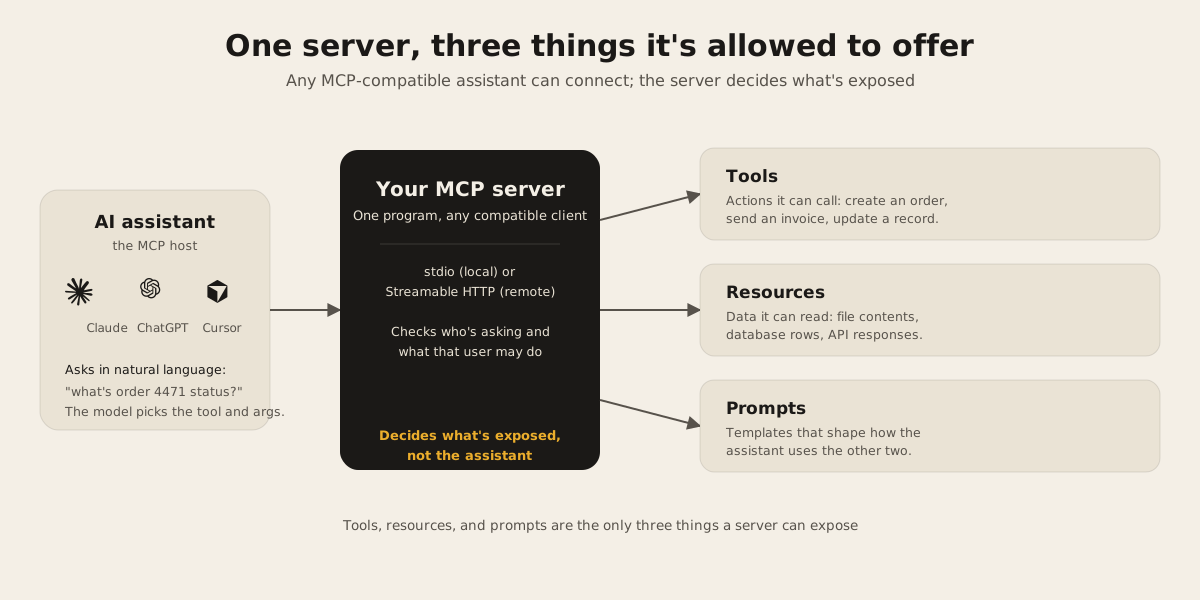
The architecture has three named participants. A host is the AI application itself, the thing a person is actually using, like Claude Desktop or an AI coding tool. The host creates a dedicated MCP client for every server it connects to, and each client keeps its own connection open. A server is the program answering the client’s requests. It can run locally and talk over stdio, the way the official filesystem reference server does, or run remotely over Streamable HTTP and serve many clients at once, the way the Sentry MCP server does. Local versus remote is a transport decision, not a difference in what the protocol offers.
What a server exposes
A server can offer three kinds of things, and only three. Tools are functions the model can call to take an action: create a record, send a message, run a search. Resources are data a client can read: file contents, database rows, an API response. Prompts are reusable templates that shape how the assistant uses the other two. That’s the whole surface area a server can expose. If you’ve heard “an MCP server exposes your API to AI,” this is the more accurate version: it exposes a small, curated set of tools, resources, and prompts, which is a narrower thing than your whole API and should be.
Defining one tool, using the TypeScript SDK, takes about this much code:
server.registerTool(
  "get_order_status",
  {
    description: "Look up a customer order by ID",
    inputSchema: z.object({ orderId: z.string() }),
  },
  async ({ orderId }) => {
    const order = await db.orders.findUnique({ where: { id: orderId } });
    return {
      content: [{ type: "text", text: order ? order.status : "not found" }],
    };
  },
);
A name, a schema the model reads before calling it, and a handler. The syntax isn’t the hard part. Deciding which dozen tools represent the product well, writing descriptions a model will use correctly, and making the handler enforce exactly what the calling user is allowed to do, that’s the work. MCP routes the request; it doesn’t check permissions for you. Your server still owns every access decision, the same as it would behind a regular API endpoint.
Where it’s worth building
A few honest signals, close to what we’d check first if a client asked (see AI integration for the wider work this usually sits alongside):
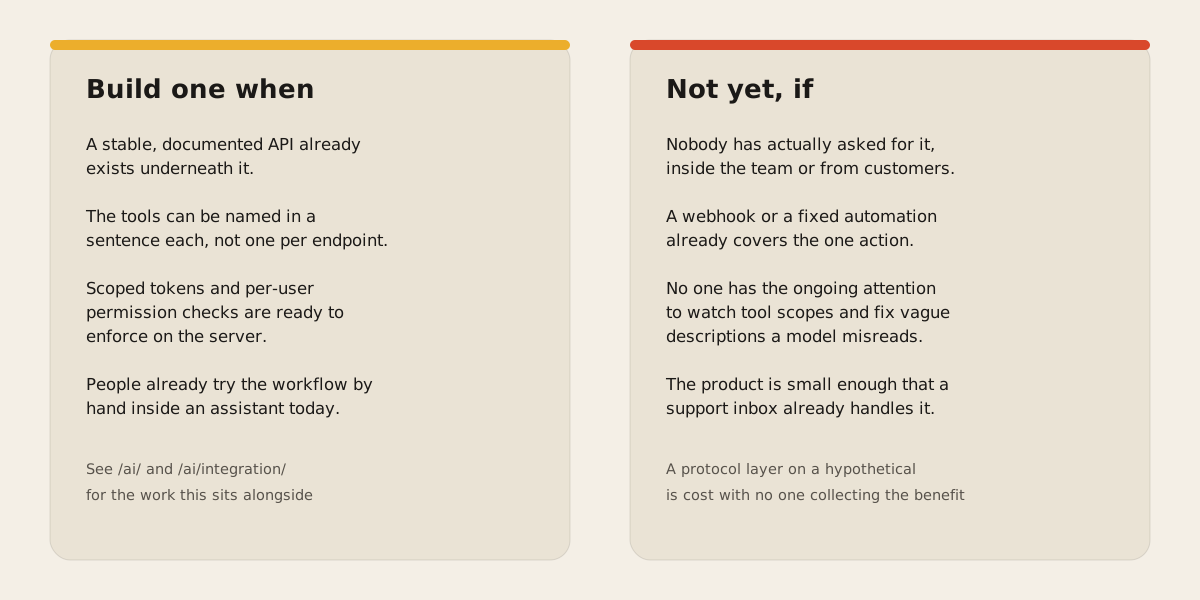
- There’s already a stable, documented API underneath. A tool layer is a second, smaller interface on top of something that already works. Building it on an API that’s still changing weekly means keeping two moving targets in sync instead of one.
- The actions can be named cleanly. A handful of well-scoped tools, like “create invoice” or “check inventory,” work far better than one tool per database table. If a tool can’t be described in a sentence, the design isn’t ready.
- Auth can be done properly: scoped tokens, per-user permission checks enforced on the server, and a clear answer for what happens when an assistant tries something the calling user couldn’t do directly. This is most of the real engineering effort, not the protocol part.
- People are already trying to do the workflow inside an assistant by hand, copy-pasting IDs or screenshots, because switching to the app for a two-click task is the actual friction.
Where it’s premature
- Nobody has asked for it. If no customer or internal team has said something close to “I wish I could just tell the assistant to do this,” the server is being built for a hypothetical.
- A webhook or a fixed automation already covers the case. MCP earns its keep when an assistant needs to decide which action to take and with what arguments. If the flow is one trigger to one fixed action every time, that’s simpler to build without a protocol layer.
- Nobody has the ongoing attention for it. A tool that grants more access than intended, or a description vague enough that a model calls it wrong, is a security incident with the business’s name on it, not the protocol’s.
- The product is small enough that a documented API and a support inbox already handle everything an assistant would otherwise be asked to do.
The verdict
MCP is a real, specific protocol with a small, well-defined surface, not a synonym for “add AI to the product.” It’s worth building once there’s a stable API underneath, a short list of tools that can be named in a sentence each, and real demand from people already working inside an assistant. It’s a distraction when none of that is true yet and the actual reason on the table is that a competitor announced theirs.
If you’re not sure which side of that line your product is on, tell us what it does and we’ll give you a straight answer, including “not yet,” before any code gets written.