
In the AI SDKs we reach for, we sorted four SDKs by the shape of the project: a feature that plans across steps points to the OpenAI Agents SDK, an agent that reads and edits files points to the Claude Agent SDK. That’s still the right first cut, but it glosses over why those two phrases land on different tools. The two SDKs run genuinely different loops underneath. Worth pulling them apart.
How the OpenAI Agents SDK loop works
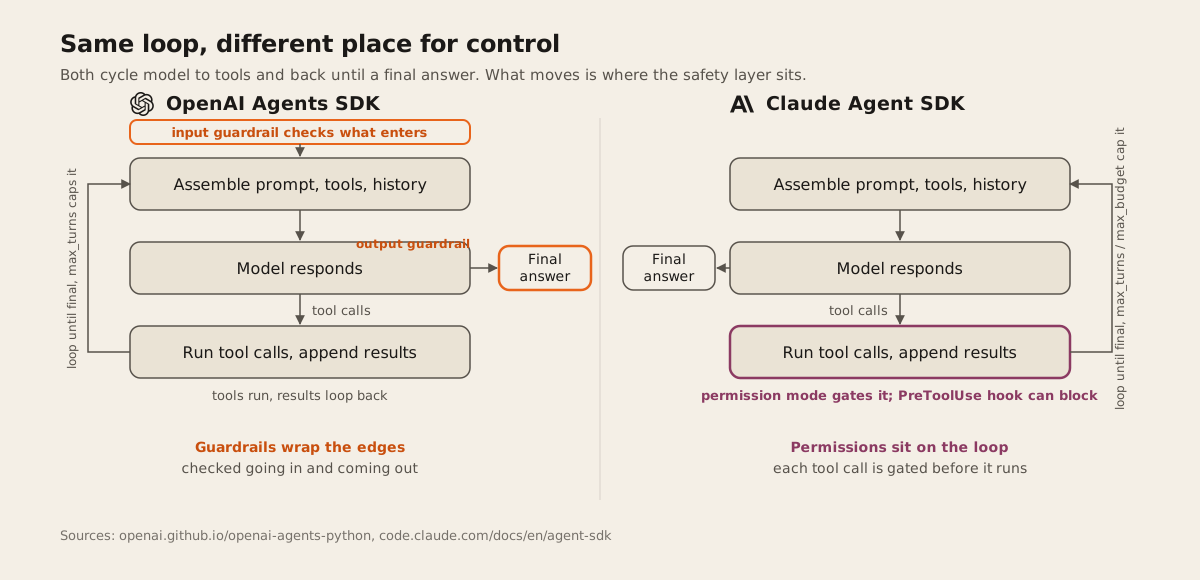
You call an agent through Runner.run(), Runner.run_sync(), or Runner.run_streamed(). Each of those runs the same cycle: the runner sends the agent’s instructions, tools, and history to the model, then checks what comes back. A text response that matches the agent’s declared output type ends the loop. A handoff switches the active agent and the loop continues under the new one. Tool calls get executed, their results get appended to history, and the loop runs again.
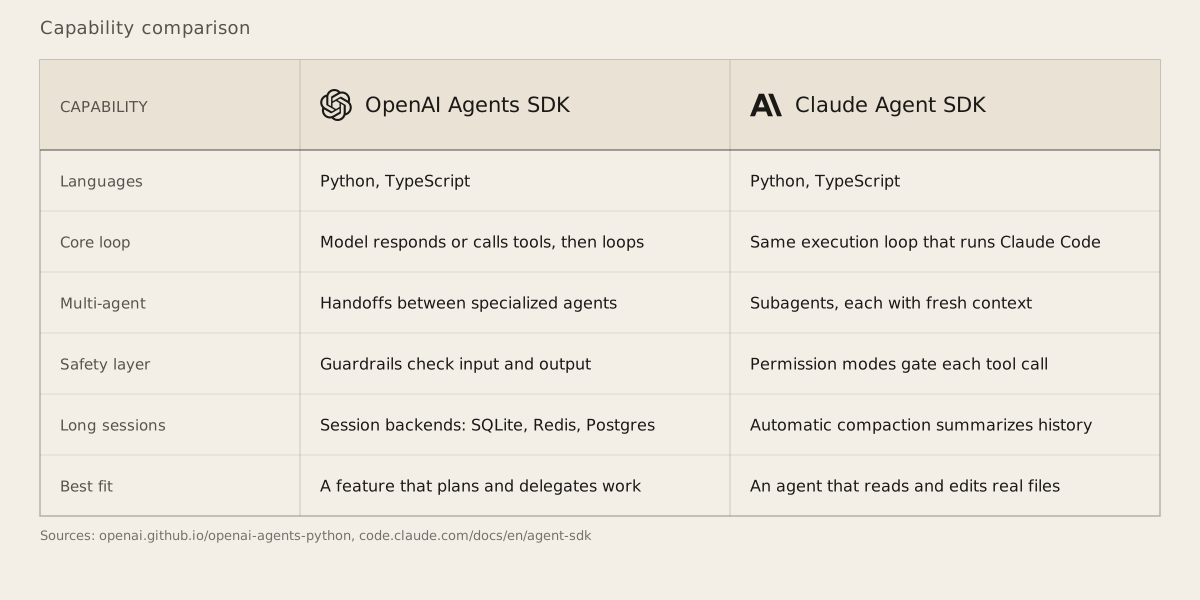
max_turns caps how many of those cycles can happen, and exceeding it raises MaxTurnsExceeded (pass max_turns=None to remove the cap). Guardrails sit alongside the loop rather than inside it: input guardrails validate what’s about to reach the model, output guardrails validate what the model produced, and a failed check raises InputGuardrailTripwireTriggered or OutputGuardrailTripwireTriggered instead of letting a bad response through. Handoffs are the SDK’s actual mechanism for multi-agent work, not an add-on bolted onto a single-agent core: one agent hands the conversation to a specialist, and the runner keeps going from there. Every run can be traced and inspected on OpenAI’s dashboard, which is also where the same traces feed into evaluation and fine-tuning. The SDK ships for Python and TypeScript.
How the Claude Agent SDK loop works
This one is built differently. It’s not a separate framework that happens to call Claude. It’s the same agent loop, tool set, and context management that runs Claude Code, packaged as a library for Python and TypeScript.
The mechanics: Claude receives the prompt along with the system prompt, tool definitions, and conversation history, then either responds with text and tool calls or a final text-only answer. Tool calls run (a PreToolUse hook can intercept or block one before it executes), the results feed back, and the cycle continues until Claude produces a response with no tool calls. That full cycle is one turn. max_turns and max_budget_usd both cap the loop, and hitting either ends the run with an error result you can inspect and, if you want, resume from.
Instead of guardrails, control here runs through permissions. allowed_tools and disallowed_tools decide which tools are even available, down to specific patterns like Bash(npm *). permission_mode sets the overall posture: default asks for approval per tool through a callback, acceptEdits auto-approves file edits and routine filesystem commands, plan lets Claude explore without ever touching a file, and bypassPermissions skips prompting entirely for CI or containers. Multi-agent work here means subagents: a focused helper spawns with a fresh context window, does its piece, and returns only a summary to the parent, so the main session doesn’t inherit the full transcript. Long sessions get handled by automatic compaction, which summarizes older turns once the context window fills, rather than a swappable session store. The SDK is Python and TypeScript only; anything else has to shell out to the Claude Code CLI directly.
The actual difference
One SDK assumes you’re building orchestration around calls to a model: route between agents, validate what goes in and out, trace the run afterward. The other assumes you’re building around a codebase or a filesystem, with a permission system deciding what runs on its own and what waits for a human. Neither is a stripped-down version of the other. They started from different products.
A short look at what that means in code. Here’s the shape of a Claude Agent SDK call that scopes an agent to three tools and auto-approves file edits:
from claude_agent_sdk import query, ClaudeAgentOptions

async for message in query(
    prompt="Fix the failing tests in auth.ts",
    options=ClaudeAgentOptions(
        allowed_tools=["Read", "Edit", "Bash"],
        permission_mode="acceptEdits",
        max_turns=20,
    ),
):
    print(message)
There’s no equivalent allowed_tools list in the OpenAI Agents SDK, because it isn’t handing you a filesystem and a shell in the first place. Its equivalent concern is which agent the conversation is allowed to hand off to, and what a guardrail lets through.
What we’d weigh on client work
Dawloom hasn’t shipped a client project on either agent SDK yet, so this is the reasoning we’d apply, not a track record. If a client needs an assistant that talks to people and routes between roles, a billing question going to one agent and a refund going to another, with a guardrail checking the output before it reaches a customer and a trace to debug a bad answer afterward, the OpenAI Agents SDK’s handoffs and guardrails fit that shape directly.
If the job is pointing an agent at a real codebase or a pile of documents and letting it act on what it finds, reading files, editing them, running commands, with a human approving the changes that matter, the Claude Agent SDK’s permission modes are built for exactly that case. That’s the shape of work we describe on our AI agents page, and it’s the same discipline behind the retrieval, evals, and cost controls we cover on the AI integration page: the SDK handles the loop, but the guardrails or permissions around it are what keep an agent from doing something you didn’t ask for.
Nothing here rules out mixing them inside one project. An OpenAI-based support agent could hand off a “go check the account’s data” step to something closer to what the Claude Agent SDK is built for. That’s a real architecture decision, not a hypothetical one, and it depends entirely on what the agent actually needs to touch.
If you’ve got a project where an agent needs to act rather than just answer, tell us what you’re building and we’ll tell you which loop it actually needs, before any code gets written.