
We build desktop apps in both Tauri and Electron, so we don’t have a favorite to defend. What we have is a set of questions we ask before recommending either one, and this post is those questions written down, along with the technical differences behind them.
We haven’t published named client projects for either framework yet, so nothing here is a case study. It’s the reasoning we’d walk a client through in a scoping call.
What each one actually bundles
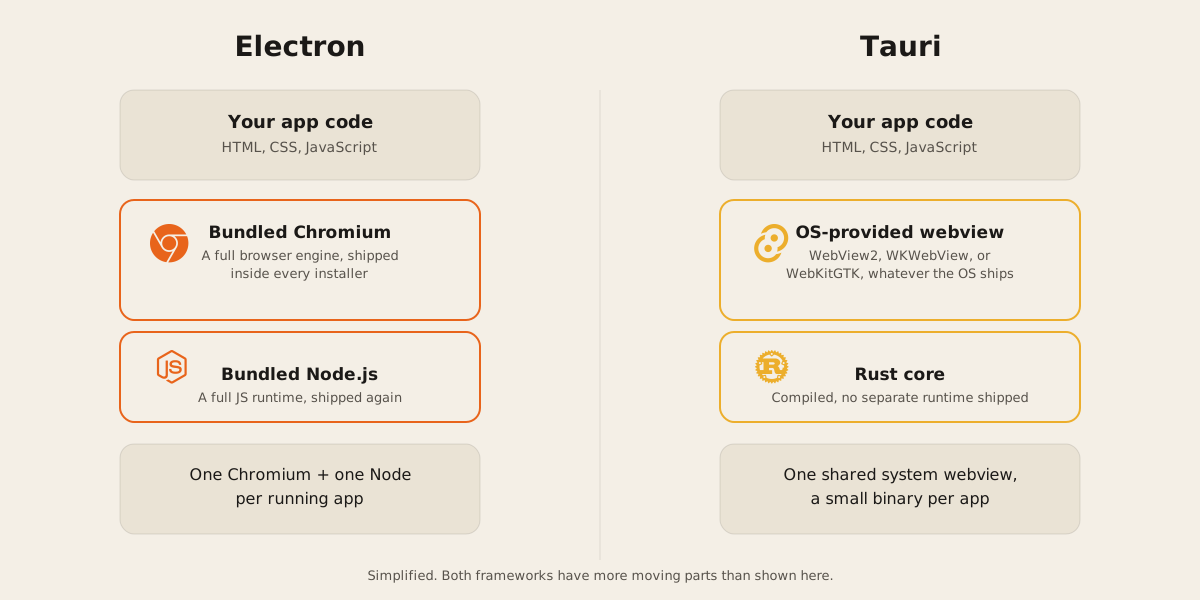
Electron embeds Chromium and Node.js inside every app. Your JavaScript, HTML, and CSS run inside a full browser engine, and Node gives you filesystem and OS access from the same process tree. That’s why anything that works on the web tends to work in an Electron app without modification: it’s running in an actual, current version of Chromium that you control.
Tauri takes the opposite approach. Instead of shipping a browser, it uses whatever web rendering engine the operating system already has installed: WebView2 (Microsoft Edge’s engine) on Windows, WKWebView on macOS, and WebKitGTK on Linux. The app itself compiles down to a native Rust binary using a library called WRY to talk to that webview and TAO to manage windows. Nothing about a browser gets bundled, which is why a minimal Tauri app can come in under 600KB, against Electron apps that start heavy before you’ve written a line of your own code, since a full copy of Chromium and Node ships with every installer.
The honest cost of each approach
Every architecture trades one problem for another, and it’s worth naming both plainly.
Electron’s cost is size and memory. You’re running a dedicated copy of Chromium and Node for every app on the machine, so disk footprint and idle memory use add up fast if someone has several Electron apps open at once. That cost buys consistency: the same rendering engine runs on every OS, so a bug you fix on your Windows machine is fixed everywhere.
Tauri’s cost is the opposite of that consistency. Because it defers to the OS webview, your app renders through three genuinely different engines depending on platform. WebKitGTK on Linux in particular has a rougher reputation for stability than the other two. That’s the real tradeoff for a small binary: you inherit whatever quirks and version differences exist across WebView2, WKWebView, and WebKitGTK, and you’re testing against three rendering targets instead of one.
Neither cost disappears with more effort. They’re structural, and picking a framework means picking which one you’d rather manage.
Process model and security surface
Electron’s multi-process model mirrors Chromium’s own: one main process with Node access, a separate renderer process per window, and IPC or a preload script bridging the two. It’s a well-understood model with over a decade of hardening behind it, and the pattern (keep Node out of the renderer, expose only what you need through contextBridge) is documented and widely followed.
Tauri’s security pitch is different: a Rust core instead of a Node backend. Rust’s compiler catches memory and type errors before the app ever runs, which shrinks a category of vulnerabilities that C and C++ based runtimes (including the native layers Node depends on) have to guard against at runtime instead. That’s a real advantage for apps handling sensitive local data. It doesn’t erase the webview inconsistency problem above. Security and rendering consistency are separate axes, and a framework can be strong on one without being strong on the other.
Shipping updates
Both frameworks ship an auto-update path, and both expect you to run some of the infrastructure yourself.
Electron’s autoUpdater module plus the Squirrel framework is built in, and for open-source apps on GitHub the team maintains a free hosted service (update.electronjs.org) that handles the update feed for you. Closed-source or non-GitHub projects need a self-hosted or third-party update server instead.
Tauri’s updater is a separate plugin you add to the project. Signature verification is mandatory and can’t be turned off: you generate a keypair, sign every release with the private key, and the app checks that signature before it installs anything. That’s a stricter default than Electron ships with, and it also means losing your private key locks you out of updating apps already in the wild. Worth writing down in a password manager, not a downloads folder.
How we choose
A few scenarios come up often enough that we have defaults for them, though we still confirm each one against the actual project.
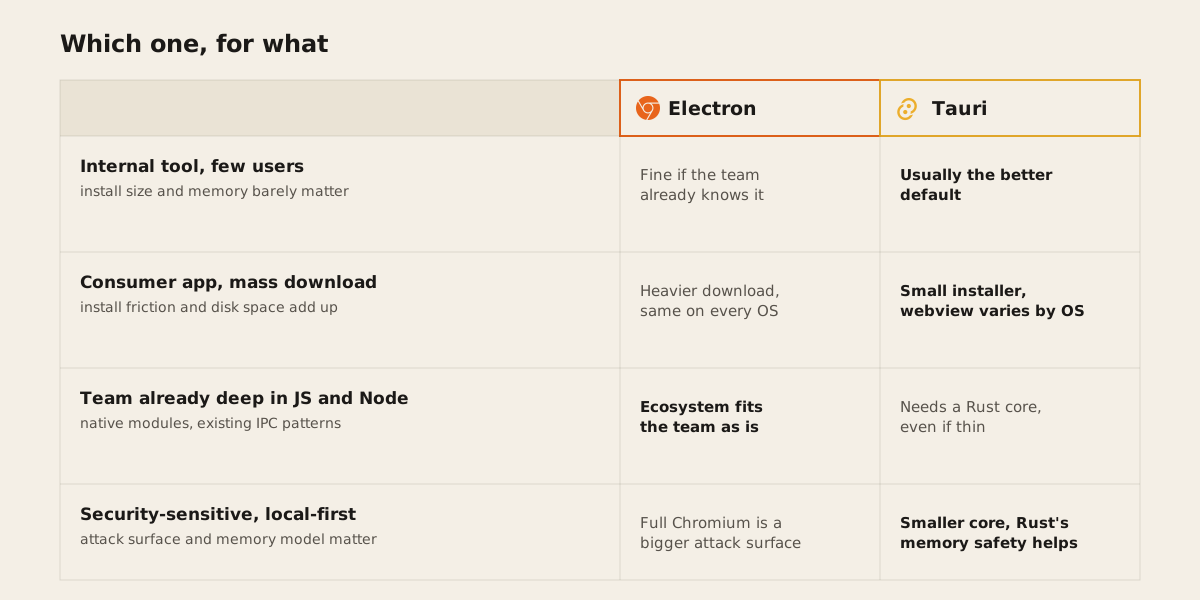
For an internal tool built for a handful of people, install size and memory rarely matter at that scale, so the decision comes down to what the team already knows. If they’re comfortable with Rust or willing to learn a thin layer of it, Tauri usually wins on how little it asks of the machine it runs on.
For a consumer app aimed at a wide download base, every megabyte of installer size is friction for someone on a slow connection or a nearly full laptop. We lean Tauri here too, with the caveat that we test carefully on Linux, where WebKitGTK is the least predictable of the three engines.
A team that’s already deep in JavaScript and Node, with existing native modules or IPC patterns built around Electron’s model, rarely benefits from rewriting that foundation to fit Tauri. We stay in Electron and get the app shipped.
For a security-sensitive, local-first app handling data that shouldn’t leave the device, Tauri’s smaller footprint and Rust core are a genuine advantage. We weigh that against the webview inconsistency cost knowingly rather than by default.
None of these are absolute. A client with a Rust team building a mass-market app might still land on Tauri for the consumer reasons above and the team fit. A security-conscious team already fluent in Node might reasonably stay in Electron and harden the process boundaries instead of switching stacks. The framework serves the project, not the other way round.
If you’re weighing this for a real app, tell us what you’re building and we’ll walk through it against your actual constraints. You can also read more about how we scope desktop app projects generally.