
Nobody sits down and decides to build an ERP out of a spreadsheet. It happens by accretion. One sheet tracks inventory, then someone adds a tab for purchase orders, then a formula pulls numbers from a third file, and eighteen months later the business is running on a file that was never built to hold what it’s holding.
The spreadsheet doesn’t announce the moment it stopped being a spreadsheet. But there are signs, and they tend to show up in the same order.
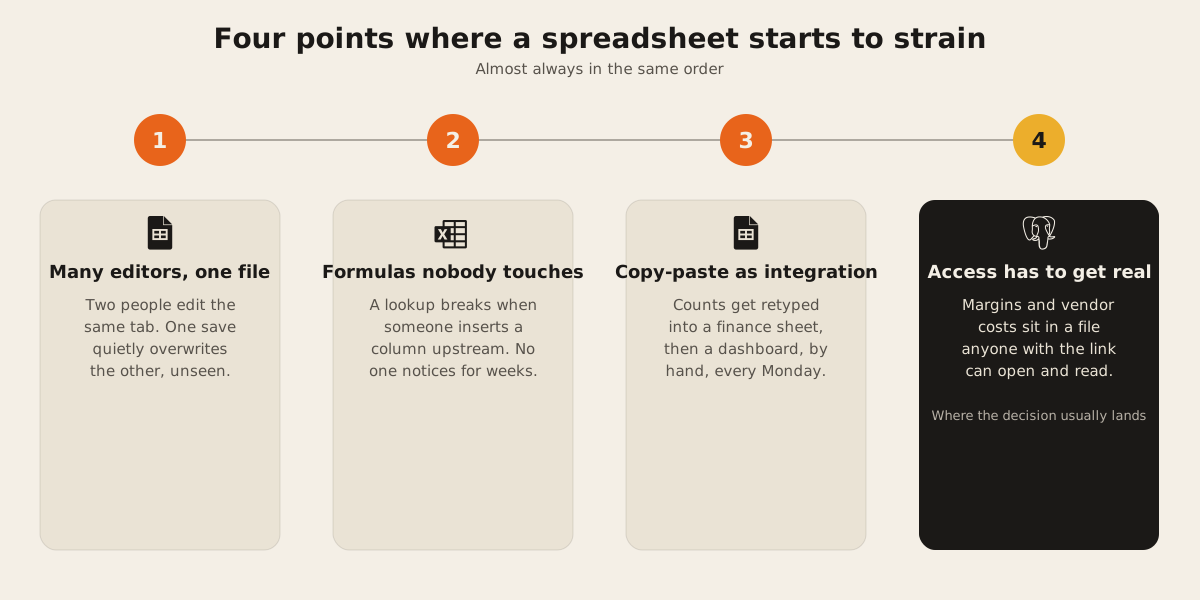
Multiple editors, one file
The first crack is concurrency. Two people open the same tab at the same time and both make changes. Depending on the tool and the moment, one edit quietly overwrites the other, or the two edits merge in a way nobody actually chose. Either way, the real problem underneath is version confusion: which tab is the true one, when three people have “final,” “final v2,” and “final v2 actual” open in different browser tabs.
A spreadsheet also has a hard technical ceiling most teams never reach but should know exists. Excel worksheets top out at 1,048,576 rows by 16,384 columns, and a Google Sheets file maxes out around 10 million cells. Most businesses never get close to either number. The concurrency problem shows up first, usually years before the row count does.
Formulas nobody dares touch
The second sign is a formula layer that has quietly turned into load-bearing code, written by whoever needed it that week, with no version history and no test to catch a broken reference. A lookup formula points at a column on another tab. Someone inserts a column upstream of it, and the lookup keeps running, just against the wrong data now. Nobody notices until a number looks off in a meeting, and by then it’s been wrong for weeks.
This is ordinary technical debt. It just accrued in a tool that was never meant to carry it, and the person who wrote the formula has usually changed teams or left the company by the time it breaks.
Copy-paste between sheets as integration
The third sign is manual retyping standing in for an integration that was never built. Inventory counts get retyped into a finance sheet. That finance sheet gets summarized by hand into a dashboard sheet every Monday. Each hop is a place where the two copies can drift apart, and the whole chain depends on one person remembering to do it, the same way, every single time.
A real integration has error handling, a log of when it last ran, and something that raises a flag when it fails. A copy-paste routine has none of that. It just quietly stops happening, or happens wrong, and nobody finds out until the numbers stop reconciling.
The tell is usually in how people talk about the process, not the spreadsheet itself. If a team describes the update with a person’s name attached to a day of the week, that person is acting as the connector between two systems that don’t actually talk to each other. Take that person out for a week, sick leave or vacation, and the dashboard sheet stops updating. Nobody downstream necessarily finds out why the numbers look frozen until someone asks.
The moment access control matters
The fourth sign is the one that usually forces the actual decision. While three trusted people share a file, permissions barely matter. Once the sheet holds vendor costs and margins, and there are people at the company who shouldn’t see them, “who can open this file” stops being informal.
A spreadsheet’s access model is file-level, or at best, protected-range-level. It has no way to say a sales rep sees order status but not landed cost, or that a warehouse worker can update stock counts but not approve a purchase order. That’s a role-based question, and spreadsheets weren’t built to answer it. It’s the exact gap our ERP and operations work is meant to close: the data store has to know who’s asking before it decides what to send back.
What a first system should be
None of this means jumping straight to a full ERP suite. The honest first step is usually much smaller: real tables with real relationships, built around whichever of the four signs is causing the most damage right now, with access control designed into the schema instead of added later.
create table purchase_orders (
  id serial primary key,
  vendor_id integer references vendors(id),
  status text not null default 'draft',
  requested_by integer references users(id),
  approved_by integer references users(id)
);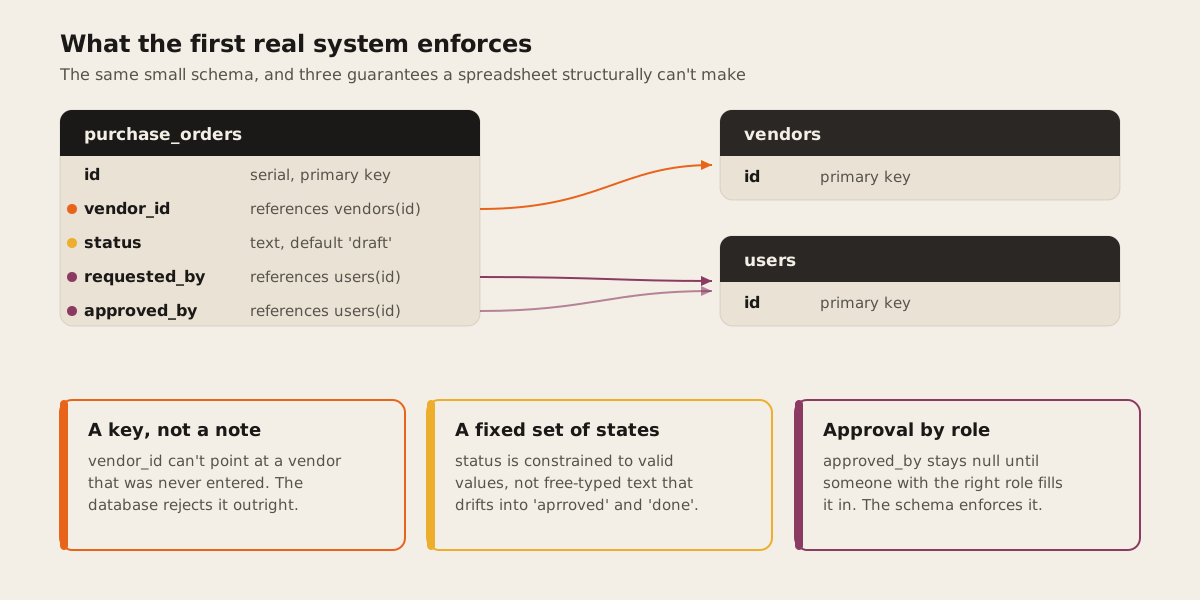
That’s a small schema, but it already does things a spreadsheet structurally can’t. A foreign key means a purchase order can’t reference a vendor that doesn’t exist. A status column can be constrained to a fixed set of valid states. approved_by stays null until someone with the right role fills it in, and the database is what enforces that, not a note in a shared doc telling people not to touch column F.
Scope should follow whichever of the four signs is causing the most damage right now. If concurrency is the pain, the first build is a shared system with real locking around the one workflow people collide on most. If it’s the copy-paste problem, the first build is a scoped integration between the two systems that keep drifting apart. Starting narrow, on web infrastructure built for exactly that workflow, is how a first system actually ships without stalling in scope for a year.
The verdict
If your team has hit two of these four signs, the spreadsheet has already become a system of record and is being asked to do a system’s job without a system’s guarantees. That’s worth fixing before a bad save or a stale formula costs you a number that mattered. Tell us what the spreadsheet is doing for you now and we’ll help you size the smallest system that actually fixes it.