
Every new project hits this question early: do we build sign-in ourselves, or hand the hard parts to Google, Microsoft, or a dedicated auth provider? It looks like a small decision. It rarely is, because the answer decides who owns password resets, breach response, and every locked-out account that shows up in a support queue afterward.
What FurnitureAxis does
FurnitureAxis is a multi-tenant SaaS for furniture retailers, used across warehouses, sales floors, and the Expo mobile companion app. Sign-in runs through Google and Microsoft, with two-factor authentication on top, not a self-built username-and-password table.
That’s the standard logic for a B2B tool aimed at retail and office staff: a lot of them already carry a Google or Microsoft account through their employer. Riding on an identity that already exists means one less password for a store manager to remember, and one less credential store for us to protect. It doesn’t remove every decision. It just moves some of them onto Google’s and Microsoft’s infrastructure instead of ours.
What buying gets you
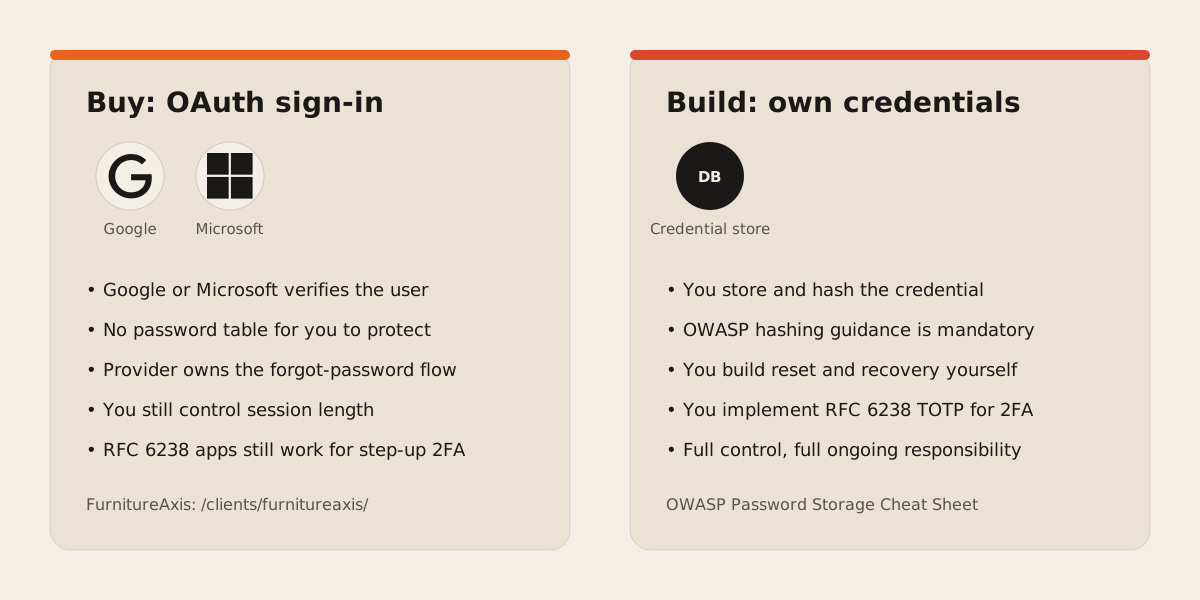
“Buy” here means routing sign-in through an OAuth identity provider instead of storing credentials yourself. Sign in with Google is built on OAuth 2.0 and hands you a button, a One Tap prompt, and a token exchange your app never has to design from scratch. The Microsoft identity platform works the same way for Microsoft and Entra ID accounts: an OAuth 2.0 and OpenID Connect compliant service, with the Microsoft Authentication Library handling token caching and single sign-on so you’re not reimplementing that logic per app.
The part worth naming plainly: when a user signs in this way, your database never holds their password. Google or Microsoft verified who they are, your app receives a signed token saying so, and account recovery for a forgotten password runs entirely on their side. You still decide what a valid session looks like inside your own app and how long it lasts. You just stop being the system of record for the credential itself.
What building costs
Owning credentials means treating the OWASP Password Storage Cheat Sheet as a permanent responsibility. OWASP’s current guidance ranks Argon2id as the preferred hashing algorithm, with scrypt as a fallback and bcrypt reserved for legacy systems, and it’s explicit that picking an algorithm is only step one: you still need a unique salt per user, a work factor tuned to your own servers, and a plan for what happens when that tuning needs to change as hardware gets faster.
Two-factor authentication has its own standard to implement correctly. Most authenticator apps generate codes using RFC 6238, the time-based one-time password algorithm, which derives a numeric code from a shared secret and the current time in fixed steps:
const T0 = 0
const step = 30
const counter = Math.floor(Date.now() / 1000 / step - T0)
That’s a few lines to compute a counter. The engineering underneath it isn’t: securely generating and storing the shared secret, handling clock drift between server and phone, issuing backup codes, and building a recovery path for someone who loses their phone before backup codes exist. None of that is exotic. All of it is work that has nothing to do with the product you were hired to build, and every hour spent on it is an hour not spent on furniture inventory sync or whatever the app is for.
The account-recovery question decides more than the login screen
This is where “build or buy” stops being about which login button looks nicer. A forgotten-password flow is a security surface: it has to prove someone is who they say they are without a password, and every shortcut in that proof (an email link with too long a lifetime, a support agent with too much power to reset an account) is a way in for an attacker instead of a locked-out user. Handing that flow to Google or Microsoft means their security team maintains it for accounts you never had to design a proof for in the first place. Building it yourself means every edge case, lost phone, changed email, shared team inbox, is a decision your team has to make and defend.
Providers dedicated to exactly this, Auth0, Clerk, and similar services among them, exist because most teams would rather pay for that decision-making to already be solved than rebuild it project by project. We weigh those against direct OAuth integrations the same way we’d weigh any other build-versus-buy call: what does the provider’s pricing model do to your unit economics at scale, and how much lock-in are you accepting in exchange for the time saved today. Those numbers depend on each project and each provider’s current plan, so we work them out case by case rather than here.
How we decide
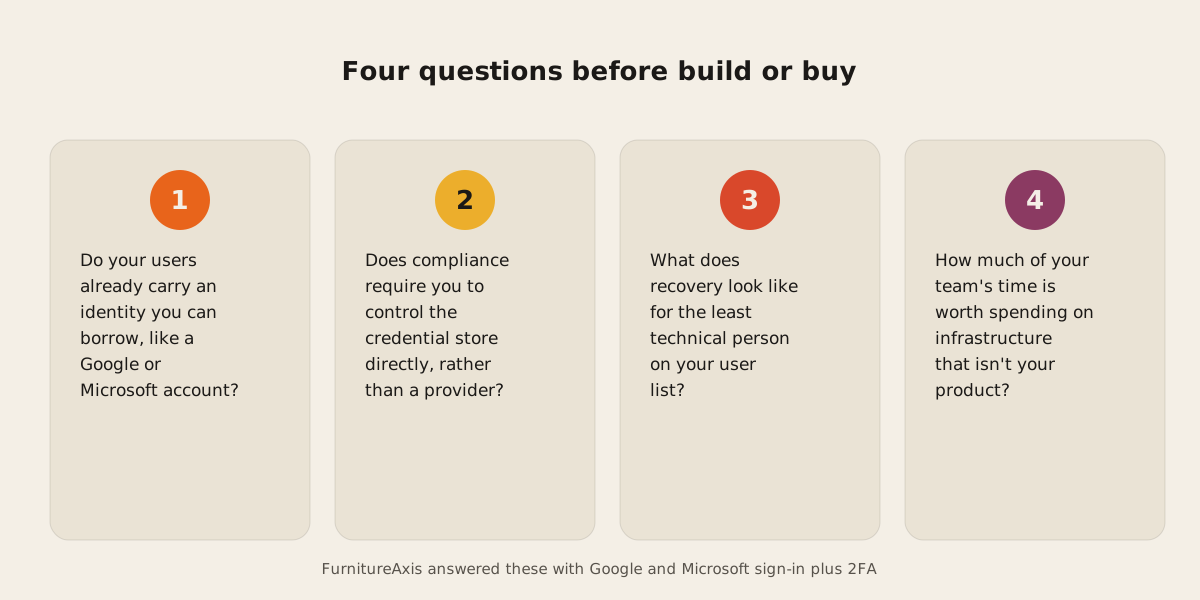
We ask four things before recommending either path: who are your users and do they already carry an identity you can borrow, does your compliance obligation require you to control the credential store directly, what does account recovery look like for the least technical person on your user list, and how much of your team’s time is worth spending on infrastructure that isn’t your product.
For FurnitureAxis, the answer pointed at Google and Microsoft sign-in with 2FA layered on top, because the users already had those identities and the product needed engineering time somewhere else. That won’t be the right answer for every app, especially one with regulatory requirements that specify how credentials must be stored and audited. We don’t default to either side. We ask the questions above and build the answer the project actually needs.
If you’re scoping a new app and haven’t settled this yet, tell us what you’re building before the login screen gets built twice. We also cover how this fits into the rest of a build in web development.