

A cron job that works in testing and then quietly stops updating anything three weeks later is one of the most common ways a product breaks without anyone noticing. Nobody watches a background job the way they watch a page load. It either keeps running or it doesn’t, and by the time someone checks, the data has been stale for days.
FurnitureAxis runs its scheduled work with that risk in mind: a separate C# service handles the vendor catalog sync, pushes products and stock to Shopify, and rebuilds the Algolia search index, all on cron, outside the main Next.js app. That separation is the first decision worth getting right, and most of what follows builds on it.
Keep the job runner out of the web process
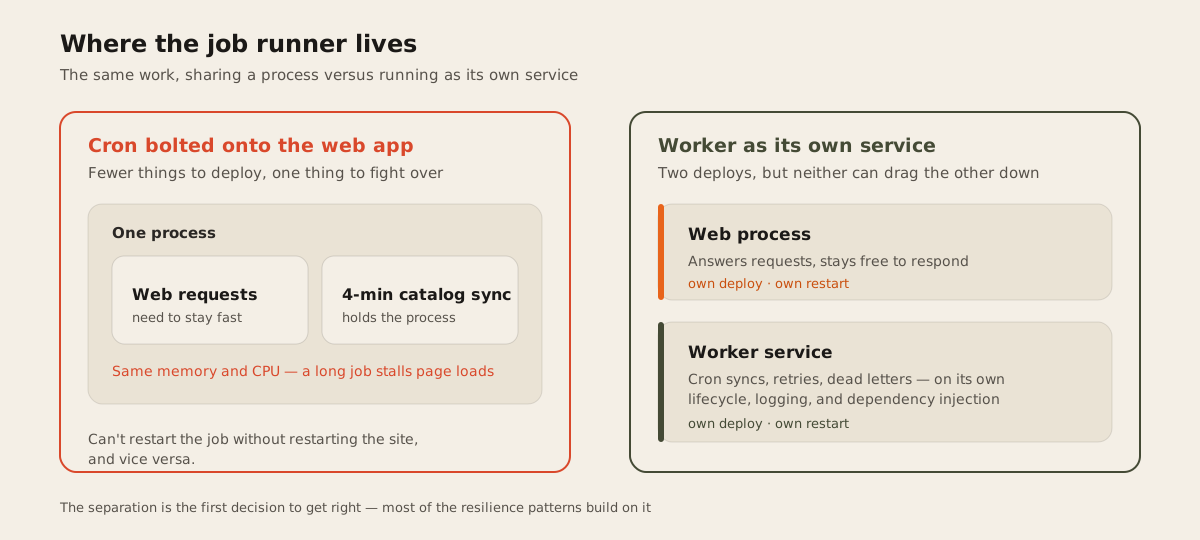
It’s tempting to bolt a cron trigger onto the same process that serves your web requests. Fewer things to deploy, fewer things to watch. The problem shows up the first time a job runs long: a catalog sync that takes four minutes is four minutes where that same process isn’t free to also handle a web request, if it’s sharing memory and CPU with your app server.
Microsoft’s own guidance on .NET Worker Services describes this split directly: long-running background work, whether it’s processing CPU-intensive data, queuing work items, or running a job on a schedule, is meant to live in its own hosted service, separate from request handling. A BackgroundService gets its own lifecycle, its own logging and dependency injection, and it can be deployed and restarted independently of the app that serves your pages. That’s the shape FurnitureAxis’s worker takes: its own .NET service with its own deploy and restart cycle, rather than a route on the web app that happens to run on a timer.
The web process should stay free to answer requests. If a job needs more memory, more time, or a retry loop that takes minutes, it shouldn’t be able to make a page load feel slow because the two are fighting over the same process.
Idempotency comes before retries
None of the resilience patterns below matter if running a job twice does something different than running it once. Before adding retries, make sure the job is safe to retry.
Stripe’s idempotent requests documentation is a clean illustration of the idea, even outside payments. A client sends a unique key with a request, and Stripe saves the resulting status and body of the first attempt made with that key. Every later request with the same key gets that same result back instead of the operation running again. Keys expire automatically after at least 24 hours, so a retry storm doesn’t leave the system holding state forever.
The version of this for a background job doesn’t need Stripe’s infrastructure. It needs the job to check, before doing the work, whether this specific unit of work already happened, and it needs the actual mutation to be safe to apply twice: an upsert instead of a plain insert, a status check before an update, a record of what’s already been processed before the job touches an external API. Get that right and a retry just runs the job again safely, without becoming its own source of bugs.
if (await db.SyncLog.AnyAsync(s => s.BatchId == batchId && s.Status == "done"))
    return;
await syncClient.PushAsync(batch);
await db.SyncLog.AddAsync(new SyncLog { BatchId = batchId, Status = "done" });
await db.SaveChangesAsync();
Retries need backoff, not a tight loop
A job that fails and retries immediately, over and over, turns a transient blip like a vendor API timeout into sustained load on a system that’s already struggling. That’s how one flaky dependency drags down an unrelated part of the system with it.
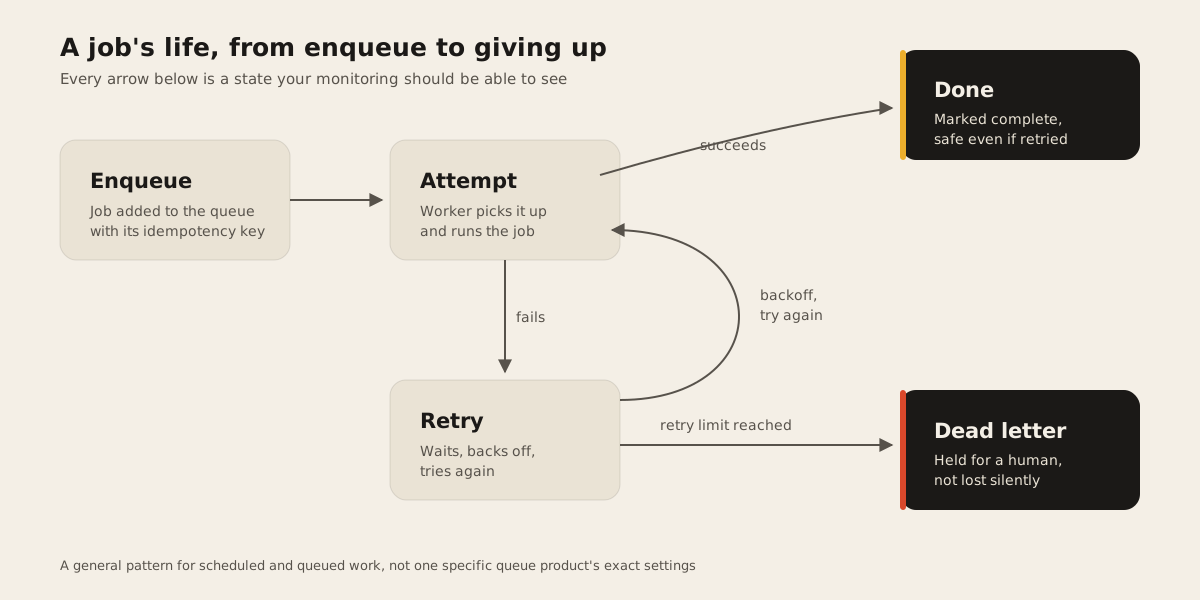
Stripe’s own webhook delivery is a public example of the shape: when an endpoint fails to return a success response, Stripe retries “for up to three days with an exponential back off in live mode,” according to its webhook documentation, spacing each attempt progressively further apart instead of hitting the endpoint on a fixed interval. The exact schedule worth picking for a given job depends on what’s failing and how urgent the work is. A price sync running an hour late is fine. A payment confirmation running an hour late is not. What stays constant is the shape: back off, and give up eventually.
Give failed jobs somewhere to go
Giving up eventually only works if giving up doesn’t mean the job’s data quietly disappears. That’s what a dead letter queue is for: a place a message goes after it fails past its retry limit, instead of vanishing or looping forever. AWS describes a dead-letter queue as one that “temporarily stores messages that a software system cannot process due to errors,” with a message moved there once it exceeds a configured maximum retry count, so one bad record stops blocking everything queued behind it without the record itself getting lost.
Applying the idea doesn’t require AWS’s infrastructure. A table of failed jobs with the payload, the error, and a timestamp gets most of the benefit: work that couldn’t complete becomes visible somewhere a person will actually look, instead of an error swallowed in a log line nobody’s tailing.
Someone has to notice
A retry-and-dead-letter setup only works if a person eventually sees the dead letter table. That part is easy to skip when a job is first built and easy to regret months later. At minimum, a job should log when it starts, when it finishes, and how many records it touched, and it should alert on failure rather than leave it as a line scrolling past in a log stream. Whether that alert lands in a dashboard, a Slack channel, or a daily digest depends on how urgent the job is and how the team already gets paged for everything else. It’s the same question we ask about any web development system: will the team notice the day it quietly stops?
The actual verdict
None of these patterns are exotic, and none require a specific queueing product. What they require is treating a scheduled job with the same seriousness as an API endpoint: idempotent by design, retried with backoff instead of a tight loop, with a dead letter path so a failure is visible rather than silent. FurnitureAxis’s worker exists as its own service partly for this reason: catalog syncs and search rebuilds are the kind of work meant to keep running quietly for years, and the way you get years out of a background job is by assuming, from day one, that some run of it will fail. If you’re building something that leans on scheduled or queued work and want that reasoning applied to your actual jobs, tell us what you’re building.