
Someone asks whether to build a custom point of sale system or just sign up for Square, and for most retailers the honest answer is: don’t build one. Off-the-shelf POS software has gotten good, and the businesses that outgrow it do so for specific, checkable reasons rather than a vague sense that custom would be better. We haven’t built a POS ourselves. This is what we weigh when a retail client asks the question, and it’s the same weighing we’d walk through with anyone comparing a subscription tool against a purpose-built system.
What Square and Lightspeed already solve well
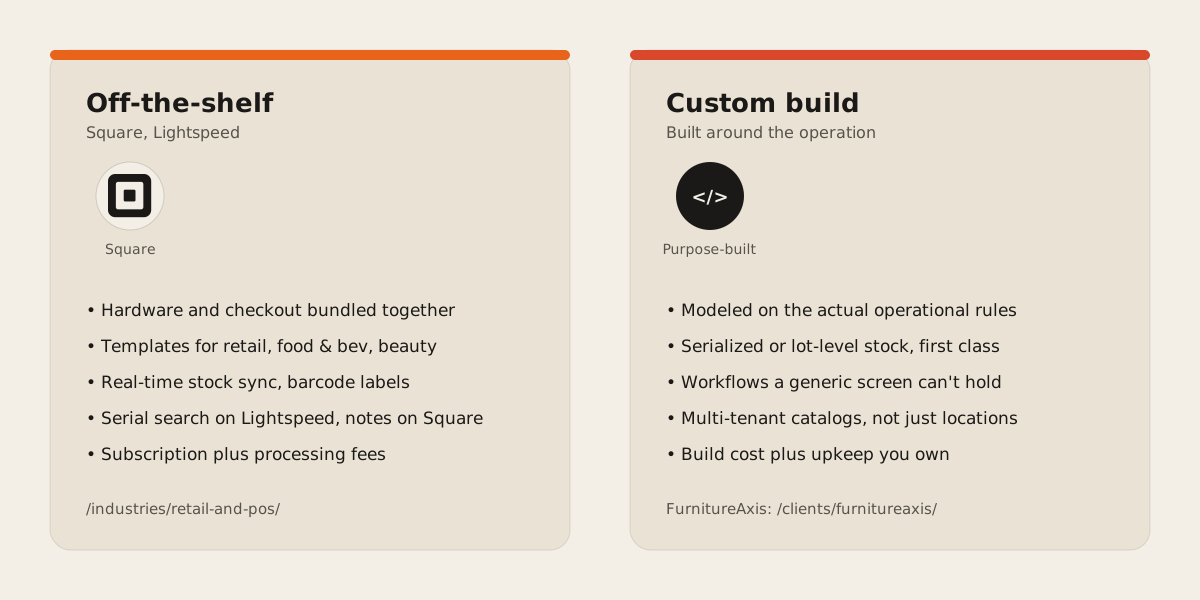
Square packages point of sale software with its own hardware and tunes it to specific business categories: retail, food and beverage, beauty, general services. Its inventory tooling keeps stock counts synced in real time across sales channels, sends low-stock alerts, and on paid plans adds barcode label printing, vendor profiles for purchase orders, and stock transfers between locations.
Lightspeed Retail leans further into multi-location retail. It tracks SKUs across stores from one dashboard, builds purchase orders with reorder suggestions, handles product variants for size and colour, and supports serial number search across locations. Both companies expose an API, so connecting to accounting or ecommerce tools doesn’t mean replacing the checkout screen.
For a single-location shop selling straightforward SKUs, or a multi-location chain whose main complexity is knowing which store has an item in stock, that covers most of what a retail business needs, already built and already supported. Building the same thing yourself means re-solving payment processing and PCI compliance that a vendor has spent years hardening, plus the certification and audit work that comes with handling card data directly instead of routing it through a processor that already carries that burden. Have a look at how we usually plug into that layer rather than replace it on our retail and POS page.
None of that changes because a business is picky about its receipts or wants a particular font on the checkout screen. Customization requests inside the boundaries the platform was built for, a different label layout, a new discount rule, an extra field on the customer record, are exactly what these products are designed to absorb through settings and add-ons. The moment worth paying attention to is when the request stops being a setting and starts being a data model the platform doesn’t have a table for.
Where the shape of the business stops matching the tool
Off-the-shelf POS strains at specific operational shapes rather than at general size. Three come up most often.
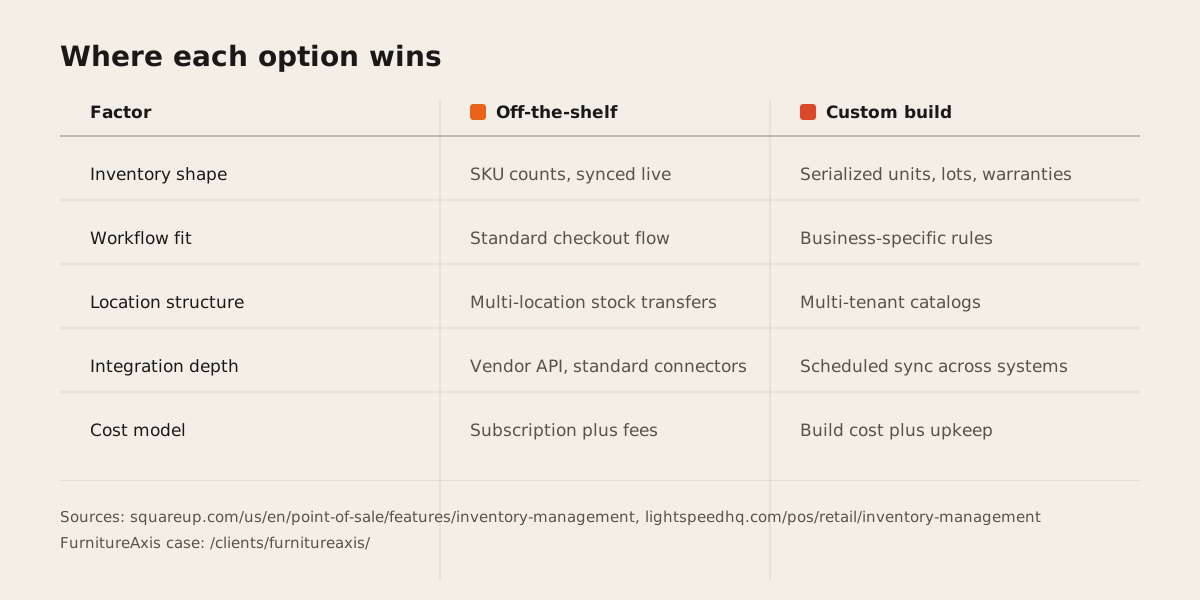
Serialized or lot-tracked stock is the first. Square’s own documentation on tracking inventory covers stock counts, aging reports, and item libraries. It doesn’t describe scanning a serial number into a sale. If every unit needs its own warranty record or service history, that’s a data shape the tool wasn’t built around. Lightspeed does support serial number search, so this particular gap is Square-specific rather than universal to off-the-shelf POS, and worth checking against whichever vendor you’re actually comparing.
The second is workflow that doesn’t map to a screen someone else designed. Commission splits that vary by product category, delivery scheduling tied to warehouse capacity, purchase orders that need sign-off from two different roles: any one of these usually becomes a workaround inside a generic POS. One workaround is fine. Three or four stacked on top of each other is a sign the software has stopped modeling how the business actually runs.
The third is multi-tenant logic, which is a different problem from multi-location. Square and Lightspeed both handle “same business, more stores” well. Neither is built for different tenants running different catalogs and different pricing rules on one shared platform. That’s not a criticism of either product. It’s a different customer entirely: one business selling in several places, versus a platform hosting several businesses that don’t share pricing, don’t share stock, and shouldn’t see each other’s data.
What custom looks like when it’s warranted
FurnitureAxis is the third shape, not a POS itself but the same build-vs-buy logic. Each tenant runs its own catalog, pricing, and inventory across warehouses, on a schema that has grown past a hundred Prisma models as the product deepened. A C# background worker runs on a cron schedule to keep the vendor catalog, Shopify, and Algolia in sync, because reconciling three external systems on a timer isn’t a checkbox any commerce platform ships. Sign-in supports Google and Microsoft accounts with 2FA, billing runs through Stripe, and a companion Expo app gives store staff a mobile view of the same data.
None of that stack exists because it’s interesting to build. It exists because the tenant boundary, the vendor sync, and the multi-role auth are the actual product a furniture retail network needed, and no combination of off-the-shelf settings gets there. That’s the test worth applying to any custom build: is the complexity solving something the business genuinely needs, or is it complexity for its own sake because someone on the team likes writing code more than configuring software.
The part that’s hardest to buy off a shelf is the tenant boundary itself, since every model in the system has to know whose data it’s touching:
model Tenant {
  id       String    @id @default(cuid())
  slug     String    @unique
  catalogs Catalog[]
}

model Catalog {
  id       String @id @default(cuid())
  tenantId String
  tenant   Tenant @relation(fields: [tenantId], references: [id])
  items    Item[]
}
Square and Lightspeed don’t hand you that by default, because most of their customers run a single business rather than a platform for many. Building it yourself means you also own the migrations and the edge cases that used to be the vendor’s problem.
Weighing the two
The verdict
If the business fits inside “sell items, track stock per location, take payment,” Square or Lightspeed gets there faster and cheaper than a custom build, and there’s no shame in buying software that already solved those problems well. Serialized stock, workflows a generic screen can’t hold, or genuine multi-tenant logic, any of those is where the off-the-shelf tool starts fighting the business instead of running it, and where a custom build starts paying for itself. Multi-tenant catalog logic in particular tends to bleed into ERP and operations territory once purchase orders and receiving get involved.
The failure mode we’d steer a client away from is building custom because the sales demo of the off-the-shelf tool looked clunky, or because a competitor mentioned they built their own. Neither is a reason. A workaround you can name, a report you can’t get, a data shape the vendor’s schema doesn’t have a column for, those are reasons. Talk to us about which side of that line your operation actually sits on before you commit to either one.