

We touched on updates briefly in our Tauri vs Electron comparison and said both frameworks ship an auto-update path that expects you to run some infrastructure yourself. That’s true, but it undersells how different the two paths get once you’re past “yes, it updates.” Signing requirements, what counts as a failure, and who owns staged rollouts all diverge in ways that matter once an app is actually installed on machines you don’t control.
How Electron’s autoUpdater actually works
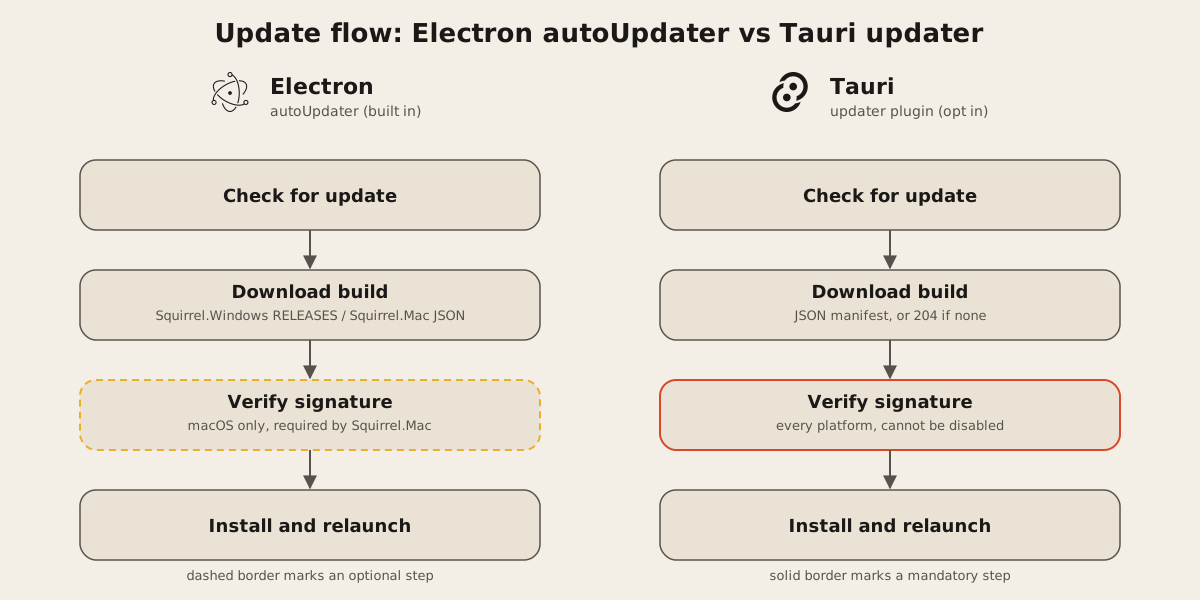
Electron’s built-in autoUpdater only covers macOS and Windows. On Windows it uses Squirrel.Windows, which expects your update server to return a RELEASES file at the /RELEASES subpath of your feed URL. On macOS it uses Squirrel.Mac, which expects a JSON response with a mandatory url field pointing at a zip of the new build. Two different servers, two different formats, one module.
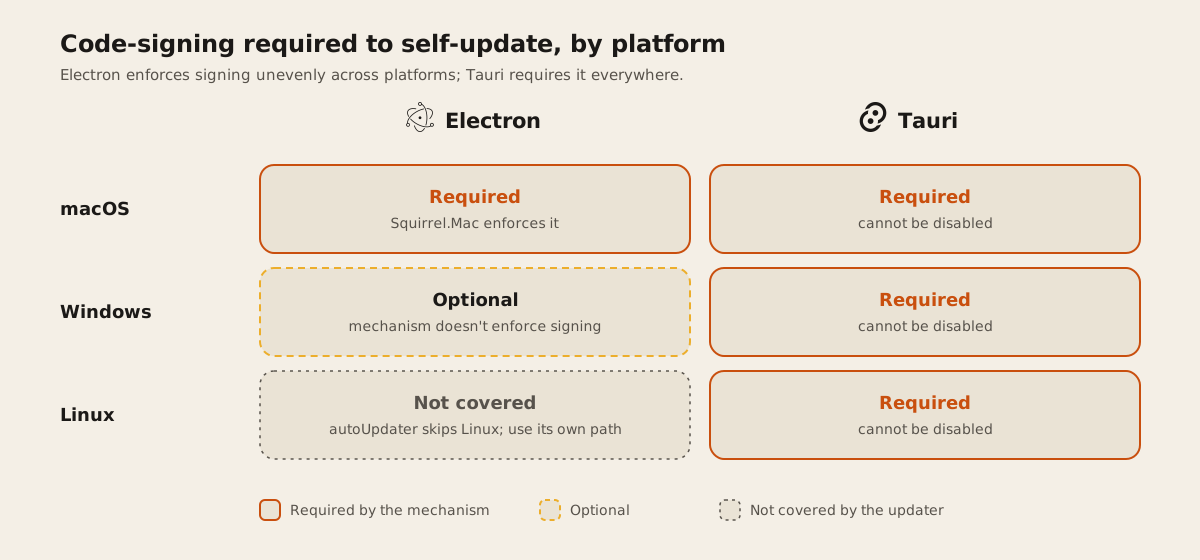
macOS adds a hard requirement the docs state plainly: your application must be signed for automatic updates on macOS, because that’s a requirement of Squirrel.Mac itself. There’s no toggle to turn that off. An unsigned Mac build can’t self-update, full stop.
Electron doesn’t cover Linux here at all. If you’re shipping .deb, .rpm, or AppImage builds, autoUpdater isn’t the mechanism. That platform needs its own distribution path.
For open source projects, update.electronjs.org removes most of the server work: a free hosted feed, on the condition that your app has a public GitHub repo, publishes builds to GitHub Releases, and ships macOS builds code signed. Closed-source projects don’t get that shortcut. You’re hosting the RELEASES file and the JSON feed yourself, or paying a third party to do it.
Tauri’s updater is stricter by default
Tauri’s updater ships as a separate plugin you add explicitly, and it makes one choice Electron leaves optional: signature verification is mandatory and, in the docs’ own words, cannot be disabled. You generate a keypair with tauri signer generate, embed the public key in tauri.conf.json, and sign every release with the private key before it goes near an update endpoint.
That’s a stricter default than Electron’s Windows path, where the update mechanism itself doesn’t enforce signing. It also turns the private key into a single point of failure for your release process. Lose it, and you can’t push updates to apps already installed. Keep it in a password manager or a secrets vault, backed up somewhere other than the machine that generated it.
The update endpoint itself is simpler than Squirrel’s two formats: one JSON response, or a 204 if there’s nothing new, carrying version, notes, and a signed download URL per platform. Tauri interpolates {{current_version}}, {{target}}, and {{arch}} into the endpoint URL, so one server route can serve every platform and architecture combination.
What happens when an update fails
This is where the two frameworks diverge in a way that matters for how you write error handling.
Electron’s autoUpdater emits an error event carrying a single Error object when something goes wrong during a check or download. That’s the whole picture: one generic event, no breakdown of what kind of failure occurred. Logging it and deciding what to do next is on you.
Tauri doesn’t use a failure event at all. The check() and downloadAndInstall() calls return a promise (a Result on the Rust side) that rejects or errors out. The progress callback only reports three states: Started, Progress, and Finished. There’s no Error variant in that enum, so a failed download surfaces as a thrown exception around the call rather than a step in the progress sequence.
const update = await check();
if (update) {
  await update.downloadAndInstall((event) => {
    if (event.event === 'Progress') {
      console.log(`downloaded ${event.data.chunkLength} bytes`);
    }
  });
  await relaunch();
}
If check() throws, that lives outside this block entirely, which is easy to miss on a first pass and worth testing on purpose instead of trusting the happy path.
Staged rollouts are on you, either way
Neither framework ships percentage-based rollouts out of the box. Electron’s docs mention that a custom update server can implement percentage-based rollouts or separate release channels. Building that logic is on you. Tauri’s updater docs don’t mention staged rollout at all. The variable interpolation in the endpoint URL means you could gate a release by target or architecture, but rolling a build out to a slice of users before the rest is application logic you’d add to your own update server. Neither plugin ships it as a feature.
The verdict
If you’re shipping an open source Electron app with a public GitHub repo, update.electronjs.org gets you a working update feed for nothing, and that beats rolling your own. Closed-source Electron and Tauri both put the server on you.
The bigger difference is signing. Electron requires it on macOS and leaves it optional on Windows. Tauri requires it everywhere and hands you the key management that comes with that choice. That’s not a flaw, it’s a stricter default, and it only pays off if your team treats the private key like the production credential it is. A client who can’t commit to that discipline yet is better served by Electron’s looser requirements, at least for now.
We build with both Tauri and Electron; see how we weigh them project by project in the comparison post, or read how we scope desktop app work generally. If you’re deciding between the two for something you’re about to ship, tell us what you’re building and we’ll walk through the update story as carefully as the initial install.