
FurnitureAxis bills its tenants through Stripe, so this isn’t a theoretical writeup of what Stripe’s docs say you should do. It’s the shape our billing code actually takes, checked against those docs one more time before writing this.
Webhook events, not the client, are the source of truth
After a customer finishes checkout or changes plans, it’s tempting to update your database right there in the browser response: the request succeeded, so mark the subscription active. Don’t. The tab can close before the confirmation call finishes, the network can drop, a background worker can throw. None of that stops Stripe from having actually created the subscription.
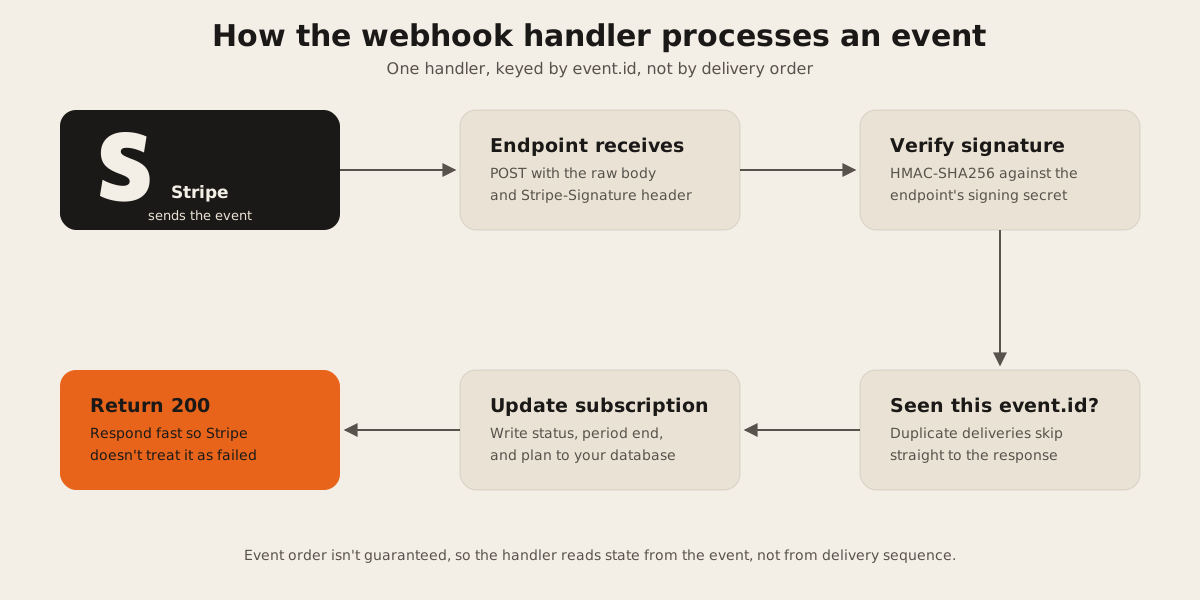
Stripe’s own webhook guide is direct about this: it doesn’t guarantee events arrive in the order they were generated. Creating a subscription can fire customer.subscription.created, invoice.created, invoice.paid, and charge.created in any order, and Stripe expects your handler to cope, refetching an object from the API if you need data from an event you haven’t received yet. The subscription lifecycle guide lists the events that actually matter: customer.subscription.updated for plan and status changes, invoice.paid for successful renewals, invoice.payment_failed for failed ones, customer.subscription.deleted when it ends.
For FurnitureAxis, subscription status is written to the database in exactly one place: the webhook handler. The checkout redirect page shows a confirmation screen and nothing else. If the webhook is late, the screen is briefly optimistic and the database catches up a second later. That’s a better failure mode than a database that’s wrong because a browser tab closed at the wrong moment.
Idempotent handlers, because retries are not optional
Stripe retries failed webhook deliveries for up to three days with exponential backoff in live mode, and it can occasionally send the same event more than once even when your endpoint responded fine the first time. Stripe’s best practices say to log the IDs of events you’ve processed and skip anything you’ve already logged, matching on the event ID or, for the rare case where two separate event objects represent the same underlying change, on the object ID plus event type together.
The same problem exists in reverse. Any POST request you make to Stripe (creating a customer, confirming a payment) can be sent with an Idempotency-Key header, so a retried request after a dropped connection doesn’t create a second object. Stripe stores the result of the first request under that key and returns it for any repeat, for at least 24 hours.
Here’s roughly what the handler looks like in practice:
const event = stripe.webhooks.constructEvent(rawBody, sig, secret);
if (await seenEvents.has(event.id)) return res.status(200).end();
switch (event.type) {
  case "customer.subscription.updated":
  case "customer.subscription.deleted":
    await syncSubscription(event.data.object as Stripe.Subscription);
    break;
  case "invoice.payment_failed":
    await flagPastDue(event.data.object as Stripe.Invoice);
    break;
}
await seenEvents.add(event.id);
res.status(200).end();
Signature verification happens before any of that, using Stripe’s library and the endpoint’s signing secret rather than trusting the payload on its own. Stripe returns a 200 fast, then does the actual database write, because a slow handler risks a timeout that triggers a retry Stripe already sent once.
Customer portal over custom billing UI
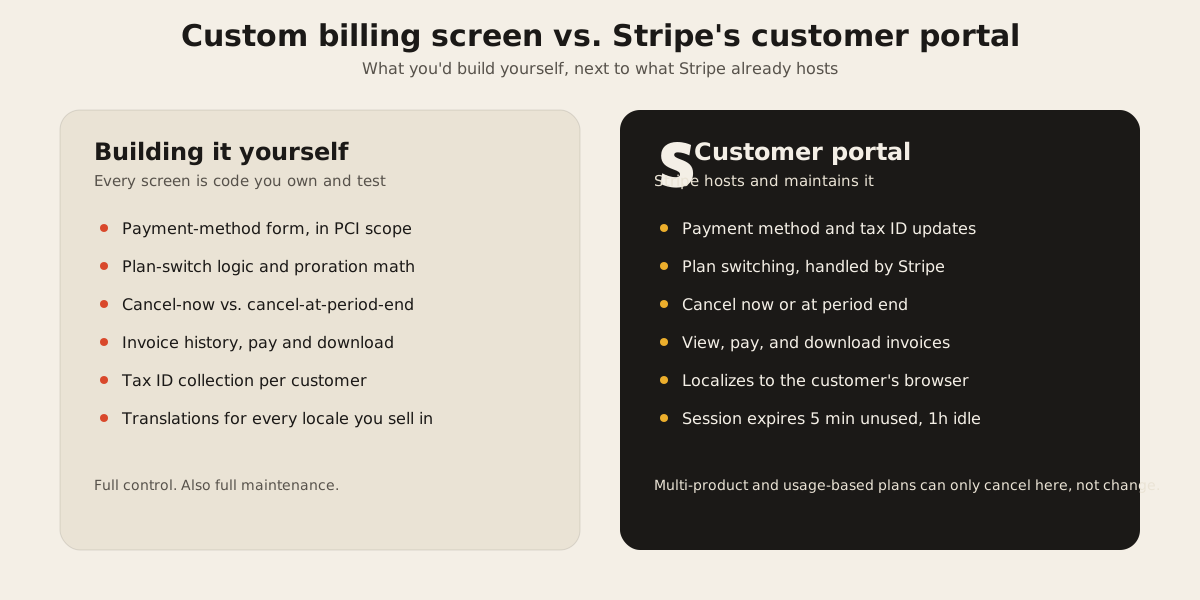
We default to Stripe’s hosted customer portal instead of building a plan-switcher and payment-method form ourselves. The portal covers updating payment methods and tax IDs, switching plans, canceling immediately or at period end, and viewing, paying, and downloading invoices, and it localizes itself to the customer’s browser language automatically. A portal session is short-lived by design: it expires after five minutes if unused, or an hour after the customer’s last action inside it.
It’s not unlimited. If a subscription has multiple products, usage-based pricing, or invoice-based collection, the portal lets a customer cancel it but not change it, and it can’t be embedded in an iframe. Those are real constraints worth checking against your pricing model before you commit to it.
The tradeoff is still usually worth it. Building payment-method forms yourself pulls you into PCI scope, plan-switching logic, proration math, and a permanent invoice-history page nobody enjoys maintaining. Handing that off to Stripe’s portal is one of the reasons a subscription feature on a web build takes weeks instead of months.
Test clocks for the renewal that only happens once a quarter
A quarterly plan’s renewal, a trial that ends in fourteen days, a failed payment on an annual subscription: none of these are convenient to test by waiting for them to actually happen. Stripe’s test clocks advance a simulated clock in test mode, and the subscriptions attached to it move through their lifecycle on that simulated timeline, firing the same webhook events a real renewal or a real failed card would fire. You get to see how your handler behaves on a payment failure for a quarterly renewal without owning a Stripe account for a quarter first.
We run through the failure paths this way before a billing feature ships: past-due handling, trial-to-active conversion, mid-cycle plan changes. It’s the difference between finding out a past_due transition doesn’t revoke access in a test run versus finding out from a support ticket.
Where this fits
None of this is specific to any one product. It’s the same shape whether the subscription gates access to a furniture retailer’s inventory tools or to an AI feature behind a metered plan, which is the more common shape when billing shows up in SaaS work now. FurnitureAxis happens to be the build where we can point at real, running code instead of a hypothetical.
If you’re wiring up Stripe subscriptions and want a second opinion on the webhook design before you write the handler, that’s a fast conversation to have. Tell us what you’re building and we’ll tell you what we’d check first.