
Ombar runs Elviepr TV, and he found us on Fiverr with a job that sounds almost too simple to be a real project: build an app for Fire TV and Android TV that plays one video, on loop, forever. Muted. Screen always on. Nobody touches the remote once it’s running. It’s less an app than a sign that happens to run on a TV box.
We shipped it twice. The first version stopped playing after about eight hours. The second has been running since the day we deployed it. Between those two versions sit fifteen days we’d rather not repeat, and a rewrite that taught us something about where trust actually lives in a codebase.
What “forever” actually means
Signage sounds trivial until you write the requirement down literally: the video has to keep playing, unattended, for weeks, through network drops and whatever a cheap TV stick’s decoder does to itself after enough hours of continuous use. There’s no user to notice a frozen frame and restart the app. There’s no crash report either, because no one is holding the device. You find out the screen went dark when a client mentions it, possibly days later.
No human in the loop, ever. That single constraint rules out most of what makes app development forgiving.
Version one, and the eight-hour wall
We built the first version in Expo React Native, using a TV-focused fork of the framework and its companion config plugin. That’s a reasonable starting point: Expo gets you to a working build fast, and the fork exists precisely because Fire TV and Android TV need focus handling and launch behavior that plain React Native doesn’t ship. For video we used the current player library that ships with Expo, on the latest versions available at the time.
We didn’t just drop a player on screen and hope. We applied every setting Fire TV playback guides recommend: muted, looping, a doNotMix audio mode so the app never fights for audio focus, background playback kept alive, external playback and picture-in-picture switched off, and a buffer profile tuned specifically for unattended looping.
const bufferOptions = {
  maxBufferBytes: 50 * 1024 * 1024,
  minBufferForPlayback: 5,
  preferredForwardBufferDuration: 30,
  prioritizeTimeOverSizeThreshold: true,
  waitsToMinimizeStalling: true,
};
player.muted = true;
player.audioMixingMode = 'doNotMix';
player.staysActiveInBackground = true;
player.bufferOptions = bufferOptions;
It played. For about eight hours. Then a frozen frame, sometimes a black screen, and no recovery. Not a crash you could catch, not an error you could log. The app just stopped doing the one thing it existed to do.
Round two: teaching it to notice
Our first instinct was to give the app a way to notice its own failure and fix itself. We added a status listener that watched for the player’s error state and started a thirty-second timer before refetching the video and rebuilding the player. Init errors got their own five-second retry. Vimeo’s signed video links expire after a few hours, so we checked for that at video boundaries and refreshed them before they could break playback.
const handleStatusChange = (payload) => {
  if (payload.status === 'error') {
    clearStoppedTimer();
    stoppedTimerRef.current = setTimeout(() => {
      onRefreshNeeded();
    }, 30000);
  } else if (payload.status === 'playing') {
    clearStoppedTimer();
  }
};
It helped. Runs stretched to about thirty-six hours at best. That’s a real improvement over eight, and for a day we thought we’d found it. We hadn’t. Thirty-six hours became a ceiling we never got past, no matter what else we tried.
Fifteen days in the same eight hours
What followed was more than fifteen days of the kind of tweaking that doesn’t make a good story because nothing about it was dramatic, just slow. We turned the buffer profile up and back down. We toggled player settings one at a time to isolate which one mattered, then found none of them did on its own. We tried recreating the player object instead of reusing it across refreshes. We upgraded to the latest Expo release mid-project on the chance a newer build fixed whatever this was. We watched logcat scroll past overnight more than once, waiting for the moment playback died, and the moment never explained itself.
The ceiling moved. Sometimes eight hours, sometimes deep into the thirty-six-hour range, depending on which combination of settings was live that week. It never disappeared. We never landed on a clean root cause, and we’re not going to pretend otherwise here: the failure lived somewhere below the code we controlled, in the layers between JavaScript and the hardware decoder actually pushing pixels to the screen, and we had no way to see into that gap or reach it directly. Not being able to observe the failure was the real problem. You can debug a bug you can see.
The call
After fifteen-plus days of narrowing a ceiling that refused to go away, we stopped tweaking and rewrote the app natively: Kotlin 2.3, Jetpack Compose’s TV-focused component libraries for the interface, Media3’s ExoPlayer for playback, no dependency injection framework, about 1,200 lines total.
It worked on the first deployment. It has run continuously since.
Most of the code is distrust, not playback
That result is suspicious on its own. A rewrite that “just works” reads like survivorship bias. So it’s worth being specific about what actually changed, because the obvious answer, native code runs faster, isn’t really it. The real answer is that most of those 1,200 lines aren’t playing video. They’re distrusting the platform, on a schedule.
refreshJob = scope.launch {
  while (isActive) {
    delay(URL_REFRESH_INTERVAL)
    runCatching { refreshUrlInPlace() }
  }
}
recycleJob = scope.launch {
  while (isActive) {
    delay(PLAYER_RECYCLE_INTERVAL)
    tryRebuildOrRecover("scheduled-recycle")
  }
}
heartbeatJob = scope.launch {
  while (isActive) {
    delay(HEARTBEAT_INTERVAL)
    checkForStall()
  }
}
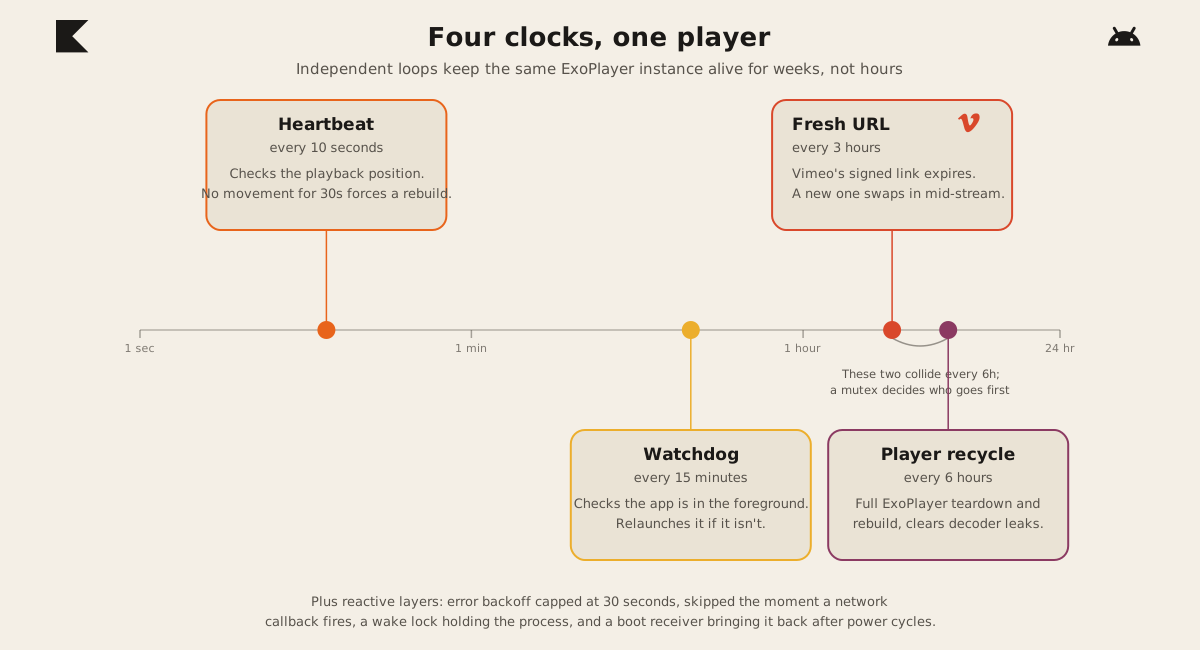
A heartbeat checks the playback position every ten seconds. If it hasn’t moved in thirty, the player gets torn down and rebuilt. A fresh signed Vimeo link gets fetched every three hours and swapped in while carrying the current playback position across, so the frame doesn’t jump. Separately, every six hours the app tears down and rebuilds the whole ExoPlayer instance regardless of whether anything looks wrong, because TV sticks leak hardware decoder memory over multi-day uptime and resetting that leak on a clock beats waiting for it to cause a crash. Those two schedules land on the same six-hour mark, so a mutex makes sure only one rebuild runs at a time instead of two racing on the same player.
Playback errors trigger recovery with exponential backoff, starting at two seconds and doubling up to a thirty-second cap, but a network callback cuts that wait short the instant connectivity comes back. A foreground service holds a partial wake lock so Android doesn’t decide the process is idle and kill it. A boot receiver relaunches the app after a power cycle. A watchdog checks every fifteen minutes that the app is actually in front and relaunches it if something knocked it out. One persistent listener watches for remote content changes so a video can be swapped without anyone touching the device.
Compare that heartbeat loop to the status listener from round two. They’re trying to do the same thing. The React Native version could only react to whatever error state the layers underneath chose to surface, which is why a stall with no error event just sat there frozen. The Kotlin version doesn’t wait to be told something is wrong. It checks whether the playback position actually moved, on its own clock, and it owns every layer it’s checking. Same instinct. Different vantage point.
Why native, specifically
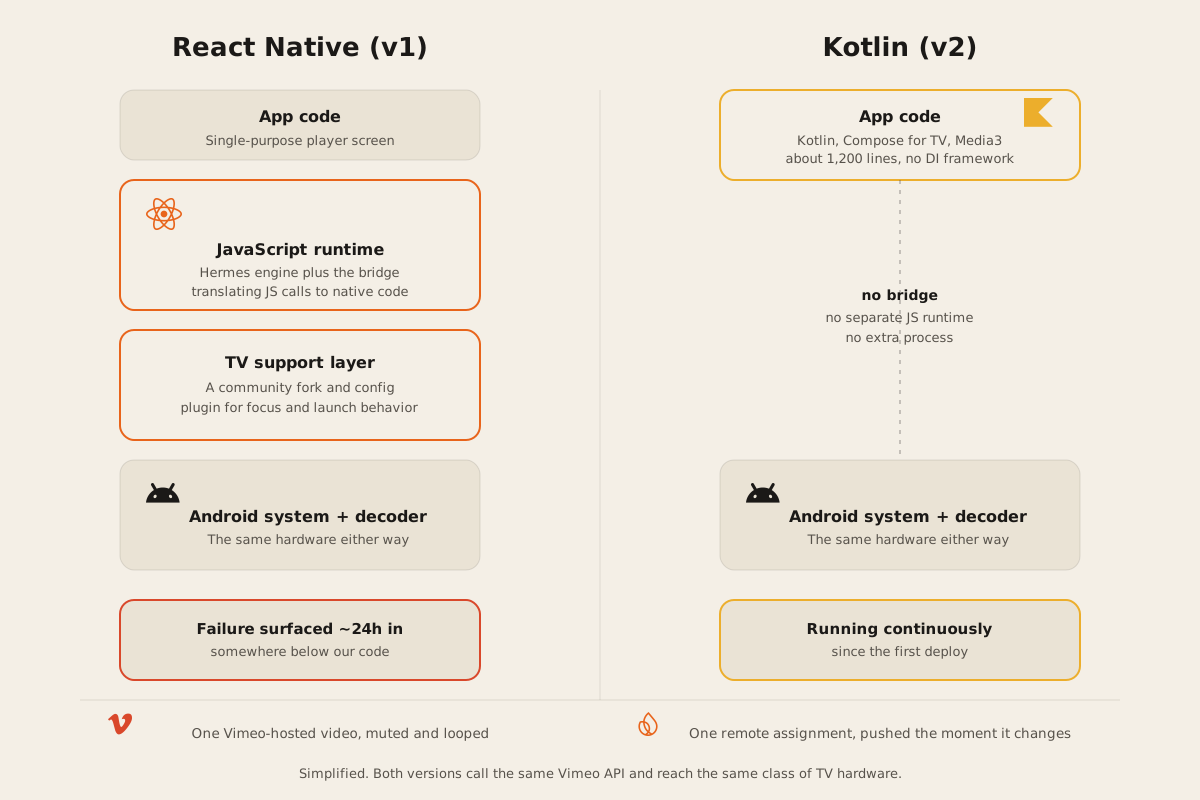
Writing that kind of distrust into an app only works if you can see and control every layer it’s watching. A watchdog that checks whether the app is in the foreground needs direct access to Android’s process lifecycle. A wake lock is an Android system primitive that has no equivalent in React Native’s own vocabulary. Rebuilding a player instance cleanly on a timer means owning the exact object graph that player lives in, with nothing translating your calls into someone else’s calls first.
None of that is impossible in React Native. You can reach native modules from JavaScript, and plenty of teams do exactly that successfully. But every one of those crossings is one more thing to trust, and trust was already the scarce resource on this project after fifteen days of not being able to explain a stall. Once we moved to Kotlin, we weren’t hoping a call would cross a bridge correctly. We were already standing on the other side of it.
Not a verdict against React Native
We still build in React Native, and we’d pick it again for the right job. FurnitureAxis runs on Expo for us right now, and it works well, because someone is holding that app, tapping through it, present enough to notice and restart it if something goes wrong. That’s the shape React Native is built for: interactive software that lives in a human’s hand, with a person in the loop to absorb the occasional rough edge.
Elviepr TV’s app has no hand to sit in. It has to survive weeks of nobody watching it, on hardware nobody’s walking over to reboot. When the job is “run unattended for as long as the power stays on,” the fewer layers between your code and the platform, the fewer places for something to quietly stop working where you can’t see it.
If you’re building mobile apps and you’re not sure which shape yours is, figure that out before you pick a framework. We’ve shipped both answers now. Tell us what you’re building and we’ll tell you honestly which one it needs.