
To test whether your MCP server is working, paste its URL into the checker below. It talks to the server the way Claude or ChatGPT would, then grades the transport, handshake, protocol version, tools, OAuth discovery, CORS, response time, and error replies, with a plain fix for each problem.
Who this is for: anyone who runs a remote MCP server over HTTPS, or wants to check a vendor’s server before connecting it. Who should use something else: if your server runs locally over stdio, or you need to test what a tool call returns, use the official MCP Inspector. This checker never calls your tools.
The checker runs on our Cloudflare Worker, because browsers block calls to most MCP servers (more on that under CORS). It accepts only public https URLs on ports 443 and 8443. It refuses private, loopback, link-local, and cloud metadata addresses, checks DNS answers and every redirect against the same list, sends no cookies and no token, stops after 8 seconds, and reads at most 1 MB per response. It stores nothing.
Real results from five public servers
We ran the checker against our own server and four public ones on 2026-10-13. These runs used a local copy of the checker, so the times come from a development machine, not from Cloudflare. Treat them as rough. Each server was checked once.
| Server | Grade | What it speaks | Tools | First answer | What stood out |
|---|---|---|---|---|---|
| dawloom.com/mcp (ours) | Pass | Modern 2026-07-28, plus 2025-11-25, 2025-06-18, 2025-03-26 | 2, 395 bytes of schema | 125 ms | Nothing to fix |
| docs.mcp.cloudflare.com/mcp | Pass | Modern 2026-07-28 only | 2, 226 bytes | 492 ms | Preflight from another origin got HTTP 403 |
| learn.microsoft.com/api/mcp | Warn | Legacy initialize, negotiated 2025-06-18 | 3, 900 bytes | 263 ms | Session header hidden from browsers |
| mcp.deepwiki.com/mcp | Warn | Legacy initialize, 2025-11-25 | 3, 661 bytes | 310 ms | Unknown method returns -32602, not -32601 |
| mcp.linear.app/mcp | Pass | Needs a login (401) | Behind login | 518 ms | Full OAuth discovery chain works |
We also checked DeepWiki’s old URL, mcp.deepwiki.com/sse. It failed: initialize got HTTP 405 and the old SSE GET got HTTP 410 with the message “The SSE transport has been deprecated in favor of Streamable HTTP. Please use the /mcp endpoint instead.” That’s a good way to retire an old endpoint. Clients get a reason, not a timeout.
The full report for our own server is on the tool page, as plain HTML.
What each check means, and how to fix a failure
1. Transport
MCP over HTTP has had three shapes. The checker tries them newest first.
- Modern Streamable HTTP (2026-07-28). Every request is its own
POST, and there are no sessions. The 2026-07-28 transport spec lists the changes as “Removal of the GET stream endpoint” and “Removal of protocol-level sessions.” - Older Streamable HTTP (2025-03-26 to 2025-11-25). It opens with an
initializehandshake and often hands out anMcp-Session-Id. - HTTP+SSE (2024-11-05). The spec marks it Deprecated and says “New implementations SHOULD NOT adopt it.”
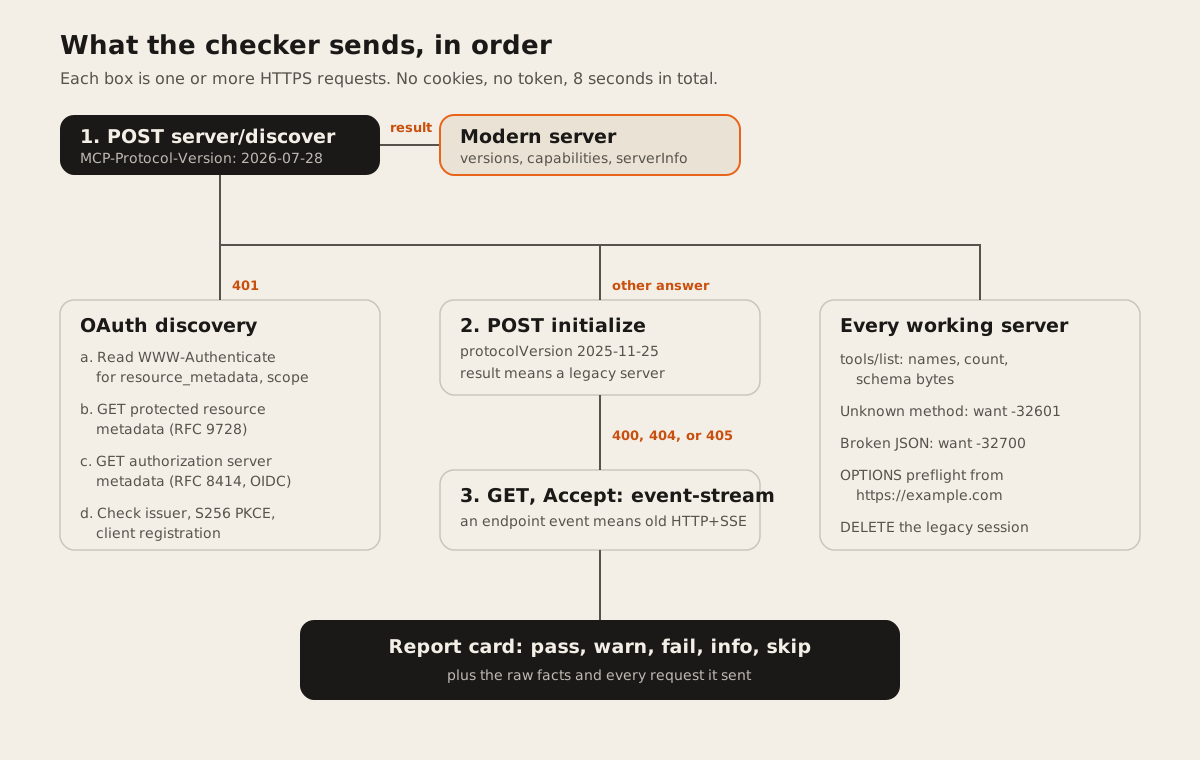
The checker follows the client fallback the spec describes. It sends a modern request first. If the reply isn’t a modern JSON-RPC error, it falls back to initialize. If that fails with 400, 404, or 405, it sends a GET and looks for an endpoint event, which marks the old SSE transport.
Common failures: a URL that points at /sse instead of /mcp, or a server that answers POST with an HTML page. Fix: serve Streamable HTTP on one path, and give users that path.
2. Handshake and protocol version
A modern server must answer server/discover. The versioning page says “Servers MUST implement server/discover.” A legacy server answers initialize and picks a version.
Three of our five servers were legacy. That’s normal months after a new spec. What matters is how they fail. DeepWiki answered our modern probe with HTTP 400 and JSON-RPC code -32600. Microsoft Learn answered with HTTP 200 and code -32601. Neither is one of the modern error codes, so a client knows to fall back to initialize. That’s the behavior the spec asks for.
The checker warns when the newest version a server speaks is older than 2025-11-25. Microsoft Learn negotiated 2025-06-18 even though we asked for 2025-11-25. That still works today. Clients that only speak newer versions will refuse it.
Fix: update your SDK. If you need to support old and new clients, run a dual-era server that answers both server/discover and initialize. Ours does.
3. Server info
The checker reads the server name, version, and instructions. The spec says clients use serverInfo “for display, logging, and debugging”, so a missing name shows up as a blank in a user’s client. Instructions tell the model when to use your tools. Our server sends 580 characters of them. DeepWiki sends 3,458.
Fix: set a name and a version in your server constructor, and write a short instructions string that says when to use the server and when not to.
4. tools/list and schema size
The checker lists every tool and measures each input schema in bytes. Tool definitions go into the model’s context, so big schemas cost tokens on every request. The checker warns when one schema is over 8 KB or all of them together pass 50 KB. It converts bytes to a rough token count at about 4 characters per token, the rule of thumb OpenAI gives for English text. Treat that as an estimate, since every model tokenizes differently.
None of the five servers came close. The biggest was Microsoft Learn at 900 bytes for three tools.
Common failures: a tool with no description, or a schema generated from a large API spec with every optional field. Fix: describe every tool in one or two sentences, and cut fields the model never needs.
5. Authentication and OAuth discovery
If the server returns 401, the checker stops asking for tools and checks the login path instead. It never sends a token. The MCP authorization spec says “MCP servers MUST implement OAuth 2.0 Protected Resource Metadata (RFC9728).” The checker follows the discovery order clients use:
- Read
resource_metadataandscopefrom theWWW-Authenticateheader on the 401. - If there’s no header URL, try
/.well-known/oauth-protected-resource/<path>, then/.well-known/oauth-protected-resourceat the root. - Take the first entry in
authorization_serversand fetch its metadata from the RFC 8414 and OpenID Connect well-known paths, in the spec’s order. - Check that
issuermatches, thatS256is incode_challenge_methods_supported, and that clients can register through client ID metadata documents or dynamic registration.
Linear passed every step. Its 401 carries resource_metadata="https://mcp.linear.app/.well-known/oauth-protected-resource/mcp" and scope="read write". That document points at https://mcp.linear.app, whose metadata lists S256 and both registration methods.
Common failures: a 401 with no WWW-Authenticate header (the checker fails this, since clients can’t start OAuth from it), metadata published at the root but not at the path, and an issuer that doesn’t match the URL it was fetched from. The spec says a client “MUST NOT use the metadata” when the issuer differs. Fix: return the header with resource_metadata, publish both well-known documents, and keep issuer exactly equal to the authorization server URL, trailing slash included. For the server side, step by step, see how to add OAuth 2.1 to an MCP server.
URLs from metadata documents get the same address checks as the one you typed. Metadata that points at a private address is never fetched.
6. CORS
The checker sends a preflight from https://example.com asking for POST with Content-Type, MCP-Protocol-Version, and Mcp-Method (or Mcp-Session-Id for legacy servers). This only matters for web-based clients. Claude Desktop, Claude Code, and server-side agents don’t need CORS, so a server with no CORS gets “info”, not a failure.
Two real cases:
- Cloudflare’s docs server sent CORS headers, but answered the preflight with HTTP 403. The Fetch standard needs an ok status (200 to 299) on a preflight, so browsers on other sites can’t call it. That may be on purpose. The MCP spec says servers “MUST validate the Origin header” to stop DNS rebinding.
- Microsoft Learn allows any origin and hands out an
Mcp-Session-Id, but doesn’t list that header inAccess-Control-Expose-Headers. A browser client can’t read the session ID, so its next request fails.
Fix: if you want browser clients, answer OPTIONS with 204, allow the MCP headers, and expose Mcp-Session-Id if you issue one. If you don’t, leave CORS off and validate Origin.
7. Response time
The checker records the time to the first answer and to tools/list. It warns above 1 second for the first answer, because clients connect at startup and a slow server delays every session. In production, times are measured from the Cloudflare data center that runs the check, so they include the network path from there to your server.
Fix: keep server/discover and initialize free of database calls, and cache the tool list. Where the server runs matters too. We compare hosts and measured latency in where to host an MCP server.
8. Error shapes
The checker sends two bad requests on purpose: an unknown method, and a body that isn’t valid JSON. JSON-RPC 2.0 defines the codes: -32601 “Method not found” and -32700 “Parse error”. The modern transport spec adds that an unknown method “MUST respond with 404 Not Found and a JSON-RPC error with code -32601”.
All five servers returned -32700 for broken JSON with HTTP 400. For the unknown method, DeepWiki returned -32602 “Invalid request parameters”. That’s a small thing. It makes a client think it sent bad arguments when the method doesn’t exist.
Common failures: an HTML 404 page from a framework router, a 500 with a stack trace, or a 200 with an empty body. The checker fails these, since a client can’t tell what went wrong. Fix: route every POST to your MCP endpoint through the JSON-RPC handler, including the ones that fail to parse.
Use it from a script or an agent
The same check is a free API. No key, and the limit is 10 checks a minute per IP. A server that fails still returns HTTP 200 with a failing report. A 4xx means the URL itself was refused, for example not_https or blocked_host.
curl -X POST https://dawloom.com/api/v1/mcp-check \
  -H "Content-Type: application/json" \
  -d '{"url":"https://dawloom.com/mcp"}'
The request and report schemas are in our OpenAPI document under checkMcpServer, and the developer portal lists the endpoint with the others.
FAQ
How do I know if my MCP server is working?
Paste its public URL into the checker. A pass means a client can reach it, finish the handshake, list tools, and get clean errors. It doesn’t call your tools, so test real tool calls in the MCP Inspector or in Claude or ChatGPT.
Why does my MCP server work in Claude Desktop but not in a browser client?
Usually CORS. Desktop apps ignore it and browsers enforce it. Check the CORS line in the report: the preflight must return a 2xx, allow the MCP headers, and expose Mcp-Session-Id if your server issues one.
Can I test an MCP server that needs OAuth?
Yes, up to the login. The checker reads the 401, the WWW-Authenticate header, and both OAuth metadata documents. It never sends a token, so it can’t list tools behind the login.
Can I test an MCP server on localhost?
No. Localhost, private networks, and cloud metadata addresses are blocked on purpose. Use the MCP Inspector locally, or expose the server through a tunnel and check the public https URL.
Should I still support the SSE transport?
Only if you have clients that can’t move yet. It has been deprecated since 2025-03-26. If you retire it, do what DeepWiki did: return a clear error that names the new endpoint.
We run a public MCP server at dawloom.com/mcp and built this checker on the same Worker. If you need an MCP server for your own product, see MCP server development. For when one is worth building at all, read MCP servers: what they are and when a business actually needs one, and for the alternatives, MCP, API, or Zapier for connecting company data to ChatGPT. Before you connect a vendor’s server, also run it through our 12-point MCP server safety checklist.