
A store owner decides to leave their old cart software for something faster or easier to run, and a few weeks after launch, organic traffic is down by a third. Nothing about the new site is broken. The product pages load, checkout works, the theme looks better than the old one ever did. The rankings just didn’t come along for the move.
Google’s own guidance on site moves is blunt about why: it indexes URLs, not intent. A ranking is attached to a specific address. If that address disappears without a clear signal pointing at its replacement, the ranking doesn’t transfer. It resets, and the new URL starts over as an unknown page while Google works out whether it deserves the position the old one held.
The fix isn’t complicated. It’s just a sequence that has to happen in order, and ecommerce sites have more ways to get it wrong than a blog does, because a single store can have thousands of indexed URLs across products, categories, and filtered listings.
Map every URL before you touch anything
Before any code changes, pull a full list of the URLs Google actually has indexed. That means checking the Coverage report in Search Console and crawling the current site, not just working from a sitemap, because a sitemap only shows what you’re telling Google exists, not what it has actually crawled and ranked. For a store, this list is bigger than the product catalog: paginated collection pages, filtered and faceted listing URLs, discontinued products that still rank for informational searches, blog posts, even old campaign landing pages.
Every one of those needs a destination on the new site. Where a 1:1 mapping doesn’t exist (a discontinued product with no direct replacement, for instance), the honest answer is usually a redirect to the parent category, not a fake product page invented to hold a URL. This groundwork matters more for ecommerce than almost any other site type, since catalog structure changes are exactly the kind of platform switch most likely to touch URL patterns.
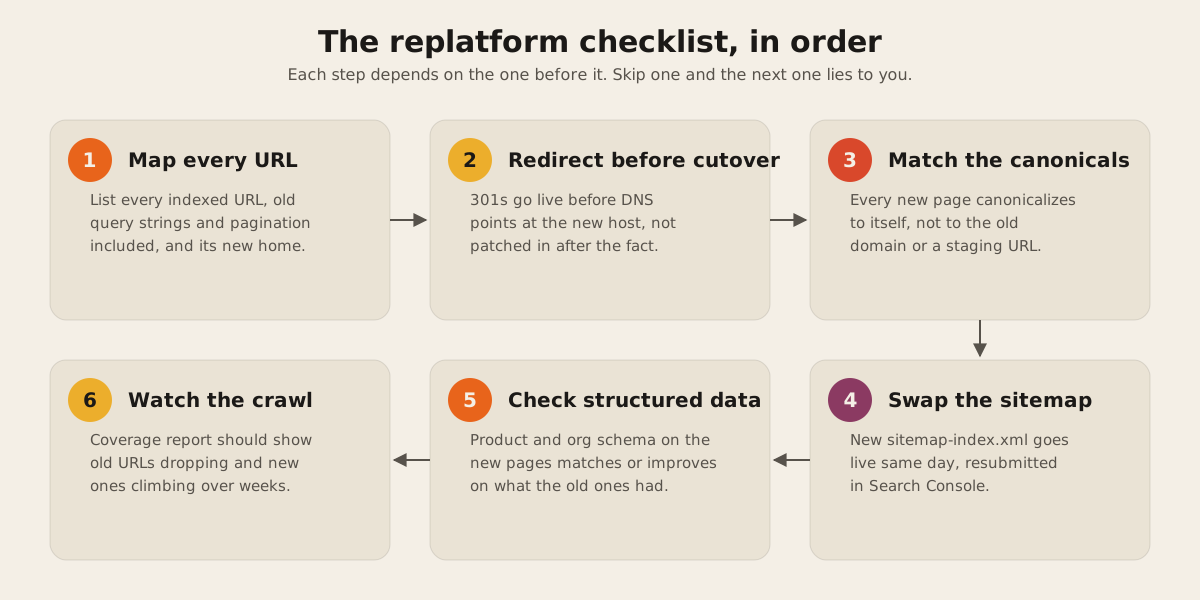
301s go live before the switch, not after
Google recommends server-side 301 redirects for permanent URL changes, and wants them live as soon as the new site is reachable, not patched in once someone notices traffic dropping. The old URL should redirect straight to its new equivalent, ideally in one hop. Chains of three or more redirects slow down crawling and occasionally get treated as broken paths.
Dawloom.com runs as static output on Cloudflare Workers, and Cloudflare’s static asset hosting handles this through a plain _redirects file sitting alongside the built site, parsed before requests hit the static files:
/collections/summer-sale /collections/summer 301
/products/old-sku-123 /products/new-sku-123 301
/blog/* /articles/:splat 301
The status code defaults to 302 if you leave it off, so it’s worth double-checking every line for the explicit 301. Cloudflare’s own docs cap a single _redirects file at 2,000 static redirects and 100 dynamic ones. A store with a catalog bigger than that needs Cloudflare’s Bulk Redirects instead, but the underlying rule is the same regardless of host: every meaningfully trafficked old URL gets a rule, and the rule ships before launch.
Canonical tags follow the new domain
A canonical tag tells search engines which URL is the authoritative version of a page. After a migration, every new page needs to canonicalize to itself on the new domain, not to a staging URL, not to the old site. It sounds obvious until you’ve seen a theme migration where the canonical logic got copy-pasted from the old build and quietly kept pointing at the retired domain for a month.
The mechanism doesn’t need to be fancy. This site computes its canonical URL once, in the base layout, from the current path and the configured site origin, so every page gets a correct self-referencing tag without anyone hand-typing it per template. An ecommerce platform switch is the same idea at a larger scale: get the canonical logic right in one place, then verify it held across product, category, and filtered pages, since filters and sort parameters are where canonical tags most often drift.
Swap the sitemap the same day
The new sitemap needs to list the new URLs and go live the day the new site does, not sometime after. Astro’s sitemap integration, which is what generates this site’s sitemap-index.xml, builds the file automatically from the site’s static routes at build time, so the sitemap can’t drift out of sync with what actually got deployed. Whatever platform is behind the new store, the sitemap should work the same way: generated from the live route list, not maintained by hand.
Once the new sitemap is live, resubmit it in Search Console. If the domain itself changed, Google’s Change of Address tool is the documented path for telling Search Console explicitly that one property has moved to another; an HTTPS-only change doesn’t need it.
Structured data has to survive the rebuild
Product schema, review markup, breadcrumbs: whatever structured data made the old pages eligible for rich results needs to exist on the new pages too. It’s easy to lose during a platform switch, because it usually lives in template code that nobody thinks about until it’s gone. Google’s Rich Results Test is the tool for checking markup during development, and the Rich result status report in Search Console is the one for catching breakage after deployment, which is worth watching in the weeks after launch since templating issues sometimes only surface in production.
Watch the crawl after launch
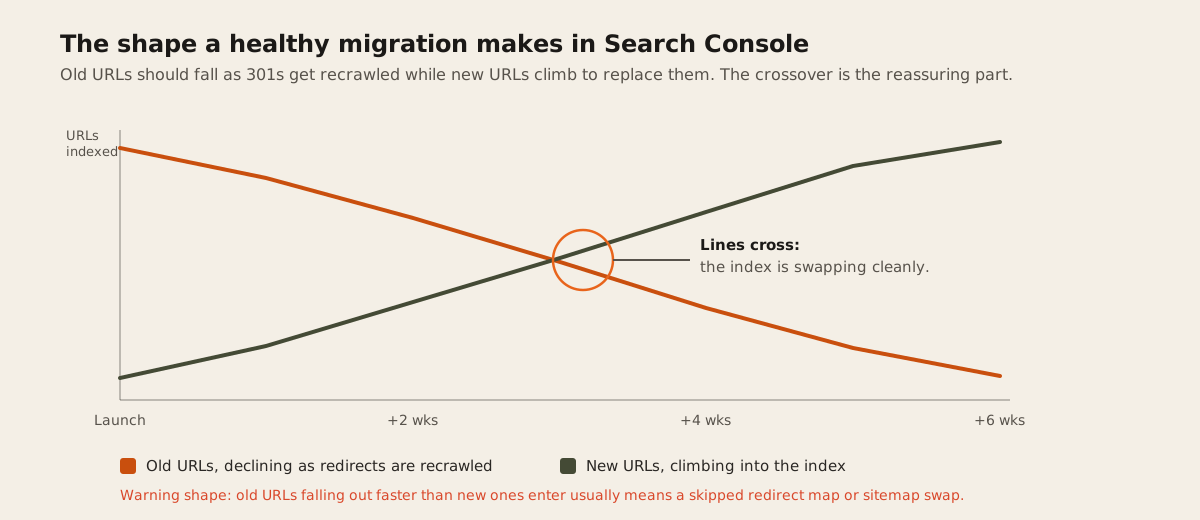
Some fluctuation after a migration is normal. What you’re watching for in the Coverage report is the shape of the change: old URLs should decline as 301s get recrawled and Google updates its index, while new URLs climb to take their place. Google’s guidance suggests small to medium sites typically settle within a few weeks if the redirect and canonical work was done correctly. A shape where old URLs are dropping out of the index faster than new ones are entering it usually means a step above got skipped, most often the redirect map or the sitemap swap.
Everything on this checklist also depends on the new site being fast; Core Web Vitals are part of how Google evaluates page experience, and a replatform that fixes the URL structure but ships a slower theme is trading one ranking problem for another.
None of these six steps is exotic. What tanks rankings during a replatform is almost never one of them being technically wrong, it’s one of them being skipped or done out of order: redirects shipped after launch instead of before, a sitemap that still points at the old structure, canonical tags nobody checked past the homepage. If you’re planning a platform switch for a store and want the URL side of it mapped out before development starts, that’s exactly the kind of groundwork our web development work covers. Get in touch before the migration, not after the traffic graph tells you something went wrong.