
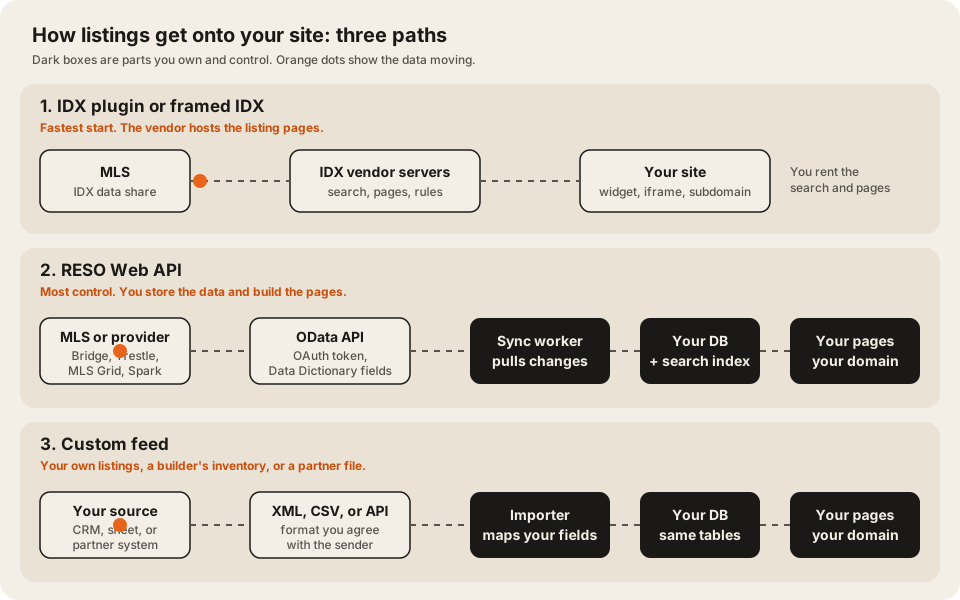
Use an IDX plugin if you want MLS listings on an agent or brokerage site this month, for roughly $50 to $150 a month plus your MLS’s fee. Use the RESO Web API if you’re building a portal of your own, with your own search, map, and lead routing, because it hands you the raw listing data to store and shape. Use a custom feed only for listings that don’t come from an MLS, such as your own rentals, a builder’s new homes, or a partner’s file.
IDX and the RESO Web API aren’t really rivals. IDX is the MLS permission and display rulebook. The RESO Web API is the pipe the data travels through. Most custom portals use both: IDX rules, delivered over the Web API.
Who this is for: brokers, team leads, and proptech founders in the US deciding how listings should reach a website. Who should look elsewhere: if you only show your own five listings, type them in by hand. If you’re outside the US, MLS rules and data providers work differently, so check your local board first.
How we checked
We read the RESO standard pages, the National Association of REALTORS® (NAR) IDX policy, data-provider docs, and each vendor’s own pricing page on 2026-10-14. Prices are US list prices in USD, read from the vendors’ US pages with a page fetcher, not a logged-in account. They may differ by country or with tax. Every number links its source and says who published it.
Most pages that rank for “IDX vs RESO Web API” today are written by IDX plugin vendors, such as Realtyna and MLSImport. They explain the terms but don’t quote the NAR rules, MLS fees, or provider rate limits. RESO’s own case study is a single vendor’s migration story. This page puts the rules, the prices, and the limits side by side.
The three paths at a glance
| IDX plugin | RESO Web API | Custom feed | |
|---|---|---|---|
| What it is | A vendor product that follows the MLS’s IDX rules | The RESO data standard: OData, OAuth, Data Dictionary fields | A file or API you agree with the sender |
| Who stores the data | The vendor | You | You |
| Who builds search and maps | The vendor | You | You |
| Where listing pages live | Depends on the vendor (see the table below) | Your domain | Your domain |
| Typical monthly cost | $49 to $149 plugin, plus MLS fee | Provider and MLS fees, plus your hosting, maps, and search | Your hosting only |
| Time to first listing | Days | Weeks, after MLS approval | Depends on the sender |
| Design control | Vendor templates | Full | Full |
| Best for | Agent and brokerage sites | Portals, apps, and custom search | Non-MLS inventory |
Path 1: an IDX plugin
IDX stands for Internet Data Exchange. NAR’s model policy defines it as the way MLS participants “authorize limited electronic display and delivery of their listings by other participants” on websites and apps (NAR Handbook on Multiple Listing Policy, 2024 edition). An IDX plugin is a vendor that holds the data feed for you and draws the search and listing pages.
The rules any IDX display has to follow
These come from NAR’s model IDX policy. Each MLS adopts its own version, so read your MLS’s rules too.
- Refresh every 12 hours at least. “Participants must refresh all MLS downloads and displays automatically fed by those downloads not less frequently than every twelve (12) hours.”
- Credit the listing broker. Each listing must “identify the listing firm, and the email or phone number provided by the listing Participant in a reasonably prominent location” in type “not smaller than the median used in the display of listing data.”
- Search engines may index it. The policy says it “does not require participants to prevent indexing of IDX listings by recognized search engines.”
- IDX data is for display only. “MLS participants may not use IDX-provided listings for any purpose other than IDX display.”
The same handbook defines a VOW (virtual office website), which can show more data, such as sold prices where allowed, but only to registered users with whom the broker has a relationship.
What IDX plugins cost
US list prices from each vendor’s own page, checked 2026-10-14. MLS fees are extra unless the vendor says otherwise.
| Vendor | Price | Setup | Where listings live, in the vendor’s words |
|---|---|---|---|
| IDX Broker | Core $60, Engage $99, Elite $149 a month | ”a one-time setup fee”, amount not published | A custom IDX subdomain (vendor page) |
| Showcase IDX | Essentials $94.95, Premium $124.95 a month | ”No Setup Fees" | "we never use subdomains … or iframes” |
| iHomefinder | Base price not published | Hosted site option “$50/mo + $500 setup" | "Our IDX is native”, “not an iframe or subdomain” |
| MLSImport | $49 a month for 1 MLS, $99 for 3, $199 for 7 | ”No setup fee” | Imported into your WordPress; they “stay in WordPress as ordinary posts” if you cancel |
On MLS fees, Showcase IDX says pass-through fees “typically ranges from $0 to $33/month,” and IDX Broker warns that “some MLSs charge additional data management fees set by your local board, not by IDX Broker.”
Where IDX plugins fall short: you rent the search and the pages. You can’t change how filters combine, add your own data to a listing, or route a lead by territory unless the vendor supports it. Our post on what a real estate portal needs that a WordPress theme can’t do covers where that line usually sits.
Path 2: the RESO Web API
RESO, the Real Estate Standards Organization, describes it plainly: “The RESO Web API is the modern way to transport data in the real estate industry” (RESO). It has three parts:
- OData. “RESO uses the OData V4 standard specification.” You query listings over HTTPS with filters, sorting, and paging.
- OAuth. Your app gets a token before it can read anything.
- The Data Dictionary. Standard field names, so
ListPriceandBedroomsTotalmean the same thing across MLSs. RESO calls it “the real estate industry’s universal language for data” (RESO Data Dictionary).
The older standard, RETS, is gone. RESO says RETS “has been deprecated and is no longer supported by RESO.” Its transition report for June 2026 says “MLS feeds converted to Web API now cover 62.4% of U.S. subscribers,” and feeds committed to converting cover 76.4%. In 2021, use was “less than 5% of the industry.” So a new build should start on the Web API.
Who serves the data
Many MLSs don’t run their own API. They license data through a provider. Two published their terms where we could read them:
- MLS Grid works by replication only: “We do not support real time data access at this time.” Its limits: “No more than 2 request per second,” 7,200 requests an hour, 40,000 a day, and 4 GB downloaded an hour. On photos: “You must maintain your own copy of all media files,” and “DO NOT use these URLs on your website.” Its FAQ says “You will only pay the license fee required by your MLS to access data.”
- Spark Platform charges “$50/mo for each MLS you can access,” and says it can “handle live queries” as well as replication.
Bridge Interactive and Trestle are the other big providers. Their docs refused our page fetcher on 2026-10-14, so we don’t quote their terms here. Ask them directly.
What the MLS charges
The MLS license fee is separate from the provider fee. Fees vary a lot by MLS. Two examples from MLS pages, checked 2026-10-14:
- ARMLS (Arizona): “Each brokerage receives five (5) free feeds,” then “$150/month per feed.” A VOW feed is “$150/month.” It also says typical vendor pricing ranges from $1,000 to $1,500 per product, per month, “depending on the dataset requested.”
- SDMLS (San Diego) lists an IDX feed at $40 a month and a vendor access fee of $349 a month.
What you build on top
With the Web API, the data arrives raw. You build:
- A sync worker that pulls only what changed since the last run, on a schedule. We cover retries and idempotency in background jobs that don’t fall over.
- A media copier, because providers like MLS Grid forbid using their photo URLs on your site.
- A purge step for listings that left the feed. Spark’s replication guide lists “Purging stale data” as its own step and asks you to purge at least once a day.
- Search and maps over your own database. See search: Postgres, Algolia, or Meilisearch.
- The IDX display rules above, on every page that shows MLS data.
A replication pull is an ordinary OData query. This sketch is illustrative. Each provider has its own base URL, page size, and paging rules:
GET {provider-base}/Property
  ?$filter=ModificationTimestamp gt 2026-12-20T00:00:00Z
  &$orderby=ModificationTimestamp
  &$top=1000
Authorization: Bearer {token}
Store the newest ModificationTimestamp you saw, and start the next run from there.
Path 3: a custom feed
A custom feed is any listing source you agree on yourself: a CSV export from your CRM, an XML file from a home builder, or a partner’s JSON API. Use it when the listings aren’t in an MLS, such as rentals you manage, new construction, commercial space, or markets outside the US.
The work is the same as path 2 without the standard. You agree the format and the schedule with the sender, map their fields to yours, and handle a file that arrives late or broken. If MLS listings and your own listings show on the same site, store both in one table with a source column, so search and maps treat them the same.
Don’t use a custom feed to dodge MLS rules. If the data came from an MLS, the MLS’s license and display rules still apply, however it reached you.
Which one should you pick?
Pick by who needs to own the search and the data. An IDX plugin suits a site that only displays MLS listings. The RESO Web API suits a portal that needs its own search, map, and lead routing. A custom feed suits listings that never touch an MLS.
- One agent or a small team, a normal website: an IDX plugin. Pick one that keeps listing pages on your own domain if search traffic matters to you.
- A brokerage that wants its own search, map, and lead routing: the RESO Web API, through your MLS’s provider. Budget for the MLS fee, the provider fee, and a sync worker.
- A portal across several MLSs: the RESO Web API, one license per MLS, with Data Dictionary fields so one schema covers them all.
- Listings that aren’t in an MLS: a custom feed, into the same database.
If you’re choosing someone to build the portal, our list of real estate software developers checked on live portals shows who publishes real feed and portal work. We build listing platforms and feed ingestion under real estate software.
FAQ
What is the difference between IDX and the RESO Web API?
IDX is the set of MLS rules that lets brokers show each other’s listings on their websites. The RESO Web API is the technical standard that delivers the data, using OData and OAuth. A custom IDX site usually gets its data over the RESO Web API and follows the IDX rules when it shows it.
Is RETS still used?
Less every year. RESO says RETS “has been deprecated and is no longer supported by RESO,” and its June 2026 report says Web API feeds cover 62.4% of US MLS subscribers. Some older feeds still run on RETS, but new builds should use the Web API.
How much does an IDX feed cost?
Two costs stack up. An IDX plugin costs about $49 to $149 a month at the vendors we checked. The MLS fee comes on top: Showcase IDX says it “typically ranges from $0 to $33/month,” while a direct vendor feed can cost more, such as ARMLS’s $150 a month per extra feed.
Can Google index IDX listings?
NAR’s model policy does not require brokers to block search engines from indexing IDX listings. Whether your pages get indexed depends on the plugin. Showcase IDX and iHomefinder say their listings sit on your own domain, and IDX Broker uses a custom subdomain.
How often do IDX listings have to update?
At least every 12 hours under NAR’s model policy. Your MLS can set a stricter rule, so check its IDX rules before launch.