
To make an AI agent wait for human approval, put the check in code around the tool, not in the prompt. When the model asks for a risky tool, your code saves the call as a pending approval and stops the run, and it only runs the tool after a person says yes.
Four details decide whether that holds up in production. Edited arguments go back through the same policy. No answer means no. The approval id doubles as the tool’s idempotency key, so a resumed run can’t pay out twice. And every step goes into an append-only log that shows when someone edits it.
Who this is for: developers and product owners adding an agent that moves money, sends messages, or changes records. The example is a support agent that drafts refunds. Who should look elsewhere: if your agent only reads and summarises, you don’t need a gate yet. If you want approvals without code, n8n has a built-in human-in-the-loop step for tools.
What we built and ran
Our plan was to screen-record this build. We published the script and its exact output instead, because you can run a script and check it yourself. A recording only shows that it worked once.
The script is ai-agent-human-approval-demo.mjs. It’s one file for Node 22 or later, with no dependencies. The gate, the pending store, the refund tool, and the audit log are real code. The model is not. A scripted planner stands in for the LLM and always proposes the same two calls: look up the order, then refund it. That’s on purpose. It lets you test the gate without a model’s randomness. Later in this post we show where the gate plugs into the OpenAI Agents SDK and the Claude Agent SDK.
We ran it on 2026-10-13 on Node 24.21. It ran six scenarios and wrote 36 audit lines.
The tutorials that rank for this question (Haystack, Microsoft Agent Framework, n8n) show the pause and the resume well. They say less about what happens when the person changes the amount, never answers, or the resume runs twice. Those are the cases this post tests.
Step 1: sort every tool by what it can break
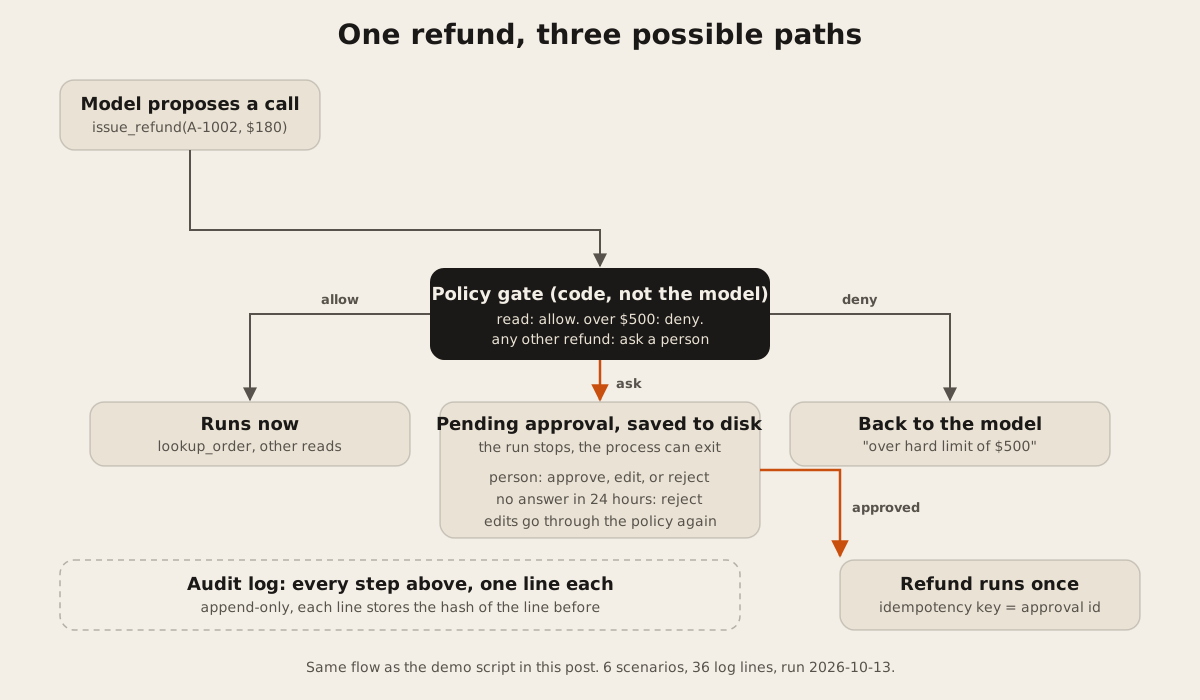
Decide this before you write any gate code. In the demo there are three groups.
| Group | Example tools | What the gate does |
|---|---|---|
| Read | lookup_order, search, fetch a record | Runs at once and is logged |
| Money or messages within limits | issue_refund up to $500 | Stops and asks a person |
| Over a hard limit | issue_refund over $500, or more than is left to refund | Denied in code. Nobody is asked, and the reason goes back to the model |
The hard limit matters. A person clicking “approve” on the hundredth request of the day isn’t much of a control. Some calls should never be possible, whatever the model or the reviewer says.
Step 2: write the policy as a plain function
The model never decides whether a call is safe. A plain function does, and it returns one of three verdicts.
const POLICY = { autoApproveUpTo: 0, hardLimit: 500, approvalTtlMs: 24 * 60 * 60 * 1000 };

function decide(name, args) {
  const tool = tools[name];
  if (!tool) return { verdict: 'deny', why: 'unknown tool' };
  if (tool.risk === 'read') return { verdict: 'allow', why: 'read-only' };
  if (name === 'issue_refund') {
    const o = orders[args.orderId];
    if (!o) return { verdict: 'deny', why: 'order not found' };
    if (args.amount > POLICY.hardLimit) return { verdict: 'deny', why: `over hard limit of $${POLICY.hardLimit}` };
    if (args.amount > o.paid - o.refunded) return { verdict: 'deny', why: 'more than the amount left to refund' };
    if (args.amount <= POLICY.autoApproveUpTo) return { verdict: 'allow', why: 'under auto-approve limit' };
    return { verdict: 'ask', why: 'money leaves the business' };
  }
  return { verdict: 'ask', why: 'default for writes' };
}
autoApproveUpTo is 0 in the demo, so every refund asks. Raise it once you trust the agent, for example to $20, and the small ones stop needing a person.
Step 3: save the call and stop the run
When the verdict is ask, write the pending call to storage you control and return. Don’t keep the process waiting on a prompt. People take hours to answer, and servers restart.
const approvalId = 'ap_' + randomUUID().slice(0, 8);
pending[approvalId] = { runId, tool: name, args, why: d.why,
  createdAt: now, expiresAt: now + POLICY.approvalTtlMs };
savePending(pending);
audit({ runId, type: 'approval_requested', approvalId, tool: name, args });
return { status: 'waiting', approvalId };
The demo saves to a JSON file. In production, use a database row with a status column, and send the reviewer a link in Slack or email.
Show the reviewer the exact arguments and the record they change. The reviewer should see “refund $180 on order A-1002, paid $180, nothing refunded yet”. “The customer is unhappy, I’ll make it right” tells them nothing they can check. A guide on approval gates from Decryption Digest puts it this way: a notice that “just says “agent wants to call send_email” gives the reviewer nothing to evaluate”. It asks for “the tool name and its full arguments as they will actually execute (not a paraphrase)”.
Step 4: handle approve, edit, reject, and silence
A person can do four things, and the code handles each one.
if (now > p.expiresAt) return deny('approval expired, default is deny');
if (decision === 'reject') return deny(message);        // the model sees this message
const args = editedArgs ?? p.args;
const recheck = decide(p.tool, args);                     // edits go through the policy again
if (recheck.verdict === 'deny') return deny(recheck.why);
const out = tools[p.tool].run(args, { idempotencyKey: approvalId });
Two lines in there are easy to miss:
- Silence is a no. The demo gives an approval 24 hours. After that, approving does nothing. A refund approved three days late, after the customer has already disputed the charge, is worse than none.
- Edits are checked again. A reviewer who changes $300 to $800 has made a new request. It has to pass the same policy, so the $500 limit still holds.
Step 5: make the tool safe to run twice
Resuming is where duplicates happen. A worker crashes after the refund call but before it marks the approval done. The retry runs it again. The fix is old and boring: pass an idempotency key, and have the tool return the first result when it sees the same key twice.
if (refundsByKey.has(idempotencyKey)) return { ...refundsByKey.get(idempotencyKey), replay: true };The approval id is the key. One approval can pay out once at most. Payment APIs support this directly. Stripe, for example, documents an Idempotency-Key header on its API. We cover the general pattern in background jobs that don’t fall over.
Step 6: write an audit log you can check
Every step gets one line: run started, tool requested (with the verdict and reason), approval requested, granted, rejected, expired, or blocked, and tool ran. Each line stores the SHA-256 hash of the line before it. If anyone edits an old line, the check fails at that line.
function audit(event) {
  const entry = { at: new Date().toISOString(), ...event, prev: lastHash };
  const hash = createHash('sha256').update(JSON.stringify(entry)).digest('hex');
  appendFileSync(AUDIT, JSON.stringify({ ...entry, hash }) + '\n');
  lastHash = hash;
}
This shows edits. It can’t prevent them. Someone who can rewrite the whole file can rebuild the chain too. To stop that, copy the latest hash somewhere the agent’s server can’t write, such as a daily row in a separate database or a write-once storage bucket.
The run: six scenarios and what happened
This is the real output from node ai-agent-human-approval-demo.mjs on 2026-10-13. Ids are random on every run.
Scenario 1: $42 refund, a person approves
  agent run                                  {"status":"waiting","approvalId":"ap_03d6237e"}
  after approval                             {"status":"ran","out":{"refundId":"rf_c6d80087","orderId":"A-1001","amount":42,"reason":"arrived damaged"},"approvalId":"ap_03d6237e"}
  same approval resumed again                {"status":"unknown_or_done"}
  refund tool called again, same key         {"refundId":"rf_c6d80087","orderId":"A-1001","amount":42,"reason":"arrived damaged","replay":true}

Scenario 2: $180 asked, the person edits it to $120
  agent run                                  {"status":"waiting","approvalId":"ap_04e62d41"}
  after edit and approval                    {"status":"ran","out":{"refundId":"rf_807efc9f","orderId":"A-1002","amount":120,"reason":"late delivery, partial"},"approvalId":"ap_04e62d41"}

Scenario 3: $900 asked, policy denies without asking anyone
  agent run                                  {"status":"denied","why":"over hard limit of $500"}

Scenario 4: nobody answers for 25 hours
  agent run                                  {"status":"waiting","approvalId":"ap_644e389b"}
  approve after 25 hours                     {"status":"denied","why":"approval expired, default is deny"}

Scenario 5: a person tries to approve an edit past the hard limit
  agent run                                  {"status":"waiting","approvalId":"ap_fa7d3519"}
  approve with amount edited to $800         {"status":"denied","why":"over hard limit of $500"}

Scenario 6: a person rejects with a message
  after rejection                            {"status":"denied","why":"Offer an exchange first"}

Audit log
  verify untouched log                       {"ok":true,"lines":36}
  entries by type                            {"run_started":6,"tool_requested":12,"tool_ran":8,"approval_requested":5,"approval_granted":2,"approval_expired":1,"approval_blocked":1,"approval_rejected":1}
verify after editing one amount {"ok":false,"line":6,"reason":"entry edited"}| Scenario | Money moved | Why |
|---|---|---|
| 1. $42, approved | $42, once | Second resume found nothing pending. A direct second call with the same key replayed the first refund. |
| 2. $180, edited to $120 | $120 | The edit passed the policy again |
| 3. $900 | $0 | Over the hard limit. Nobody was asked |
| 4. $65, no answer | $0 | Expired after 24 hours |
| 5. $300, edited to $800 | $0 | The edit failed the policy. A reviewer can’t approve past the limit |
| 6. $65, rejected | $0 | The message “Offer an exchange first” goes back to the model |
The last line is the tamper test. The script copies the log, changes "amount":42 to "amount":4.2 in the approval line, and runs the check. It fails at line 6.
Plugging the gate into an agent SDK
Both big agent SDKs have an approval hook. Neither replaces the policy function, the expiry, or the idempotency key. You still write those. The snippets below follow each vendor’s docs, read on 2026-10-13. We did not run them against a live model for this post.
OpenAI Agents SDK (TypeScript)
The human-in-the-loop guide says you mark a tool by “setting the needsApproval option to true or to an async function that returns a boolean”. When a gated call comes up, “the run pauses and returns all pending approvals in the result interruptions array”. You then call result.state.approve(interruption) or result.state.reject(interruption) and resume with run(agent, state).
const issueRefund = tool({
  name: 'issue_refund',
  description: 'Refund part or all of an order',
  parameters: z.object({ orderId: z.string(), amount: z.number(), reason: z.string() }),
  needsApproval: async (_ctx, args) => decide('issue_refund', args).verdict === 'ask',
  execute: async (args) => {
    const d = decide('issue_refund', args);          // check again here: needsApproval only decides whether to ask
    if (d.verdict === 'deny') return `Denied: ${d.why}`;
    return refunds.issue(args, { idempotencyKey: currentApprovalId() });
  },
});
For long waits, the guide says to save the state with result.state.toString() or JSON.stringify(result.state) and load it later with RunState.fromString(agent, serializedState). It also warns to load only snapshots from storage you trust, and to keep them on the server.
Claude Agent SDK
In the Claude Agent SDK, the canUseTool callback gets the tool name and input, and returns { behavior: "allow", updatedInput } or { behavior: "deny", message }. Returning a changed updatedInput is how a reviewer’s edit reaches the tool. Run the edit through decide() first.
Two lines in the docs matter here. First: “The callback can stay pending indefinitely.” For waits longer than your process can stay up, the docs say to “register a PreToolUse hook that returns the defer decision instead of waiting in the callback, so the process can exit and resume later from the persisted session.” Second, from the permissions page: “Auto-approved tools never reach canUseTool.” If you list your refund tool in allowedTools, or run in bypassPermissions mode, your gate is skipped without a warning in the log. The docs say to use a PreToolUse hook for checks that must run on every call.
Which SDK fits which project is a longer question. We compare them in OpenAI Agents SDK vs Claude Agent SDK.
Mistakes we see in approval gates
- The rule lives in the prompt. “Always ask before refunding” is only a request to the model. Put the rule in
decide(). - The reviewer sees a summary. Show the arguments and the record they change.
- Approvals never expire. Old approvals get clicked by accident. Expire them and treat silence as a no. The same guide says it plainly: “A timeout that defaults to allow turns your entire Tier 3 classification into a suggestion”.
- Edits skip the policy. A reviewer can type any number. Check it again.
- No idempotency key. The first crash during a resume pays the customer twice.
- The log can be edited quietly. Hash-chain it, and copy the latest hash somewhere else.
- Every write asks. If reviewers approve 200 calls a day, they stop reading them. Auto-approve the small, reversible ones and save people for the calls that matter.
FAQ
How do I add human approval to an AI agent?
Wrap each risky tool in a gate written in code. When the model calls it, save the call with its arguments, stop the run, and send a person a link. Run the tool only after they approve, with the approval id as an idempotency key. Our demo script does this in 210 lines.
Should the approval check be in the prompt or in code?
In code. A prompt tells the model what you’d like. Code decides what actually runs. The demo’s policy function denies a $900 refund whatever the model asks for, and whatever a reviewer types in.
What happens if nobody approves the request?
Pick a deadline and treat silence as a rejection. The demo uses 24 hours. After that, a late approval does nothing, and the audit log records approval_expired.
Can the reviewer change what the agent wants to do?
Yes. Both SDKs support it. The Claude Agent SDK takes an updatedInput, and in your own gate you pass the edited arguments to the tool. Run the edit through the same policy first. In our scenario 5, a reviewer’s $800 edit was blocked by the $500 limit.
Which tools need an approval gate?
Anything that moves money, sends a message to a customer, deletes data, or changes a record someone else relies on. Reads can usually run without a gate. If the tools come from a third-party MCP server, our 12-point MCP server safety checklist covers read-only mode and approval before writes. If you’re unsure whether the feature needs an agent at all, start with our checklist for whether a feature should be AI.
We build AI agents with permissions, approval gates, and audit trails. If you have a workflow that needs one, tell us what it should be allowed to do, and we’ll send a written scope first.