
To build a ChatGPT app for your SaaS, build a small MCP server with a few focused tools, add one render tool that points at a ui:// HTML card, and test it before you connect it to ChatGPT. Then package it as a plugin with a skill and submit it. Since July 2026 OpenAI ships ChatGPT apps as plugins, and the card uses the open MCP Apps standard instead of the older text/html+skybridge setup most tutorials still teach.
Who this is for: a developer or technical founder whose SaaS already has an API and who wants customers to use it from inside ChatGPT. Who should stop here: if you are still deciding between a plugin, a plain MCP server, and a Custom GPT, read ChatGPT app vs MCP server vs Custom GPT first. If you only want staff to reach your data in ChatGPT, you may not need a public app at all: see how to connect company data to ChatGPT.
Every OpenAI fact below comes from OpenAI’s plugin docs, read on 2026-10-14. The code is a working demo we wrote and ran on Node 24.21.0 with @modelcontextprotocol/sdk 1.31.0, @modelcontextprotocol/ext-apps 1.7.5, and zod 3.25.76. You can download all four files.
The request flow in one picture
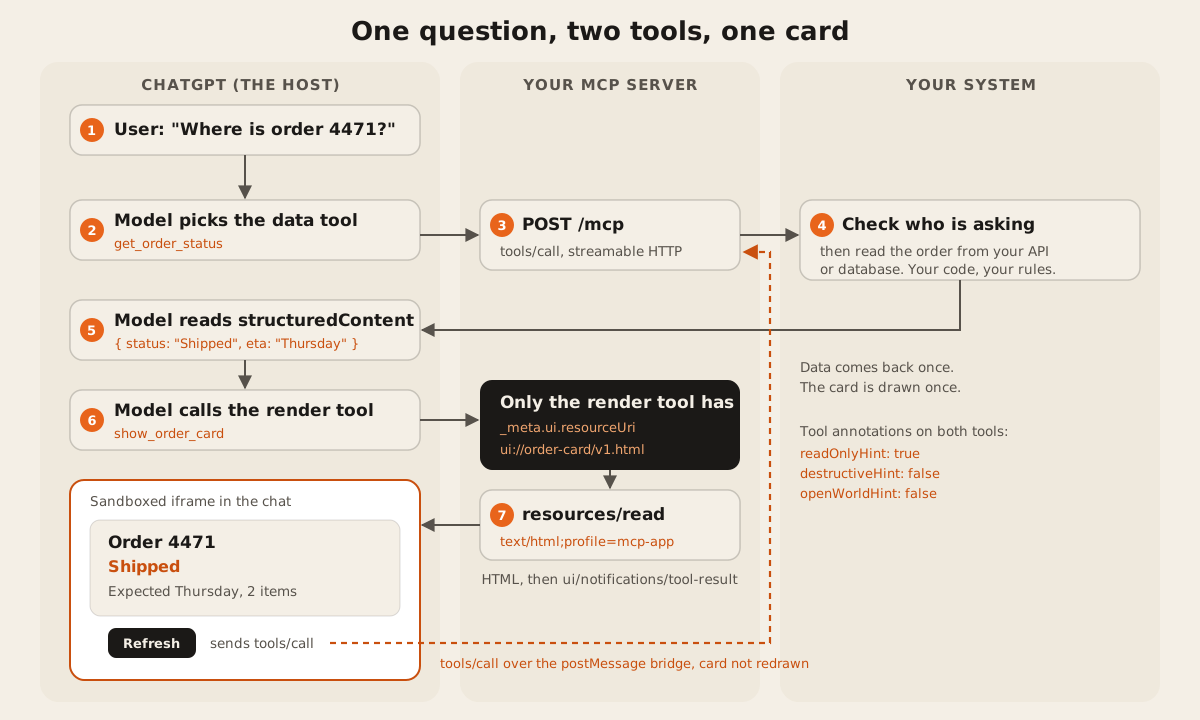
Two ideas carry most of the design. The model gets data from a data tool and decides what to show. Then a separate render tool draws the card once. OpenAI’s UI guide puts it plainly: “Only the render tool should include _meta.ui.resourceUri” (OpenAI, add UI to your MCP server). If you attach the card to every tool, “ChatGPT can re-render your iframe too often” (same page).
What changed in 2026, and why old tutorials break
Most of the top guides for “how to build a ChatGPT app” were written for the 2025 Apps SDK. Three things moved since.
| Then (2025 tutorials) | Now (October 2026 docs) |
|---|---|
| “Apps” in an app directory | ”Plugins” in one directory shared by ChatGPT and Codex (submission guide) |
text/html+skybridge and _meta["openai/outputTemplate"] | MCP Apps: _meta.ui.resourceUri and MIME type text/html;profile=mcp-app. The old key still works as “a compatibility alias” (UI guide) |
window.openai.toolOutput, window.openai.callTool | JSON-RPC over postMessage: ui/notifications/tool-result and tools/call. Use window.openai “only for capabilities that the shared specification does not cover” (same page) |
| Annotations optional | readOnlyHint, destructiveHint, and openWorldHint must be explicit booleans on every tool (plugin guidelines) |
| A form in the dashboard | A plugin ZIP with plugin.json, skills, and an MCP connection, then review |
The upside of the new standard is reuse. ChatGPT “implements the open MCP Apps standard” (OpenAI quickstart), and the MCP Apps extension is built so the same card renders in other compliant clients such as Claude.
Step 1: pick one or two jobs, not your whole product
Start with the questions a customer would ask your product in a chat. “Where is my order?” “What’s my balance?” “Book the 3pm slot.” Each one becomes a tool. OpenAI’s server guide says “Create one tool for each distinct action” and prefer “focused operations” over “one tool with many unrelated modes” (build an MCP server).
Keep the first version read-only if you can. Write tools need sign-in, confirmation, and a stricter review, and every tool you add costs tokens on every turn. Our post on why MCP servers use so many tokens shows how fast a long tool list adds up.
Step 2: write the data tool
Install the SDK, the MCP Apps helpers, and zod. In a throwaway folder we used pnpm:
pnpm add @modelcontextprotocol/sdk@1.31.0 @modelcontextprotocol/ext-apps@1.7.5 zod@3.25.76The data tool has no UI. It returns structuredContent the model can read and reuse, plus a short text line. Note the three annotations and the description that starts with when to use it, which is the pattern OpenAI recommends.
server.registerTool("get_order_status", {
  title: "Get order status",
  description: "Use this when the user asks where an order is. Looks up one order by its number and returns status, expected delivery, and item count. Read only.",
  inputSchema: { orderNumber: z.string().regex(/^\d{4,8}$/) },
  outputSchema: order,
  annotations: { readOnlyHint: true, destructiveHint: false, openWorldHint: false },
}, async ({ orderNumber }) => {
  const found = ORDERS[orderNumber];
  if (!found) return { isError: true, content: [{ type: "text", text: `No order ${orderNumber} on this account.` }] };
  return {
    structuredContent: found,
    content: [{ type: "text", text: `Order ${orderNumber}: ${found.status}, expected ${found.eta}.` }],
  };
});
ORDERS is sample data. In your SaaS, this is a call to your own API, scoped to the signed-in customer. The protocol doesn’t check who may see order 4471. Your handler does.
On annotations, the guidelines are strict: openWorldHint is true for “public or open-ended entities, including read-only web search”, and a tool “confined to a bounded private account, workspace, or catalog may use false” (plugin guidelines). Our order lookup reads one customer’s own account, so it’s false.
Step 3: add the render tool and the ui:// resource
The render tool takes the data the model already has and points at the card. registerAppTool and registerAppResource come from @modelcontextprotocol/ext-apps/server. RESOURCE_MIME_TYPE is the string text/html;profile=mcp-app.
const WIDGET_URI = "ui://order-card/v1.html"; // a cache key: bump v1 on breaking UI changes

registerAppResource(server, "order-card", WIDGET_URI, {}, async () => ({
  contents: [{
    uri: WIDGET_URI,
    mimeType: RESOURCE_MIME_TYPE,
    text: widgetHtml,
    _meta: { ui: { prefersBorder: true, csp: { connectDomains: [], resourceDomains: [] } } },
  }],
}));

registerAppTool(server, "show_order_card", {
  title: "Show order card",
  description: "Shows an order as a card in the chat. Always call get_order_status first, then pass its result here.",
  inputSchema: order,
  outputSchema: order,
  annotations: { readOnlyHint: true, destructiveHint: false, openWorldHint: false },
  _meta: { ui: { resourceUri: WIDGET_URI } },
}, async (data) => ({
  structuredContent: data,
  content: [{ type: "text", text: `Showing order ${data.orderNumber}.` }],
}));
Three details from OpenAI’s docs that tutorials skip:
- The CSP. Declare the exact domains the card fetches from in
connectDomainsand loads assets from inresourceDomains. “The plugin review process checks the declared policy against the UI behavior” (UI guide). Our card fetches nothing, so both lists are empty, but we still declare them. - The URI is a cache key. “When you make a breaking change to the HTML, JavaScript, or CSS, publish a new URI” (same page). That’s why ours ends in
v1. - The dependency goes in the description. OpenAI’s own example says “Always call
roll_dicefirst” in the render tool’s description. Ours says the same aboutget_order_status.
Step 4: write the card and its bridge
The card is one HTML file. It talks to ChatGPT with JSON-RPC 2.0 over postMessage: it sends ui/initialize, confirms with ui/notifications/initialized, and then listens for ui/notifications/tool-result. The core of it:
window.addEventListener("message", (event) => {
  if (event.source !== window.parent) return;
  const msg = event.data;
  if (msg?.jsonrpc !== "2.0") return;
  if (msg.id !== undefined && pending.has(msg.id)) { /* resolve the request */ return; }
  if (msg.method === "ui/notifications/tool-result") render(msg.params?.structuredContent);
});

await request("ui/initialize", {
  appInfo: { name: "order-card", version: "1.0.0" },
  appCapabilities: {},
  protocolVersion: "2026-01-26",
});
send({ method: "ui/notifications/initialized", params: {} });

// Refresh calls the data tool directly, so the card is not remounted.
refreshButton.onclick = async () => {
  const result = await request("tools/call", { name: "get_order_status", arguments: { orderNumber: order.orderNumber } });
  render(result?.structuredContent);
};
render() writes values with textContent, never innerHTML. OpenAI says to treat structuredContent “as untrusted input” (UI guide). The protocolVersion string is the one in OpenAI’s quickstart.
Step 5: test it before ChatGPT sees it
OpenAI suggests MCP Inspector (npx @modelcontextprotocol/inspector@latest, then pick Streamable HTTP and enter http://localhost:8787/mcp). We also wrote a 20-line client, test.js, that lists the tools, calls both, tries a missing order, and reads the UI resource. This is its real output from our run:
server: {"name":"order-status-demo","version":"1.0.0"}
tool: get_order_status {"readOnlyHint":true,"destructiveHint":false,"openWorldHint":false} {}
tool: show_order_card {"readOnlyHint":true,"destructiveHint":false,"openWorldHint":false} {"ui":{"resourceUri":"ui://order-card/v1.html"},"ui/resourceUri":"ui://order-card/v1.html"}
get_order_status: {"orderNumber":"4471","status":"Shipped","eta":"Thursday","items":2} | Order 4471: Shipped, expected Thursday.
show_order_card: Showing order 4471.
missing: true | No order 9999 on this account.
resource: ui://order-card/v1.html text/html;profile=mcp-app 2870 chars {"ui":{"prefersBorder":true,"csp":{"connectDomains":[],"resourceDomains":[]}}}
Two things to notice. The data tool has no _meta, so it never draws UI. And registerAppTool writes the older flat key ui/resourceUri next to ui.resourceUri, so hosts on either form find the card.
To check the card itself, we loaded the ui:// HTML into a sandboxed iframe (sandbox="allow-scripts") on a small test page that plays ChatGPT’s side of the bridge. The card initialized, rendered “Order 4471, Shipped, Expected Thursday, 2 items”, and its Refresh button sent a tools/call that reached the server. That test page isn’t ChatGPT.
Step 6: connect it in ChatGPT
ChatGPT needs a public HTTPS URL. During development, OpenAI’s quickstart uses a tunnel such as ngrok and the URL with /mcp on the end. Then, from OpenAI’s connect and test page:
- Go to ChatGPT Plugins, select the plus button, then Add custom MCP server.
- Enter the URL, configure authentication, and accept the risk warning.
- Select Create as a plugin, install it, start a new chat, type
@, and pick it.
Build an evaluation set while you’re there: direct requests, indirect ones, follow-ups that reuse an order number, and “unsupported requests that shouldn’t call a tool” (same page). After every change to tools or metadata, select Refresh on the plugin’s page. Which ChatGPT plans can add a custom server, and with what limits, is covered in our MCP vs API vs Zapier guide.
For a real launch the tunnel has to go. OpenAI’s server guide says: “Do not use Secure MCP Tunnel alone, a temporary tunnel, or a local endpoint for public submission.” Our post on where to host an MCP server compares Workers, Vercel, Fly, and a VPS.
Step 7: add sign-in for customer data
Our demo has no login because it serves sample data. Your SaaS will. OpenAI’s auth guide says “you are expected to implement an OAuth 2.1 flow”, and that ChatGPT does not support “machine-to-machine OAuth grants such as client credentials” (OpenAI, authentication). We walk through the server side in how to add OAuth 2.1 to an MCP server.
Step 8: package it as a plugin with a skill
The plugin is a folder with plugin.json at the root, an optional skills/ folder, and an mcp.json that names the server (OpenAI, package your plugin). The minimum mcp.json for a remote server:
{
  "$schema": "https://agent-plugins.org/schemas/1.0.0/mcp.schema.json",
  "mcpServers": {
    "orders": { "type": "streamable-http", "url": "https://api.example.com/mcp" }
  }
}
A skill is a SKILL.md file with a name, a description, and steps. OpenAI’s split: “Use the server for live data, authentication, authorization, and controlled actions. Use the skill for tool sequences, decision points, output requirements” (build skills). For our demo, a skill could say: call get_order_status, show the card only when the order exists, never guess a delivery date.
Step 9: submit for review
Public listing means a ZIP upload, a domain challenge, five positive and three negative test cases, a video walkthrough, and a review with no published timeline. We cover each requirement, the common rejection reasons, and a preflight script in our ChatGPT app submission checklist. You can also run your live server through our MCP server checker to test the transport and handshake.
Get the code
All four files are public. Download them into an empty folder, run pnpm install (or npm install), then node server.js and, in a second terminal, node test.js.
- server.js: the MCP server, 90 lines
- widget.html: the card and its bridge
- test.js: the client we used for the output above
- package.json: pinned versions
It’s a teaching demo with sample data and no login. Don’t submit it as is: OpenAI’s guidelines say “Trial or demo plugins will not be accepted.”
If you want a team to connect ChatGPT to your product, see our AI integration service.
FAQ
Do I need the Apps SDK to build a ChatGPT app?
Not as a separate thing anymore. You need an MCP server, built with the official TypeScript SDK or the Python mcp package, plus the MCP Apps helpers if you want UI. OpenAI’s docs now call the result a plugin.
Is a ChatGPT app the same as a plugin now?
Yes, in OpenAI’s current docs a public ChatGPT app is published as a plugin in the directory shared by ChatGPT and Codex. A plugin can hold skills, one connected MCP server, and optional UI.
Should I still use text/html+skybridge and window.openai?
Not for new work. Use text/html;profile=mcp-app, _meta.ui.resourceUri, and the ui/* bridge. ChatGPT still honors openai/outputTemplate as a compatibility alias, and window.openai is for extras the standard lacks, such as checkout and file uploads.
Does my ChatGPT app need a UI?
No. Tools should work without the card, and many plugins have none. Add a card when text isn’t enough, like a list to pick from, a map, or a form.
Will the same server work in Claude?
The MCP server, yes. The MCP Apps card is designed to render in any compliant host. Skills and the directory listing stay with OpenAI.
Our only public MCP server is the one behind this site, at https://dawloom.com/mcp, documented on the developer portal. If you want a plugin built on your own API, see MCP servers for how we scope it.