
To connect your company data to ChatGPT in late 2026, build a small MCP server in front of your system, or use Zapier MCP if the data already sits in an app Zapier supports. The third route, a REST API called from a Custom GPT Action, is closing: OpenAI retires Custom GPTs on Dec 11, 2026, and custom actions do not move to the new plugins.
Who this is for: an owner or ops lead who wants staff, or customers, to ask ChatGPT about orders, stock, bookings, or accounts and get a live answer. If your data is only documents in Google Drive, SharePoint, Box, or Dropbox, you probably need no build at all. Skip to the decision flow.
All OpenAI, Zapier, and Cloudflare facts below were checked on 2026-10-13. OpenAI renamed and moved a lot this year, so the date matters.
The three ways in, side by side
We take one question, “Where is order 4471?”, and follow it through each option. The figure shows the path the question takes down to your system and the path the answer takes back up.
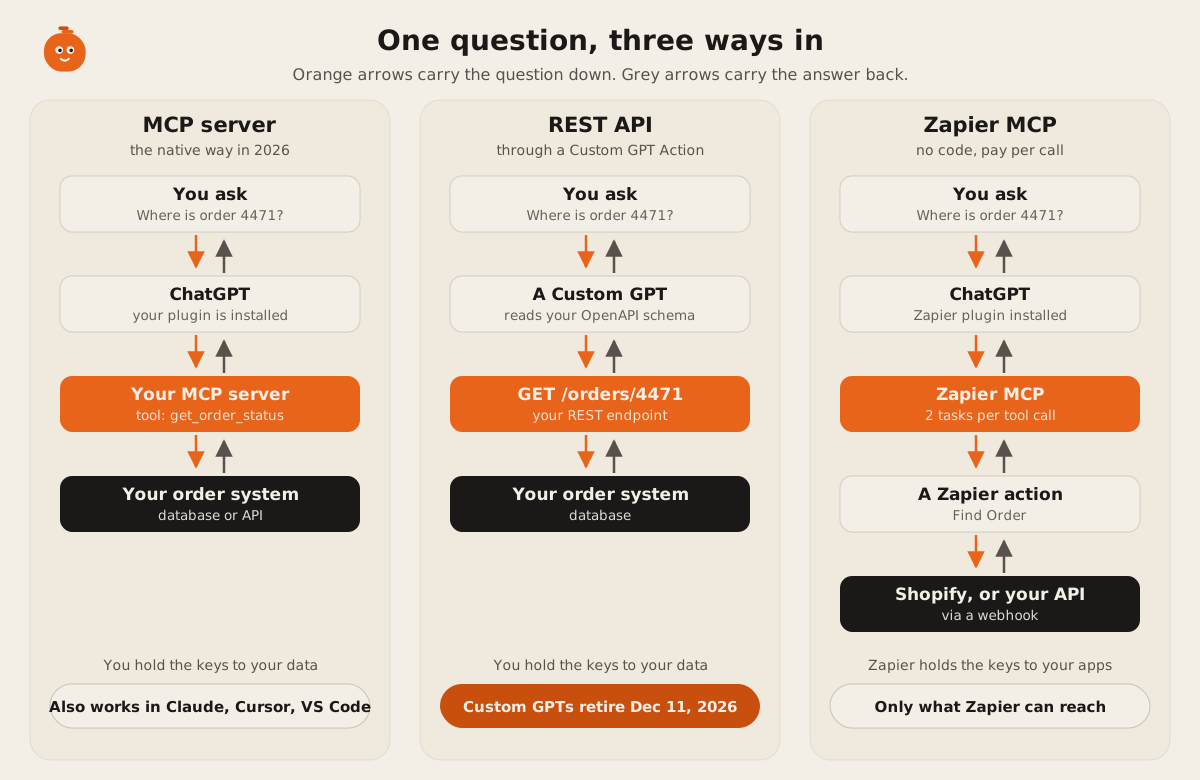
The paths look alike. The differences are who holds the keys, who can use it, and what happens next year.
Option 1: an MCP server
The Model Context Protocol is an open standard for giving AI apps tools. In the spec’s words: “Tools enable models to interact with external systems, such as querying databases, calling APIs, or performing computations.” You run a small server that lists a few tools. ChatGPT, Claude, and coding tools call them.
How it reaches ChatGPT today:
- Transport. ChatGPT connects to “a public endpoint” that “supports streamable HTTP, typically at
/mcp” (OpenAI, connect and test your plugin). For a server on a private network, OpenAI offers a Secure MCP Tunnel. - Setup. In ChatGPT you go to Plugins, press the plus button, and pick “Add custom MCP server” (same page).
- Who can use it. “Full MCP (Model Context Protocol) support, including modify/write actions, is rolling out in beta to ChatGPT Business, Enterprise, and Edu plans.” On Pro, “Pro users can connect MCPs with read/fetch permissions in developer mode” (OpenAI help center). The page does not name Plus.
- Admin control. On Business, “Only admins/owners can enable developer mode and deploy an app.” After approval, ChatGPT keeps a frozen snapshot of your tools. A change to your tool list waits until an admin reviews and publishes it (same page).
- Login. The MCP authorization spec is OAuth 2.1 based and optional. OpenAI says “you are expected to implement an OAuth 2.1 flow” for user data, and that “ChatGPT does not support machine-to-machine OAuth grants such as client credentials” (OpenAI auth docs). A public, read-only server can run with no login. Our step-by-step OAuth 2.1 guide shows the server side.
Here is the order lookup as one MCP tool. This is the whole tool. The server around it adds transport and login.
server.registerTool(
  "get_order_status",
  {
    title: "Get order status",
    description:
      "Look up one customer order by its order number. Returns status, carrier, and expected delivery date.",
    inputSchema: { orderNumber: z.string().regex(/^\d{4,8}$/) },
    annotations: { readOnlyHint: true },
  },
  async ({ orderNumber }, { authInfo }) => {
    const order = await orders.findForCustomer(orderNumber, authInfo.customerId);
    if (!order) return { content: [{ type: "text", text: "No order with that number on this account." }] };
    return {
      content: [{ type: "text", text: `Order ${orderNumber}: ${order.status}, due ${order.eta}` }],
      structuredContent: order,
    };
  },
);
Note findForCustomer. The protocol carries the request. It does not check who is allowed to see order 4471. Your server does. That check is most of the real work, and it is the same work you would do behind any API. Our MCP servers explainer goes deeper on what a server should and shouldn’t expose.
Pick it when the data lives in your own system, you want write actions later (refunds, bookings, stock moves), or you want the same tools in Claude and coding tools too. An MCP server is the only option of the three that works across AI apps without a middleman.
Option 2: a REST API through a Custom GPT Action
A Custom GPT Action was the 2024 answer. You describe your API in an OpenAPI file, paste it into a Custom GPT, and the GPT calls your endpoints. OpenAI’s docs say “The schema must be provided as an OpenAPI specification in JSON or YAML” (configuring actions), and auth can be “None”, “API Key”, or “OAuth” (actions authentication).
The same order lookup, as the schema a GPT reads:
openapi: 3.1.0
info: { title: Order status, version: "1" }
servers: [{ url: https://api.example-store.com }]
paths:
  /orders/{orderNumber}:
    get:
      operationId: getOrderStatus
      summary: Look up one customer order by its order number
      parameters:
        - name: orderNumber
          in: path
          required: true
          schema: { type: string, pattern: "^\\d{4,8}$" }
      responses:
        "200":
          description: Status, carrier, and expected delivery date
Custom GPT Actions still work today, but the ground has moved under them:
- “We’re planning to retire custom GPTs … Instead of custom GPTs, we recommend moving your workflows to Plugins” (OpenAI).
- “Custom GPTs are scheduled to retire on Dec 11, 2026.” Some Enterprise workspaces with an approved deferral get until Feb 11, 2027 (retirement FAQ).
- “GPT custom actions do not transfer through the migration workflow.” OpenAI adds that “Rebuilding the connection may require a custom MCP server” (same FAQ).
- “New GPT creation and publishing are not available on personal ChatGPT accounts, including Free, Go, Plus, and Pro” (GPTs in ChatGPT).
Your REST API is not wasted. It becomes the thing your MCP server calls. In the TypeScript above, orders.findForCustomer can be a call to that same /orders/{orderNumber} endpoint. What goes away is the GPT wrapper around it.
Pick it when you already run a Custom GPT with actions and need it working until December. Plan the move to an MCP server now. Don’t start a new build here.
Option 3: Zapier MCP
Zapier runs an MCP server for you at one URL. You sign in, choose which Zapier actions ChatGPT may use (say, Shopify “Find Order”), and ChatGPT calls them. Zapier says it gives “access to 30,000+ actions across 9,000+ apps” (Zapier MCP).
- Setup in ChatGPT. You need “Business, Enterprise, or Edu if your workspace already added Zapier, or a plan with developer mode if you are creating your own plugin”. The server URL is
https://mcp.zapier.com/api/v1/connect(Zapier docs). - Billing. “MCP is available on all Zapier plans. Each MCP tool call uses two tasks from your plan’s quota” (Zapier MCP FAQ).
- Plans. Free has 100 tasks a month. Professional starts at $19.99 a month billed yearly for 750 tasks. Team is $69 a month billed yearly for 2,000 tasks (Zapier pricing, checked 2026-10-13). Webhooks by Zapier, which you need to call your own API, starts at Professional.
- The old route is gone. Zapier’s AI Actions “is no longer being developed and supported”, and its ChatGPT plugin stopped working on April 9, 2024 (Zapier help). Guides that still show those are out of date.
Pick it when the data already lives in a SaaS app Zapier supports, a few people make the lookups, and you want it working this afternoon. It is the wrong fit for a custom database with no API, for high volume, or when you can’t let a third party hold the logins to your apps.
The order lookup, built three ways
Same job in all three columns: answer “where is my order?” for about 1,000 lookups a month. Prices are vendor list prices checked 2026-10-13. “Code” counts the lines in the snippets on this page.
| MCP server | REST API + Custom GPT Action | Zapier MCP | |
|---|---|---|---|
| What you build | A remote MCP server with one tool, plus login | An HTTPS endpoint and an OpenAPI file pasted into a GPT | Nothing, if the store is in Zapier. A webhook step if it’s your own API |
| Code for the lookup | 18 lines for the tool, plus the server shell | 16 lines of OpenAPI, plus the endpoint | None |
| Build effort | Highest of the three. Login and per-customer checks are most of it | Medium, if the API already exists | Lowest. Setup in the Zapier and ChatGPT screens |
| Run cost, 1,000 lookups a month | Your hosting. Cloudflare Workers Free allows 100,000 requests a day; Paid starts at $5 a month | Your hosting, same as left | 2,000 tasks. Above Professional’s 750-task entry tier, inside Team’s 2,000 ($69 a month, yearly) |
| Who can use it in ChatGPT | Business, Enterprise, Edu with write actions. Pro read-only in developer mode | Users of the GPT, until Dec 11, 2026 | Same plan rules as an MCP server |
| Works outside ChatGPT | Yes: Claude, Cursor, VS Code, and other MCP clients | No | Yes, Zapier MCP works with other MCP clients |
| Who holds the keys | You | You | Zapier holds your app logins |
| Upkeep | You own tool wording, login, and hosting. An admin re-publishes after tool changes | Must be rebuilt before the retirement date | Low. Cost grows with every call |
The pattern: Zapier is cheapest to start and gets more expensive with use. An MCP server costs the most to build and the least to run. The Custom GPT route has an end date.
Which way to connect ChatGPT to your data
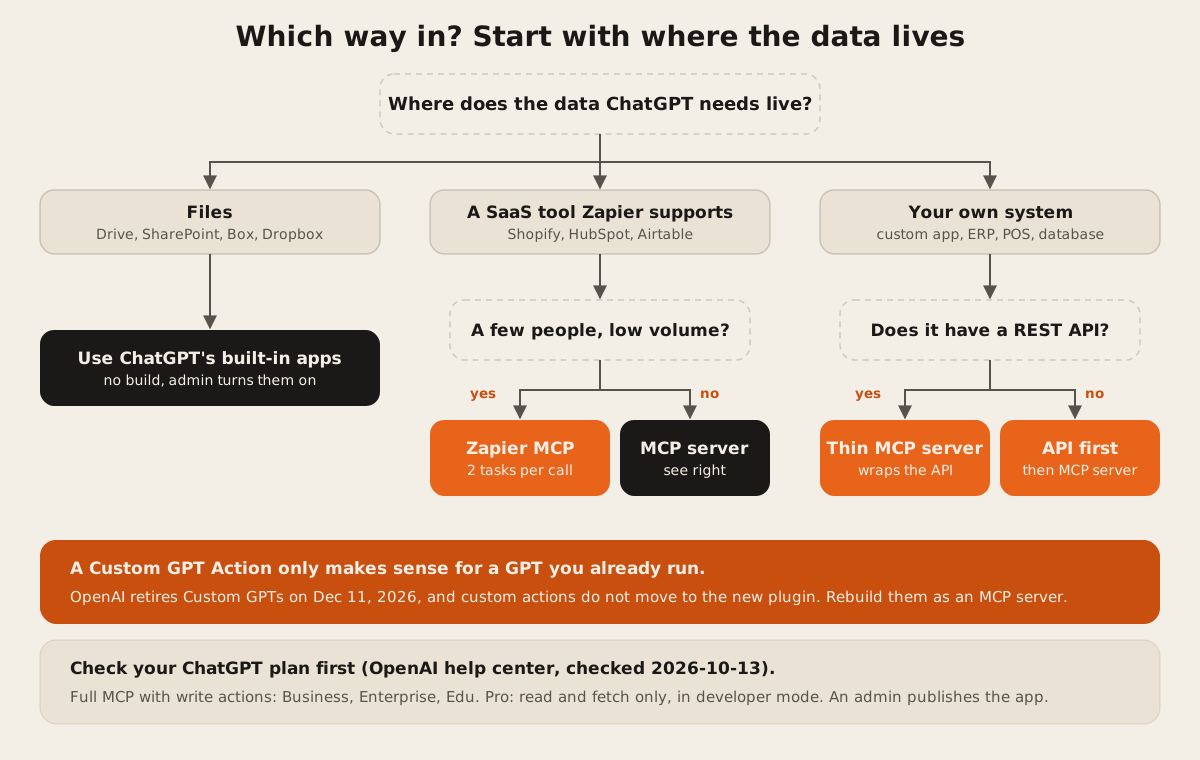
A few notes on the flow:
- Files need no build. ChatGPT Business seats include “GPTs, Projects, Apps, Company Knowledge, ChatGPT Agent, Deep Research” (OpenAI). A Business seat is $20 a month per user billed yearly, or $25 monthly, with a two-seat minimum (same page, checked 2026-10-13). OpenAI also says it doesn’t train on data reached through connectors for Business, Enterprise, and Edu by default (connected apps in ChatGPT).
- “Low volume” is a money question. Every call costs two Zapier tasks. Work out your monthly lookups, double them, and compare the Zapier tier with a few dollars of hosting.
- A REST API you already have is a head start. The thin MCP server on top of it is the smallest build in this post.
FAQ
Can I connect my own database to ChatGPT directly?
Not safely. ChatGPT talks to tools, not to databases. Put a small MCP server in front of the database that exposes a few named actions, like “get order status”, and checks who is asking. Never hand ChatGPT a raw SQL connection.
Does ChatGPT Plus support custom MCP servers?
OpenAI’s help page, checked 2026-10-13, names Business, Enterprise, and Edu for full MCP with write actions, and Pro for read and fetch in developer mode. It doesn’t mention Plus. Check the developer mode page before you plan around it.
What happens to my Custom GPT with actions?
OpenAI’s migration turns the GPT’s instructions into a skill and its knowledge files into reference files in a plugin. Custom actions do not move. Rebuild them as an MCP server before Dec 11, 2026, or Feb 11, 2027 if your Enterprise workspace has an approved deferral.
Is Zapier MCP secure enough for customer data?
Zapier holds the logins to the apps you connect, and every call goes through Zapier. That’s fine for many teams. If your contracts say customer data may not pass through another processor, build your own MCP server instead. Our 12-point checklist for third-party MCP servers covers what to check before you connect any hosted server.
Will the same MCP server work in Claude?
Yes. Claude supports custom connectors using remote MCP on Free, Pro, Max, Team, and Enterprise plans, and free users get one. That reuse is the main reason to build MCP instead of something ChatGPT-only. Our follow-up, ChatGPT app, MCP server, or Custom GPT, covers when to add a ChatGPT plugin with its own screens on top.
We run a public MCP server at https://dawloom.com/mcp, documented on the developer portal, so you can see what a small one looks like. If you want one in front of your own system, our MCP servers and AI integration pages explain how we scope it.