

We built one SaaS dashboard twice, in Next.js 16.3 and SvelteKit 2.70, with the same data, logic, and CSS. The SvelteKit page loaded 33.8 KB of JavaScript (gzip) and the Next.js page loaded 131.6 KB, about 3.9 times more. Build time was closer: a median of 24.6 seconds for SvelteKit, 30.2 seconds for Next.js with its built-in type check, and 18.3 seconds for Next.js without it.
Everything here was measured by us on one laptop on 2026-10-13. The full code and the measuring scripts are at the end of this post, so you can run it yourself.
Who this is for: founders and tech leads choosing a framework for a new SaaS, who want numbers from a real page rather than a hello-world. Who should look elsewhere: if your team already knows React well, or you need a React-only library such as a specific editor or charting kit, team speed will matter more than these numbers. Our post on Svelte 5 runes vs React hooks covers that side.
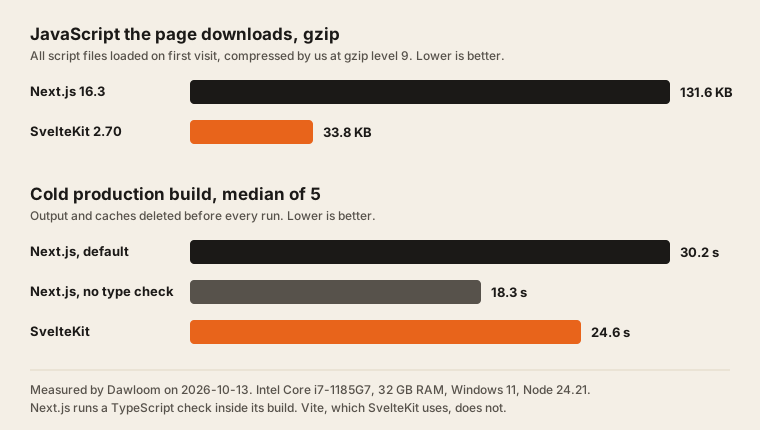
The results
| Measure | Next.js 16.3.6 | SvelteKit 2.70.3 | Who measured |
|---|---|---|---|
| JavaScript files loaded | 6 | 8 | Us |
| JavaScript, raw | 446.8 KB | 86.8 KB | Us |
| JavaScript, gzip level 9 | 131.6 KB | 33.8 KB | Us |
| JavaScript, brotli level 11 | 112.6 KB | 30.5 KB | Us |
| HTML document, raw / gzip | 120.9 KB / 12.5 KB | 85.6 KB / 10.7 KB | Us |
| Cold build, median of 5 | 30.2 s (with type check) | 24.6 s | Us |
| Cold build, no type check | 18.3 s | 24.6 s | Us |
| Lines of code, framework files | 132 | 113 | Us |
| Shared lines (data, logic, CSS) | 93 | 93 | Us |
The five build runs, in seconds: Next.js 31.3, 30.2, 28.4, 31.9, 25.7. Next.js with no type check 16.5, 16.4, 18.3, 23.0, 33.9. SvelteKit 25.0, 23.1, 22.7, 24.6, 34.5.
What the numbers say:
- SvelteKit sends about a quarter of the JavaScript. Most of the gap is the framework itself. React, React DOM, and the Next.js router load on every page, whatever the page does. Svelte compiles each component to direct DOM updates and adds only a small runtime. On a slow phone, less script means less to download, parse, and run before the dashboard responds.
- The HTML is bigger on Next.js too. Both apps render the page on the server and send the 1,000 orders along so the browser can sort and filter them. Next.js sends that data as a React Server Components payload next to the HTML. SvelteKit sends it as one serialized object. After gzip the gap is small: 12.5 KB against 10.7 KB.
- Build time depends on what you count. By default
next buildalso runs a TypeScript check. The Next.js docs say it “fails your production build (next build) when TypeScript errors are present in your project.” Vite, which SvelteKit uses, skips type checking. With the check turned off, Next.js built faster than SvelteKit here. In the SvelteKit build, Vite’s own timing report put 14.4 seconds in the SvelteKit plugin’s write step, which writes the server bundle and the gzip and brotli copies that adapter-node makes by default (precompress: true). - Lines of code are close. The Svelte page is 85 lines and the React component is 114. Most of the gap is JSX formatting and the
useMemoanduseStatelines. Neither is harder to read.
Interaction speed: too close to call on this machine
We also timed four clicks with the browser’s Event Timing API, which is what Interaction to Next Paint (INP) is built on. Chrome ran headless with the CPU slowed 4 times to act like a mid-range phone. Each number is the median of 10 fresh page loads.
| Interaction | Next.js | SvelteKit |
|---|---|---|
| Switch the range to 90 days (recomputes everything) | 144 ms | 88 ms |
| Sort the table by customer | 104 ms | 96 ms |
| Type one letter in the search box | 64 ms | 64 ms |
| Go to the next page of the table | 104 ms | 112 ms |
The laptop was running other work during the test, and single runs jumped around a lot (Next.js range switch: 96 to 288 ms). MDN notes the API is “rounded to the nearest 8ms.” Only the 90-day switch shows a gap bigger than the noise. Both apps stay under the 200 ms line that web.dev calls good: “An INP below or at 200 milliseconds means a page has good responsiveness.” This is lab timing on one machine, not INP from real users.
What we built
The test app is a revenue dashboard of the kind most SaaS products have, built once in Next.js and once in SvelteKit:
- A range switch for 7, 30, and 90 days.
- Four KPI tiles: revenue, orders, average order, and refund rate.
- An SVG line chart of daily revenue, drawn by hand with no chart library.
- An orders table with search, a status filter, sortable columns, and 20 rows per page.
The page reads 1,000 orders on the server for every request, the same way it would read them from a database. Both apps render the full page on the server, then hydrate it so the controls work. The data generator, the stats functions, and the CSS are the same files in both apps. We checked that both pages render the same numbers: $89,802 revenue, 321 orders, and “Page 1 of 17” on the default 30-day view.
| Next.js app | SvelteKit app | |
|---|---|---|
| Framework | Next.js 16.3.6, App Router, Turbopack build | SvelteKit 2.70.3, Vite 8.3.1 |
| UI library | React 19.3.0 | Svelte 5.57.1 |
| Server | next start | @sveltejs/adapter-node 5.5.7 |
| Rendering | Server component loads data, one client component | +page.server.ts loads data, one page component |
| Data per request | export const dynamic = 'force-dynamic' | Server load function |
| TypeScript | 6.0.3 | 6.0.3 |
We didn’t use the very newest versions. Next.js 16.4.0 and SvelteKit 3.0.1 were published less than 15 days before the test, and our install rule waits 15 days on any new package version. We explain why in the 15-day cooldown that would have stopped an npm attack. pnpm picked the newest version older than that for each package.
How we measured
- Machine: Intel Core i7-1185G7 (4 cores, 8 threads), 32 GB RAM, NVMe SSD, Windows 11 Pro, Node 24.21.0, pnpm 12.4.1, Google Chrome 155.0.8059.40.
- Build time:
node build-times.mjs 5. It deletes the build output and caches, runspnpm build, and times it, five times per app, alternating apps. Windows file scanning and other work on the machine add noise, so read the medians, not single runs. - JavaScript size:
node measure.mjsloads each production server in headless Chrome and saves every script the page loads. We then compress the raw bytes ourselves at gzip level 9 and brotli level 11, so both apps are judged the same way no matter how their servers compress. - Interaction timing: the same script, with Chrome’s CPU slowed 4 times through the DevTools protocol and an Event Timing observer at the 16 ms minimum threshold.
Things we did not measure: real-user INP, behavior on a real phone, cold starts on a host, and memory use. Hosting changes those numbers more than the framework does. If you’re choosing a host as well, our SaaS hosting cost comparison prices both frameworks on Vercel, Cloudflare, Railway, and a VPS.
Which one should you pick?
Pick SvelteKit when page weight matters a lot: a product used on phones, in places with slow networks, or a public app where every visit starts cold. It’s also a good fit when the team is small and new to both, since a Svelte component is close to plain HTML. If you need an outside team for it, see which SvelteKit agencies actually ship Svelte.
Pick Next.js when the team knows React, when you need React-only libraries, or when you plan to hire, since far more developers know React. 131.6 KB of gzip JavaScript is fine for a logged-in dashboard on a laptop. We explain how we decide for one client project in Next.js or Astro: how we choose, and why page weight matters for being read by AI crawlers in why this site loads in under a second.
The gap shrinks as an app grows, because your own code becomes a bigger share of the bundle. It doesn’t close: React’s runtime stays on every page.
FAQ
Is SvelteKit faster than Next.js?
It ships less JavaScript. On our dashboard SvelteKit loaded 33.8 KB of gzip JavaScript and Next.js loaded 131.6 KB. Click response was within noise on three of four interactions in our lab test, and both were under 200 ms with the CPU slowed 4 times.
Does SvelteKit build faster than Next.js?
Not always. Our SvelteKit build took a median of 24.6 seconds. Next.js took 30.2 seconds with its default TypeScript check and 18.3 seconds without it. If you run svelte-check or tsc in CI anyway, compare like with like.
How big is a Next.js bundle in 2026?
On our dashboard with Next.js 16.3.6 and React 19.3.0, the browser loaded six script files: 446.8 KB raw, 131.6 KB gzip, 112.6 KB brotli. Most of that is React, React DOM, and the Next.js router, which every page loads.
Is SvelteKit good for SaaS?
Yes, for most SaaS apps. It has server rendering, form actions, server load functions, and adapters for Node, Vercel, Cloudflare, and other hosts. The main reasons to pick Next.js instead are team experience, hiring, and React-only libraries.
Can I run this benchmark myself?
Yes. The full code is below. Put the two apps and the shared files in one folder, run pnpm install, then node build-times.mjs 5 and, with both servers running, node measure.mjs. Expect different absolute numbers on a different machine. The ratios should hold.
Appendix: the full code
The shared files (data.ts, stats.ts, dash.css) are copied into next-dash/lib/ and kit-dash/src/lib/. The CSS is 22 lines of plain layout rules and is left out here.
Shared: data.ts (27 lines)
// Same file in both apps. Makes 1,000 fake orders over 90 days from a fixed seed.
export type Status = 'paid' | 'refunded' | 'pending';
export type Order = { id: string; day: number; customer: string; plan: string; amount: number; status: Status };

const NAMES = ['Acme', 'Globex', 'Initech', 'Umbrella', 'Hooli', 'Stark', 'Wayne', 'Wonka', 'Tyrell', 'Soylent', 'Cyberdyne', 'Vandelay'];
const PLANS = ['Starter', 'Team', 'Business'];
const PRICES = [29, 99, 299];

function rng(seed: number) {
  return () => {
    seed = (seed * 1664525 + 1013904223) % 4294967296;
    return seed / 4294967296;
  };
}

export function makeOrders(count = 1000): Order[] {
  const r = rng(42);
  return Array.from({ length: count }, (_, i) => {
    const p = Math.floor(r() * 3);
    const s = r();
    return {
      id: `ord_${(10000 + i).toString(36)}`,
      day: Math.floor(r() * 90),
      customer: `${NAMES[Math.floor(r() * NAMES.length)]} ${Math.floor(r() * 90) + 10}`,
      plan: PLANS[p],
      amount: PRICES[p] * (1 + Math.floor(r() * 4)),
      status: s < 0.08 ? 'refunded' : s < 0.15 ? 'pending' : 'paid',
    };
  });
}
Shared: stats.ts (44 lines)
// Same file in both apps. Pure functions the dashboard calls on every change.
import type { Order, Status } from './data';

export type SortKey = 'day' | 'customer' | 'amount';
export type Query = { range: number; search: string; status: Status | 'all'; sort: SortKey; dir: 1 | -1; page: number };
export const PAGE_SIZE = 20;

export function inRange(orders: Order[], range: number) {
  return orders.filter((o) => o.day < range);
}

export function kpis(orders: Order[]) {
  const paid = orders.filter((o) => o.status === 'paid');
  const revenue = paid.reduce((s, o) => s + o.amount, 0);
  const refunds = orders.filter((o) => o.status === 'refunded').length;
  return {
    revenue,
    orders: orders.length,
    aov: paid.length ? revenue / paid.length : 0,
    refundRate: orders.length ? refunds / orders.length : 0,
  };
}

export function daily(orders: Order[], range: number) {
  const days = Array.from({ length: range }, () => 0);
  for (const o of orders) if (o.status === 'paid') days[range - 1 - o.day] += o.amount;
  return days;
}

export function linePath(values: number[], w: number, h: number) {
  const max = Math.max(1, ...values);
  const step = values.length > 1 ? w / (values.length - 1) : 0;
  return values.map((v, i) => `${i ? 'L' : 'M'}${(i * step).toFixed(1)},${(h - (v / max) * h).toFixed(1)}`).join(' ');
}

export function tableRows(orders: Order[], q: Query) {
  const s = q.search.trim().toLowerCase();
  const rows = orders.filter(
    (o) => (q.status === 'all' || o.status === q.status) && (!s || o.customer.toLowerCase().includes(s) || o.id.includes(s)),
  );
  rows.sort((a, b) => {
    const x = a[q.sort];
    const y = b[q.sort];
    return (x < y ? -1 : x > y ? 1 : 0) * q.dir;
  });
  const pages = Math.max(1, Math.ceil(rows.length / PAGE_SIZE));
  const page = Math.min(q.page, pages - 1);
  return { total: rows.length, pages, page, rows: rows.slice(page * PAGE_SIZE, (page + 1) * PAGE_SIZE) };
}

export const money = (n: number) => '$' + Math.round(n).toLocaleString('en-US');
Next.js: app/page.tsx, app/layout.tsx, next.config.mjs
// app/page.tsx
import { makeOrders } from '../lib/data';
import Dashboard from './Dashboard';

export const dynamic = 'force-dynamic';

export default function Page() {
  // Stands in for a database query. Runs on the server for every request.
  return <Dashboard orders={makeOrders()} />;
}
// app/layout.tsx
import '../lib/dash.css';

export const metadata = { title: 'Dashboard' };

export default function RootLayout({ children }: { children: React.ReactNode }) {
  return (
    <html lang="en">
      <body>{children}</body>
    </html>
  );
}
// next.config.mjs
// SKIP_TYPECHECK=1 turns off the type check Next runs inside `next build`, to compare with Vite, which skips it.
export default { poweredByHeader: false, typescript: { ignoreBuildErrors: process.env.SKIP_TYPECHECK === '1' } };
Next.js: app/Dashboard.tsx (114 lines)
'use client';
import { useMemo, useState } from 'react';
import type { Order, Status } from '../lib/data';
import { daily, inRange, kpis, linePath, money, tableRows, type SortKey } from '../lib/stats';

const RANGES = [7, 30, 90];

export default function Dashboard({ orders }: { orders: Order[] }) {
  const [range, setRange] = useState(30);
  const [search, setSearch] = useState('');
  const [status, setStatus] = useState<Status | 'all'>('all');
  const [sort, setSort] = useState<SortKey>('day');
  const [dir, setDir] = useState<1 | -1>(1);
  const [page, setPage] = useState(0);

  const scoped = useMemo(() => inRange(orders, range), [orders, range]);
  const k = useMemo(() => kpis(scoped), [scoped]);
  const path = useMemo(() => linePath(daily(scoped, range), 600, 150), [scoped, range]);
  const t = useMemo(
    () => tableRows(scoped, { range, search, status, sort, dir, page }),
    [scoped, range, search, status, sort, dir, page],
  );

  function sortBy(key: SortKey) {
    if (key === sort) setDir(dir === 1 ? -1 : 1);
    else {
      setSort(key);
      setDir(1);
    }
    setPage(0);
  }

  return (
    <main>
      <header>
        <h1>Revenue</h1>
        <div className="seg">
          {RANGES.map((r) => (
            <button
              key={r}
              aria-pressed={r === range}
              onClick={() => {
                setRange(r);
                setPage(0);
              }}
            >
              {r} days
            </button>
          ))}
        </div>
      </header>

      <section className="kpis">
        <div className="kpi"><span>Revenue</span><strong>{money(k.revenue)}</strong></div>
        <div className="kpi"><span>Orders</span><strong>{k.orders}</strong></div>
        <div className="kpi"><span>Average order</span><strong>{money(k.aov)}</strong></div>
        <div className="kpi"><span>Refund rate</span><strong>{(k.refundRate * 100).toFixed(1)}%</strong></div>
      </section>

      <section className="card">
        <svg viewBox="0 0 600 150" preserveAspectRatio="none" role="img" aria-label={`Daily revenue, last ${range} days`}>
          <path d={path} fill="none" stroke="#e8641b" strokeWidth="2" vectorEffect="non-scaling-stroke" />
        </svg>
      </section>

      <section className="card">
        <div className="filters">
          <input
            type="search"
            placeholder="Search customer or order id"
            value={search}
            onChange={(e) => {
              setSearch(e.target.value);
              setPage(0);
            }}
          />
          <select
            value={status}
            onChange={(e) => {
              setStatus(e.target.value as Status | 'all');
              setPage(0);
            }}
          >
            <option value="all">All statuses</option>
            <option value="paid">Paid</option>
            <option value="pending">Pending</option>
            <option value="refunded">Refunded</option>
          </select>
        </div>
        <table>
          <thead>
            <tr>
              <th>Order</th>
              <th><button onClick={() => sortBy('day')}>Days ago</button></th>
              <th><button onClick={() => sortBy('customer')}>Customer</button></th>
              <th>Plan</th>
              <th><button onClick={() => sortBy('amount')}>Amount</button></th>
              <th>Status</th>
            </tr>
          </thead>
          <tbody>
            {t.rows.map((o) => (
              <tr key={o.id}>
                <td>{o.id}</td>
                <td>{o.day}</td>
                <td>{o.customer}</td>
                <td>{o.plan}</td>
                <td>{money(o.amount)}</td>
                <td className={o.status}>{o.status}</td>
              </tr>
            ))}
          </tbody>
        </table>
        <div className="pager">
          <button disabled={t.page === 0} onClick={() => setPage(t.page - 1)}>Previous</button>
          <span>Page {t.page + 1} of {t.pages}, {t.total} orders</span>
          <button disabled={t.page >= t.pages - 1} onClick={() => setPage(t.page + 1)}>Next</button>
        </div>
      </section>
    </main>
  );
}
SvelteKit: +page.server.ts, +layout.svelte, svelte.config.js
// src/routes/+page.server.ts
import { makeOrders } from '$lib/data';

// Stands in for a database query. Runs on the server for every request.
export function load() {
  return { orders: makeOrders() };
}
// svelte.config.js
import adapter from '@sveltejs/adapter-node';
import { vitePreprocess } from '@sveltejs/vite-plugin-svelte';

export default { preprocess: vitePreprocess(), kit: { adapter: adapter() } };
<!-- src/routes/+layout.svelte -->
<script lang="ts">
import '$lib/dash.css';
let { children } = $props();
</script>
<svelte:head><title>Dashboard</title></svelte:head>
{@render children()}SvelteKit: src/routes/+page.svelte (85 lines)
<script lang="ts">
  import type { Status } from '$lib/data';
  import { daily, inRange, kpis, linePath, money, tableRows, type SortKey } from '$lib/stats';

  let { data } = $props();

  const RANGES = [7, 30, 90];
  let range = $state(30);
  let search = $state('');
  let status = $state<Status | 'all'>('all');
  let sort = $state<SortKey>('day');
  let dir = $state<1 | -1>(1);
  let page = $state(0);

  const scoped = $derived(inRange(data.orders, range));
  const k = $derived(kpis(scoped));
  const path = $derived(linePath(daily(scoped, range), 600, 150));
  const t = $derived(tableRows(scoped, { range, search, status, sort, dir, page }));

  function sortBy(key: SortKey) {
    if (key === sort) dir = dir === 1 ? -1 : 1;
    else {
      sort = key;
      dir = 1;
    }
    page = 0;
  }
</script>

<main>
  <header>
    <h1>Revenue</h1>
    <div class="seg">
      {#each RANGES as r (r)}
        <button aria-pressed={r === range} onclick={() => ((range = r), (page = 0))}>{r} days</button>
      {/each}
    </div>
  </header>

  <section class="kpis">
    <div class="kpi"><span>Revenue</span><strong>{money(k.revenue)}</strong></div>
    <div class="kpi"><span>Orders</span><strong>{k.orders}</strong></div>
    <div class="kpi"><span>Average order</span><strong>{money(k.aov)}</strong></div>
    <div class="kpi"><span>Refund rate</span><strong>{(k.refundRate * 100).toFixed(1)}%</strong></div>
  </section>

  <section class="card">
    <svg viewBox="0 0 600 150" preserveAspectRatio="none" role="img" aria-label="Daily revenue, last {range} days">
      <path d={path} fill="none" stroke="#e8641b" stroke-width="2" vector-effect="non-scaling-stroke" />
    </svg>
  </section>

  <section class="card">
    <div class="filters">
      <input type="search" placeholder="Search customer or order id" bind:value={search} oninput={() => (page = 0)} />
      <select bind:value={status} onchange={() => (page = 0)}>
        <option value="all">All statuses</option>
        <option value="paid">Paid</option>
        <option value="pending">Pending</option>
        <option value="refunded">Refunded</option>
      </select>
    </div>
    <table>
      <thead>
        <tr>
          <th>Order</th>
          <th><button onclick={() => sortBy('day')}>Days ago</button></th>
          <th><button onclick={() => sortBy('customer')}>Customer</button></th>
          <th>Plan</th>
          <th><button onclick={() => sortBy('amount')}>Amount</button></th>
          <th>Status</th>
        </tr>
      </thead>
      <tbody>
        {#each t.rows as o (o.id)}
          <tr>
            <td>{o.id}</td>
            <td>{o.day}</td>
            <td>{o.customer}</td>
            <td>{o.plan}</td>
            <td>{money(o.amount)}</td>
            <td class={o.status}>{o.status}</td>
          </tr>
        {/each}
      </tbody>
    </table>
    <div class="pager">
      <button disabled={t.page === 0} onclick={() => (page = t.page - 1)}>Previous</button>
      <span>Page {t.page + 1} of {t.pages}, {t.total} orders</span>
      <button disabled={t.page >= t.pages - 1} onclick={() => (page = t.page + 1)}>Next</button>
    </div>
  </section>
</main>
package.json files and pnpm-workspace.yaml
// next-dash/package.json
{
  "name": "next-dash",
  "private": true,
  "scripts": { "build": "next build", "start": "next start -p 3101" },
  "dependencies": { "next": "^16", "react": "^19", "react-dom": "^19" },
  "devDependencies": { "typescript": "^6", "@types/react": "^19", "@types/node": "^24" }
}
// kit-dash/package.json
{
  "name": "kit-dash",
  "private": true,
  "type": "module",
  "scripts": { "build": "vite build", "start": "node build/index.js" },
  "devDependencies": {
    "@sveltejs/kit": "^2 || ^3",
    "@sveltejs/adapter-node": "^5 || ^6",
    "@sveltejs/vite-plugin-svelte": "^6 || ^7",
    "svelte": "^5",
    "vite": "^7 || ^8",
    "typescript": "^6"
  }
}packages:
- next-dash
- kit-dash
minimumReleaseAge: 21600
minimumReleaseAgeStrict: false
allowBuilds:
sharp: false
esbuild: false
'@parcel/watcher': falsebuild-times.mjs
// Cold production builds, alternating apps. Deletes build output and caches before each run.
import { execSync } from 'node:child_process';
import { rmSync } from 'node:fs';

const RUNS = Number(process.argv[2] ?? 5);
const jobs = [
  { name: 'next', dir: 'next-dash', clean: ['.next'], env: {} },
  { name: 'next-no-typecheck', dir: 'next-dash', clean: ['.next'], env: { SKIP_TYPECHECK: '1' } },
  { name: 'sveltekit', dir: 'kit-dash', clean: ['.svelte-kit/output', 'build', 'node_modules/.vite'], env: {} },
];
const times = Object.fromEntries(jobs.map((j) => [j.name, []]));
for (let i = 0; i < RUNS; i++) {
  for (const j of jobs) {
    for (const c of j.clean) rmSync(`${j.dir}/${c}`, { recursive: true, force: true });
    const t = performance.now();
    execSync('pnpm build', { cwd: j.dir, stdio: 'ignore', env: { ...process.env, NEXT_TELEMETRY_DISABLED: '1', ...j.env } });
    times[j.name].push((performance.now() - t) / 1000);
  }
}
const median = (a) => [...a].sort((x, y) => x - y)[Math.floor(a.length / 2)];
for (const [k, v] of Object.entries(times)) console.log(k, 'median', median(v).toFixed(1), 's, runs', v.map((x) => x.toFixed(1)).join(' '));
measure.mjs
// Loads each production server in headless Chrome and records:
// 1. every JavaScript file the page loads, raw, gzip, and brotli size (we compress the raw bytes ourselves so both apps are judged the same way)
// 2. the HTML document size
// 3. interaction latency from the Event Timing API, with the CPU slowed 4x, median of RUNS
import { chromium } from 'playwright-core';
import { gzipSync, brotliCompressSync, constants } from 'node:zlib';

const RUNS = 10;
const apps = [
  { name: 'next', url: 'http://localhost:3101/' },
  { name: 'sveltekit', url: 'http://localhost:3102/' },
];
const kb = (n) => (n / 1024).toFixed(1);
const median = (a) => [...a].sort((x, y) => x - y)[Math.floor(a.length / 2)];
const browser = await chromium.launch({ executablePath: 'C:/Program Files/Google/Chrome/Application/chrome.exe', headless: true });

for (const app of apps) {
  // Sizes
  const ctx = await browser.newContext();
  const page = await ctx.newPage();
  const js = new Map();
  let html = 0;
  page.on('response', async (res) => {
    const type = res.request().resourceType();
    try {
      const body = await res.body();
      if (type === 'script') js.set(res.url(), body);
      if (type === 'document') html = body;
    } catch {}
  });
  await page.goto(app.url, { waitUntil: 'networkidle' });
  await page.waitForTimeout(1000);
  let raw = 0, gz = 0, br = 0;
  for (const b of js.values()) {
    raw += b.length;
    gz += gzipSync(b, { level: 9 }).length;
    br += brotliCompressSync(b, { params: { [constants.BROTLI_PARAM_QUALITY]: 11 } }).length;
  }
  console.log(`${app.name}: ${js.size} JS files, raw ${kb(raw)} KB, gzip ${kb(gz)} KB, brotli ${kb(br)} KB`);
  console.log(`${app.name}: HTML raw ${kb(html.length)} KB, gzip ${kb(gzipSync(html, { level: 9 }).length)} KB`);
  await ctx.close();

  // Interactions
  const results = { range90: [], sortCustomer: [], typeSearch: [], nextPage: [] };
  for (let i = 0; i < RUNS; i++) {
    const c = await browser.newContext();
    const p = await c.newPage();
    const cdp = await c.newCDPSession(p);
    await cdp.send('Emulation.setCPUThrottlingRate', { rate: 4 });
    await p.goto(app.url, { waitUntil: 'networkidle' });
    await p.waitForTimeout(500);
    await p.evaluate(() => {
      window.__ev = [];
      new PerformanceObserver((l) => {
        for (const e of l.getEntries()) if (e.interactionId) window.__ev.push({ id: e.interactionId, d: e.duration });
      }).observe({ type: 'event', durationThreshold: 16, buffered: true });
    });
    const step = async (key, fn) => {
      await p.evaluate(() => (window.__ev = []));
      await fn();
      await p.waitForTimeout(400);
      const ev = await p.evaluate(() => window.__ev);
      results[key].push(ev.length ? Math.max(...ev.map((e) => e.d)) : 0);
    };
    await step('range90', () => p.getByRole('button', { name: '90 days' }).click());
    await step('sortCustomer', () => p.getByRole('button', { name: 'Customer' }).click());
    await step('typeSearch', () => p.getByPlaceholder('Search customer or order id').pressSequentially('a'));
    await step('nextPage', () => p.getByRole('button', { name: 'Next' }).click());
    await c.close();
  }
  for (const [k, v] of Object.entries(results)) console.log(`${app.name}: ${k} median ${median(v)} ms (runs ${v.join(' ')})`);
}
await browser.close();
We build SaaS products on both Next.js and SvelteKit. See our web development work if you want help choosing or building.