
If your app outgrew Firebase because of queries, reporting, or lock-in, Supabase is the usual move: it’s Postgres, it’s open source, and it has official scripts that copy your users, Firestore data, and files. Appwrite is the closest match if you want to keep a document model, and its console can import from Firebase directly. Every other option, including Convex, PocketBase, Nhost, and AWS Amplify, means moving users and data with your own scripts.
Who this is for: founders and tech leads with a live Firebase app that is hitting query limits, reporting pain, or a bill they can’t predict. Who should stay: apps that mostly sync user data to phones, with simple queries and no reporting needs. Firebase does that job well, and a move costs weeks. If your only problem is SQL, look at Firebase SQL Connect first (below). It adds Postgres without leaving Firebase.
How we checked
We read each vendor’s own migration docs, pricing pages, and GitHub repos on 2026-10-13. Every claim links the page it came from. We didn’t run a migration for this post, so “what moves” is what the docs say a tool moves, not a test result.
The lists that rank for “Firebase alternatives” today are mostly written by vendors on the list: SuperTokens, Back4App, SashiDo, and Encore each rank their own product. None of the ones we read says which alternatives have an official Firebase import tool, or what happens to your users’ passwords. That’s the part that decides how long a move takes, so it’s the focus here.
Why apps outgrow Firestore
Apps usually outgrow Firestore because of query limits, missing search, and per-read billing, not raw speed. Google documents each limit:
- Query limits. “Use the
inoperator to combine up to 30 equality (==) clauses on the same field with a logicalOR” (Firestore queries). Reports that filter across many values or fields need workarounds or extra copies of data. - Search. “Text search requires a Firestore Enterprise edition database” (Firestore text search). On the Standard edition you add a search service yourself. Our post on Postgres full-text search, Algolia, or Meilisearch covers that choice.
- Pay per read. Standard edition list prices in Iowa (us-central1) are $0.03 per 100,000 reads, $0.09 per 100,000 writes, and $0.01 per 100,000 deletes, after a free 50,000 reads and 20,000 writes a day (Google Cloud Firestore pricing, checked 2026-10-13). Counts cost reads too: “count() operations that read between 0 and 1000 index entries are billed for one document read” (same page).
The cost is often smaller than people fear. Take 2,000 daily users who each open a 50-row list 20 times a day. That’s 2,000,000 reads a day, so about 1,950,000 billed reads a day after the free tier, or about $17.55 a month at $0.03 per 100,000 (our math, 30 days). Most teams leave Firestore for queries and reporting, not for the read bill.
What each alternative’s tools move for you
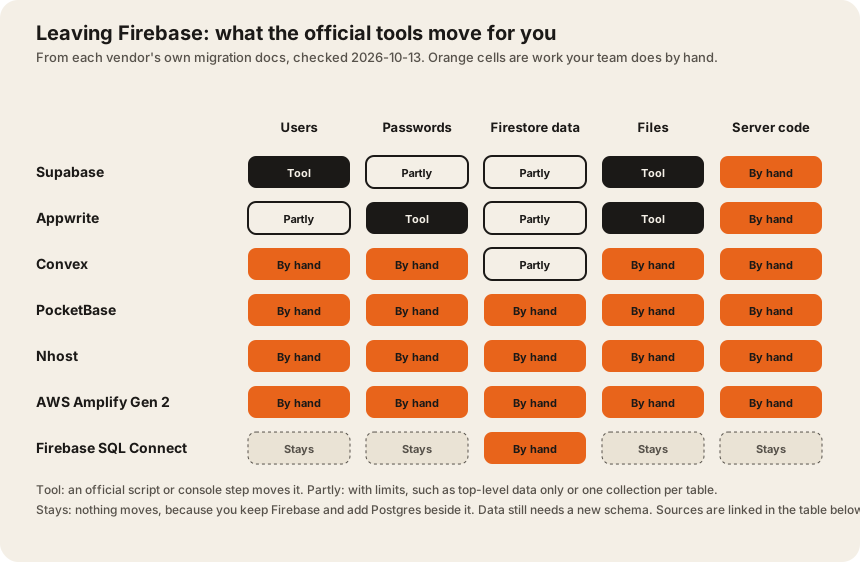
Server code is a rewrite everywhere you leave Firebase. Appwrite says it plainly: “Functions are not automatically migrated because of syntax and runtime differences” (Appwrite docs).
The migration effort table
Effort is our rating from what each vendor’s docs say its tools move. Lower means an official tool moves users and data. Medium means a generic import exists but you reshape the data. Higher means you write the export and import yourself. None of these ratings is measured hours. Prices are list prices checked 2026-10-13. Scroll sideways on a phone.
| Option | Data model | Open source, self-host | Official Firebase import | Users and passwords | Paid entry price | Effort |
|---|---|---|---|---|---|---|
| Supabase | Postgres, relational | Apache-2.0, self-host yes. GitHub | Scripts in the community repo. Firestore: “copies the entire contents of a single Firestore collection to a single Postgres table”, flattened to text, numeric, boolean, or jsonb. Files: download, then upload. Data, files | Users export and import into auth.users. Keeping passwords needs “a middleware server component” that checks the Firebase password at first sign-in. Docs | $25 a month (Pro), 100,000 monthly active users included. Pricing | Lower for moving. The real work is turning documents into related tables. |
| Appwrite | Tables and documents | BSD-3-Clause, self-host yes. GitHub | Console migration from Firestore. “only top-level row migration is supported. Nested rows will not be migrated automatically.” “Realtime Database is currently not supported.” Docs | Needs read access to “your users, including their hash config”. “OAuth users will not be migrated”, so they sign in again. Docs | From $25 a month (Pro), 200K monthly active users. Pricing | Lower if your data is flat. Subcollections are by hand. |
| Convex | Documents, with TypeScript queries and live updates | FSL-1.1-Apache-2.0. Self-host covers “most features of the cloud product”. GitHub | No Firebase tool. Generic npx convex import for CSV, JSON, and JSONL. Docs | By hand. | $25 per developer a month (Professional). Pricing | Medium. Data imports, but every query and function is rewritten. |
| PocketBase | SQLite in one binary, with realtime subscriptions | MIT, self-host only. “full backward compatibility is not guaranteed before reaching v1.0.0”. Latest release v0.40.5. GitHub | None. | By hand. | Free. You pay for the server. | Higher. Fine for small apps on one server. |
| Nhost | Postgres with a GraphQL API | MIT. GitHub | None. | By hand. | From $25 a month (Pro), users “Unlimited”. Pricing | Higher. |
| AWS Amplify Gen 2 | ”powered by AWS AppSync and connected to an Amazon DynamoDB database” | Runs in your AWS account. Docs | None. It can connect to existing MySQL and PostgreSQL databases. Docs | By hand. | Billed by AWS usage. We didn’t price it for this post. | Higher. Best for teams already on AWS. |
| Firebase SQL Connect | Cloud SQL for PostgreSQL, inside Firebase | Google managed. Formerly Data Connect. | Nothing to move except the data you want in SQL. | Stay in Firebase Auth. | Cloud SQL “starting as low as $9.37 / month”, operations $0.90 per million after 250K a month. Pricing | Lowest if SQL is the only problem. |
All sources checked 2026-10-13. US list prices. “Effort” is Dawloom’s rating from the vendors’ docs, not measured hours.
Passwords: the part that decides your launch day
Users don’t care which database you picked. They care whether they have to reset their password. Here’s what the docs say.
Firebase can export password hashes. “the auth:export command only exports passwords hashed using the scrypt algorithm, which is used by the Firebase backend” (Firebase CLI docs). Firebase uses “a modified version of the scrypt hashing algorithm” (same page), so the new system has to know how to check that hash, or you check it yourself.
That leaves three paths:
- The new system reads Firebase hashes. Appwrite’s migration asks for “your users, including their hash config” (Appwrite docs), so it can carry them over.
- Check the old password once, then re-hash. Supabase’s advanced path uses a middleware for “verifying a user’s existing Firebase password and updating that password in your Supabase project” the first time a user signs in (Supabase docs). You can build the same for any backend.
- Ask everyone to reset. Cheapest to build, most support tickets. Social sign-in users (Google, Apple) avoid this, but on Appwrite “OAuth users will not be migrated”, so they sign in again and get linked by email.
If you’re rethinking login anyway, our post on when to build auth and when to buy it helps decide where users should live next.
Each alternative in one paragraph
Supabase is the default pick for apps that need SQL. You get Postgres, row-level security, auth, storage, and realtime, and the migration scripts are documented end to end. The catch is the data model. The import gives you one table per collection with nested data in jsonb columns. Splitting that into proper related tables is where the weeks go. Our post on why we default to Postgres explains why the work usually pays off.
Appwrite suits teams who want to keep thinking in documents and avoid a SQL redesign. Its console import is the closest thing to one click, as long as your data lives in top-level collections. Subcollections and the Realtime Database need your own scripts.
Convex fits TypeScript teams who liked Firestore’s live updates and want them with real server-side functions. You rewrite every query, so it’s a rebuild of the data layer with a generic import at the end.
PocketBase is a single Go binary with SQLite. It’s free and simple for an internal tool or a small app on one server. It’s still before v1.0, and its README warns that backward compatibility isn’t guaranteed until then.
Nhost gives you Postgres with a GraphQL API and unlimited users on Pro. There’s no Firebase importer, so plan it like a custom migration.
AWS Amplify Gen 2 makes sense when your company already runs on AWS. Its default data layer is DynamoDB, another document store, so it doesn’t fix SQL needs unless you connect a Postgres or MySQL database.
Firebase SQL Connect is the option most lists skip. It adds a Cloud SQL Postgres database to your Firebase project. Auth, Storage, and Functions stay. If your problem is reporting and joins on some of your data, try this before a full move.
Your own Postgres and API gives the most control and the most work. It’s the right call when the app is turning into a business system with roles, audits, and integrations. The multi-tenant isolation models post covers one of the first design calls.
A migration plan that keeps the app live
- Freeze the data model on paper. List every collection and subcollection, and how the app queries it.
- Export a copy. A managed Firestore export “uses the LevelDB log format” (Firestore export docs), which isn’t JSON. Use the vendor’s scripts or the Admin SDK for a JSON copy you can read.
- Move users first. Pick one of the three password paths above and test it with real accounts.
- Dual-write for a while. New writes go to both systems. Compare counts each day.
- Switch reads screen by screen. Start with reports, since that’s usually why you’re moving.
- Turn off Firebase writes last. Keep the export for at least one billing cycle.
If your app is mobile and offline sync was the reason you picked Firebase, read offline-first React Native databases before you choose. Sync is the feature that’s hardest to replace.
FAQ
What is the best alternative to Firebase?
For most apps that outgrew Firestore, Supabase, because it’s Postgres and has official migration scripts for users, data, and files. Pick Appwrite if you want to keep a document model, or Firebase SQL Connect if you only need SQL for part of your data.
Is Supabase better than Firebase?
It’s better when you need relational queries, reports, and SQL. Firebase is still strong for mobile apps that sync user data with simple queries. Supabase Pro is $25 a month with 100,000 monthly active users included, checked 2026-10-13.
Can I migrate Firebase users without resetting passwords?
Usually yes. Firebase exports scrypt password hashes with auth:export. Appwrite’s migration reads the hash settings. With Supabase, you add a middleware that checks the old password at first sign-in and saves a new hash.
Is there a self-hosted Firebase alternative?
Yes. Supabase (Apache-2.0), Appwrite (BSD-3-Clause), Nhost (MIT), and PocketBase (MIT) can all run on your own servers. Convex can self-host under the FSL-1.1-Apache-2.0 license.
How long does a Firebase migration take?
It depends on how many collections you have and how nested they are. Copying the data is the quick part. Reshaping documents into tables, rewriting Cloud Functions, and testing sign-in take most of the time.
We help teams move off Firebase and build what comes next, on web and mobile. Talk to us with your collection list and we’ll tell you which option fits.