

For a typical business backend, pick the one your team already writes well: both .NET and Node.js handle thousands of requests a second on a small server, and the database is usually the slower part. In our test of the same API on the same laptop, .NET 10 served 1.6 to 4.2 times more requests than Node.js 24 running 4 processes, and 5 to 13 times more than a single Node process, so .NET wins when the work is CPU-heavy or the server bill matters.
Who this is for: founders, CTOs, and tech leads choosing a backend for a SaaS, an internal tool, or an ERP-style system. Who should look elsewhere: if you’re weighing Go or Bun too, start with our Go, Node, or Bun guide. If your team only knows one of these two, that’s your answer, and the numbers below won’t change it.
What we built and how we measured
Most pages that rank for ”.NET vs Node.js” quote other people’s benchmarks or none at all. We built one small API twice and ran it on one machine, on 2026-10-13. All numbers in this post are ours.
The API. Four endpoints a business app really has, with the same data and logic in both:
GET /products/42: return one product as JSON.GET /products?category=3&limit=50: return a list of 50 products.POST /orders: check a 5-line order against the catalog, work out totals and 8% tax, return 201.GET /reports/sales-by-store: add up 50,000 sales rows by store and sort them. This is the CPU-heavy one.
Data lives in memory: 1,000 products and 50,000 sales rows, built by the same seeded number generator in both languages. We checked that all three servers return byte-identical JSON for every endpoint before measuring.
The servers.
- .NET 10: ASP.NET Core Minimal API,
WebApplication.CreateBuilderdefaults, Release build, run withdotnet Api.dll. SDK 10.0.401, runtime 10.0.12. - Node.js 24.21.0 with Fastify 5.12.5, one process.
- Node.js 24.21.0 with Express 5.2.1, one process.
- Node.js 24.21.0 with Fastify, 4 processes through the built-in
clustermodule.
The machine and the load. A Windows 11 Pro laptop with an Intel Core i7-1185G7 (4 cores, 8 logical CPUs) and 32 GB of RAM. Each server was pinned to 4 logical CPUs. The load tool, bombardier 2.0.2, ran on the other 4, with 64 open connections. Each test got a 5-second warm-up we threw away, then a 20-second run. We repeated every test 3 times, restarting the server each round, and report the median.
One honest problem. The laptop was busy with other work and Windows reported 100% CPU load before every run. Our first full pass at normal priority was too noisy to use: the same test varied by up to 30x between rounds, so we threw it away. We then started both the servers and the load tool at high priority. After that, most results stayed within 15% of their median. The widest spreads were the .NET report (3,423 to 5,025) and the 4-process Node runs (up to 27%). The table shows every range.
The results
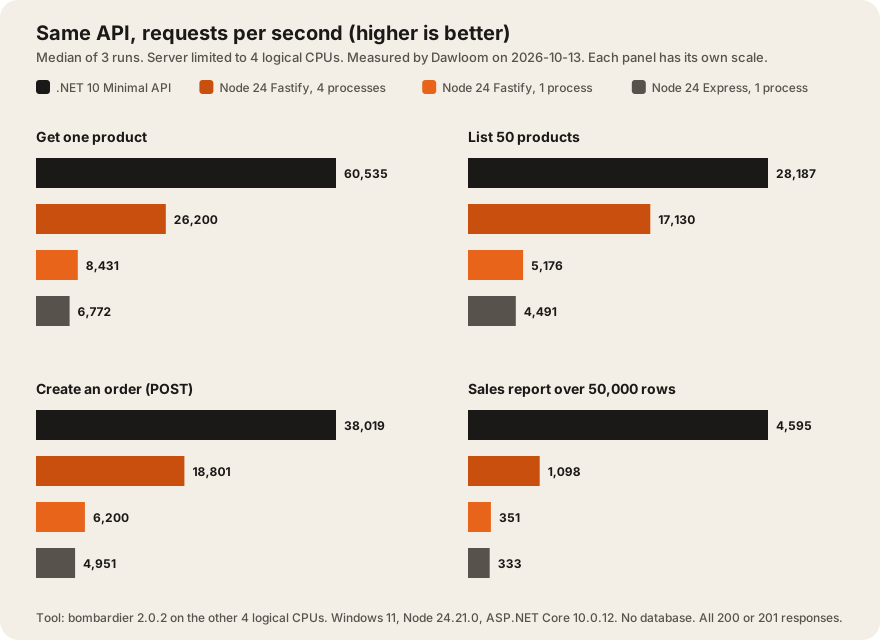
| Endpoint | .NET 10 | Fastify, 4 processes | Fastify, 1 process | Express, 1 process |
|---|---|---|---|---|
| Get one product | 60,535 (56,565 to 61,078) p99 3.8 ms | 26,200 (24,600 to 31,061) p99 10.0 ms | 8,431 (8,200 to 8,612) p99 15.4 ms | 6,772 (5,966 to 7,241) p99 19.5 ms |
| List 50 products | 28,187 (27,657 to 28,745) p99 4.7 ms | 17,130 (14,797 to 17,373) p99 13.6 ms | 5,176 (5,078 to 5,346) p99 23.7 ms | 4,491 (4,366 to 4,516) p99 24.8 ms |
| Create an order | 38,019 (36,648 to 43,224) p99 3.8 ms | 18,801 (18,786 to 23,953) p99 12.4 ms | 6,200 (6,124 to 6,479) p99 19.9 ms | 4,951 (4,917 to 5,011) p99 20.4 ms |
| Sales report, 50,000 rows | 4,595 (3,423 to 5,025) p99 26.5 ms | 1,098 (885 to 1,395) p99 174 ms | 351 (345 to 377) p99 231 ms | 333 (307 to 355) p99 264 ms |
| Memory at idle | 57 MB | 399 MB (5 processes) | 83 MB | 77 MB |
| Peak memory under load | 96 MB | 475 MB | 104 MB | 125 MB |
Requests per second, median of 3 runs (lowest to highest run in brackets). p99 is the median of each run’s 99th percentile latency. Memory is Windows working set, summed across processes. Measured by Dawloom on 2026-10-13. Every response was a 200 or 201.
What the numbers say:
- One process uses every core in .NET, not in Node. ASP.NET Core spread the work over all 4 CPUs with no setup. A single Node process runs your JavaScript on one thread. That’s most of the 5x to 7x gap on the simple endpoints.
- Running 4 Node processes closes about half the gap. Fastify with 4 processes did 3x the work of one process. .NET still served 2.3x more on “get one product”, 1.6x on the list, and 2.0x on orders.
- CPU-heavy work is where .NET pulls away. On the 50,000-row report, .NET was 4.2x faster than 4 Node processes, and its slowest 1% of requests took 26.5 ms against 174 ms.
- Fastify beat Express by 15% to 25% on the three simple endpoints, and by 5% on the report.
- Node’s 4-process setup costs memory. 399 MB at idle against 57 MB for .NET, because each process carries its own runtime and copy of the data.
What these numbers don’t tell you
Read these limits before you quote the results.
- There’s no database. A real request that waits 5 to 20 ms on Postgres can’t go faster than the database allows, on either runtime. Both stacks handle that kind of waiting well. Our post on why Postgres is our default database is about that other half.
- It’s Windows, not Linux. Most Node and .NET backends run on Linux in production. Node’s docs say its cluster module uses round-robin “on all operating systems except Windows” (Node.js cluster docs), so our 4-process numbers may be lower than Linux would give. We didn’t test Linux.
- One laptop, one day, a busy CPU. Absolute numbers will differ on your server. The ratios held steady across rounds once we raised priority, and that’s what we’d rely on.
- Default settings. We didn’t tune garbage collection, use Native AOT, or try
worker_threads. Node’s docs suggestworker_threads“when process isolation is not needed” (same page).
Put simply: 5,000 requests a second, held all day, is about 432 million requests a day. If your app is far below that, any of the four setups we tested is fast enough, and your choice should rest on the next section.
The same endpoint in both
Here is the order endpoint, the part both versions share. Node first:
app.post('/orders', async (req, reply) => {
  const r = createOrder(req.body); // checks lines, adds totals and 8% tax
  return reply.code(r.status).send(r.body);
});
And .NET, trimmed to the checks and the totals:
app.MapPost("/orders", (OrderRequest? body) =>
{
    if (body?.Lines is not { Count: > 0 and <= 50 })
        return Results.BadRequest(new { error = "invalid order" });
    long subtotal = 0;
    foreach (var l in body.Lines)
    {
        if (!byId.TryGetValue(l.ProductId, out var p) || l.Qty is < 1 or > 100)
            return Results.BadRequest(new { error = "invalid line" });
        subtotal += (long)p.PriceCents * l.Qty;
    }
    long tax = (long)Math.Round(subtotal * 0.08, MidpointRounding.AwayFromZero);
    return Results.Json(new { body.CustomerId, subtotal, tax, total = subtotal + tax }, statusCode: 201);
});
The full .NET server was 83 lines. The Node version was 47 lines of shared logic plus 9 lines for Fastify. .NET’s records and types add lines, and they also catch a wrong field name at build time. In Node you get that from TypeScript, and our post on TypeScript strict mode at scale covers what it does and doesn’t catch.
How to choose for a business backend
Choose .NET when:
- The backend does real computing in the request path: pricing rules, reports, imports, PDF or image work.
- You want one process to use the whole server, with less tuning.
- You need long support windows. ”.NET 10” is an LTS release with end of support on November 14, 2028, and “LTS releases get free support and patches for three years” (Microsoft .NET support policy, checked 2026-10-13). .NET 8 support ends November 10, 2026, so new projects should start on .NET 10.
- Your team or your customer’s IT already runs Microsoft tools, SQL Server, or Azure.
Choose Node.js when:
- Your frontend is TypeScript and you want one language across the stack, with shared types between client and server.
- The backend mostly waits on a database and other APIs. Node’s event loop is built for that.
- You need a library that only exists on npm.
- Your team ships faster in JavaScript. That beats a 2x throughput gap for almost every business app.
On versions, Node’s own guidance is that “Production applications should only use Active LTS or Maintenance LTS releases” (Node.js releases). Node 24 is an LTS line.
If heavy jobs are the reason you lean to .NET, there’s a middle path many teams use: keep the API in Node and move the heavy work into a background worker. Our post on background jobs that don’t fall over shows the patterns, and Bun in production covers a faster JavaScript runtime if you want to stay in one language.
We build backends in both, along with Go, and our stack page says when we’d skip each one. If you’re choosing for a new product, our web development page explains how we scope it.
FAQ
Is .NET faster than Node.js?
In our test, yes. On the same 4 CPUs, .NET 10 served 1.6x to 4.2x more requests than Node.js 24 running 4 processes, and 5x to 13x more than a single Node process. The gap was biggest on CPU-heavy work. With a database in the path, the gap gets smaller.
Is Node.js good for enterprise backends?
Yes, when the work is mostly I/O: calling databases and other APIs. Plan for more than one process to use all cores, and use an LTS release. For CPU-heavy work in the request path, .NET or a separate worker service is a better fit.
Should I use .NET or Node.js for a startup?
Use what your team writes fastest. Both are fast enough for a startup’s traffic. Pick Node if your frontend is TypeScript and you want one language. Pick .NET if your founders or first hires know C#, or the product does heavy computing.
Is Fastify faster than Express?
In our test, Fastify 5 served 15% to 25% more requests than Express 5 on simple JSON endpoints, and about the same on CPU-heavy work. Both ran on Node.js 24.21.0, one process each.
Does .NET use less memory than Node.js?
In our test, one .NET process sat at 57 MB idle and peaked at 96 MB under load. One Node process sat at 83 MB and peaked at 104 MB. Four Node processes, needed to use 4 cores, sat at 399 MB.