
Someone selling houses asks us this every few months: can’t they just buy a real estate WordPress theme? Usually the honest answer is yes. Sometimes it’s no, and the reasons are specific enough to name instead of waving at.
When a theme is actually the right call
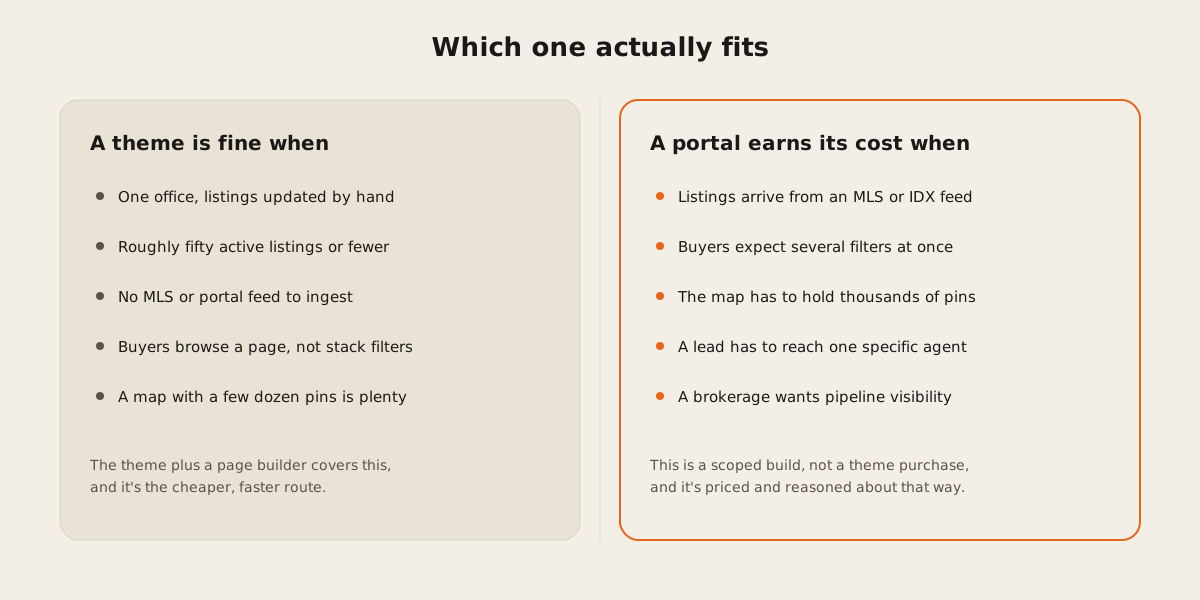
If you run one office, update listings yourself, and rarely carry more than fifty active properties at a time, a real estate theme plus a page builder does the job. It’s the cheaper, faster build, and there’s no MLS feed fighting the page builder’s assumptions. Worth saying plainly before anything else, because most of what follows only applies once one of those conditions stops being true.
Where the theme’s data model runs out of road
WordPress lets you register a custom post type for a listing, complete with your own fields, and that works fine for a hand-maintained catalog. Custom post types are exactly what they sound like: your own content type alongside posts and pages.
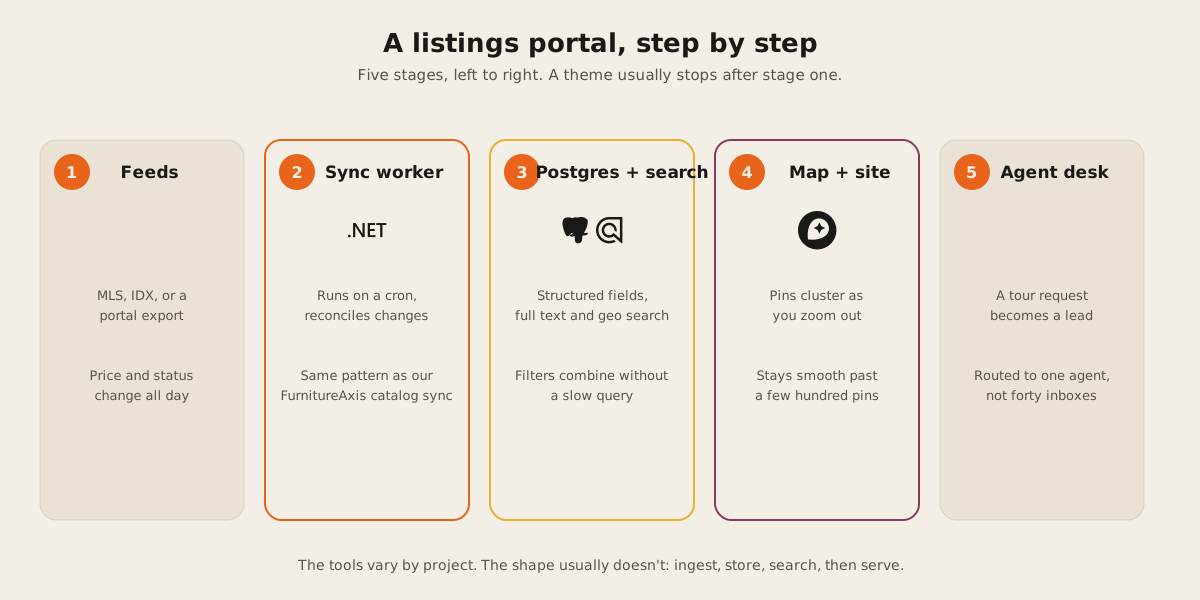
The strain shows up in how those fields get stored. Each custom field lives in wp_postmeta as its own row, a key and a value per field per listing, the way WordPress has stored post metadata since it was a blogging tool. That’s fine for an editor typing fields in by hand. It’s a rough fit for a scheduled import that needs to update bedroom counts, prices, and statuses for hundreds of listings in one pass, because touching each field means writing another row, and reconciling “this listing changed” against “this listing is new” against “this listing came off market” isn’t something the meta table was built to help with.
We already run that kind of scheduled reconciliation in production, just not for real estate. FurnitureAxis has a C# background worker that pulls a vendor catalog on a cron and keeps Shopify and the site’s search index in sync with it. An MLS or IDX feed is the same shape of problem: pull on a schedule and write only what changed, after diffing against what’s already there. FurnitureAxis is furniture, not houses, but the sync pattern doesn’t care what the SKU represents.
Search that means several filters at once
A buyer filtering by price range, bedrooms, and neighborhood, all at once, is asking for something WordPress’s built-in search was never built to answer. Core search is a LIKE match against post titles and content. It doesn’t reach into custom fields, and it has no way to combine several of them into one query at acceptable speed.
PostgreSQL’s full text search handles this directly if your listings live in a normal relational schema: index the fields you filter and search on, and the database does ranking and filtering in a single query.
CREATE INDEX listings_search_idx ON listings
USING GIN (
  to_tsvector('english', title || ' ' || city || ' ' || description)
);
For a hosted alternative, Algolia supports geolocation search natively: attach a _geoloc field to each record and you can filter or sort by distance from a point on top of the usual facet filters. We already run Algolia in production for FurnitureAxis’s catalog search, so we know its filtering and latency behavior first hand, even on a catalog built for furniture instead of floor plans.
Maps that don’t choke past a few hundred pins
A market with a few dozen listings is fine as plain map markers. A market with a few thousand isn’t: drop one DOM marker per listing and the browser tab starts struggling before a user even zooms in. Mapbox GL JS clusters points at the source level, grouping nearby listings into a single circle that expands as you zoom, so the map only ever renders what’s actually visible. Plenty of WordPress map plugins render one marker per pin with no clustering step at all, which is fine until your listing count stops being small. Worth testing against your real count before picking one.
What happens after the tour request
A theme is built to publish a listing. It has no opinion about what happens next. A portal can attach a lead to the specific listing and agent it came from, then route it by territory or rotation instead of a shared inbox. That gives the brokerage a pipeline view instead of a pile of inboxes nobody’s watching. That’s the gap the real estate work we scope usually centers on: leads dying between the portal and the agent who could have called them back that day.
Agent dashboards fall out of the same need. Once leads and listings live in your own database instead of a theme’s post types, showing an agent their live pipeline, or a broker every agent’s, becomes a query against data you already have rather than a new integration to build.
The verdict
If your listings fit in your head and you’re the one updating them, buy the theme. Keep the difference and spend it on better photography, which will do more for your conversions than anything above.
If listings arrive from a feed, buyers expect to stack filters and see a live map, and a lead needs to land on the right desk instead of a general inbox, you’ve already outgrown the theme, whether or not the site looks like it yet. That’s a scoped build, worth scoping properly instead of bolting plugins onto a theme until it groans. Tell us what you’re working with and we’ll say plainly which side of that line you’re actually on. The general shape of how we approach a build like this is web development work, and our review history is public if you want to see how past clients rate the follow-through.