

A 301 redirect map is a two-column list: every old URL that had traffic or links, and the new URL it should go to. For a move to Shopify, that list becomes a CSV with the headers “Redirect from” and “Redirect to”, which you import under Content, Menus, URL redirects.
The builder below does the slow part. Paste your old and new URL lists. It matches them by path, slug, and page type, marks which matches need a human, and exports the CSV. It runs in your browser, so your URL lists never leave your machine.
Who this is for: store owners, SEO leads, and developers moving a store from WooCommerce, Magento, BigCommerce, or a custom build to Shopify, or between any two platforms. Who should use something else: if you need .htaccess or nginx rules, or have tens of thousands of URLs with ID-based patterns, Patrick Stox’s free Redirect Map Builder exports more server formats and learns pattern rules from your fixes. It has no Shopify CSV export.
From your crawl, sitemap, or Search Console export. One per line, or a CSV with the URL in the first column.
From the new store, for example a Shopify product export. One per line, or a CSV with the URL in the first column.
How to use it
- Get the old URLs. Crawl the old site, export the sitemap, and export the Pages report from Search Console. Use all three. A sitemap only shows what you told Google about. Search Console shows what it ranked.
- Get the new URLs. On Shopify, export products and collections, or crawl the new store on its preview domain.
- Paste both lists and press Match. Each line can be a full URL or a path. A CSV works too, as long as the URL is in the first column.
- Fix what needs a look. The default view hides exact and high matches and shows the rest. Type or pick a new path for each one. Leave a row unticked if the page had no traffic and no links. A 404 is fine for those.
- Export and import. Pick “Shopify CSV” and download. In Shopify, go to Content, Menus, URL redirects, Import.
A worked example
A WooCommerce furniture store moving to Shopify. These ten rows come straight from the tool’s code, so the page and the tool always agree.
| Old path | Type | Suggested new path | Match | Why |
|---|---|---|---|---|
| / | Home | / | Same path | Same path on the new site. No redirect needed. |
| /product/oak-dining-table-6-seater | Product | /products/oak-dining-table-6-seater | High | Same slug, new folder. |
| /product/linen-sofa-3-seat-grey | Product | /products/linen-sofa-3-seater-grey | Check | 80% of slug words shared, same page type. |
| /product/walnut-coffee-table | Product | /products/walnut-coffee-table-round | Check | 86% of slug words shared, same page type. |
| /product-category/dining-room | Category | /collections/dining-room | High | Same slug, new folder. |
| /product-category/sofas | Category | /collections/sofas-and-couches | Check | 67% of slug words shared, same page type. |
| /about-us | Page | /pages/about-us | High | Same slug, new folder. |
| /delivery-information | Page | /pages/delivery | Check | 67% of slug words shared, same page type. |
| /2024/03/how-to-care-for-oak-furniture | Other | /blogs/news/how-to-care-for-oak-furniture | High | Same slug, new folder. |
| /product/winter-sale-bundle-2023 | Product | None | No match | No close product. Pick the closest category by hand, or let it return 404 if it never had traffic. |
The Shopify CSV it exports for that example
Redirect from,Redirect to
/product/oak-dining-table-6-seater,/products/oak-dining-table-6-seater
/product/linen-sofa-3-seat-grey,/products/linen-sofa-3-seater-grey
/product/walnut-coffee-table,/products/walnut-coffee-table-round
/product-category/dining-room,/collections/dining-room
/product-category/sofas,/collections/sofas-and-couches
/about-us,/pages/about-us
/delivery-information,/pages/delivery
/2024/03/how-to-care-for-oak-furniture,/blogs/news/how-to-care-for-oak-furniture
Three things to notice:
- Same slug, new folder is the easy 80%. WooCommerce puts products under
/product/and categories under/product-category/by default, per its permalinks doc. Shopify uses/products/and/collections/. When the slug is unchanged, the match is safe. - Renamed slugs need a check.
linen-sofa-3-seat-greybecamelinen-sofa-3-seater-grey. The tool finds it, but marks it “Check” because only 80% of the words match. - Some pages have no home. The 2023 winter bundle has no product on the new site. The tool won’t guess. You pick the closest category, or let it 404 if it never had traffic.
Shopify’s redirect rules that catch people out
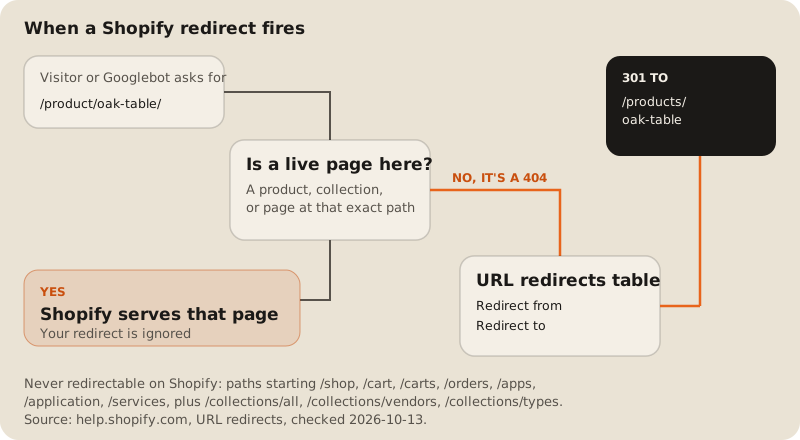
All from Shopify’s URL redirects help page, checked 2026-10-13:
- Redirects only fire on a 404. Shopify says: “You can redirect only from broken URLs.” And: “If the URL still loads a valid webpage, then the URL redirect won’t work.” So if you rebuild a page at the old path, the redirect you imported does nothing.
- Some paths can never be redirected. Shopify lists
/apps,/application,/cart,/carts,/orders,/services, and/shop. This one bites WooCommerce stores that used/shop/as the product base. The tool flags those rows in red. - Query strings are unreliable. Shopify says URLs with query strings “might not work as expected with URL redirects.” The tool drops the query string from the export and warns you.
- The limit is high. “You can create a maximum of 100,000 URL redirects unless your store is on the Plus plan, which has a maximum of 20,000,000 URL redirects.”
What Google asks for
Google’s site move guide (checked 2026-10-13) sets the rules the tool follows:
- “It’s important to map your old site’s URLs to the URLs for the new site.”
- Use permanent redirects: “we recommend that you use HTTP permanent redirects if possible, such as
301and308.” - “Don’t redirect many old URLs to one irrelevant single URL destination, such as the home page of the new site.” Google says this “might be treated as a soft 404 error.” The tool warns when more than one page goes to the home page.
- “Avoid chaining redirects.” The tool warns when a target is itself redirected.
- “Keep the redirects for as long as possible, generally at least 1 year.”
If you’re not on Shopify
The same map exports as a _redirects file for Cloudflare or Netlify, a bulk CSV for Vercel, or a plain three-column CSV. Each host has its own limit.
| Host | File format | Limit | Catch |
|---|---|---|---|
| Shopify | CSV with the headers "Redirect from" and "Redirect to" | 100,000 redirects, or 20,000,000 on Plus | Only fires when the old path returns a 404. Paths starting /shop, /cart, /orders, /apps, /services and a few more cannot be redirected. |
| Cloudflare _redirects (Workers static assets) | One line each: old path, new path, status | 2,000 static and 100 dynamic redirects | Defaults to 302 if you leave the status off. Query strings are not matched. |
| Cloudflare Bulk Redirects | Lists of source and target URLs | 10,000 on Free, 25,000 on Pro, 50,000 on Business, per account | No regular expressions or string replacement. |
| Vercel bulk redirects | CSV with source, destination, permanent | 1,000 included on Pro, 10,000 on Enterprise | Pro and Enterprise only. vercel.json holds up to 2,048 routes per deployment. |
| Netlify _redirects | One line each: old path, new path, status | No fixed number published | Netlify says a deploy may fail if the redirect file is too large. |
This site runs on Cloudflare Workers, so we use the _redirects format ourselves. Cloudflare defaults to a 302 if a line has no status code, which is why the export writes 301 on every line.
What the tool doesn’t do
- It doesn’t crawl. You bring the lists. It can’t tell which old URLs had traffic, so check that in Search Console before you decide what to drop.
- It matches on the URL, not the page content. A product renamed from “Linen sofa” to “Harbour 3-seater” shares no words, so it won’t be matched. You fix those by hand.
- It doesn’t learn patterns. If 5,000 URLs moved by one rule, a single wildcard rule on your host may be better than 5,000 lines.
The redirect map is one of six steps in our replatforming checklist, next to canonicals, the sitemap swap, and structured data. If the move also changes how stock flows, read keeping Shopify in sync with an inventory system before launch day. If you’re weighing a custom front end at the same time, our Shopify Plus vs headless cost breakdown covers the 3-year bill. And since rankings also depend on speed, why this site loads in under a second shows the static-first setup we use.
The tool also lives on its own page: redirect map builder. If you want the migration planned before the build starts, that’s part of our e-commerce development work.
FAQ
How do I create a 301 redirect map for a Shopify migration?
List every old URL from a crawl, the old sitemap, and Search Console. List the new URLs from a Shopify export. Match each old URL to its closest new page, then save the result as a CSV with the headers “Redirect from” and “Redirect to” and import it under Content, Menus, URL redirects. The tool above does the matching and the CSV.
Why is my Shopify redirect not working?
Most often, something still loads at the old path. Shopify only redirects URLs that return a 404. The other common causes are a blocked prefix such as /shop or /cart, and a query string in the old URL.
Should I redirect discontinued products to the home page?
No. Google warns that many redirects to the home page can be treated as soft 404s. Send a discontinued product to its closest category, or let it return 404 if it had no traffic or links.
How long should I keep redirects after a migration?
Google says “generally at least 1 year”, and from a user’s view, “consider keeping redirects indefinitely.” On Shopify there’s little reason to remove them, given the 100,000 limit.
Does Shopify support wildcard redirects?
Shopify’s URL redirects help page doesn’t document wildcards. Plan on one line per URL. If you need pattern rules, run them at a host that supports them, such as Cloudflare or Netlify.