
For a small SaaS whose database runs all day, DigitalOcean Managed PostgreSQL is the cheapest of the three at $15.15 a month for 1 GB of RAM, against $20.83 on Neon and $25 on Supabase Pro. Neon wins when the database is idle most of the day, because it scales to zero: a side project busy 4 hours a day fits Neon’s free plan.
Supabase costs more as a database, but the $25 also buys auth, file storage, and realtime. If you’d pay for those elsewhere, it can be the cheapest overall. Every price below is from the providers’ own pricing pages, checked 2026-10-13.
Who this is for: founders and tech leads picking a hosted Postgres for a new web or mobile SaaS. Who should look elsewhere: teams that need a specific cloud region, HIPAA, or a private network from day one. Those features sit on higher plans (Neon Scale, Supabase Team, DigitalOcean Advanced Edition) and change the math.
How we compared
We read each provider’s pricing page and docs on 2026-10-13 and priced the same database at three sizes. We matched memory: 1 GB of RAM is Supabase Micro, a 0.25 CU Neon compute, and DigitalOcean’s 1 GiB node. Neon says “each CU allocates approximately 4 GB of RAM.” We did not open paid accounts or run restores, so the backup and branching section is what each vendor documents. Test a restore yourself before you rely on one.
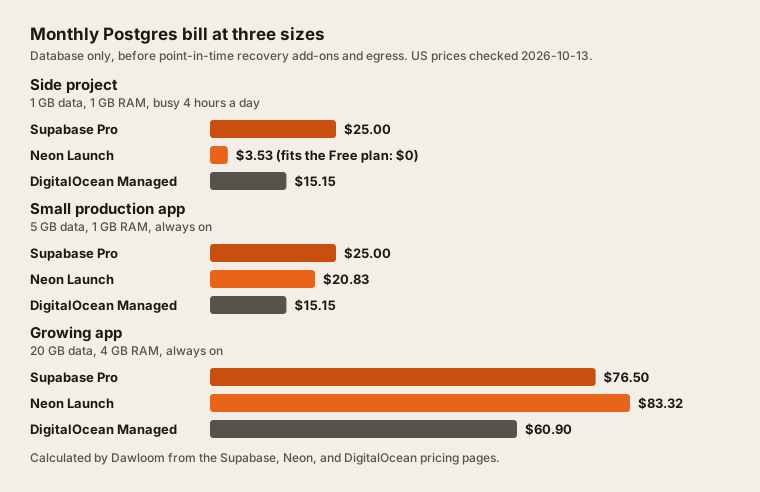
Cost at three sizes
| Size | Supabase Pro | Neon Launch | DigitalOcean Managed PostgreSQL |
|---|---|---|---|
| Side project 1 GB of data, 1 GB RAM, busy 4 hours a day | $25.00 Micro | $3.53 0.25 CU Fits the Free plan: $0 | $15.15 1 GiB, 1 vCPU |
| Small production app 5 GB of data, 1 GB RAM, always on | $25.00 Micro | $20.83 0.25 CU | $15.15 1 GiB, 1 vCPU |
| Growing app 20 GB of data, 4 GB RAM, always on | $76.50 Medium | $83.32 1 CU | $60.90 4 GiB, 2 vCPU |
| Provider | What | Price |
|---|---|---|
| Supabase | Pro plan, includes $10 compute credit (one Micro) | $25 a month |
| Supabase | Micro compute, 1 GB RAM | $10 a month |
| Supabase | Small compute, 2 GB RAM | $15 a month |
| Supabase | Medium compute, 4 GB RAM | $60 a month |
| Supabase | Large compute, 8 GB RAM | $110 a month |
| Supabase | Disk over 8 GB | $0.125 per GB |
| Supabase | Egress over 250 GB | $0.09 per GB |
| Supabase | Point-in-time recovery, needs Small compute or larger | $100 a month per 7 days |
| Supabase | Branching | $0.01344 per branch-hour |
| Neon | Launch compute | $0.106 per CU-hour |
| Neon | Launch storage | $0.35 per GB-month |
| Neon | Instant restore history | $0.2 per GB-month of changes |
| Neon | Egress over 500 GB | $0.1 per GB |
| Neon | Branches over 10 per project | $0.002 per branch-hour |
| DigitalOcean | Managed PostgreSQL 1 GiB, 1 vCPU, from 10 GiB | $15.15 a month |
| DigitalOcean | Managed PostgreSQL 2 GiB, 1 vCPU, from 30 GiB | $30.45 a month |
| DigitalOcean | Managed PostgreSQL 4 GiB, 2 vCPU, from 60 GiB | $60.9 a month |
| DigitalOcean | Extra storage | $0.215 per GiB-month |
How each number is built:
- Supabase Pro is $25 a month and “Paid plans include $10/mo in compute credits, enough to cover one Micro instance.” Micro is $10, Small $15, Medium $60. Disk is “8 GB disk size per project then $0.125 per GB.” So the growing app is $25 + $60 - $10 + 12 GB × $0.125 = $76.50 (Supabase pricing).
- Neon Launch is “$0.106 per CU-hr” and “$0.35 per GB-month,” with “no monthly minimum.” An always-on 0.25 CU compute uses 180 CU-hours in a 30-day month, so the small app is 180 × $0.106 + 5 × $0.35 = $20.83 (Neon pricing).
- DigitalOcean Managed PostgreSQL is $15.15 a month for 1 GiB and 1 vCPU, $30.45 for 2 GiB, and $60.90 for 4 GiB and 2 vCPUs. Extra storage is $0.215 per GiB per month (DigitalOcean pricing). Its docs say single node clusters “begin at $15.00 per month,” so the page and the docs differ by 15 cents. We used the pricing page.
What changes the order:
- Idle time favors Neon. Neon’s page says a database can “scale to zero when idle, and start back up within a few hundred milliseconds when it’s needed.” At 4 busy hours a day, our side project uses 30 CU-hours and 1 GB, inside the Free plan’s 100 CU-hours and 1 GB per project. Supabase’s free plan caps the database at 500 MB, and “Free projects are paused after 1 week of inactivity.”
- Always-on load favors fixed prices. A Neon compute that never sleeps bills every hour. At 1 CU (4 GB) that’s $76.32 a month in compute alone, more than DigitalOcean’s whole 4 GiB node.
- Many small databases favor Neon. Launch includes 100 projects with no fee per project. On Supabase each extra project needs its own compute, “Additional projects from $10/mo.”
Backups, restore, and branching
Documented features, checked 2026-10-13. We didn’t test them.
| Supabase Pro | Neon Launch | DigitalOcean Managed PostgreSQL | |
|---|---|---|---|
| Daily backups | ”Pro Plan projects can access the last 7 days of daily backups” (docs) | Scheduled snapshots: 100 snapshots, $0.09 per GB-month (pricing) | “PostgreSQL cluster backups run automatically once per day and are retained for seven days” (docs) |
| Restore to any second | Point-in-time recovery add-on, $100 a month per 7 days. Needs “at least a Small compute add-on” | Instant restore, up to 7 days. $0.20 per GB-month of changes kept | Included. Restore “to any point-in-time within the previous seven days” (docs) |
| Branches | $0.01344 per branch-hour. “Data-less by default” (docs) | 10 per project included, then $0.002 per branch-hour. “A branch is a copy-on-write clone of your data” (docs) | Not offered. Fork a new cluster from a backup instead |
| Free plan backups | None. Supabase recommends regular exports with the CLI | Restore window “up to 6 hours or 1 GB of data changes” | No free plan |
The biggest cost gap is in this table. To restore to any second over the last 7 days, Supabase needs Small compute and the add-on: $25 + $15 - $10 + $100 = $130 a month. DigitalOcean includes it in $15.15. On Neon you pay for the changes you keep: a database that rewrites 2 GB a week pays about $0.40.
Branching works differently on each. A Neon branch includes the data and costs nothing to create, so a preview deploy can run against a real copy. Supabase branches start empty and get your schema from migrations and data from a seed file. That’s slower to set up, but safer when the production data is sensitive. Neon also offers schema-only branches for that case.
A change coming to DigitalOcean
DigitalOcean’s pricing docs say: “Beginning 15 October 2026 for new accounts and 30 November 2026 for all accounts, new Standard Edition clusters cannot use plans with more than 4 GiB of RAM or add standby or read-only nodes.” High availability and bigger nodes move to Advanced Edition, which “begin[s] at $130.00 per month.” The $15.15 to $60.90 plans above are not affected. If you expect to need a standby node, price Advanced Edition now.
Neon handles that part differently: “Neon’s storage is multi-AZ by default, without the need for HA standbys.”
Which one to pick
| If your app… | Pick | Why |
|---|---|---|
| Needs auth, file storage, and realtime too | Supabase Pro | $25 covers all of them. See auth: build or buy |
| Is idle most of the day, or you run many databases | Neon | Scales to zero, no monthly minimum, 100 projects |
| Wants preview environments with real data | Neon | Copy-on-write branches with the data, 10 included |
| Runs all day and wants a fixed bill with point-in-time recovery | DigitalOcean Managed PostgreSQL | $15.15 with 7-day point-in-time recovery included |
| Already runs on Railway or a VPS | Postgres on the same host | Cheapest, but you own backups and upgrades |
All three are plain Postgres, so you can move later with pg_dump and pg_restore. Supabase is the hardest to leave if you also use its auth and storage APIs. Our post on why Postgres is our default database covers why that portability matters, and multi-tenant isolation models covers how many databases a SaaS needs in the first place.
To see the database next to the hosting bill, use the hosting cost calculator, or read Vercel vs Cloudflare vs Railway vs a VPS.
FAQ
Is Neon cheaper than Supabase?
For a database that sleeps, yes: a side project busy 4 hours a day costs $3.53 on Neon Launch, or $0 on Neon Free, against $25 on Supabase Pro. For a 1 GB database that runs all day, Neon is $20.83 and Supabase $25. At 4 GB of RAM always on, Supabase is cheaper: $76.50 against $83.32.
Is Supabase free plan good enough for production?
Usually not. The database is capped at 500 MB, projects pause after a week with no activity, and there are no automatic backups. It’s fine for a prototype or a demo.
Does Neon have a cold start?
Yes, when a compute has scaled to zero. Neon says it starts “back up within a few hundred milliseconds.” Neon’s compute sleeps after 5 minutes of no activity by default, and paid plans can turn that off, which then bills every hour.
What is the cheapest managed Postgres for a small app?
Of the three we priced, DigitalOcean at $15.15 a month for an always-on 1 GiB node, with daily backups and 7-day point-in-time recovery included. For an app that’s idle most of the day, Neon is cheaper and can be free.
Do Supabase branches copy production data?
No. Supabase’s docs say new branches “do not start with any data or storage objects from your main project.” You fill them from a seed file. Neon branches do include the data, because they’re copy-on-write clones.
We build SaaS products on Postgres and set up the database, backups, and migrations. See our web development work.