
To use ChatGPT for business, put your team on a business plan, where OpenAI says it won’t train on your data, and use it for first drafts, summaries, spreadsheet analysis, and research. Check every fact before it leaves the building. Never paste card numbers, health records, ID numbers, or passwords. And know its biggest limit: it can’t see your own orders, stock, or customer records until someone connects them, usually with an MCP server.
Who this is for: an owner or manager of a small business, roughly 2 to 50 people, deciding how staff should use ChatGPT. Who should look elsewhere: if you’re choosing between ChatGPT, Claude, and Gemini, read our plan comparison first. If you want AI inside your own product, that’s an API decision, covered in which AI model your business should use.
Plan features below come from OpenAI’s pricing page and ChatGPT Business overview, both read on 2026-10-14. Many of the top guides for this question still say “ChatGPT Team”, which OpenAI renamed to Business on Aug 29, 2025, and some still recommend Custom GPTs, which OpenAI retires on Dec 11, 2026.
Step 1: get everyone off personal accounts
The first business decision is the plan, because it decides what happens to what staff type.
| Free, Go, Plus, Pro (personal) | Business | Enterprise | |
|---|---|---|---|
| Content used to train OpenAI’s models | ”Opt-out available”, so on unless each person turns it off | ”No." | "No.” |
| Price | Varies by country | $20 per seat a month billed yearly, $25 monthly, 2-seat minimum | Contact sales |
| Admin console, SAML SSO, central billing | No | Yes | Yes |
| Company knowledge (search across connected work apps) | No | Yes | Yes |
| Workspace agents | No | Yes | Yes |
| Connect apps to internal tools, developer mode | Plus and Pro | Yes | Yes |
| SCIM, data residency, connector registry | No | No | Yes |
| BAA for health data | No | No. OpenAI lists BAAs among options that need “a contracted offering” | Through sales |
Training rows and features are from OpenAI’s pricing page comparison tables. Price and BAA rows are from the Business overview, which says: “OpenAI won’t train on your workspace’s data.” Checked 2026-10-14.
Two people paying for Plus on personal accounts is the common way small businesses start. It’s also the riskiest. Each person’s training setting is their own, nobody can remove access when they leave, and the chats belong to their personal account.
What ChatGPT is good at in a small business
These are jobs where it saves real time, with the limit you should know for each.
| Job | How to do it | Where it fails |
|---|---|---|
| Draft emails, replies, and posts | Paste the thread or your notes, say who it’s for and the tone | It sounds generic until you give it two or three of your own past emails as examples |
| Summarize long documents | Upload the PDF or contract and ask for the points that matter to you | It can miss or invent details. Ask for page numbers and check them |
| Work with spreadsheets | Upload a CSV or Excel file and ask for totals, trends, or a chart | Check any number you’ll act on against the sheet. Clean the data first |
| Research a supplier, market, or rule | Use search or deep research, and ask for sources | Sources can be weak or out of date. Open the important ones |
| First drafts of policies, job ads, SOPs | Give it your facts and ask for a structure | It doesn’t know your law or your contracts. A person signs off |
| Recurring jobs | Scheduled tasks, or ChatGPT Work, which OpenAI calls “our agentic work product” | Agents can take wrong steps. Start with tasks you can check in a minute |
| Answer questions from your own files | Projects with uploaded files, or Company knowledge on Business | It only knows the files and apps you connect, not your live systems |
The honest limits
It makes things up. Confident wrong answers are normal, especially for numbers, quotes, legal points, and anything recent. The fix is a team rule: a person checks every fact, figure, name, and date before anything goes to a customer.
It can’t see your own systems. ChatGPT can connect to apps like Google Drive, SharePoint, Slack, and many vendor plugins. Your own order system, booking database, or ERP is invisible to it until someone builds a connection. Today that’s an MCP server: a small program that gives ChatGPT a few named actions such as “get order status”. We compare that with an API route and Zapier in how to connect company data to ChatGPT.
You can’t “train” it on your company. You don’t retrain the model. You give it context in three ways:
- Projects: upload files and instructions that every chat in the project uses.
- Company knowledge (Business and Enterprise): it searches the work apps you connect.
- An MCP server for live data from your own systems.
Pages that tell you to build a Custom GPT for this are out of date. OpenAI retires Custom GPTs on Dec 11, 2026, and their API actions don’t migrate. Our ChatGPT app vs MCP server vs Custom GPT covers what moves and what you rebuild.
Some data must never go in. OpenAI’s own plugin guidelines bar plugins from collecting four kinds of “Restricted Data”: payment card data under PCI DSS, protected health information, government identifiers such as social security numbers, and “Access credentials and authentication secrets (such as API keys, MFA/OTP codes, or passwords).” If OpenAI won’t let plugin builders handle that data, your staff shouldn’t paste it into chat.
Plugins and connectors carry their own risk. A plugin connected to your account can read, and sometimes change, your data in that service. OpenAI’s own listing pages warn that “Use of apps may come with elevated risk.” Approve plugins centrally. Our 12 checks before connecting an MCP server apply to plugins too.
A one-page policy for staff
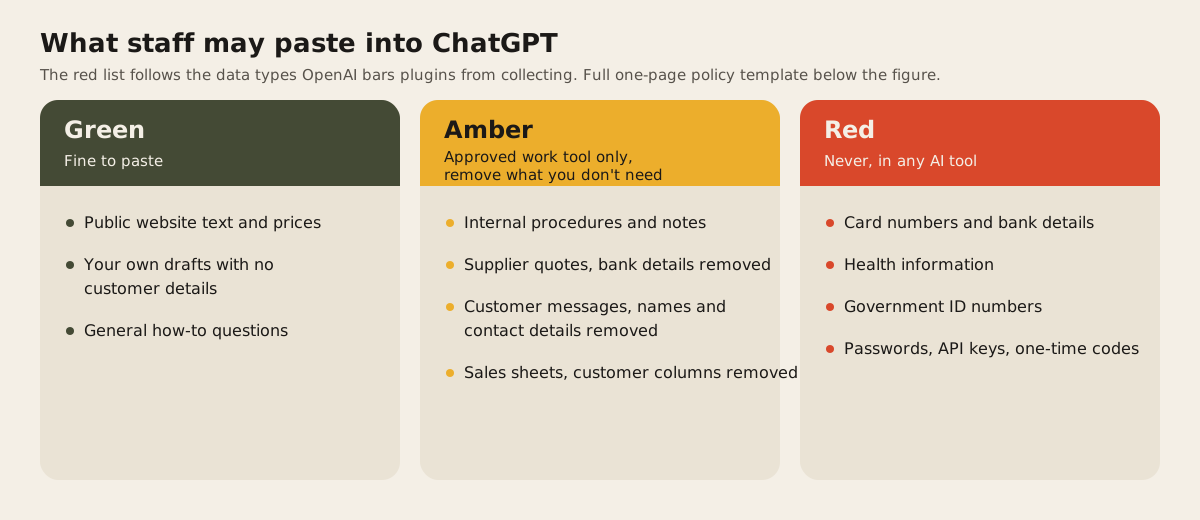
We wrote a one-page policy you can copy: download the staff AI policy template (Markdown, edit the parts in brackets). It covers which tool staff may use, the green, amber, and red paste rules above, who checks answers before they go to customers, and what to do if someone pastes something from the red list. It isn’t legal advice. Your contracts may add items to the red list.
The rules in it:
- One approved tool, on work accounts only.
- No plugins or connectors without approval.
- The person who sends it owns it, even if AI wrote it.
- Anything about money, legal terms, or safety gets a second reader.
- Red-list slips are reported the same day, with no blame for reporting.
Rolling it out in a week
- Day 1. Buy Business seats for the people who’ll use it. Start everyone on Standard seats.
- Day 2. Share the policy. Turn off what you don’t need in the admin console.
- Days 3 to 5. Each person picks two jobs from the table above and tries them on real, non-sensitive work.
- Day 5. Fifteen minutes as a team: what worked, what was wrong, what to stop.
- After a month. Move heavy users to Premium seats ($100 billed yearly), and decide whether ChatGPT needs to reach your own system. That’s the point where an MCP server pays off.
If you want AI built into your own software, see our AI integration service.
FAQ
Is ChatGPT safe for business data?
On a Business or Enterprise plan, OpenAI says it won’t train on your workspace’s data, and admins control access. On personal plans, training is on unless each user opts out. Either way, keep card, health, ID, and password data out.
Does ChatGPT train on my company data?
Not on Business or Enterprise. OpenAI’s pricing page answers “Content is used to train our models” with “No.” for both. On Free, Go, Plus, and Pro it says “Opt-out available.”
Can I train ChatGPT on my company data?
Not in the sense of retraining the model. Upload files to a Project, connect work apps through Company knowledge on Business, or build an MCP server so it can look up live data from your own systems.
Is ChatGPT HIPAA compliant for a small clinic?
Not on self-serve Business. OpenAI says BAAs need a contracted plan such as Enterprise. Until you have a signed BAA, keep patient information out of ChatGPT entirely.
What’s the difference between ChatGPT Plus and ChatGPT Business?
Plus is a personal account with training on by default and no admin. Business is a shared workspace with no training on your data, SSO, central billing, Company knowledge, and shared projects, from $20 per seat billed yearly with a 2-seat minimum.
When your team needs ChatGPT to look up orders, stock, or bookings in your own system, that’s the job of a small MCP server. See MCP servers for how we scope one.