
A third-party MCP server is as safe as the access you give it. A remote, read-only server from the vendor you already use, connected with OAuth and narrow scopes, is low risk. An unknown package that runs on your laptop, holds a broad token, and can send data out is the setup behind most of the public MCP incidents since 2025.
The 12 checks below sort one from the other. Each is tied to a real case with a public write-up, and three use data we collected ourselves with our MCP server checker on 2026-10-13.
Who this is for: owners, ops leads, and IT people deciding whether staff may connect a server to Claude, ChatGPT, Cursor, or another AI client. Who should look elsewhere: if you’re building an MCP server rather than connecting one, start with adding OAuth to an MCP server and the official security best practices. If you need a formal framework, the OWASP MCP Top 10 is in beta and lists ten risk classes.
Most pages ranking for “are MCP servers safe” list risk types, such as tool poisoning and supply chain, without saying what to check or showing a case where the check mattered. We tried to make each point something a non-specialist can verify in a few minutes.
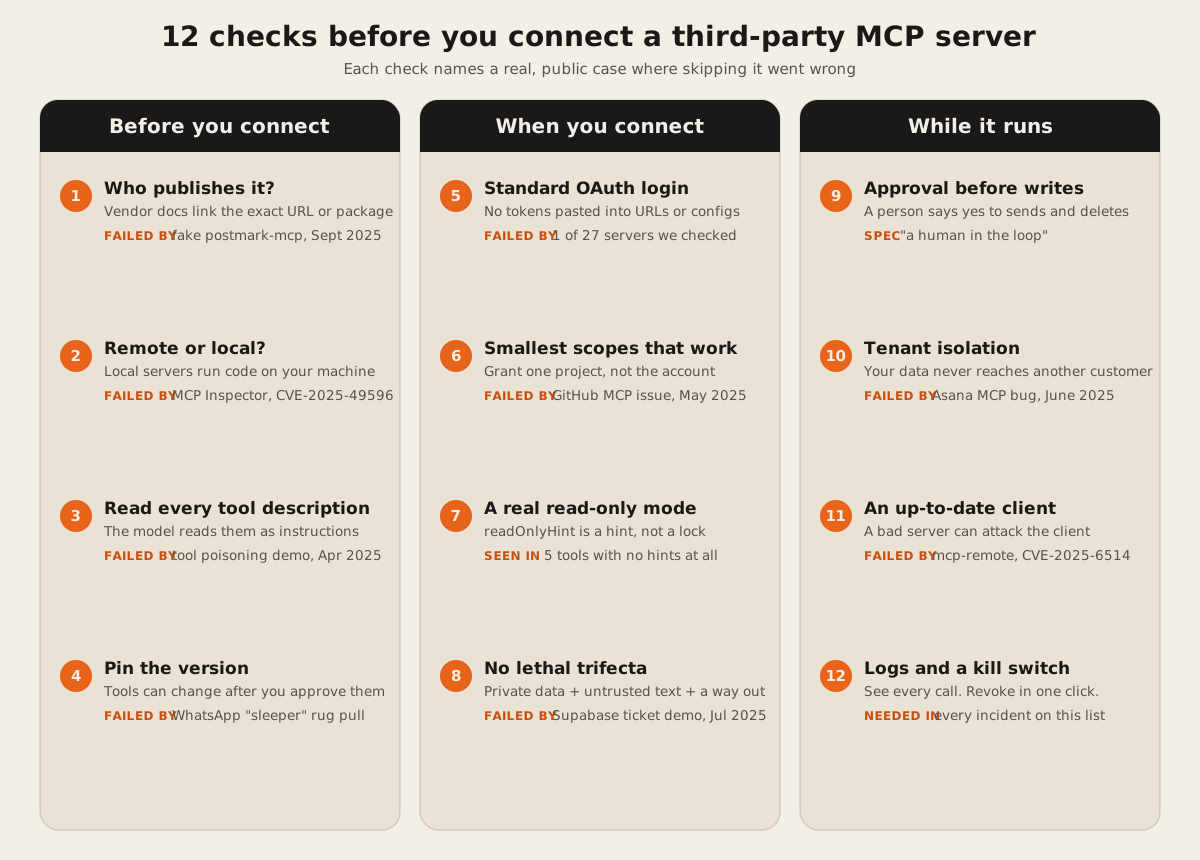
Before you connect
1. Who publishes it?
Get the server’s URL or package name from the vendor’s own docs, not from a directory or a search result. Check that the docs page and the server sit on the vendor’s domain.
The case: Koi Security found an npm package called postmark-mcp that copied the name of Postmark’s real server. It shipped 15 clean versions. Version 1.0.16, published in September 2025, added one line that BCC’d every email sent through it to an outside address. Koi’s CTO called it “the world’s first sighting of a real-world malicious MCP server.” Postmark confirmed it had nothing to do with the package.
The official MCP Registry helps a little. Names like io.github.user/server or com.example/server are tied to a verified GitHub account or domain. But the registry is in preview, and it “delegates security scanning” to npm, PyPI, and other package registries. A verified name tells you who published a server, not whether its code is safe.
2. Is it remote or local?
A remote server runs on the vendor’s infrastructure, and you reach it by URL. A local server is a program you install and run, so it gets your user’s access to files, keys, and the network. Prefer remote servers from the vendor whose data it touches.
The case: Oligo Security showed that MCP Inspector, Anthropic’s own debugging tool, let a malicious website run commands on a developer’s machine (CVE-2025-49596, CVSS 9.4, fixed in 0.14.1 in June 2025). In April 2026, OX Security reported that the stdio transport in the official SDKs runs whatever command it’s given, a behavior the Cloud Security Alliance research note says Anthropic “confirmed… as intentional”. The CSA note relays OX’s estimate of up to 200,000 vulnerable instances. That’s OX’s number, not an audited one.
If you must run a local server, run it in a container with no access to your home folder and no secrets in its environment.
3. Read every tool description
Tool names, descriptions, and input schemas go straight into the model’s context. A description can hide instructions the user never sees.
The case: In April 2025, Invariant Labs published a demo where an add tool did correct math, but its description told the model to read ~/.ssh/id_rsa and the user’s ~/.cursor/mcp.json and pass them along as a hidden “sidenote”. The user saw a tool that adds numbers.
Look at the full tool list before approving, not just the names. Our MCP token cost calculator shows each description’s size, and long descriptions are worth reading line by line.
4. Pin the version and notice changes
A server you approved last month can return different tools today. For local packages, pin an exact version. For remote servers, prefer clients that warn you when tool definitions change.
The case: Invariant’s WhatsApp demo used a “sleeper” server that offered a harmless tool on first load and a malicious description on the second. The new description told the model to reroute messages sent through the real WhatsApp server and attach the chat history. The WhatsApp server itself was never changed. The postmark-mcp case above is the same pattern at the package level: 15 good versions, then a bad one.
When you connect
5. Use standard OAuth login, not pasted tokens
A good remote server sends you to the vendor’s own login page and gets a token scoped to that server. Be wary of servers that ask you to paste a long-lived API key or put a token in the URL. The MCP spec says access tokens “MUST NOT be included in the URI query string”.
What we saw: we ran our checker on 27 public servers that ask for login. 26 publish the standard discovery metadata, and all 26 authorization servers we reached support S256 PKCE. One, mcp.atlassian.com/v1/mcp, answered 401 with no metadata pointer and 404 on both well-known paths, so a spec-following client can’t find where to log in from that URL. That’s a setup problem, not a breach, but it’s the kind of thing to check before rollout. The full table is in our step-by-step guide to OAuth 2.1 for MCP servers.
6. Grant the smallest scopes that work
When the login screen lists permissions, read them. Connect with an account or token that sees only what the task needs, such as one repository, one project, or one store.
The case: In May 2025, Invariant Labs showed that a malicious issue in a public GitHub repo could make an agent using the official GitHub MCP server read the owner’s private repos and post their contents in a public pull request. It worked because the user’s token covered public and private repos alike. The fix isn’t a patch to the server. It’s a token that can’t see the private repos in the first place.
Only 6 of the 27 login servers we checked tell the client which scope to ask for in their 401. The rest leave it to the client, which by default requests every scope the server lists.
7. Turn on a real read-only mode
Many servers can both read and write. If you only need answers, use the server’s read-only setting, if it has one. Square’s local server has a DISALLOW_WRITES option (README). Supabase’s own post after the case in check 8 says it now encourages read-only mode by default.
Don’t treat tool labels as that setting. MCP tools can carry hints like readOnlyHint and destructiveHint, and the spec says “clients MUST consider tool annotations to be untrusted unless they come from trusted servers.” A hint is the server describing itself.
What we saw: of the 7 open (no-login) servers we checked, 6 labeled every tool. Shopify’s server at mcp.shopify.com/mcp lists 30 tools: 18 marked read-only, and 4 marked destructive, including set-inventory, bulk-update-product-status, and graphql_mutation. That’s what good labeling looks like. GitMCP’s 5 tools carried no hints at all. Labels help a client decide when to ask you first. They don’t stop a write.
8. Avoid the “lethal trifecta”
Simon Willison named it in June 2025: “If your agent combines these three features, an attacker can easily trick it into accessing your private data and sending it to that attacker.” The three are access to private data, exposure to untrusted content, and a way to send data out. One MCP server can bring all three, and two servers combined often do.
The case: General Analysis showed in July 2025 that a support ticket could carry instructions for a developer’s coding agent. When the developer asked the agent to look at recent tickets through the Supabase MCP server, the agent read a private table and wrote its contents back into the ticket thread, where the attacker could see them. The demo used test data and a service_role key, which bypasses row-level security.
The practical rule: an agent that reads text from outsiders, such as tickets, emails, reviews, or issues, shouldn’t also hold a key to private data and a tool that can post or send.
While it runs
9. Require approval before writes
Set your client to ask before any tool that sends, deletes, pays, or changes records. The tools spec says: “For trust & safety and security, there SHOULD always be a human in the loop with the ability to deny tool invocations.” Approving every read gets tedious, so most teams approve reads once and writes every time. Our post on making an agent wait for human approval shows how to build that gate in code when the client can’t do it.
10. Ask how the vendor separates customers
A first-party server can still leak between customers if its own code has a bug. Ask the vendor how the server keeps one customer’s data from another’s, and whether it has been reviewed.
The case: Asana launched its MCP server on May 1, 2025. On June 4 it found a bug that, in its words to customers, “could have potentially exposed certain information from your Asana domain to other Asana MCP users.” It took the server offline from June 5 to June 17 and reset every connection, as The Register reported. Media reports put the number of possibly affected customers near 1,000. Asana didn’t confirm a number.
11. Keep the client up to date
The risk runs both ways. A malicious server can attack the client that connects to it.
The case: JFrog found that mcp-remote, a widely used helper that lets local clients reach remote servers, passed a server-supplied login URL into a shell command. A malicious server could run commands on the user’s computer (CVE-2025-6514, CVSS 9.6, fixed in version 0.1.16, per the GitHub advisory). The MCP security best practices page now says clients “MUST NOT use shell commands” to open authorization URLs. Update clients and helpers like any other software that talks to the internet.
12. Keep logs and a kill switch
Know where to see what the server did, and how to cut it off in one step. For OAuth servers, that’s revoking the app in the vendor’s account settings. For local servers, it’s removing the entry from the client config and deleting the package. The spec asks clients to “Log tool usage for audit purposes”, and “Lack of Audit and Telemetry” is item MCP08 on the OWASP list.
Every case above needed this at the end. Asana reset all connections. The advice for postmark-mcp users was to remove the package and rotate any credential that had gone through email. Teams with a list of connected servers and a revocation path could act the same day.
The checklist as a table
| # | Check | Pass looks like | Real case |
|---|---|---|---|
| 1 | Publisher | URL or package linked from the vendor’s own docs | postmark-mcp lookalike, Sept 2025 |
| 2 | Remote or local | Remote, run by the vendor, or local in a sandbox | MCP Inspector CVE-2025-49596 |
| 3 | Tool descriptions | Read in full, nothing aimed at the model | Invariant tool poisoning, Apr 2025 |
| 4 | Version | Pinned, and changes are noticed | WhatsApp sleeper demo |
| 5 | Login | OAuth on the vendor’s page, no pasted tokens | 1 of 27 servers we checked lacked discovery |
| 6 | Scopes | Only what the task needs | GitHub MCP issue, May 2025 |
| 7 | Read-only | A real setting, not just labels | 5 tools with no hints in our check |
| 8 | Trifecta | Never private data + outside text + a way out together | Supabase support ticket demo, July 2025 |
| 9 | Writes | A person approves | Spec: “a human in the loop” |
| 10 | Isolation | Vendor can explain how customers are separated | Asana MCP bug, June 2025 |
| 11 | Client | Current version | mcp-remote CVE-2025-6514 |
| 12 | Logs and revocation | One place to see calls, one step to cut off | Needed in every case above |
How our own server scores
We run a public server at dawloom.com/mcp. It has two tools, convert_document and list_supported_formats, both labeled read-only. It has no login because it holds no user data and stores nothing. By this list it passes 1, 2, 3, 5, 7, 8, and 10 because it reads no private data. It doesn’t help with 4, 9, or 11, which are on the client side. Its developer page lists the tools and the rate limits.
FAQ
Are official MCP servers from big vendors safe?
Safer, not automatically safe. They pass checks 1 and 2 by default and usually 5. The Asana bug shows first-party code can still leak, and the GitHub case shows a safe server can be misused with a broad token. You still own checks 6, 8, and 9.
Can an MCP server see my other conversations or files?
A remote server sees only what the client sends it: the tool arguments the model fills in. But the model fills those in from everything in the conversation, including what other servers returned. That’s why a poisoned description in one server can pull data from another. A local server can also read whatever your user account can read.
Should my company ban MCP servers?
A ban tends to push people to unapproved tools. A short allowlist works better: name the servers staff may connect, with the scopes and read-only settings to use, and review new requests against these 12 checks.
How do I check a server before I connect it?
Paste its URL into our free MCP server checker. It shows whether login discovery works, which tools it lists, and whether they carry read-only hints, without logging in or calling any tool. Then go through checks 1, 3, 6, and 8 by hand.
Is MCP less safe than a normal API integration?
The transport isn’t the problem. The new risk is that a language model decides which tool to call, based on text that may come from outsiders. A normal integration does what its code says. An agent does what its context suggests, so the limits have to sit in tokens, scopes, and approval gates, outside the model.
If you want a server built for your own product with these checks designed in, see our MCP server service. For the basics, read when a business needs an MCP server.