
To add OAuth 2.1 login to a remote MCP server, make the server a resource server and let a separate authorization server handle sign-in. Your server answers unauthenticated calls with a 401 that points to a metadata document, publishes that document, and checks the signature, issuer, audience, expiry, and scope of every token it gets.
That’s the whole job on the MCP side. The login screen, consent, and token issuing belong to an authorization server such as Auth0, WorkOS, Keycloak, Stytch, or Cloudflare’s OAuth provider library. The MCP authorization spec says the authorization server’s implementation details are “beyond the scope of this specification”.
Who this is for: developers putting an MCP server on the internet that reads or changes a user’s own data, and product owners who want to know what “add OAuth” means before they pay for it. Who should look elsewhere: if your server only serves public data, like our own server at dawloom.com/mcp, you don’t need login at all. If the server runs on the user’s machine over stdio, the spec says it “SHOULD NOT” use this flow and should read credentials from the environment.
Every spec rule below comes from the current version, 2026-07-28, checked on 2026-10-13. Most tutorials that rank for “MCP server authentication” were written for the 2025-06-18 version. They still teach Dynamic Client Registration as the default, which the new spec deprecates, and few show a token being rejected for the wrong audience. We wrote the code below, ran it, and show its output.
The flow in one picture
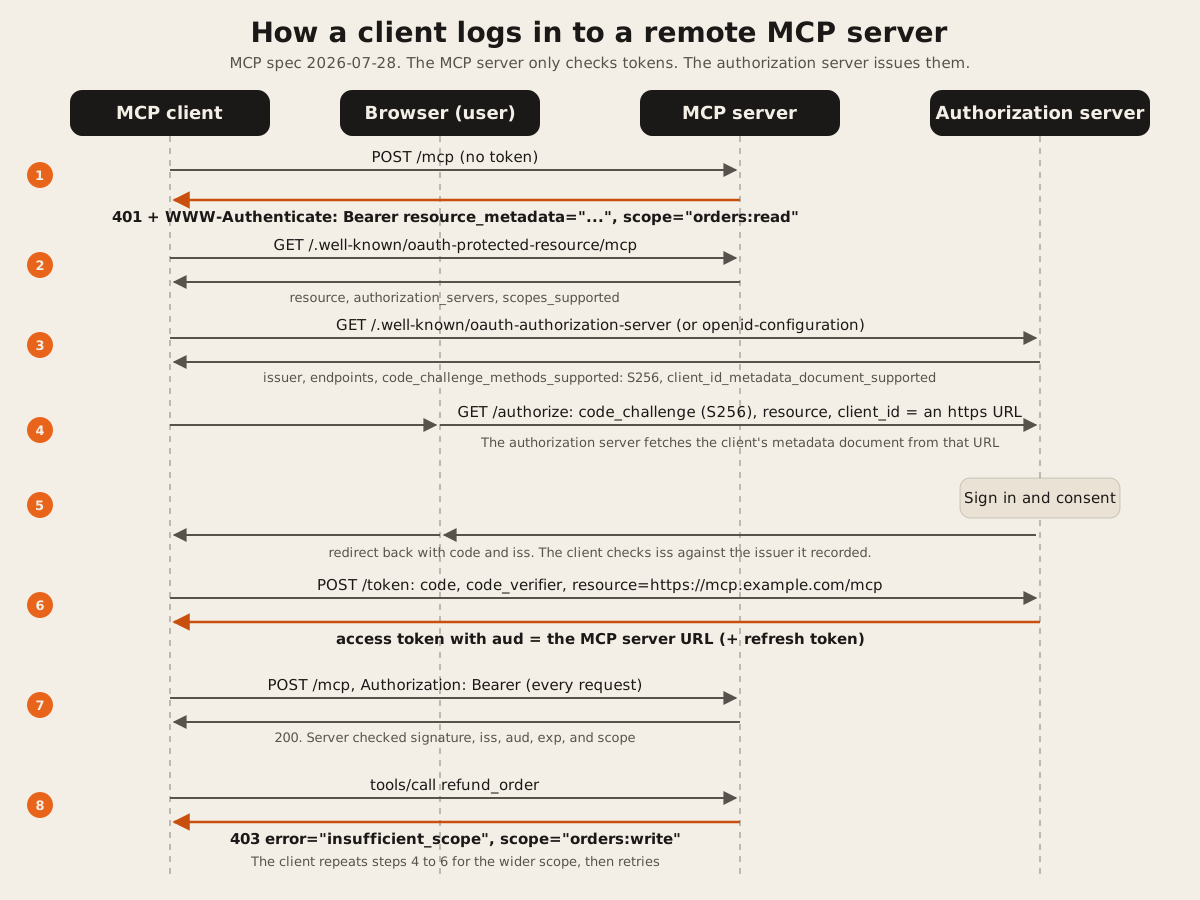
Only steps 1, 2, 7, and 8 touch your MCP server. Steps 3 to 6 happen between the client and the authorization server.
Step 1. Answer with a 401 that points to your metadata
When a request has no token, return 401 with a WWW-Authenticate header. The spec’s own example:
HTTP/1.1 401 Unauthorized
WWW-Authenticate: Bearer resource_metadata="https://mcp.example.com/.well-known/oauth-protected-resource",
                         scope="files:read"
resource_metadata tells the client where to look. scope tells it what to ask for. The spec says servers “SHOULD include a scope parameter” so clients request the least they need. Without it, clients fall back to every scope in your metadata.
Claude is strict here. Anthropic’s connector authentication docs say “A 401 is required to start sign-in, and Claude ignores a WWW-Authenticate header on a 200 response.”
Step 2. Publish Protected Resource Metadata
This is RFC 9728, and the spec says MCP servers “MUST implement” it. Serve a small JSON file at /.well-known/oauth-protected-resource plus your MCP path. For a server at https://mcp.example.com/mcp, that’s https://mcp.example.com/.well-known/oauth-protected-resource/mcp. Clients that get no pointer in the 401 try that path first, then the root.
{
  "resource": "https://mcp.example.com/mcp",
  "authorization_servers": ["https://auth.example.com"],
  "scopes_supported": ["orders:read"],
  "bearer_methods_supported": ["header"]
}
Two details break real connections:
resourcemust equal the URL the user typed, path included. Claude’s docs say it “must equal the URL as the user enters it in Claude, including any path component”.- Claude uses only the first entry in
authorization_servers. Put your main issuer first.
Keep scopes_supported small. The spec calls it “the minimal set of scopes necessary for basic functionality”, with more scopes asked for later (step 5).
Step 3. Pick an authorization server that does three things
You don’t build this part. You check that the one you pick supports these, by reading its /.well-known/oauth-authorization-server or /.well-known/openid-configuration document:
| Needs | Metadata field | Why |
|---|---|---|
| PKCE with S256 | code_challenge_methods_supported includes "S256" | Claude sends S256 on every request. OpenAI’s auth docs call servers without it “unsupported”. |
| Client ID Metadata Documents | client_id_metadata_document_supported: true | The spec’s preferred way for a client with no prior relationship to identify itself. The client’s client_id is an https URL to a JSON file. |
Audience from resource | The token’s aud claim | Clients send resource=<your MCP URL> on both the authorize and token requests (RFC 8707). The authorization server must put that value in the token so your server can check it. |
Dynamic Client Registration still works, but the 2026-07-28 changelog deprecates it “in favor of Client ID Metadata Documents”. Anthropic’s docs explain the practical cost: “DCR causes Claude to register a new client on every fresh connection, which can result in very large numbers of registered clients on your authorization server.” Claude picks CIMD only when your metadata has both client_id_metadata_document_supported: true and "none" in token_endpoint_auth_methods_supported.
If you register clients by hand instead, add these redirect URIs, checked 2026-10-13:
- Claude web, desktop, and mobile:
https://claude.ai/api/mcp/auth_callback - Claude Code: a loopback URI on any port,
http://localhost/callbackandhttp://127.0.0.1/callback, matched with the port ignored - ChatGPT:
https://chatgpt.com/connector_platform_oauth_redirectif your server sendsissin authorization responses (RFC 9207), otherwise a per-connectionhttps://chatgpt.com/connector/oauth/{callback_id}. Copy the exact value from OpenAI’s management page.
Step 4. Check every token, every time
The spec says MCP servers “MUST validate that access tokens were issued specifically for them as the intended audience” and “MUST NOT accept or transit any other tokens”. That second line rules out token passthrough, where a server forwards whatever token it got to a downstream API. The security best practices page lists what goes wrong when you skip it, including a stolen token turning your server into “a proxy for data exfiltration”.
For a JWT access token, check five things on every request:
- The signature, against the issuer’s published keys, with the algorithm pinned.
issequals your authorization server.audcontains your MCP server’s URL. This is the check most tutorials skip.expis in the future.- The token’s scopes cover the tool being called.
Any failure in 1 to 4 is a 401 with error="invalid_token". The spec says “Invalid or expired tokens MUST receive a HTTP 401 response.”
Also: tokens only ever travel in the Authorization header. The spec says access tokens “MUST NOT be included in the URI query string”.
Step 5. Ask for more scope with a 403
When a valid token lacks the scope a tool needs, don’t fail with a generic error. Return 403 with error="insufficient_scope" and the scope required. The client then runs the login again for the wider scope and retries. The spec’s example:
HTTP/1.1 403 Forbidden
WWW-Authenticate: Bearer error="insufficient_scope",
                         scope="files:write",
                         resource_metadata="https://mcp.example.com/.well-known/oauth-protected-resource",
                         error_description="File write permission required for this operation"
This lets a user start with read access and only grant write access when they first try to change something. The spec asks servers to put every scope the operation needs into one challenge, so the user isn’t sent through login twice for one action.
The code: about 100 lines, no dependencies
This is a complete resource server in Node 22, using only the standard library. It has two tools, get_order (needs orders:read) and refund_order (needs orders:write). The MCP part is a stub that answers tools/list and tools/call so you can see the auth behavior. In a real server, put the official MCP SDK handler where the stub is, because the 2026-07-28 spec also requires server/discover and other methods this sketch skips.
// An MCP endpoint that requires OAuth 2.1 tokens. Node 22 or later, no dependencies.
// The MCP server is only the resource server. Login and tokens come from your
// authorization server (Auth0, WorkOS, Keycloak, Cloudflare, or your own).
import { createServer } from 'node:http';

const RESOURCE = process.env.MCP_RESOURCE; // e.g. https://mcp.example.com/mcp
const ISSUER = process.env.AUTH_ISSUER; // e.g. https://auth.example.com
const JWKS_URL = process.env.AUTH_JWKS_URL; // e.g. https://auth.example.com/.well-known/jwks.json
const MCP_PATH = new URL(RESOURCE).pathname;
const PRM_URL = new URL('/.well-known/oauth-protected-resource' + MCP_PATH, RESOURCE).href;

// Each tool names the one scope it needs.
const TOOLS = {
  get_order: { scope: 'orders:read', run: ({ id }) => ({ id, status: 'shipped' }) },
  refund_order: { scope: 'orders:write', run: ({ id }) => ({ id, refunded: true }) },
};

// Step 2. Protected Resource Metadata (RFC 9728).
const metadata = {
  resource: RESOURCE,
  authorization_servers: [ISSUER],
  scopes_supported: ['orders:read'], // the minimum. Ask for more later with a 403.
  bearer_methods_supported: ['header'],
};

// Steps 1 and 5. The challenge for no token, a bad token, or too few scopes.
function challenge(res, status, extra = {}) {
  const params = { resource_metadata: PRM_URL, scope: 'orders:read', ...extra };
  const header = 'Bearer ' + Object.entries(params).map(([k, v]) => `${k}="${v}"`).join(', ');
  res.writeHead(status, { 'WWW-Authenticate': header, 'Content-Type': 'application/json' });
  res.end(JSON.stringify({ error: extra.error ?? 'unauthorized' }));
}

// Step 4. Verify the JWT: signature, issuer, audience, expiry.
let jwks = null;
async function getKey(kid) {
  if (!jwks || !jwks.keys.some((k) => k.kid === kid)) jwks = await (await fetch(JWKS_URL)).json();
  const jwk = jwks.keys.find((k) => k.kid === kid);
  if (!jwk) return null;
  return crypto.subtle.importKey('jwk', jwk, { name: 'ECDSA', namedCurve: 'P-256' }, false, ['verify']);
}
const b64 = (s) => Buffer.from(s, 'base64url');
async function verify(token) {
  const [h, p, s] = token.split('.');
  if (!s) return null;
  const header = JSON.parse(b64(h));
  if (header.alg !== 'ES256') return null; // pin the algorithm
  const key = await getKey(header.kid);
  if (!key) return null;
  const ok = await crypto.subtle.verify({ name: 'ECDSA', hash: 'SHA-256' }, key, b64(s), Buffer.from(`${h}.${p}`));
  if (!ok) return null;
  const claims = JSON.parse(b64(p));
  const now = Math.floor(Date.now() / 1000);
  if (claims.iss !== ISSUER) return null;
  if (![].concat(claims.aud ?? []).includes(RESOURCE)) return null; // the audience check
  if (typeof claims.exp !== 'number' || claims.exp <= now) return null;
  if (typeof claims.nbf === 'number' && claims.nbf > now + 60) return null;
  return { sub: claims.sub, scopes: String(claims.scope ?? '').split(' ').filter(Boolean) };
}

createServer(async (req, res) => {
  const path = new URL(req.url, RESOURCE).pathname;
  if (req.method === 'GET' && path.startsWith('/.well-known/oauth-protected-resource')) {
    res.writeHead(200, { 'Content-Type': 'application/json', 'Access-Control-Allow-Origin': '*' });
    return res.end(JSON.stringify(metadata));
  }
  if (path !== MCP_PATH || req.method !== 'POST') {
    res.writeHead(404);
    return res.end();
  }
  const auth = req.headers.authorization ?? '';
  if (!auth.startsWith('Bearer ')) return challenge(res, 401);
  const user = await verify(auth.slice(7)).catch(() => null);
  if (!user) return challenge(res, 401, { error: 'invalid_token' });

  let body = '';
  for await (const chunk of req) body += chunk;
  const msg = JSON.parse(body);
  const reply = (result) => {
    res.writeHead(200, { 'Content-Type': 'application/json' });
    res.end(JSON.stringify({ jsonrpc: '2.0', id: msg.id, result }));
  };

  if (msg.method === 'tools/list') {
    // List only what this token can call. The spec allows the list to vary by authorization.
    const tools = Object.entries(TOOLS)
      .filter(([, t]) => user.scopes.includes(t.scope))
      .map(([name]) => ({
        name,
        inputSchema: { type: 'object', properties: { id: { type: 'string' } }, required: ['id'] },
      }));
    return reply({ resultType: 'complete', tools });
  }
  if (msg.method === 'tools/call') {
    const tool = TOOLS[msg.params?.name];
    if (!tool) return reply({ resultType: 'complete', isError: true, content: [{ type: 'text', text: 'Unknown tool' }] });
    // Step 5. Step-up: a valid token without the right scope gets a 403.
    if (!user.scopes.includes(tool.scope)) return challenge(res, 403, { error: 'insufficient_scope', scope: tool.scope });
    const data = tool.run(msg.params.arguments ?? {});
    return reply({ resultType: 'complete', content: [{ type: 'text', text: JSON.stringify(data) }], structuredContent: data });
  }
  res.writeHead(200, { 'Content-Type': 'application/json' });
  res.end(JSON.stringify({ jsonrpc: '2.0', id: msg.id, error: { code: -32601, message: 'Method not found' } }));
}).listen(Number(process.env.PORT ?? 8787));
The tools/list filter uses a rule the 2026-07-28 tools page allows: the list “MAY vary by the authorization presented on the request”. A read-only token never even sees refund_order.
What we ran, and what came back
On 2026-10-13 we ran this file against a small test script. The script generates an ES256 key pair, serves the public key as a JWKS like an authorization server would, signs test tokens, and sends nine requests. It’s a local test with a stand-in issuer. We did not run it against Auth0, WorkOS, or another hosted provider, and no real client (Claude or ChatGPT) was involved. The output:
PASS - no token: 401 with resource_metadata | 401 Bearer resource_metadata="http://127.0.0.1:8787/.well-known/oauth-protected-resource/mcp", scope="orders:read"
PASS - metadata names the resource and the issuer
PASS - read token: 200, lists only get_order
PASS - token for another audience: 401 invalid_token
PASS - expired token: 401
PASS - wrong issuer: 401
PASS - tampered signature: 401
PASS - read token calls refund: 403 insufficient_scope | 403 Bearer resource_metadata="...", scope="orders:write", error="insufficient_scope"
PASS - read and write token calls refund: 200
9/9 passed
The “another audience” case is the one to copy into your own tests. That token was valid, signed by the right issuer, and not expired. It was issued for a different API, so the server refused it.
Before production, change three things. Use https URLs (the test used 127.0.0.1). Cache the JWKS with a time limit instead of forever. And if your provider issues opaque tokens instead of JWTs, replace verify with a call to its token introspection endpoint.
How 27 live MCP servers handle login today
We ran our MCP server checker against 36 public MCP servers on 2026-10-13, from a machine in Pakistan. 27 of them asked for login. The checker reads the 401, the protected resource metadata, and the authorization server metadata. It never logs in. Each server was checked once.
| Server | resource_metadata in the 401 | Metadata found | S256 PKCE | CIMD | DCR | scope in the 401 |
|---|---|---|---|---|---|---|
| mcp.linear.app | Yes | Yes | Yes | Yes | Yes | read write |
| mcp.notion.com | Yes | Yes | Yes | Yes | Yes | default |
| mcp.sentry.dev | Yes | Yes | Yes | Yes | Yes | No |
| mcp.canva.com | Yes | Yes | Yes | Yes | Yes | No |
| mcp.monday.com | Yes | Yes | Yes | Yes | Yes | No |
| mcp.semgrep.ai | Yes | Yes | Yes | Yes | Yes | No |
| mcp.stripe.com | Yes | Yes | Yes | No | Yes | No |
| mcp.paypal.com | Yes | Yes | Yes | No | Yes | No |
| mcp.squareup.com | Yes | Yes | Yes | No | Yes | No |
| mcp.vercel.com | Yes | Yes | Yes | No | Yes | No |
| mcp.supabase.com | Yes | Yes | Yes | No | Yes | No |
| mcp.neon.tech | Yes | Yes | Yes | No | Yes | No |
| mcp.intercom.com | Yes | Yes | Yes | No | Yes | mcp operator |
| mcp.webflow.com | Yes | Yes | Yes | No | Yes | No |
| mcp.wix.com | Yes | Yes | Yes | No | Yes | No |
| mcp.globalping.dev | Yes | Yes | Yes | No | Yes | measurements |
| bindings.mcp.cloudflare.com | Yes | Yes | Yes | No | Yes | No |
| mcp.prisma.io | Yes | Yes | Yes | No | Yes | No |
| mcp.jam.dev | Yes | Yes | Yes | No | Yes | mcp:read mcp:write |
| mcp.plaid.com | Yes | Yes | Yes | No | Yes | mcp:developer |
| mcp.zapier.com | No | Yes | Yes | No | Yes | No |
| mcp.asana.com (v2) | Yes | Yes | Yes | No | No | No |
| api.githubcopilot.com | Yes | Yes | Yes | No | No | No |
| mcp.hubspot.com | Yes | Yes | Yes | No | No | No |
| mcp.box.com | Yes | Yes | Yes | No | No | No |
| mcp.xero.com | No | Yes | Yes | No | No | No |
| mcp.atlassian.com/v1/mcp | No | No | Not reached | Not reached | Not reached | No |
What the table says:
- Every authorization server we reached supports S256. 26 of 26. PKCE is settled.
- CIMD is still rare. 6 of 27 advertise it. 21 offer DCR, which the spec now calls deprecated. Expect that to shift over the next year.
- 5 offer neither CIMD nor DCR (Asana, GitHub, HubSpot, Box, and the server at mcp.xero.com). A client needs a pre-registered client ID for those, which is why big clients get them working and a new client often can’t. We couldn’t find Xero docs for the
mcp.xero.comendpoint. Xero’s documented server is the one you run yourself. - Only 6 of 27 send
scopein the 401. The rest leave clients to request everything inscopes_supported. - One failed discovery outright. Atlassian’s
/v1/mcpanswered401with a header but noresource_metadata, and both well-known paths returned404. Clients that follow the spec can’t find its authorization server from that URL. Atlassian may expect clients to use a different URL. We checked only this one.
These are first-party servers from large companies, and most of them pass. If you’re building your own, the bar is the top six rows.
Common mistakes
- Putting the login pages in the MCP server. You can, and older guides do. But then your MCP server holds passwords, consent records, and signing keys. Use a provider and keep the MCP server small.
- Checking the signature but not the audience. Any token from the same provider, issued for any app, then works on your server.
- One giant scope. The security best practices page lists “Publishing all possible scopes in
scopes_supported” and wildcard scopes such as*orfull-accessas common mistakes. - A slow token endpoint. Claude gives discovery, registration, and token endpoints 10 seconds and refresh requests 30 seconds, then fails the connection.
- Wrong refresh error codes. Return
invalid_grantwhen a refresh token is no longer valid. Anthropic’s docs ask for that code, notinvalid_requestor a custom one. - No test for the flow end to end. Add the server as a custom connector in Claude and in ChatGPT before launch. Our checker shows whether discovery works without logging in.
FAQ
Do I need OAuth for my MCP server?
Only if the server reads or changes data that belongs to a specific user or account. A server that serves public documentation can run with no login. Claude also supports a fixed API key in a request header (in beta for some organizations), but that key belongs to the whole organization, so it can’t tell users apart.
Can my MCP server be its own authorization server?
Yes. The spec says the authorization server “may be hosted with the resource server or a separate entity.” Cloudflare’s remote MCP guide shows one way. You then own login, consent pages, key rotation, and refresh tokens. Most small teams are better off with a provider.
What is the difference between DCR and CIMD?
With Dynamic Client Registration, each client calls your /register endpoint and gets a new client ID, so one popular client can create thousands of records. With a Client ID Metadata Document, the client’s ID is an https URL to a JSON file it hosts, such as Claude Code’s published document. Your authorization server fetches that file and checks the redirect URIs. The 2026-07-28 spec prefers CIMD and marks DCR deprecated.
Why does Claude say “Couldn’t reach the MCP server” after I added OAuth?
Most often, discovery failed. Anthropic’s docs describe the usual symptom: your MCP server gets the first request, but your authorization server sees no traffic at all. Check that the 401 has a resource_metadata pointer, that the metadata resource matches the URL exactly, and that your authorization server’s well-known document is reachable from Anthropic’s IP range.
Does the MCP server need to handle refresh tokens?
No. Refresh happens between the client and the authorization server. Your server just sees a new access token. The spec even says MCP servers “SHOULD NOT include offline_access” in their scope challenge or metadata.
If you want a server with login built for your product, we build MCP servers from a written scope, billed hourly or by milestone. For what a server should and shouldn’t expose, read when a business needs an MCP server and ChatGPT app, MCP server, or Custom GPT. To pick a host, see where to host an MCP server. To judge someone else’s server before you connect it, use our 12-point MCP server safety checklist.