
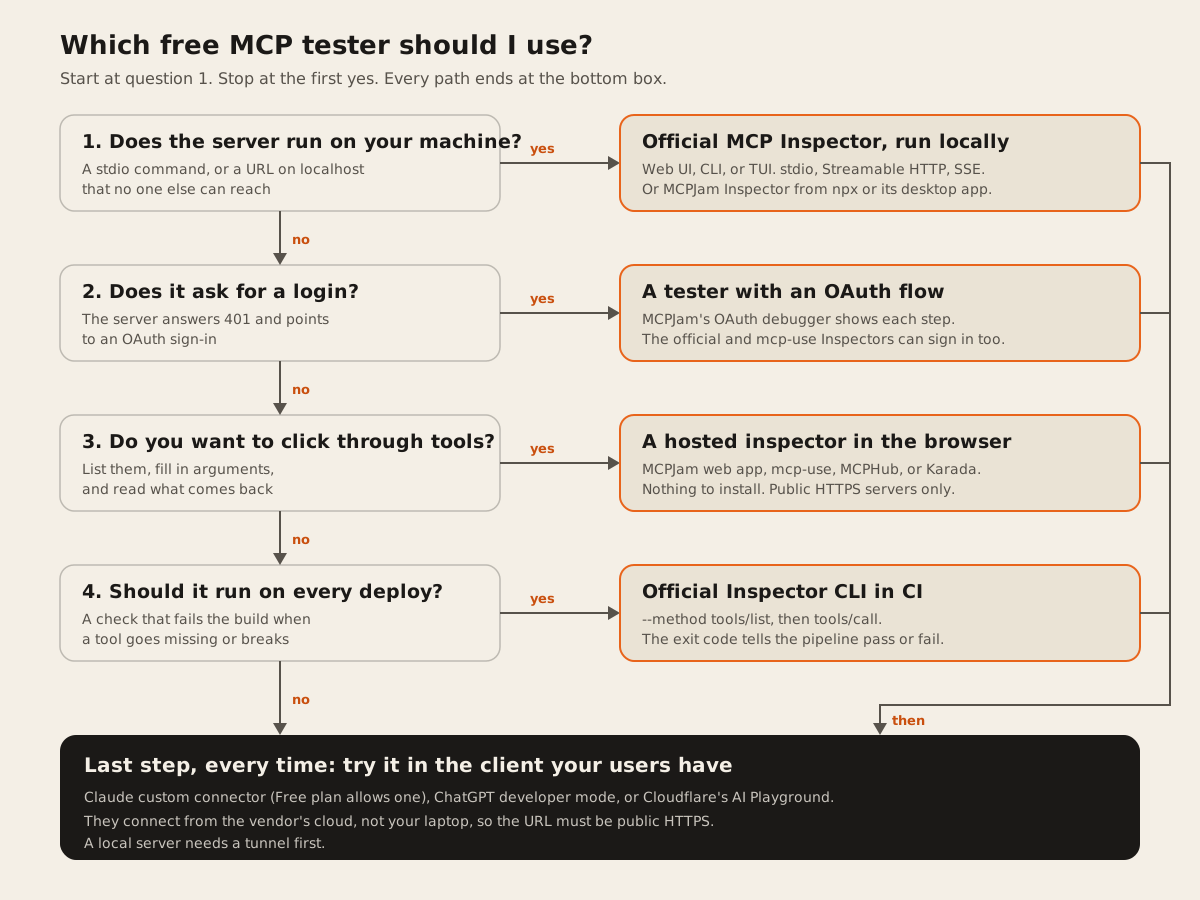
Yes. The official MCP Inspector is free and open source, and it tests local and remote MCP servers: it connects, lists the tools, and calls them. If you’d rather not install anything, hosted inspectors from MCPJam, mcp-use, MCPHub, and Karada do the same for a public HTTPS server in your browser.
Then do one last test in the client your users have, such as Claude or ChatGPT. An inspector proves the server speaks MCP. Only the real client proves a model can find and use your tools from where that client runs.
Who this is for: developers and technical founders checking an MCP server before they hand it to users, and anyone checking a vendor’s server before connecting it. Who should use something else: if you need load tests, a security audit, or evals that score a model’s tool choices over hundreds of prompts, these free testers are only a start. MCPJam has evals, and the official Inspector CLI has a load-test flag, but neither replaces a test plan.
We opened each tool’s own page or repo on 2026-11-10. When we asked ChatGPT this question, the pages it cited were mostly each tool’s own landing page. None of them says which testers can’t do OAuth, which can’t reach a local server, or which only list tools without calling them. That’s what the tables below are for.
Which free tools can test an MCP server?
How we compared them: where it runs, which transports it speaks, whether it can sign in with OAuth, whether it calls tools or only lists them, its license or price, and its limits. Every cell comes from the tool’s own page or its maker’s listing, checked 2026-11-10. “Not stated” means the page doesn’t say. It doesn’t mean the feature is missing.
The order is by what each tool can reach, from the most (local and remote) to the least. It isn’t a score.
| Tool | Where it runs | Transports | OAuth | Calls tools? | License, price | Main limit |
|---|---|---|---|---|---|---|
| Official MCP Inspector | Local: web UI, CLI, TUI | stdio, Streamable HTTP, SSE | Yes | Yes | Open source, free | Needs Node. Runs code on your machine |
| MCPJam Inspector | Hosted web app, npx, desktop app, Docker | HTTP and stdio locally. Hosted is HTTPS only | Yes, with a step-by-step debugger | Yes, plus LLM chat and evals | Apache 2.0. Core free, hosted model use costs credits | Hosted app has no stdio or tunnel |
| mcp-use Inspector | Hosted, npx, Docker | Streamable HTTP only | Yes, popup sign-in | Yes, plus chat with your own key | MIT, free | No stdio. Telemetry on by default |
| MCPHub Playground | Hosted | Streamable HTTP, SSE | Not stated. Custom headers only | Yes | Free, no account | Remote only. stdio needs a tunnel |
| Karada Inspector | Hosted | Streamable HTTP, SSE | Not stated | Yes | Free, no account | Made by a vendor that sells MCP hosting |
| MCP Playground Online | Hosted | SSE or Streamable HTTP | Not stated | Yes | ”Free to start” | Says little about limits |
| MCP Showcase Inspector | Hosted, runs on their side | Streamable HTTP, then SSE | No. None or a bearer token | Lists only | Free, small daily limit | Calling tools needs a sign-up |
Official MCP Inspector
The official MCP Inspector is the reference tool from the MCP project. The docs describe it as “three clients behind one binary”: a web UI, a CLI “for CI, shell pipelines, and coding agents”, and a TUI for the terminal (MCP docs, checked 2026-11-10).
- Runs: locally through
npx. The docs ask for “Node 22.19.0 or newer”. The README lists exact patched releases on the 22, 24, and 26 lines. - Transports: the CLI help in version 2.12.0 lists
--transportas “sse, http, or stdio”, and picks one from the URL when you leave it out (our run, 2026-11-10). - OAuth: yes. The CLI has flags for a static client ID, a client secret, and a client ID metadata document, and the authorization page says it “implements the full authorization flow in all three clients.” For CI,
--stored-auth-onlyuses a saved token and “fails immediately otherwise,” so a pipeline never waits on a login. - Calls tools: yes.
--method tools/call --tool-name ... --tool-arg ...in the CLI, and a Tools tab in the web UI. - License, price: free. The README says the project is moving from MIT to Apache 2.0 for new code.
- Limits: it runs on your machine and can start processes. The security page says “stdio servers run as you” and that the web backend’s API token “is what stands between that capability and anything else that can reach the port.” It binds
127.0.0.1by default. On a machine with no OS keychain, it saves OAuth tokens to a file that is “plaintext unless you supply a key.”
One warning if you still run version 1. GitHub advisory GHSA-4fc4-wcmh-4g86, rated Critical (CVSS 9.6) and published Oct 21, 2026, says “A malicious remote MCP server can abuse the OAuth callback to switch MCP Inspector from the original remote HTTP transport to stdio and execute an arbitrary local command.” It affects 0.13.0 through 1.0.2. The fix is 1.0.3. Version 2 is the current line.
MCPJam Inspector
MCPJam Inspector has the longest feature list of the seven. The README calls it “the open-source testing & evaluations platform for MCP server developers who ship” (GitHub, checked 2026-11-10).
- Runs: a hosted web app at app.mcpjam.com,
npx @mcpjam/inspector@latest(Node 20+), Mac and Windows desktop apps, and Docker. - Transports: “HTTP/S and local STDIO servers.” The hosted app is HTTPS only and has “no STDIO, tunneling, skills, or tasks (those need the local inspector).”
- OAuth: an OAuth debugger that walks the flow “step-by-step to find the source of errors”, with guided checks for spec versions 2025-03-26 through the 2026-07-28 draft. It supports dynamic registration, pre-registered clients, and client ID metadata documents.
- Calls tools: yes, “with full JSON-RPC logs.” It also has an LLM chat, evals, and an emulator for ChatGPT app widgets.
- License, price: Apache 2.0. The feature page says “The client, Inspector, core CLI, and SDK are open source and free, forever.” The pricing page adds that “Hosted model usage consumes credits.”
- Limits: the hosted app can’t reach a local server. The local version has a built-in tunnel so ChatGPT, Claude, and Gemini can reach a local server.
mcp-use Inspector
The mcp-use Inspector is a hosted and local inspector from the mcp-use project (GitHub, docs, checked 2026-11-10).
- Runs: hosted at inspector.mcp-use.com, which sent us a 301 redirect to inspector.manufact.com on 2026-11-10. Also
npx @mcp-use/inspector, Docker, and mounted at/mcp/inspectoron mcp-use dev servers. - Transports: the README says “The Inspector supports Streamable HTTP only.”
- OAuth: “Built-in OAuth flow handling with popup authentication.” The docs also cover servers where some tools are public and some need a login.
- Calls tools: yes. You “Choose a tool, fill the generated form, and run it.” Chat works with your own OpenAI, Anthropic, Google, or Ollama key, which “is stored locally in your browser and never sent to our servers.”
- License, price: “MIT © mcp-use”, free.
- Limits: no stdio. The README says telemetry goes to PostHog by default, and you turn it off with
MCP_USE_ANONYMIZED_TELEMETRY=false.
MCPHub Playground
MCPHub Playground calls itself “a free MCP inspector for remote Model Context Protocol servers” (MCPHub, checked 2026-11-10).
- Runs: in your browser. “Requests go direct from your browser. A same-origin proxy is used only when the server blocks CORS.”
- Transports: Streamable HTTP, and “SSE (legacy) only when the server still exposes the older HTTP+SSE transport.” “Stdio-only servers are not reachable from the browser until you publish them behind a public tunnel URL.”
- OAuth: not stated. You can add headers such as
Authorization, which “stay in your session for the request.” - Calls tools: yes, “call them with JSON arguments.”
- Price: free, “No account required.”
- Limits: remote servers only. “Private network and metadata addresses are blocked on the proxy.”
Karada Inspector
Karada Inspector is a “Zero-install interactive testbed” (Karada, checked 2026-11-10).
- Runs: in your browser. Requests are “executed directly from your browser sandbox session.”
- Transports: “select Streamable HTTP or SSE in the transport dropdown.” The page lists protocol 2026-07-28.
- OAuth: not stated.
- Calls tools: yes. It runs
tools/list,resources/list, andprompts/liston connect, andtools/callon demand. - Price: “Free Developer Tool · No Account Required.”
- Limits: Karada sells a service that generates and hosts MCP servers from OpenAPI specs, and the inspector links to it. That’s fine. Just know who made it.
MCP Playground Online
MCP Playground Online is a browser toolkit, listed by its maker on PeerPush as an “All-in-one browser toolkit for MCP testing & security” (own site, checked 2026-11-10).
- Runs: in your browser, “without
npx, Node, or local setup.” - Transports: the PeerPush listing says it connects “via SSE or Streamable HTTP.” Its own site doesn’t name transports.
- OAuth: not stated.
- Calls tools: yes, “call them with real arguments, watch the raw JSON-RPC.”
- Price: “free to start.” The site doesn’t say what costs money.
- Limits: the security scan is “35+ checks” on its own site and an “18-point security audit” on PeerPush. Trust the newer page, and read the checks yourself.
MCP Showcase Inspector
MCP Showcase Inspector is a hosted checker that lists what a server exposes (MCP Showcase, checked 2026-11-10).
- Runs: on their side. The page says “We run the handshake” and “Results are stored.”
- Transports: “Streamable HTTP first, SSE as a fallback,” and it reports the negotiated protocol version.
- OAuth: no. Auth is “None (public server)” or “Bearer token”. On a 401 it only “reports that the server requires OAuth.”
- Calls tools: no. It lists tools “with full schemas.” Calling them is in a separate playground behind “Start for Free.”
- Price: “Inspecting a server is free and anonymous,” with “a small daily limit per visitor.”
Should you also test in Claude, ChatGPT, or Cloudflare’s AI Playground?
Yes. Claude, ChatGPT, and Cloudflare’s AI Playground are fair final tests, and you should run at least one. They answer the question an inspector can’t: does a real model, in a real client, connecting from the vendor’s network, pick your tools and get useful results? All three are remote clients, so a server on localhost or behind a VPN won’t connect. Use a tunnel or deploy first. If you haven’t picked a host yet, see where to host an MCP server.
They’re weaker for debugging. When a connection fails, an inspector shows you the raw requests. A chat client mostly tells you it couldn’t connect. So test in an inspector first, then here.
| Client | How to add a server | Plans | Reaches your server from | What to watch |
|---|---|---|---|---|
| Claude custom connector | Customize, Connectors, add a custom connector, paste the URL | Free, Pro, Max, Ultra, Team, Enterprise. “Free users are limited to one custom connector." | "Anthropic’s cloud infrastructure, rather than from your local device” | OAuth options and fixed request headers. To edit a connector, remove it and add it again |
| ChatGPT developer mode | chatgpt.com/plugins, plus button, Add custom MCP server | Depends on your plan and workspace. “Account and workspace policies apply" | "a public HTTPS endpoint or Secure MCP Tunnel” | Press Refresh after you change tools, then start a new chat |
| Cloudflare AI Playground | Open playground.ai.cloudflare.com, enter the URL, Connect | No plan named on the page | A “fully remote MCP client”, per Cloudflare | Signs in “if required.” Good neutral check with no paid account |
Notes from each page, checked 2026-11-10:
- Claude. The help article says the server “must be reachable over the public internet from Anthropic’s IP ranges”, and that servers “behind a VPN, or blocked by a firewall won’t connect.” Local servers set up in
claude_desktop_config.jsonare “a separate mechanism” and “aren’t available in Cowork or claude.ai.” So a server that works in Claude Desktop’s local config can still fail as a connector. - ChatGPT. OpenAI’s connect guide says public endpoints should support “streamable HTTP, typically at
/mcp”, and that for local testing “a development tunnel or another HTTPS forwarding service can also provide an endpoint.” The Secure MCP Tunnel guide covers private servers. We couldn’t confirm the plan list on the official page: OpenAI’s help center article on developer mode returned HTTP 403 to our fetch. Check your plan there before you count on it. - Cloudflare. The docs say to “enter your MCP server URL, and click Connect”, and then the tools “will be available to the AI model in the chat.” Cloudflare’s launch post calls it a “fully remote MCP client” with “built-in authentication support.” Neither page states a cost.
If your server needs a login, test the sign-in in an inspector before you try these clients. Our OAuth 2.1 guide for MCP servers covers the server side.
What the official Inspector found on our own server
The official MCP Inspector listed all 8 tools on our server in 4.5 seconds, called one, and found 3 schema warnings that a tool-list check misses. We ran the Inspector CLI, pinned to version 2.12.0, against our public MCP server on 2026-11-10, from a Windows machine:
pnpm dlx @modelcontextprotocol/inspector@2.12.0 --cli https://dawloom.com/mcp --method tools/listWhat came back:
- Exit code 0. We didn’t pass
--transport. The CLI picked HTTP from the/mcppath. - 8 tools, as 25,036 bytes of JSON. That count includes each tool’s input schema, output schema, annotations, and
_meta. - One line on stderr: “Schema portability: 0 errors, 3 warnings across 2 tools.”
- Time: 4.5 seconds of wall time, most of it pnpm starting up. The first run, which downloaded the package, took 42 seconds.
We re-ran it with --strict to see the warnings. All three were about our output schemas, not input schemas. Three fields use a type array such as ["object","null"]: gps in read_image_metadata, and email_domain and help_url in check_launch_readiness. The Inspector says this “is legal JSON Schema” but “less portable”, because a client that maps schemas onto a single-type dialect “may reject the tool or drop the constraint”, and it suggests anyOf instead. That’s a real finding about our own server. A tool list check alone wouldn’t catch it.
Then we called one tool:
pnpm dlx @modelcontextprotocol/inspector@2.12.0 --cli https://dawloom.com/mcp --method tools/call --tool-name lookup_ai_models --tool-arg 'models=["claude-opus-5-5"]'It exited 0 in 4.0 seconds and returned 2,033 bytes: a text block with the model’s prices and dates, and the same data as structuredContent. That’s the step most hosted checkers skip. A server can list tools perfectly and still fail when one is called.
Where Dawloom fits
We built a free MCP server checker (how it works: MCP server checker post). It tests one public HTTPS URL for transport, handshake, protocol version, the tool list and schema size, OAuth metadata, CORS, response time, and error shapes, and gives a pass, warn, or fail for each.
What it does not do: it never calls your tools, so it can’t tell you a tool returns the right data. It blocks localhost and private networks, so it can’t test a local or stdio server. It never sends a token, so it stops at the login on an OAuth server. It has no chat, no evals, and no schema portability checks. For all of those, use the testers above.
We ran it on our own server on 2026-11-10 with POST https://dawloom.com/api/v1/mcp-check. It answered HTTP 200 in 0.51 seconds with grade pass: 11 passed, 0 warnings, 0 failed, 2 skipped (OAuth metadata, not needed), 1 info (no token needed). It found 8 tools with 2.8 KB of input schema, protocol 2026-07-28 plus three older versions, a 204 CORS preflight, -32601 for an unknown method, and -32700 for broken JSON. It reported a 2 ms handshake, but ignore that number: when the target is dawloom.com, our Worker answers the check itself, with no network in between. It did not flag the three schema warnings the Inspector found.
Dawloom is a small software team. We bill $30 an hour or by milestone (pricing). Our public MCP work is that server at dawloom.com/mcp and our free tools. If you want help building or fixing an MCP server, see MCP server development. If you can test and fix it yourself, the free tools above are enough.
FAQ
Is there a free tool to test whether an MCP server works?
Yes. The official MCP Inspector is free and open source. It runs locally, speaks stdio, Streamable HTTP, and SSE, and calls tools. For a public HTTPS server, hosted options such as the MCPJam web app, mcp-use Inspector, MCPHub Playground, and Karada work in the browser with nothing to install.
How do I test an MCP server locally?
Run the official Inspector with your server’s start command, for example npx @modelcontextprotocol/inspector node path/to/server/index.js. Add --cli and --method tools/list for a scriptable check. MCPJam’s npx and desktop versions also reach local servers. Hosted inspectors can’t, unless you put the server behind a tunnel.
Why does my MCP server work in the Inspector but not in Claude?
Usually because the Inspector ran on your machine and Claude didn’t. Claude’s help article says connectors connect “from Anthropic’s cloud infrastructure, rather than from your local device”, so localhost, a VPN, or a firewall blocks it. Deploy the server or use a tunnel, then add the public HTTPS URL.
How do I test MCP OAuth?
Use a tester that can sign in: MCPJam’s OAuth debugger shows each step, and the official and mcp-use Inspectors both run the flow. Then add the server to Claude or ChatGPT and sign in there too, because each client signs in its own way. Claude, for example, offers three OAuth client options. For the server side, see how to add OAuth 2.1 to an MCP server.
Is the MCP Inspector safe to run?
Run version 2, and keep it updated. Version 1 up to 1.0.2 had a critical advisory where a malicious server could make it run a local command. Even on version 2, the security page says stdio servers “run as you”, so only start servers you trust. Before you connect someone else’s server, run through our 12 checks for third-party MCP servers.