
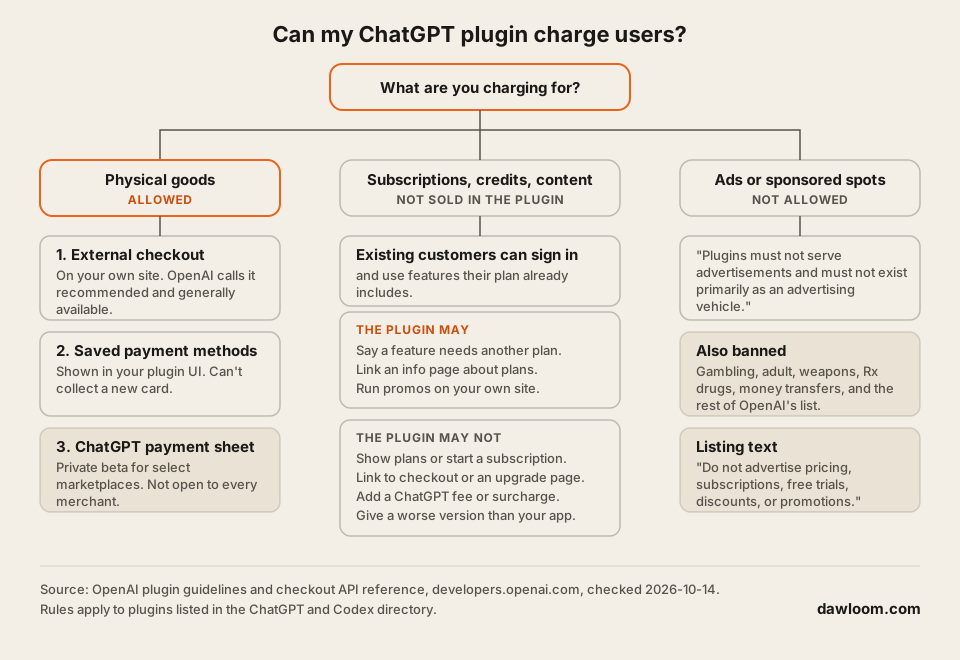
Only for physical goods. A ChatGPT app, which OpenAI now ships as a plugin, may sell physical products with checkout on your own site, but it may not sell subscriptions, credits, tokens, or digital content. Your existing paying customers can sign in and use what their plan already includes, and that’s the main way a SaaS earns from a plugin today.
We read every rule below in OpenAI’s plugin guidelines and checkout docs on 2026-10-14, and we quote them so you can check the exact words.
Who this is for: a SaaS founder or product lead who wants to know if a ChatGPT plugin can make money before paying to build one. Who should look elsewhere: if you only want ChatGPT to read your own company data, you don’t need a public plugin, and selling doesn’t come into it. See how to connect company data to ChatGPT. If you’re choosing between a plugin, an MCP server, and a Custom GPT, read that comparison first.
Many “monetize your ChatGPT app” articles that rank today predate these rules, or guess at a revenue share. We found no revenue share or developer payout in OpenAI’s plugin docs.
The rule in OpenAI’s words
The commerce section of the plugin guidelines opens with this:
“Currently, plugins may conduct commerce only for physical goods.”
The banned list is “subscriptions, digital content, tokens, or credits”, and the ban holds “whether offered directly or indirectly (for example, through freemium upsells).”
Then it carves out room for SaaS products that people already pay for:
“Users may sign in to an existing paid account and access features already included in their subscription. Plugins must not display subscription plans, initiate new subscriptions, or promote upgrades.”
The checkout docs say the same, with a hint that it may change: “While current approval is limited to plugins for physical goods purchases, we are actively working to support a wider range of commerce use cases” (checkout docs). There’s no date for that.
What a SaaS plugin may and may not show
Each row quotes the plugin guidelines, checked 2026-10-14.
| What you want to do | Allowed? | OpenAI’s words |
|---|---|---|
| Let paying customers sign in and use their plan | Yes | ”Users may sign in to an existing paid account and access features already included in their subscription.” |
| Tell a user a feature needs a higher plan | Yes | ”Explain that a certain feature is not available with the user’s current plan or entitlement.” |
| Link to a page that describes your plans | Yes | ”Link to an informational page describing available plans or entitlement options.” |
| Show a pricing table or plan picker in the plugin | No | ”Plugins must not display subscription plans, initiate new subscriptions, or promote upgrades.” |
| Link straight to checkout or an upgrade page | No | ”Link directly to a checkout or other transactional page.” and “Link to a page that explicitly initiates the process to upgrade, subscribe, or complete a purchase.” |
| Sell credits, tokens, or a freemium upgrade | No | ”whether offered directly or indirectly (for example, through freemium upsells)“ |
| Charge ChatGPT users more than other users | No | ”Plugins must not apply ChatGPT-specific fees, surcharges, or other pricing that penalizes users for accessing a service through ChatGPT.” |
| Give ChatGPT users a cut-down version | No | ”If the same feature in your plugin is also available through your external website or application, you must not provide a worse version through your plugin.” |
| Run a discount on your own site | Yes | ”Temporary discounts and promotional offers on other platforms are permitted.” |
| Mention price or a free trial in the listing | No | ”Do not advertise pricing, subscriptions, free trials, discounts, or promotions.” |
| Show ads | No | ”Plugins must not serve advertisements and must not exist primarily as an advertising vehicle.” |
| Ship a demo to drive sign-ups | No | ”Trial or demo plugins will not be accepted.” |
Two rows catch SaaS founders out. The “informational page” link must not start an upgrade, so a pricing page with a big “Upgrade now” button that opens checkout is a risk. And the “no worse version” rule means you can’t keep your best features out of ChatGPT to push people back to your app, if the same feature exists on your website.
Selling physical goods: three ways to take the money
If you sell physical products, OpenAI’s checkout docs describe three paths.
| Path | Status on 2026-10-14 | What it means |
|---|---|---|
| External checkout | ”the recommended and generally available approach” | Your plugin shows products, then sends the buyer to checkout on your own site. “Payment, billing, taxes, refunds, and compliance are handled entirely on your domain.” |
| Saved payment methods | In the docs, no beta label | The buyer pays inside ChatGPT with a card already saved with you. It “can only display saved payment methods and cannot collect new payment method credentials.” |
| ChatGPT payment sheet | ”private beta" | "limited to select marketplaces today and is not available to all users.” Your widget calls requestCheckout, ChatGPT shows the sheet, and your complete_checkout tool charges the token through your payment provider |
The guidelines call the payment sheet “Instant Checkout, which is currently in beta” and say “standard external checkout is the required approach” until it opens up. They also say “No other third-party checkout solutions may be embedded or hosted within the plugin UI.” So you can’t drop a Stripe or PayPal checkout widget into your plugin’s screen.
The payment sheet works with six payment providers: Adyen, Checkout.com, Fiserv, PayPal, Stripe, and Worldpay. Only merchants “with a PCI DSS Level 1 certificate” can receive raw card details through the Agentic Commerce Protocol. OpenAI’s checkout docs don’t list a fee for the payment sheet.
Getting products to show up in ChatGPT shopping is a separate program. OpenAI’s product feed guide says “Onboarding product feeds in ChatGPT is currently available to approved partners.”
Even physical goods have limits. The guidelines ban a long list, including adult products, gambling, prescription drugs, nicotine, weapons, and “Execution of money transfers, crypto transfers, or investment trades.”
How a SaaS can still earn from a plugin
None of these are sales inside ChatGPT. They’re the ways the rules leave open.
- Make the plugin worth signing in for. Paying customers get their real features in ChatGPT. That keeps them using you. It’s a retention play.
- Let non-customers create a free account. The rules ban selling inside the plugin, not free sign-ups. A user who signs up and later pays on your website is a normal customer. Don’t build the plugin as a teaser: “Trial or demo plugins will not be accepted.”
- Explain locked features honestly. When a feature needs a higher plan, say so and link an informational plans page. Don’t link checkout.
- Price the same everywhere. No ChatGPT surcharge, and no cheaper plan that’s only for ChatGPT users of your app.
- Sell the paid plan where you already sell it. Your own site, your own Stripe subscription flow, your own app.
One cost works in your favour. ChatGPT runs the model, so the plugin doesn’t add model tokens to your bill. You pay to host the MCP server and its calls to your backend. If your product also calls a model on its own, our guide on how to price an AI SaaS covers seat versus token pricing.
Declaring commerce when you submit
The plugin package has a field for it. OpenAI’s sample plugin.json includes this under review:
"commerce": false,
"commerce_description": "This plugin does not sell products or process payments."
OpenAI’s field reference says commerce is “Whether the app supports commerce” and that “This declaration doesn’t accept legal terms” (submission guide). If your plugin sells physical goods, set it to true and describe the checkout flow. Our guide to submitting an MCP server to the ChatGPT and Claude directories covers the rest of the review.
Is Claude any different?
Claude’s directory is stricter on money and quieter on subscriptions. Anthropic’s Software Directory Policy does not allow “Software that transfers money, cryptocurrency, or other financial assets, or executes financial transactions on behalf of users”, or software that “serves advertisements, sponsored content, paid product placements.” The submission form also has a required acknowledgment on “financial transactions” (Anthropic, submit a connector).
The policy we read says nothing about subscriptions, plan pages, or upgrade links. Connectors that act on a user’s account log in with OAuth 2.0, so a paying customer of your SaaS can connect their account. If you plan to show any pricing inside Claude, ask Anthropic first.
FAQ
Can I sell subscriptions in a ChatGPT app?
No. Plugins “may conduct commerce only for physical goods”, and the guidelines name “subscriptions, digital content, tokens, or credits” as not allowed. Users who already pay you can sign in and use their plan.
Can my ChatGPT plugin link to my pricing page?
Yes, if it’s an informational page. The plugin may “Link to an informational page describing available plans or entitlement options.” It may not link to checkout or to a page that starts an upgrade.
What is ChatGPT Instant Checkout?
It’s OpenAI’s in-chat payment sheet. The guidelines call it “currently in beta” and “available only to select marketplace partners.” Everyone else uses external checkout on their own site.
Does OpenAI pay developers for plugin usage?
We found no revenue share or payout program in OpenAI’s plugin docs on 2026-10-14. You earn from your own customers, outside ChatGPT.
Can I charge ChatGPT users a higher price?
No. “Plugins must not apply ChatGPT-specific fees, surcharges, or other pricing that penalizes users for accessing a service through ChatGPT.”
If you want a plugin that serves your paying customers inside ChatGPT and Claude, see how we build MCP servers and AI SaaS products, billed hourly or by milestone.