
For a retailer with two or more stores, the closest Square alternatives are Lightspeed Retail (X-Series) and Shopify POS. Both document stock transfers between stores and per-location reports, and Lightspeed also records serial numbers at the sale. If you want to keep your own card processor, look at KORONA POS or Odoo, and only build a custom POS when per-unit tracking, offline stock counts, or your own workflows matter more than a ready product.
Who this is for: owners and ops leads running 2 to 50 retail stores on Square, or choosing a first POS for a chain. Who should look elsewhere: restaurants (look at restaurant systems, including Toast), and single-store shops, which rarely need anything Square’s free plan lacks.
How we checked
We read each vendor’s own pricing pages and help docs on 2026-10-13. Every claim below links the page it came from. We did not run trial accounts, so this is what vendors document, not what we measured in a store. Where a vendor’s docs say nothing about a feature, we write “not documented”. That doesn’t always mean the feature is missing. It means you should ask for it in writing before you sign.
The comparisons that rank for this question today mostly come from payment processors and POS vendors ranking themselves. The two we read closely (Coastal Pay and ShelfPerks) give no vendor links or check dates, and neither covers serial numbers or what happens to stock counts offline. Those are the gaps this page tries to fill.
Prices are US list prices, software only, unless we say otherwise. Card rates are for in-person payments.
The comparison matrix
Scroll sideways on a phone. Each cell starts with a label. “Catch” means the vendor documents it with a limit you should know about. “Not documented” means we couldn’t find it in the vendor’s own docs.
| Vendor | Stock transfers between stores | Serial or IMEI tracking | Offline selling and stock counts | Per-location reports | Hardware | Payment processing | Price per location |
|---|---|---|---|---|---|---|---|
| Square (Plus, Premium) | Catch Draft, pending, partially received, completed. Created in the Dashboard only. Pricing page lists it under Premium, help article says Plus and Premium. Help, pricing | Not documented Not on the pricing or retail pages. Pricing | Catch Cash and offline cards. Upload within 72 hours (Register, Terminal, Handheld) or 24 hours (Readers, Stand). Stock counts offline: not documented. Help | Yes Location-specific reporting. Up to 300 locations per account. Help | Open No Square hardware needed to take payments. Readers work with iOS 17.1+ or Android 7.0+. Compatibility | Square only 2.6%, 2.5% or 2.4% + 15¢ by plan. Using another card processor: not documented. Pricing | $0, $49 or $149 a month. Plus and Premium are charged per location. Pricing |
| Shopify POS (Pro) | Catch Ready to ship commits stock at the origin. In progress shows it as incoming at the destination. POS can fulfil and receive, not create. Needs POS Pro and internet. Help, POS | Not documented Not in the help center. Shopify points to third-party apps such as Workmate. Shopify | Catch Opt-in offline cards with device and transaction limits. Orders and stock don’t sync until you reconnect. No returns, exchanges or voids offline. Help | Yes Total sales by POS location report. Help | Open Your own iOS or Android devices. Minimums rise in 2027. Help | Catch Shopify readers need Shopify Payments. Another terminal can be logged as a custom payment method, with no Shopify transaction fee. Help | A Shopify plan from $29 a month (US price, billed yearly; Shopify shows prices by country), plus $89 a month per POS Pro location, billed yearly. Pricing |
| Lightspeed Retail (X-Series) | Yes Pick source and destination outlets, scan or add from reorder points, then receive at the destination. Help | Serial: yes Serial numbers are added per outlet and recorded on the sale. IMEI isn’t named. Help | Catch Cash sales queue and sync later. Can’t view inventory offline. Offline cards only on the Lightspeed Payments Smart Terminal, in beta. Help, cards | Yes Inventory reports by outlet, including stock on transfer. Help | Open A browser on Windows or Mac, or the iPad app. Support covers only listed peripherals. Help | Catch Third-party processors are mentioned in the docs. Offline cards need Lightspeed Payments. Help | $89, $149 or $289 a month billed yearly ($109, $179, $339 monthly). Each extra location costs the base price again. Pricing |
| Clover (retail) | Not documented The multi-location dashboard keeps “stock quantities in sync”. We found no help article on transfers. Help | Not documented Not on the retail pricing page. Pricing | Catch Offline cards for up to 7 days, with per-payment and total limits set per device. Stock counts offline: not documented. Help | Yes Multi-location sales reports. Help | Clover devices Retail plans are sold as Clover device bundles. Other hardware: not documented. Pricing | Clover only 2.6% + 10¢ (Basic) or 2.3% + 10¢ (Standard, Advanced). Accounts are approved by First Data. Pricing | Standard bundle: $1,899 + $84.95 a month, or $180 a month for 36 months. Per-location billing: not documented. Pricing |
| Heartland Retail | Yes Pending request, awaiting pick, then in transit once you complete the shipment. Help | Not documented Not in the help center or retail pages. Retail page | No offline mode A web app that needs an active connection. Many stores “revert to hand slips”. Help | Yes Splits sales by where the item shipped from and where it was bought. Help | Catch Existing hardware is fine, but EMV readers must come from a supported processor. Help | Catch Supported: Clover, eConduit, Vantiv. A standalone terminal means a custom payment type. Fees: not documented. Help | $89 a month per selling station. No charge per user. Pricing, billing |
| KORONA POS | Yes A stock order takes stock out of the source. A stock receipt books it in at the target. Manual | Catch Serial numbers can be scanned at the POS and put on the receipt. Per-unit stock tracking: not documented. Manual | Catch The terminal works without the cloud. Sales data, stock receipts and gift cards wait for the connection. Offline cards: not documented. FAQ | Plus tier ”Multi-location inventory tools and reports” are in Plus only. Pricing | Not documented The pricing page links a hardware quote builder only. Pricing | Your choice ”Processing agnostic”. KORONA “never takes a percentage of your sales”. Pricing | $59, $79 or $99 a month per terminal. Multi-location needs Plus ($99). Pricing |
| Odoo POS + Inventory | Yes Routes resupply stores from a central warehouse and create inter-warehouse transfers on their own. Docs | Serial: yes Adding a tracked product in the POS imports its serial or lot number. IMEI isn’t named. Docs | Catch Orders are cached in the browser and sync on reconnect. No real-time stock sync and no payment terminals offline. Docs | Yes Order reports show which point of sale made each order. Docs | Open Terminals, drawers, displays, scales, scanners and printers, some through an IoT box. Docs | Your choice 13 terminal providers, including Adyen, Stripe, Worldline and Viva.com. Docs | Per user: $31.10 (Standard) or $61.00 (Custom) a user a month, billed yearly, as shown to US visitors ($24.90 and $49.10 for the first 12 months). Odoo prices differ by country. More than one company forces Custom. Pricing |
| Custom build | You design it Any states you need, such as damaged in transit or partial receipt with a reason. | You design it One record per unit, with status and location. Why it matters | You own it Local stock and a sync queue can be built and tested. So can every conflict it creates. | Yes Any report your data supports. | Open Whatever devices you choose to support. | Your choice Any processor with an API. Card data handling still needs a PCI plan. | No per-location fee. You pay for the build, hosting and upkeep. |
All sources checked 2026-10-13. US list prices. Square and Clover card rates are for in-person payments on the vendor’s own processing.
Three things in that table surprised us. Square’s own pages disagree on which plan includes transfers. Heartland Retail has no offline mode at all. And no vendor names IMEI tracking, even the ones that track serial numbers. If you sell phones, ask each vendor to show you IMEI capture on a real sale.
What three stores cost each month
The monthly cost for three stores below is software only, one register per store, from each vendor’s list price. Card fees and hardware come on top. Checked 2026-10-13. For the full bill with card fees at three sales levels, see Shopify POS vs Square vs Lightspeed vs Clover for 3 stores.
| Vendor and plan | 3 stores a month | How we got it |
|---|---|---|
| Square Free | $0 | No transfer orders on this plan. Square pricing |
| Square Plus | $147 | $49 x 3 locations. Transfers here per the help article only. |
| Square Premium | $447 | $149 x 3 locations. |
| Shopify Basic + POS Pro | $296 | $29 plan (US, billed yearly) + $89 x 3, as shown on Shopify POS pricing. POS Pro is billed yearly. |
| Lightspeed X-Series Basic | $327 monthly | We set the pricing calculator to 2 locations. It showed the base price twice ($218 monthly), so 3 stores is 3 x $109. Each extra register is $59 a month. |
| Heartland Retail | $267 | $89 x 3 stations. The page says to ask about savings at 3 or more. |
| KORONA Plus | $297 | $99 x 3 terminals. Plus is the tier with multi-location tools. |
| Odoo Standard | Depends on staff | $31.10 a user a month billed yearly (US price; $24.90 for the first 12 months). Odoo also sells cheaper users who only use the POS; check the price for your country. Odoo pricing |
| Clover Standard | Not documented | The Standard bundle is $1,899 + $84.95 a month, or $180 a month for 36 months. The page doesn’t say how a second store is billed. |
At three stores, Square Plus is the cheapest per-store plan here. The cost gap with Square usually comes from card rates and from the features each plan unlocks, so price the plan that has the features you need.
What happens to stock counts during a transfer and an outage
Stock counts during transfers and outages are the part most POS comparisons skip. A transfer moves stock in two steps, and an outage can leave head office looking at a number that’s no longer true.
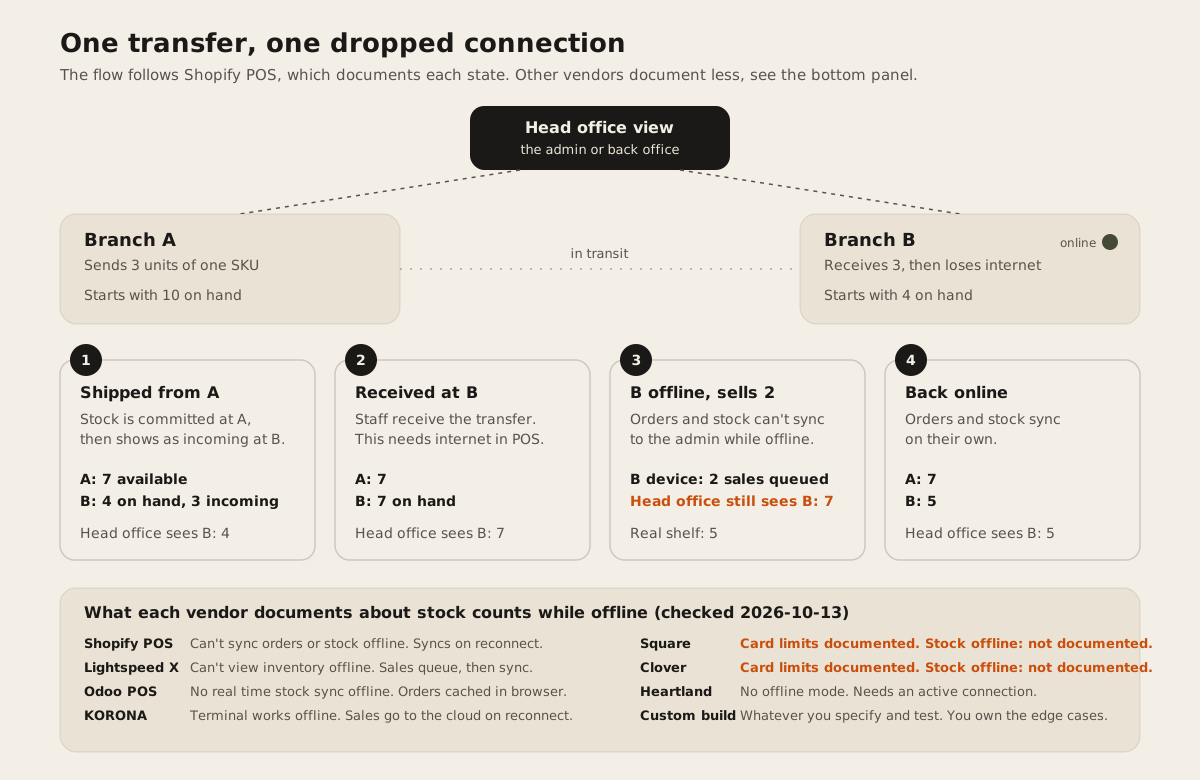
The flow follows Shopify because its docs cover each state. A transfer marked ready to ship is “committed at the origin location”, and once in progress the stock “is marked as incoming at the destination location” (Shopify Help). While a store is offline, “Shopify POS can’t sync orders and inventory with your Shopify admin” (Shopify Help).
Odoo is just as direct. Offline, it can’t do “Synchronizing stock in real time”, and “Connected payment terminals rely on an active internet connection and do not work offline” (Odoo docs).
What this means in practice: during the outage, head office, the web store, and the other branches all see stock at Branch B that has already been sold. If someone reserves it for a customer or ships it from B to a third store in that window, the count goes wrong. A short outage on a fast-moving SKU is usually harmless. A day offline on one-of-a-kind stock, like a floor model sofa or a used phone, is how a business sells the same item twice.
Each Square alternative in one paragraph
Lightspeed Retail (X-Series) is the most complete swap for a store-heavy chain. Transfers, serial numbers at the sale, and outlet-level inventory reports are all documented. The catch is price: each extra location costs the full base price again, and offline card payments only work on Lightspeed’s own Smart Terminal, which the docs list as beta. Lightspeed also runs an older R-Series product with its own serialized item workflow, but the US pricing page prices X-Series, so that’s what we compared.
Shopify POS fits best when the web store matters as much as the shops. Stock is one pool across channels, and POS Pro adds transfers, staff roles, and returns at any location. Transfers can’t be created from the POS app itself, only fulfilled and received, and that needs internet. If you already sync Shopify with other systems, our post on keeping Shopify in sync with an inventory system covers the failure modes.
Clover is a hardware and processing bundle. The multi-location dashboard, shared items, and multi-location sales reports are documented. Native transfers and serial tracking aren’t, and the free hardware offer needs a 3-year contract (Clover pricing). Pick it if you want one vendor for the counter, the card machine, and the deposits.
Heartland Retail documents a clear transfer flow and splits sales by where an item shipped from versus where it was bought, which helps stores that sell from each other’s stock. But it’s a web app with no offline mode. Its help center is now titled “Global Payments Retail Help Center”, and many articles there are from 2020, so confirm current behaviour with sales. The $0 software offer requires Heartland processing, a 3-year contract, and “4% cash discounting” (Heartland).
KORONA POS is the pick if card rates are the reason you’re leaving Square. It’s processor-agnostic, transfers are documented, and the terminal keeps working without the cloud. Multi-location tools are only in the $99 Plus tier, and offline card handling depends on your processor.
Odoo makes sense when the POS is one part of a bigger system: purchasing, accounting, warehouses, maybe manufacturing. Transfers and serial numbers are both documented, and you choose the card processor. You pay per user, whatever the number of stores, and you’ll need someone to configure it. That’s often a partner or an in-house admin.
Toast we left out. Toast describes itself as “a restaurant point of sale and management system” (Toast). It does now sell a retail POS, but we didn’t check its retail inventory docs for this page, so we won’t rank it.
When Square is still the right answer
Stay on Square if most of these are true:
- You run a handful of stores and move stock between them now and then.
- Your products are interchangeable SKUs. Nobody asks which exact unit a customer bought.
- You’re happy with Square’s flat card rates and don’t want to manage a separate processor.
- You need offline card payments with clear, documented time limits. Square documents 72 hours on its own registers.
Square supports up to 300 locations per account (Square Help), and at three stores its Plus plan costs less than any per-store rival above. Before you switch, ask Square in writing which plan includes transfer orders, since its two pages disagree.
When a custom POS makes sense
A custom build earns its cost in a few specific cases. Our longer guide, Custom POS or Square, goes through them. In short:
- Every unit needs its own record. Furniture, appliances, phones, bikes. A serial number on the receipt isn’t the same as a unit with a status, a location, and a history. Serialized inventory: why counts fail explains the difference.
- Stores can’t stop selling when the internet drops, and you need local stock counts you can trust offline. No vendor above documents that.
- Your transfer flow has states the vendors don’t, like damaged in transit, partial receipt with a reason, or transfers that need a manager’s approval.
- Several businesses share one platform. That’s multi-tenant, a different problem from multi-location.
A custom POS also means you own payment integration, PCI scope, offline sync conflicts, and support. If none of the cases above apply, buy a product.
Test before you switch
Run these on a free trial before you sign. They take an afternoon.
- The transfer test. Send 3 units from store A to store B. Check A’s count after you ship, and B’s count before and after you receive. Note when each one changes.
- The cable test. Turn off Wi-Fi at store B. Sell one unit. Look at B’s count from head office and from the web store. Then reconnect and time how long the sale takes to show.
- The serial test. Sell a serialized unit, then return it. Check that the same serial comes back, and that you can mark it as not sellable.
- The report test. Pull last week’s sales and stock for one store only, then all stores side by side.
- The exit test. Export your products, stock per location, and customers to CSV. If you leave in two years, this is what you take with you.
FAQ
Does Square for Retail work with multiple locations?
Yes. Square supports up to 300 locations per account, with location-specific reporting. Transfer orders between locations need a paid plan, and Square’s pricing page and help article disagree on whether that’s Plus or only Premium. Checked 2026-10-13.
Which Square alternative lets me keep my own card processor?
KORONA POS says it’s “processing agnostic”. Odoo supports 13 terminal providers. Heartland Retail works with Clover, eConduit, and Vantiv. Lightspeed X-Series mentions third-party processors in its docs, but offline card payments need Lightspeed Payments. Clover pricing is built on Clover’s own processing.
Which POS tracks serial numbers or IMEI across stores?
Lightspeed X-Series and Odoo document serial numbers recorded at the sale. KORONA lets you scan a serial number at the POS. None of the vendors we checked mention IMEI by name, so ask for a demo with your own stock.
Can a multi-store POS keep selling offline without wrecking stock counts?
Most keep taking cash and sometimes cards offline. Shopify POS and Odoo say plainly that stock doesn’t sync until you reconnect. Square and Clover document offline card limits but not stock counts. Heartland Retail has no offline mode.
When should a multi-location retailer build a custom POS?
When every unit needs its own record, when stores must sell and count stock reliably offline, or when your transfer and approval flow doesn’t fit any product. Otherwise buying is cheaper and faster.
If your stores fit one of those custom cases, our retail and POS page shows what we build, and ERP and operations covers the purchasing and warehouse side. Talk to us and we’ll tell you honestly whether a product above already does the job.