
This free barcode label generator makes Code 128, EAN-13, UPC-A, and QR codes and lays them out on printable label sheets, with an optional product name and price on each label. Type one label per line, pick a sheet such as Avery 5160 or a roll size for a thermal printer, and print. Nothing you type leaves your browser.
Who this is for: shop owners and stockroom staff who need shelf labels, bin labels, or serial tags this afternoon, without an account or a monthly fee. Who should use something else: if you print thousands of labels a day from an inventory system, print from that system or a label app that speaks your printer’s own language, such as ZPL. This tool goes through the normal print dialog.
Write code | name | price. Name and price are optional.
Good for: SKU and bin labels, short Code 128, EAN-13, UPC-A.
3 labels on 1 page · narrowest bar 0.339 mm

In the print dialog, set scale to 100% or "Actual size" and margins to none. Print one page on plain paper first and hold it against a label sheet. If it's off, nudge it and print again. Nothing you type leaves your browser.
The same tool has its own page at /tools/barcode-label-generator/.
Which barcode type to use
Most labels need one of three answers. If the product already carries a GS1 number on its box, print that number as EAN-13 (or UPC-A in the US and Canada), so the shelf label scans the same as the product. If the label should open a web page, use a QR code. For everything you number yourself, such as SKUs, bins, and serial numbers, use Code 128.
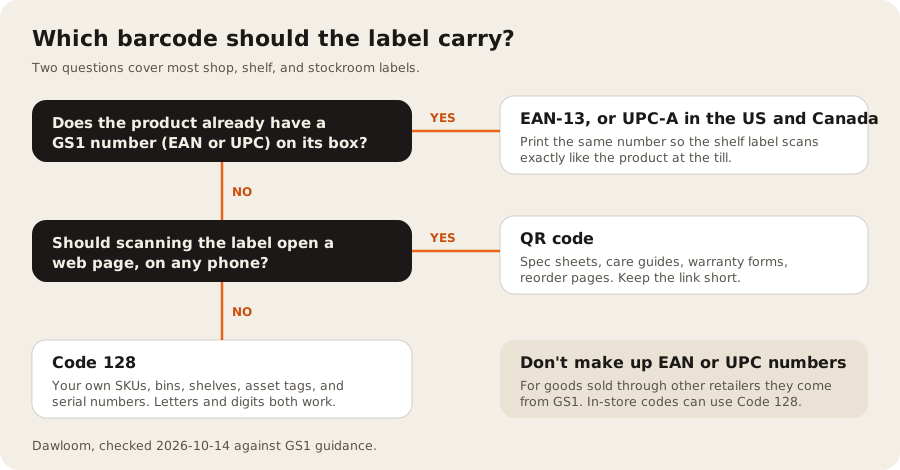
Here’s what each type holds in this tool:
| Type | What it holds | Check | Quiet zone | Use it for |
|---|---|---|---|---|
| Code 128 | Letters, digits, and symbols (printable ASCII). Long digit runs pack two digits per character. | Mod 103 check character, added for you | 10 modules each side | Your own SKUs, bin and shelf codes, serial numbers, asset tags |
| EAN-13 | 13 digits: 12 plus a check digit | GS1 mod 10, added or checked for you | 11 modules left, 7 right (GS1) | Products sold at a checkout outside North America, using a GS1 number |
| UPC-A | 12 digits: 11 plus a check digit | GS1 mod 10, added or checked for you | 9 modules each side (GS1) | Products sold at a checkout in the US and Canada, using a GS1 number |
| QR code | Any text or link, up to 213 bytes in this tool | Error correction level M (about 15% of the code can be damaged) | 4 modules on every side | Links to a product page, a spec sheet, a warranty form, or a reorder page |
Don’t invent EAN-13 or UPC-A numbers
Retail barcodes come from GS1. GS1 US says “each variation of each product you sell requires a unique barcode”, and that its barcodes “identify your company as the brand owner of that product” (GS1 US, checked 2026-10-14). The same page lists a single GS1 US GTIN at $30 with no renewal fee, and a prefix for 10 items at $250 plus $50 a year. Those are GS1’s list prices.
If a label is only for your own store, such as a bin, a shelf edge, or a used item with no maker’s code, you don’t need a GS1 number. Use Code 128 with your own SKU. GS1 also keeps a range of numbers for use inside one company or country. GS1 Ireland lists prefixes such as 20 and 02 alongside company prefixes for this (GS1 Ireland), but the rules differ by country, so ask your local GS1 office before you print them.
How big a barcode needs to be
The tool fits each code to the label and tells you the width of the narrowest bar, called the X-dimension. For EAN-13 on a consumer product, the GS1 size guide gives these limits:
| Measure | Minimum | Recommended | Maximum |
|---|---|---|---|
| X-dimension | 0.264 mm | 0.330 mm | 0.660 mm |
| Bar height | 18.28 mm | 22.85 mm | 45.70 mm |
| Quiet zone | ”At least 11 times X-dimension” left, “at least 7 times” right |
Source: GS1 Sweden size guide, checked 2026-10-14. GS1 Ireland gives the same 0.330 mm nominal width and allows 80% to 200% of nominal size (GS1 Ireland).
In-store labels often get shorter bars than the GS1 retail sizes, because a hand scanner held close to a shelf is forgiving. The tool warns you when EAN-13 or UPC-A bars drop below 0.264 mm, and when any bars get shorter than 5 mm. Treat those as prompts to test-scan, not as hard rules.
QR codes in this tool use error correction level M. The QR code’s inventor, Denso Wave, says “Typically, Level M (15%) is most frequently selected” (QRcode.com). That means a label can lose some of its area to a scratch or a smudge and still read.
What the labels look like
These are made by the same code as the tool, on a 4 x 2 inch label.
How we tested it
We wrote the encoders ourselves, with no barcode library, so the page stays small and works offline once loaded. Then we checked them the way a scanner would. We rendered every test label to an image and decoded it with the open source zxing-cpp reader.
- 120 random Code 128 values and 40 random QR codes up to the 213-byte limit: all 160 decoded back to the exact text we typed.
- The standard EAN-13 example 590123412345 came back as 5901234123457, with the check digit added. UPC-A 03600029145 came back with its check digit 2.
- Every barcode type on every sheet in the table below scanned back from a full-page render.
A decoder reading a clean image isn’t the same as your scanner reading a label printed on your printer. Print one label and scan it before you print a batch.
Label sheets
Label sizes and counts come from Avery’s template pages, such as 5160 (30 labels, 1 x 2 5/8 inch) and 5163 (10 labels, 2 x 4 inch). Avery’s pages don’t list margins, so we used the layout that common label templates use. Print a test page on plain paper and hold it against a label sheet. If it’s off, use the nudge fields.
| Sheet | Paper | Labels | Label size | Top and left margin | Good for |
|---|---|---|---|---|---|
| Avery 5160 / 8160 | US Letter | 30 (3 x 10) | 66.7 x 25.4 mm | 12.7 mm, 4.8 mm | SKU and bin labels, short Code 128, EAN-13, UPC-A |
| Avery 5163 / 8163 | US Letter | 10 (2 x 5) | 101.6 x 50.8 mm | 12.7 mm, 4.0 mm | Shelf and price labels with a product name, carton labels |
| Avery 5167 / 8167 | US Letter | 80 (4 x 20) | 44.4 x 12.7 mm | 12.7 mm, 7.6 mm | Tiny tags: short Code 128 values only, no caption |
| Avery L7160 | A4 | 21 (3 x 7) | 63.5 x 38.1 mm | 15.2 mm, 7.2 mm | Shelf labels with name and price, QR codes, EAN-13 |
| Avery L7651 | A4 | 65 (5 x 13) | 38.1 x 21.2 mm | 10.7 mm, 4.7 mm | Small SKU tags and serial numbers, short Code 128 |
| Roll or thermal printer | One label per page | 1 per page | You set it, 20 to 200 mm wide | None | Zebra, DYMO, Brother, and other label printers |
For a thermal label printer, pick “Roll or thermal printer” and enter the label size. Each label prints as its own page, at the size you set.
When labels aren’t enough
A barcode on a shelf tells a scanner which product it is. It doesn’t tell you which physical unit is in which bin, or which one came back damaged. If you sell furniture, appliances, or anything else where each unit has its own history, the label should carry a serial number tied to a record. Our post on why serialized inventory can’t run on stock counts explains the difference, and Square alternatives for retailers with more than one location lists which POS products document serial numbers at all.
If you’re still deciding whether to buy a POS or build one, start with custom POS or Square. If stock also lives in an online store, keeping Shopify in sync with an inventory system covers what breaks.
FAQ
Is this barcode generator free for commercial use?
Yes. There’s no account, watermark, or label limit, and you can print labels for products you sell. The barcode types themselves are open standards. For EAN-13 and UPC-A on retail goods, the number is what you need to license, from GS1.
Can I print barcode labels on Avery 5160 sheets?
Yes. Pick Avery 5160 in the sheet list. It holds 30 labels, 3 across and 10 down, each 1 x 2 5/8 inch. Set the print scale to 100% and print a test page on plain paper first.
What’s the difference between Code 128 and EAN-13?
EAN-13 holds exactly 13 digits and is for products sold at a checkout, using a GS1 number. Code 128 holds letters, digits, and symbols of any length, so it fits your own SKUs, bin codes, and serial numbers.
Can I make a barcode from an Excel list?
Yes. Copy the column from Excel or Google Sheets and paste it into the box, one value per line. To add a name and price, join the columns with a | between them, like SKU-001 | Oak table | $1,299.
Does it work with a Zebra or DYMO label printer?
Yes, through your browser’s print dialog. Pick the roll option and enter your label size in millimetres. The tool doesn’t send printer commands such as ZPL, so for very large runs a printer’s own software may be faster.
We build retail and inventory systems for multi-branch retailers, including barcode scanner and label printer integration. If labels are the easy part and stock is the hard part, tell us what you track.