

An offline POS keeps selling during an outage because each register saves every sale in its own local database first, puts it in a queue, and sends the queue to the server when the internet returns. Card payments taken offline are stored on the device and only authorized after reconnecting, so a decline at that point is the store’s loss.
Every major cloud POS does a version of this, with different limits. Square gives you up to 72 hours to upload offline card payments. Shopify POS stops syncing stock until you reconnect. Heartland Retail has no offline mode at all. Below is how the queue and sync work, what each vendor documents, and what to test before an outage tests it for you.
Who this is for: store owners and ops leads who’ve lost sales to a dead router, and anyone writing the offline rules for a POS. Who should look elsewhere: if you’re building a mobile app rather than a till, our offline-first React Native database comparison covers the sync engines.
How an offline-first POS works
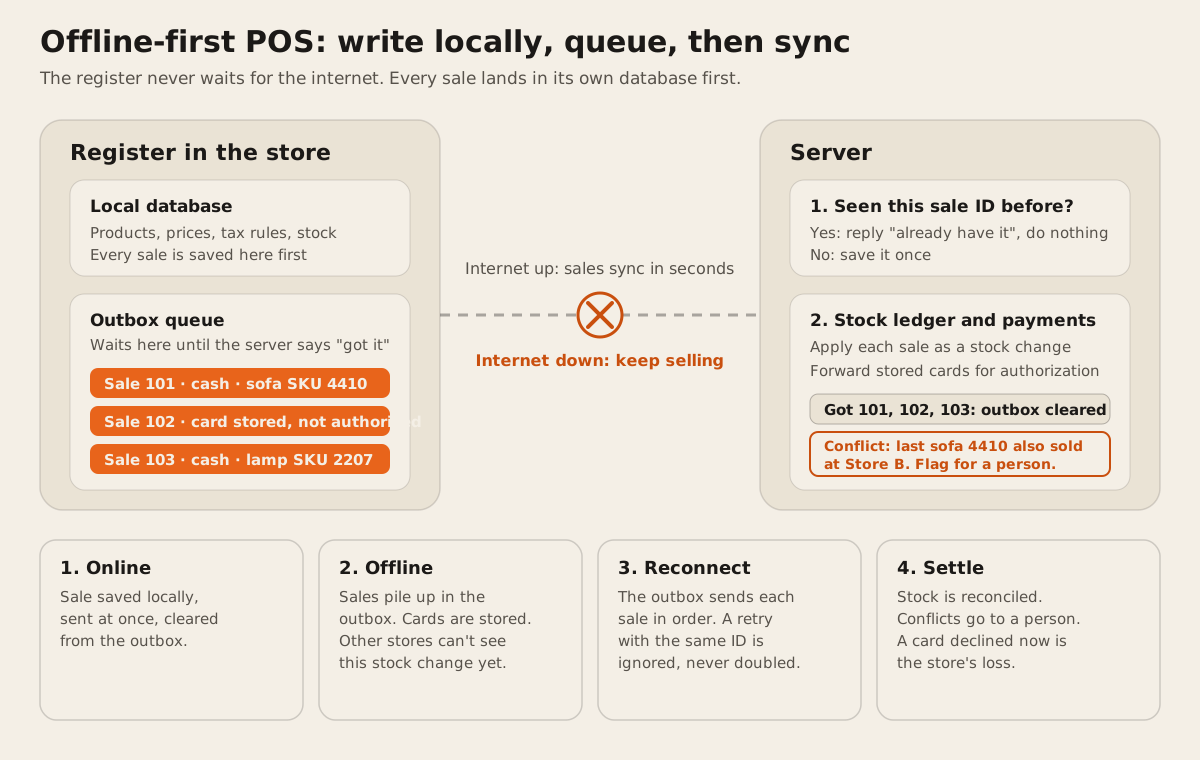
The diagram shows the pattern most offline-capable systems follow. We drew it from vendor documentation and the payment SDK docs linked below. It isn’t a recording of any one product.
1. Keep a copy of what the till needs
The register stores products, prices, tax rules, staff logins, and recent stock on the device. If it has to ask the server for a price, it can’t sell offline. Shopify says this plainly: “If you lose your internet connection after logging in, then you can continue using the app as long as you don’t log out” (Shopify Help).
A POS that runs in a browser has an extra risk. Browser storage is “best-effort” by default, and a browser can delete it when the device runs low on space. Once an app calls navigator.storage.persist() and the browser grants it, that data is only removed “if the user chooses to” (MDN). Unsynced sales should never sit in best-effort storage.
2. Write every sale locally first
Each sale is saved to the local database and added to an outbox, online or not. When the internet is up, the outbox empties in seconds. When it’s down, the outbox grows. Because the register always takes the same path, there’s no special “offline mode” code path to break on the one day it’s needed.
Each sale gets a unique ID made on the register, not by the server. Stripe recommends the same thing for its card readers: offline payments have no server ID yet, so add “a custom identifier to the PaymentIntent’s metadata to help reconcile” them later (Stripe docs).
3. Send the queue, and make retries safe
When the connection returns, the register sends each queued sale. Networks fail halfway, so the register will sometimes resend a sale the server already saved. The fix is an idempotency key: the sale ID travels with the request, and the server saves each ID once. Stripe’s API works this way, so that “if a connection error occurs, you can safely repeat the request without risk of creating a second object” (Stripe API). A sale leaves the outbox only after the server confirms it.
Don’t let staff end the session while the outbox has sales in it. Square warns that signing out, deleting the app, or switching locations while offline means “Pending offline payments will be permanently lost and the funds won’t be captured” (Square Help).
4. Settle stock and flag conflicts
The server applies each sale as a stock change, such as “minus one sofa at Store A”, rather than overwriting a count. Changes from different stores then add up correctly in any order.
Some conflicts can’t be merged. If Store A sold the last floor-model sofa offline and Store B sold the same one online, both sales are real. The server should flag it for a person to decide. For interchangeable stock that might mean a backorder. For one-of-a-kind stock it means a phone call. This is why per-unit stock is hard to keep right offline, as we cover in serialized inventory.
Card payments offline: who takes the risk
An offline card payment is only a promise to pay. The card is read and stored, and the bank only sees it after you reconnect.
- Square: “You’re responsible for any expired, declined, or disputed payments accepted while taking offline payments.” You can set a maximum per offline payment between $1 and $50,000 (Square Help).
- Stripe Terminal: “You, as the user, assume all decline and tamper-related risks associated with an offline transaction.” Stripe caps one offline payment at 10,000 USD and lets you refuse offline payments over an amount you set, or once the stored total gets too high (Stripe docs).
So set a limit per sale and a limit on the total stored, and upload as soon as you can. Square says “uploading your offline payments within 24 hours is highly recommended to reduce your risk of chargebacks or card declines”. For a $3,000 sofa, ask for a second payment method or hold the sale until you’re back online.
What each POS documents offline
All checked 2026-10-13 from vendor docs. Most of these rows come from our Square alternatives for multi-location retail.
| POS | Sells offline | Card payments offline | Stock while offline |
|---|---|---|---|
| Square | Yes | Upload within 72 hours on Register, Terminal, Handheld. Readers and Stand: 24 hours to take them (help) | Not documented |
| Shopify POS | Yes, if you stay logged in | Opt-in, “won’t be able to capture the payment until your POS device reconnects” (help) | “can’t sync orders and inventory” until you reconnect |
| Lightspeed X-Series | Cash sales queue | Only on the Lightspeed Payments Smart Terminal, in beta (help) | Can’t view inventory offline (help) |
| Clover | Yes | Up to 7 days, with limits per device (help) | Not documented |
| Odoo | Orders cached in the browser | Terminals “do not work offline” (docs) | No real-time stock sync |
| KORONA POS | The terminal works without the cloud | Not documented | Sales and stock receipts wait for the connection (FAQ) |
| Heartland Retail | No offline mode (help) | No | No |
What’s often missing offline: Shopify POS can’t do “exchanges, returns, or voids”, gift cards, or tips (Shopify Help). Square can’t take gift cards, Tap to Pay, or keyed-in cards offline, and can’t refund an offline payment until it uploads (Square Help).
Test it before the internet does
Run these on a quiet afternoon. They take about an hour.
- Pull the cable. Turn off Wi-Fi and unplug the router at one store. Sell a cash item and a card item.
- Check head office. Look at that store’s stock from another store and from the website. It won’t have changed. Note who could sell the same item meanwhile.
- Try a return offline. Many systems block it. Decide what staff should do instead.
- Reconnect and time it. Measure how long the sales take to appear, and confirm each appears once.
- Sell the last unit twice. Put one unit in stock. Sell it offline at store A and online at store B. See what the system does, and who gets told.
If the last test ends with a silent negative count, plan a manual check for one-of-a-kind stock after every outage.
When offline needs more than a setting
The vendor modes above cover a short outage on interchangeable stock. They struggle with stores that lose internet often, sell expensive one-off items, or need returns and stock counts to work offline. That’s where a POS designed around a local database and a sync queue earns its cost, and where the conflict rules have to be written down and agreed with the business. If that POS runs as a desktop app, it also has to drive the till hardware. See receipt printer, scanner, and cash drawer in a desktop app. Our build-vs-buy guide for POS covers when to cross that line, and our notes on background jobs cover the retry and idempotency side of the server.
FAQ
Can a POS system work without internet?
Yes, most cloud POS systems keep taking cash and often cards offline, then sync later. Heartland Retail is an exception: its help center says it needs an active connection. Check returns, gift cards, and stock lookups, which often stop working offline.
What happens to card payments when the POS is offline?
The card is read and stored on the device. The bank authorizes it only after you reconnect. If the card is declined then, the store usually loses the money. Square and Stripe both say the seller carries that risk.
How long can Square stay offline?
Square says offline payments must be uploaded within 72 hours on Square Register, Terminal, and Handheld. Readers and Square Stand can take offline payments for 24 hours. Payments not uploaded in time expire and can’t be recovered. Checked 2026-10-13.
Does inventory update when the POS is offline?
Usually not across stores. The register knows what it sold, but head office, other stores, and the website don’t see it until the register reconnects. Shopify and Odoo both say stock doesn’t sync while offline.
How do offline POS systems avoid duplicate sales when syncing?
Each sale gets a unique ID on the register. The server saves each ID once and ignores repeats, so a retry after a dropped connection can’t book the sale twice. This is called an idempotency key.
Offline selling is one of the things our retail and POS page lists. If your stores lose sales to outages, tell us how often and for how long, and we’ll say whether a vendor setting is enough.