
FurnitureAxis runs on Next.js with strict TypeScript over a Prisma schema that has grown past a hundred models. That’s not a settings default we forgot to change. It’s a deliberate choice, and it’s worth explaining what the flag actually does, because “strict mode” gets treated as one switch when it’s really a bundle of separate checks that each catch a different class of bug.
What strict actually turns on
The strict compiler option is shorthand for enabling a set of individual flags at once. You can turn each one on or off independently, but strict: true is the standard starting point, and the TypeScript team adds new checks to the bundle over time as they’re proven safe for most codebases.
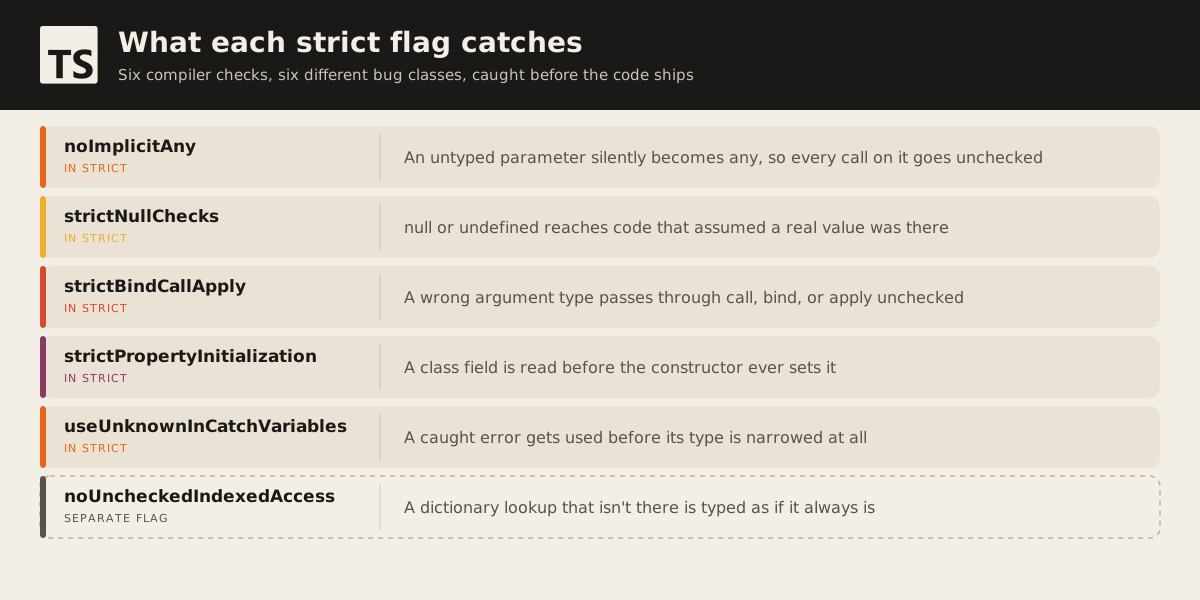
The two that catch the most in practice are noImplicitAny and strictNullChecks. Without noImplicitAny, a parameter TypeScript can’t infer falls back to any, which means every property access and method call on it stops being checked at all. With strictNullChecks off, null and undefined are assignable to anything, so a function that can return nothing still type-checks as if it always returns something. That second one matters more as a schema grows, because more models means more optional relations and more places a lookup can come back empty.
A few flags in the bundle are narrower but still worth knowing. strictFunctionTypes checks function parameters more correctly when one function type is assigned to another. strictBindCallApply checks that arguments passed through .call, .bind, and .apply match what the underlying function expects, instead of waving them through as any. strictPropertyInitialization flags a class property that’s declared but never set in the constructor. useUnknownInCatchVariables types a caught error as unknown instead of any, so you have to narrow it before touching it. alwaysStrict just emits "use strict" in the output and parses your source as strict-mode JavaScript.
None of these are exotic. They’re the checks that turn “this compiled, so it’s probably fine” into “the compiler actually looked at this.”
Where it bites on a large schema
Here’s the shape of bug strictNullChecks catches, on any ORM, not just Prisma:
async function getUser(id: string) {
  const user = await db.user.findFirst({ where: { id } });
  return user.email;
}
findFirst returns User | null, because the row might not exist. With strictNullChecks on, user.email is a compile error until you handle the null case, either with a guard, a fallback, or letting the caller decide. With it off, that line compiles cleanly and throws at runtime the first time the id doesn’t match, which on a schema with a hundred-plus models and a lot of optional relations is not a rare path. It’s the default path for anything that depends on data that might not be there yet: a quote before it’s approved, a shipment before it’s assigned a driver, a customer record before onboarding finishes.
The error moves from a stack trace in production logs to a red squiggle in the editor, before the code ships. That’s the entire value of the flag: not fewer bugs in some abstract sense, but the same bugs caught at a different, cheaper point in time.
The migration cost curve
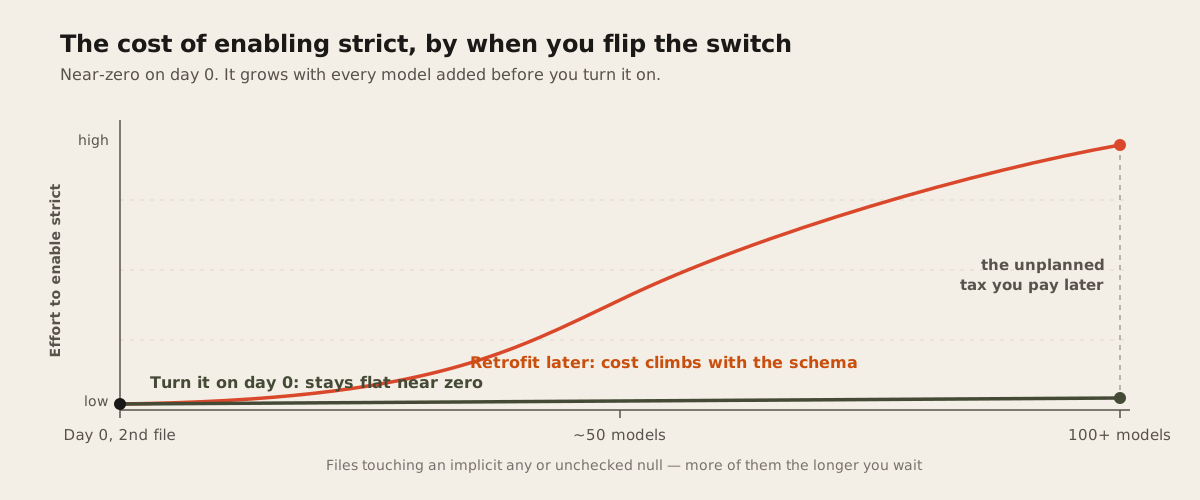
Enabling strict mode on a new project costs close to nothing, because you write against the constraints from the first file. Enabling it on an existing codebase is a different problem, and the cost doesn’t scale with how buggy the code is. It scales with how many files touch an implicit any or an unchecked null, which in a large codebase is most of them.
The usual way through it is incremental: turn on strict in tsconfig.json, then use // @ts-expect-error or a temporary per-file exclusion list to quiet the flood, and pay down the list file by file instead of blocking every other change until the migration finishes. That works, but it’s real, ongoing effort that a greenfield project never has to spend. This is the actual argument for turning strict mode on before the second file exists rather than after the fiftieth model: the cost is roughly fixed either way, but paid on your terms early or as an unplanned tax later.
Why we keep it on as the schema grows
A hundred-plus Prisma models means a lot of optional relations, nullable foreign keys, and fields that are only set after some other step happens. Every one of those is a place where strictNullChecks either catches a missing guard at compile time or lets it through to run in production. The bigger the schema, the more of those seams exist, and the more a single unchecked file can hide one.
One flag worth knowing about is not in the bundle at all. noUncheckedIndexedAccess has to be enabled separately, and it adds undefined to the result of any indexed lookup, like a dictionary keyed by product SKU or a lookup table built from one of a hundred models. Strict mode alone doesn’t add that check, so we treat it as a natural companion once a schema is large enough that lookups by key show up constantly.
None of this is specific to Prisma or to Next.js. The same argument applies to any codebase where the type of a value depends on data that might not exist yet, which is most backends past a certain size. We’ve written before about how we choose between Next.js and Astro for a given project, and the same logic applies here: the tool that costs more up front is often the one that costs less over the life of the codebase, and a hundred-model schema is exactly the kind of codebase that has a long life ahead of it.
The verdict
Turn strict mode on the day the repository is created, before the schema grows a name of its own. The cost of writing against strictNullChecks and noImplicitAny from the first commit is close to zero. The cost of retrofitting it onto a hundred-model codebase is real and it grows with every model added before you flip the switch. If you’re scoping a build that’s going to accumulate a large schema over time, get the compiler settings right before the second migration runs. Tell us what you’re building and we’ll tell you what we’d configure on day one.