
On public evidence, the best agencies for adding AI to an app that already has users are Monterail, which added Claude-written reports to Simfoni’s live spend analytics product, and Seedium, which turned a client’s chatbot into a support agent with a guardrail layer. Chop Dawg and Azumo tie with them on points and are the picks if you want a published price.
The bigger finding: we couldn’t confirm any of these AI features on the client’s own public site. Every agency here tells you the feature shipped. None of the client sites we could find names it. So treat every case study as a claim to check on a reference call.
We wrote this guide, so weigh that. We left ourselves out of the ranking. Where we fit is in a box at the end.
Who this is for: a company with a working web or mobile app and real users that wants to add an AI feature, such as search that understands meaning, document extraction, summaries, or an assistant, without breaking what already works. Who should look elsewhere: if you’re building a new AI product from scratch, look for an AI SaaS or MVP team instead. If you only need a chatbot on your marketing site, a hosted chatbot tool is cheaper than any agency.
Why “already has users” changes the job
A new AI product can launch with rough edges. An existing app can’t. The feature has to work with your current database and login, cope when the model API is slow or down, stay inside a cost budget, and roll out to a few users before everyone. Chop Dawg’s own guide to adding AI to an existing app puts it plainly: “Never let the app break if AI fails.” It suggests releasing to “10% of users” first and monitoring “accuracy, errors, costs” for a week.
The lists that rank for this question today mostly describe services. Few link to a feature you can open. That’s what this list tries to check.
How we scored them
Each agency gets 0, 1, or 2 points on five criteria, for a total out of 10. We only counted what we could open or find on a public page on 2026-10-13.
| Criterion | 2 points | 1 point | 0 points |
|---|---|---|---|
| Live AI feature we could check | The client’s own public site or app listing names the AI feature today | A case study or client review says it shipped to real users, but we couldn’t see it publicly | Proof of concept only, or nothing found |
| Added to an existing product | A case study says the feature went into a product that already had users | AI built as part of a new product | Nothing found |
| Safe rollout shown | A case study names a safeguard: a validation step, a separate service, a guardrail layer, or a fallback | Described only in a guide or service page | Nothing found |
| Small-budget fit | Clutch minimum of $10,000 or less | $10,001 to $25,000 | Over $25,000, or none found |
| Public price | A price or range for AI work on the agency’s own site | A fixed-price model stated, with no number | Nothing found |
Ties are ordered by the live score, then existing product, then safe rollout, then the number of Clutch reviews.
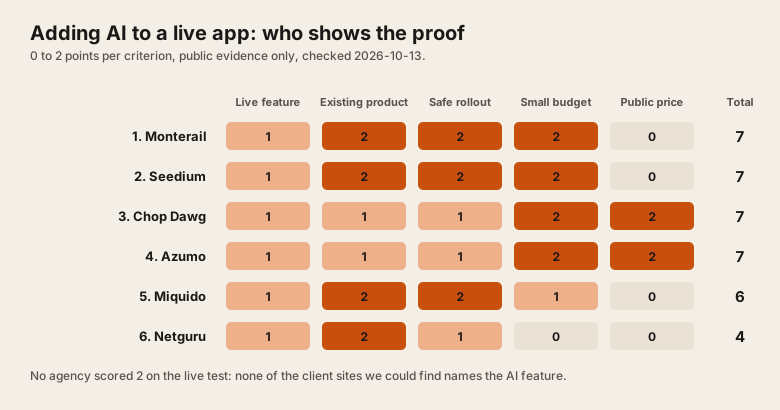
The scores at a glance
| # | Agency | AI feature we looked for | Live | Existing product | Safe rollout | Budget | Price | Total |
|---|---|---|---|---|---|---|---|---|
| 1 | Monterail | Insights AI reports for Simfoni | 1 | 2 | 2 | 2 | 0 | 7 |
| 2 | Seedium | Support agent for AllClinics | 1 | 2 | 2 | 2 | 0 | 7 |
| 3 | Chop Dawg | AI assistant in BedMatch Pro | 1 | 1 | 1 | 2 | 2 | 7 |
| 4 | Azumo | Prediction engine for Stovell AI | 1 | 1 | 1 | 2 | 2 | 7 |
| 5 | Miquido | Profile builder for Pangea.ai | 1 | 2 | 2 | 1 | 0 | 6 |
| 6 | Netguru | Personalised content for Newzip | 1 | 2 | 1 | 0 | 0 | 4 |
1. Monterail: best for an LLM feature inside a data product
- Live (1): Monterail’s Simfoni case study says the work “was quickly integrated into the live product by Simfoni’s team, under the name of ‘Insights AI’” and that “Any Simfoni customer can now generate an Insights AI report at the click of a button.” Simfoni’s spend intelligence page talks about “AI-powered insights” but doesn’t name Insights AI, so one point.
- Existing product (2): the feature went into Simfoni’s existing spend analytics platform, “By integrating Claude, a large language model (LLM) through AWS Bedrock.”
- Safe rollout (2): the case study names “a validation step in which the numeric data generated by the AI was carefully reviewed and corrected if necessary”, plus “Limiting the AI prompts to 2-3 iterations to maintain context and produce reliable results.” It reports no accuracy numbers.
- Budget (2): Clutch lists $10,000+ and $25 to $49 an hour. 4.8 from 64 reviews. Based in Wrocław, Poland.
- Price (0): nothing public.
Pick them if your product is full of data and you want the model to write about it, with someone checking the numbers. The case study calls the final version a proof of concept that was “largely functional”, so ask what production hardening looked like.
2. Seedium: best for turning an existing chatbot into an agent
- Live (1): the AllClinics case study links to allclinics.io. The public site shows no AI assistant, so it may sit behind a login. One point.
- Existing product (2): Seedium had already built AllClinics, a healthcare market data platform, and replaced its Botpress chatbot with “a custom RAG (Retrieval-Augmented Generation) architecture using modern LLMs”.
- Safe rollout (2): “a dedicated post-generation moderation step ensures compliance with defined privacy and safety rules”, and “incoming requests are filtered for language and prompt injection attempts”. The team tested “adversarial prompts”.
- Budget (2): Clutch lists $1,000+ and $25 to $49 an hour. 4.9 from 27 reviews. Based in Tallinn, Estonia.
- Price (0): nothing public on its AI development page.
Seedium reports “approximately 85% of issues being resolved without human intervention” with no method given. Pick them for a support assistant on a small budget, ideally if they already know your codebase.
3. Chop Dawg: best published price and the clearest rollout advice
- Live (1): the COO of BedMatch Pro wrote in a Clutch review that Chop Dawg built “provider and user dashboards, an AI assistant, CRM integration” and that the platform launched. Chop Dawg’s own success story describes the matching as “a weighted matching engine” and lists “AI driven placement recommendations” as a future phase. We couldn’t find the live product to check.
- Existing product (1): BedMatch Pro was a new build, “a full featured, launch ready web application”, not AI added to an app that already had users.
- Safe rollout (1): their guide is the most concrete we read: “Deploy with the feature disabled,” roll out to 10%, then 50%, then 100%, and “Cap usage: 10 requests per day for free users, 100 per day for paid users.” It’s a guide, not a case study, so one point.
- Budget (2): Clutch lists $1,000+ and $50 to $99 an hour. 4.8 from 112 reviews. Headquartered in Philadelphia.
- Price (2): their pricing page lists AI features at “1-5 Months” and “Starts At $10K/mo”.
Pick them if you want a monthly price you can plan around and a team that writes down its rollout plan. Ask for an AI feature they added to an existing app, not a new one.
4. Azumo: best for a fixed-price start and nearshore rates
- Live (1): the Stovell AI case study reports “8+ years in production” for prediction models such as Market Vision. It links to no Stovell product.
- Existing product (1): the case study describes building from the start: “We’ve been working with Azumo since our founding.” That’s AI in a new product.
- Safe rollout (1): its small business page mentions “reviewing flagged interactions” in admin dashboards. The Stovell case study names no safeguard.
- Budget (2): Clutch lists $10,000+ and $25 to $49 an hour. 4.9 from 27 reviews.
- Price (2): “$15,000 for a focused proof of concept to $75,000 to $150,000 for a production system with integrations”, and “Azumo offers fixed-price projects for well-defined scopes.”
Pick them for a scoped proof of concept at a known price. Ask for a case study where they added AI to a product they didn’t build.
5. Miquido: best documented integration, higher minimum
- Live (1): Miquido’s Pangea.ai case study says it built “a Generative AI feature to automate the profile creation process”, from kickoff “to full AI feature implementation” in three weeks. Pangea.ai’s homepage doesn’t mention the feature, which likely sits inside the sign-up flow.
- Existing product (2): the feature reads uploaded resumes and “accurately matches them to Pangea.ai’s form fields”, inside Pangea’s existing marketplace.
- Safe rollout (2): “It had to be developed independently to avoid disruption,” as a separate service with “RabbitMQ as a queuing system”. That’s the right shape for an app with users: the AI can fail without taking the app down.
- Budget (1): Clutch lists $25,000+ and $50 to $99 an hour. 4.9 from 51 reviews. Based in Kraków, Poland.
- Price (0): nothing public.
Miquido reports profiles completed “90% faster” for agencies and “95% faster” for developers, with no baseline given. Pick them for document-heavy features if your budget starts at $25,000.
6. Netguru: a large firm that tests with a proof of concept first, not for small budgets
- Live (1): the Newzip case study reports “60% More engagement”, “measured after the PoC launched”, and “10% More conversions”. So it reached real users, but we couldn’t see the feature on Newzip’s site.
- Existing product (2): Netguru built “a prototype web application in three modules”, added an API, and helped integrate it into Newzip’s platform. Newzip’s CEO talks about “evolving your existing product portfolio”.
- Safe rollout (1): a proof of concept on “a four-to-six-week timeline”, measured before going further, is a sound way to start. The case study names no fallback or validation step.
- Budget (0): Clutch lists $50,000+ and $50 to $99 an hour. 4.8 from 73 reviews, with 250 to 999 staff.
- Price (0): nothing public.
Pick them for a larger company that wants a measured test before committing. For a small business, the minimum rules them out.
Checked and left off
- thoughtbot says it helps “add AI to their existing products” on its AI services page. Its generative AI case study is an internal tool for a confidential healthcare company, not a feature in a product with outside users.
- LITSLINK and Master of Code Global blocked our reader, so we couldn’t check their case studies directly.
If you run an agency with an AI feature live in a client’s app, and the client’s site shows it, send us the link and we’ll score you by the same rules.
Questions to ask before you hire
- “Show me an AI feature you added to an app that already had users.” Then open the client’s app and find it. A new build doesn’t count.
- “What happens when the model API is down?” You want a named fallback, such as keyword search, a cached answer, or a hand-off to a person.
- “How will it roll out?” A feature flag and a small first group of users, with accuracy, errors, and cost watched for a week or more.
- “How do you know it’s right?” A set of test cases with known answers, run before each release. Our AI SaaS launch checklist lists the checks we’d expect.
- “What will it cost per user each month?” Get the running cost in writing. Our cost-per-user calculator shows how to estimate it.
- “Who owns the model API account and the prompts?” Your company should. An SDK that can switch providers keeps your options open, as we explain in the AI SDKs we reach for.
Our checklist, should this feature be AI, helps you decide which feature to start with.
Who should pick whom
| Your situation | Start with |
|---|---|
| Data-heavy product, want AI-written reports with numbers checked | Monterail |
| Support chatbot to upgrade into an agent, small budget | Seedium |
| Want a monthly price and a written rollout plan | Chop Dawg |
| Want a fixed-price proof of concept from $15,000 | Azumo |
| Document upload and extraction feature, $25,000 or more | Miquido |
| Larger company, wants a measured test before committing | Netguru |
Where Dawloom fits
We can’t show a named client AI feature in production yet. Our reviews, 4.9 from 343 on Fiverr and 5.0 from 156 on Freelancer.com, cover all our work, not AI features. We have no Clutch profile and no published minimum.
What you can check: our AI integration page says we “run automated evals against known-correct answers before every release” and lists “Quality evals, cost controls, monitoring, and fallbacks.” You can try our free AI feature cost calculator and our public MCP server at https://dawloom.com/mcp. We bill $30 an hour, or by milestone, from a written scope (pricing).
Pick someone else if you need to see an AI feature an agency added to a live app before you talk to anyone. Every agency in the ranking above shows more proof of that than we can today.
FAQ
How much does it cost to add AI to an existing app?
Among agencies that publish prices, Chop Dawg lists AI features from $10,000 a month for 1 to 5 months, and Azumo starts at $15,000 for a proof of concept. Both checked 2026-10-13. On top of that comes the monthly model bill, which our cost-per-user calculator estimates.
Can AI be added to an app without rebuilding it?
Yes. The usual pattern is a separate AI service that your app calls, so the rest of the code barely changes. Miquido built Pangea.ai’s feature this way, as “a separate service” that “could scale and update the AI solution more easily”.
How do I add AI to my app without breaking it for current users?
Put the feature behind a flag, release it to a small share of users, watch accuracy, errors, and cost, and keep a fallback for when the model fails. Then widen the rollout.
How do I check an agency’s AI case study is real?
Open the client’s live product and look for the feature by name. Ask for a reference call with the client. Of the six agencies here, we couldn’t find the AI feature named on any client’s public site, which is why nobody scored full marks on that test.
If you want an AI feature added to an app that already has users, see our AI integration page or tell us what the feature should do. We’ll send a written scope first.