
Before an AI SaaS goes live, make sure nobody can spend your model budget for you, and make sure a hijacked prompt can’t touch data it shouldn’t. In practice that means a hard spend limit on every model account, a usage quota per user in your own database, rate limits on every endpoint that calls a model, least-privilege tools with human approval for risky actions, and an eval set you run before every release.
Those are 5 of the 25 blockers on the list below. The full checklist has 43 checks in 7 groups. Tick them off in your browser, then download the list as markdown for your repo or tracker.
Who this is for: founders and engineers about to put an AI product in front of paying users, whether you built it yourself, with an AI app builder, or with an agency. Who should look elsewhere: if you handle health, payment card, or children’s data, you need your regulator’s checklist too. This one doesn’t cover HIPAA, PCI DSS, or SOC 2.
Spend limits and cost alerts
0 / 7Rate limits and abuse
0 / 7Prompt injection and data safety
0 / 7Evals and output quality
0 / 6Billing and payments
0 / 6Monitoring and operations
0 / 5Accounts, legal, and launch day
0 / 5The same tool lives on its own page at /tools/ai-saas-launch-checklist/, with a blank markdown copy.
Why an AI product needs its own launch list
A normal SaaS costs about the same to run whether a user clicks once or a thousand times. An AI product doesn’t. Every request has a token bill, so a user, a bug, or a script can turn into a cost you can’t cap after the fact. OWASP’s 2025 list of LLM risks calls this “Unbounded Consumption.” OWASP says it happens when an app “allows users to conduct excessive and uncontrolled inferences,” and lists “economic losses” among the results.
The second difference is that the model reads text you didn’t write. A file upload, a web page, or an email can carry instructions. OWASP’s top risk is prompt injection, and its own page is honest that no fix is complete. The guidance is to limit what a hijacked model can do.
The launch checklists that rank for this question today mostly mix general SaaS items with marketing tasks, and few of them link a primary source. This list sticks to what can cost you money, data, or trust in your first weeks live, and it says where each rule comes from.
The five gates on every model call
Most of the spend and abuse checks come down to one request path. Each gate has a clear answer for the user when it says no.
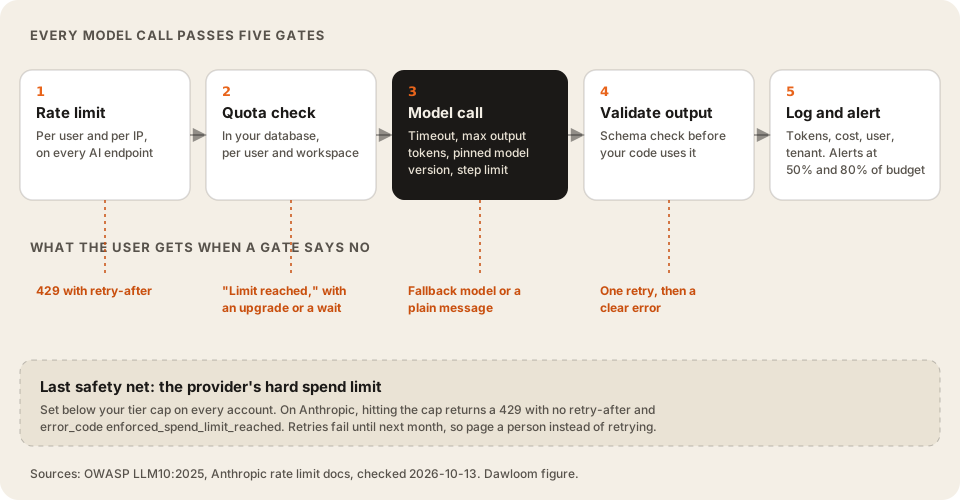
The order matters. The rate limit and the quota run before the model call, so a rejected request costs you nothing. The log runs after it, so it records what the call really cost.
The checks people skip
These five come up the least in the guides we read, and each one has a cheap fix.
1. The spend-cap error is not a normal rate limit
Anthropic’s rate limit docs say that when your organization hits its monthly spend cap, the API returns HTTP 429, the same status as a rate limit. But “the response has no retry-after header. Retrying, including the SDK’s automatic retries, fails until access resumes.” Access comes back at “00:00 UTC on the first day of the next month,” unless you raise the limit.
So if your code treats every 429 as “wait and retry,” it will retry for weeks. Check error.details.error_code for enforced_spend_limit_reached, show users a clear message, and alert a person.
Set your own lower limit too. When usage reaches a limit you set, Anthropic returns HTTP 400 with invalid_request_error instead. OpenAI’s production guide says the same thing in one line: “To enforce a monthly cap, set a hard spend limit.”
2. Your quota and the provider’s limit protect different things
Provider limits protect your account from going over a number. They don’t know which of your users is spending it. Only a quota in your own database, checked before each call, stops one free account from using up what ten paying accounts pay for. How to price an AI SaaS shows how to find the usage level where a user stops paying for themselves. Set the quota below it.
3. Card testing hits AI products too
A free trial that asks for a card is a target for people checking stolen cards. Stripe’s card testing guide explains that testers can use your publishable key to try many cards, and the declines raise your decline rate “even after card testing ceases.” The fix is to use Stripe Checkout or the Payment Element, require login before payment, and limit cards per account.
4. Webhooks arrive twice and out of order
Stripe’s webhook docs say: “Webhook endpoints might occasionally receive the same event more than once,” and Stripe “doesn’t guarantee the delivery of events in the order that they’re generated.” If your handler grants credits on invoice.paid, a duplicate grants them twice. Store processed event IDs and skip repeats. Verify the signature on the raw request body, or an attacker can send you fake events. Our Stripe subscription patterns post has the handler shape.
5. A model alias can change under you
If you call a model by a moving alias, the provider can point it at a new version on a day you didn’t pick. Outputs, token counts, and cost can all change. Pin a dated model version, keep a set of real inputs with known-good answers, and run that set before you switch. Our own AI SaaS page puts “Evals and cost monitoring from day one” in what a first version usually includes, for this reason.
The full checklist
Here is every check, with the reason and the source. The tool above uses the same data.
43 checks in 7 groups. 25 are marked blocker: do not launch until they are done. Sources checked 2026-10-13.
| Check | Level | Why it matters |
|---|---|---|
| Set a hard monthly spend limit on every model provider account. | Blocker | A bug or an abuser can spend a month of budget in an hour. Both Anthropic and OpenAI let you set your own cap below the account limit. Anthropic rate and spend limits |
| Use separate keys and workspaces (or projects) for production, staging, and evals, each with its own limit. | Blocker | A runaway eval job should not take production down with it. Anthropic workspaces and OpenAI projects both take their own spend and rate limits. Anthropic rate and spend limits |
| Enforce a usage quota per user and per workspace in your own database, checked before each model call. | Blocker | Provider limits protect your account, not your margin. Only your own quota stops one free user from using what ten paying users pay for. OWASP LLM10:2025 |
| Send spend alerts at about 50% and 80% of the monthly budget to a channel someone reads. | Should | Alerts only help if someone sees them. OpenAI supports spend alerts and email thresholds on the limits page. OpenAI production best practices |
| Handle the provider spend-cap error as its own case, with a clear message to users and a page to your team. | Blocker | On Anthropic the spend-cap 429 has no retry-after header and retries keep failing until the next month or a higher limit. Check error_code enforced_spend_limit_reached. Anthropic rate and spend limits |
| Log input, cached, and output tokens for every call, with user ID, tenant ID, and feature name. | Should | When the bill jumps, you need to find the heaviest user and feature in one query, not by guessing. |
| Cap input size and max output tokens per feature. | Should | OWASP lists input size limits as the first defence against unbounded consumption. A pasted 300-page PDF should not reach the model by accident. OWASP LLM10:2025 |
| Check | Level | Why it matters |
|---|---|---|
| Rate limit every endpoint that calls a model, per user and per IP. | Blocker | OWASP LLM10 says to "apply rate limiting and user quotas to restrict the number of requests a single source entity can make." OWASP LLM10:2025 |
| Rate limit sign-up, login, password reset, and email sending. | Blocker | These are the first endpoints scripts hit. Unlimited sign-ups also mean unlimited free-tier AI usage. |
| Decide what a free account must prove before it can call a model: verified email, CAPTCHA, or a card on file. | Blocker | A free tier with no gate is a free model API for anyone with a script. |
| Put a timeout on every model call and a step limit on every agent loop. | Blocker | OWASP: "Set timeouts and throttle processing for resource-intensive operations." An agent that loops forever bills forever. OWASP LLM10:2025 |
| Read provider rate-limit headers and back off with jitter, using retry-after when it is sent. | Should | Anthropic returns retry-after and anthropic-ratelimit-* headers. Retrying at once makes a 429 storm worse. Anthropic rate and spend limits |
| Protect the payment form from card testing: Stripe Checkout or Payment Element, login before paying, and limits on cards per account. | Blocker | Stripe says card testers use your publishable key to try stolen cards, and the declines hurt your approval rate after the attack ends. Stripe card testing guide |
| Run long AI jobs on a queue, not inside a web request. | Should | A queue gives you retries, a concurrency cap, and a place to see stuck work. A held-open request gives you none of those. |
| Check | Level | Why it matters |
|---|---|---|
| Give the model only the tools and data the feature needs, scoped to the current user and tenant. | Blocker | OWASP LLM01: "Restrict the model's access privileges to the minimum necessary for its intended operations." OWASP LLM01:2025 |
| Require a human to approve anything that sends, pays, deletes, or changes another person's data. | Blocker | OWASP: "Implement human-in-the-loop controls for privileged operations." No current method fully prevents prompt injection. OWASP LLM01:2025 |
| Mark uploaded files, web pages, and emails as untrusted data inside the prompt. | Blocker | OWASP: "Separate and clearly denote untrusted content to limit its influence on user prompts." OWASP LLM01:2025 |
| Enforce the tenant boundary in the database query, never in the prompt. | Blocker | Injected text can override a prompt instruction. It cannot override a WHERE clause in your query. |
| Keep API keys out of client code and the repo, store them in a secret manager, and set an expiry. | Blocker | OpenAI recommends environment variables or a secret manager, an expiry date on project keys, and regular rotation. OpenAI production best practices |
| Run moderation on input and output where users can see each other's content. | Should | OpenAI's moderation endpoint is free and its omni-moderation-latest model takes text and images. OpenAI moderation guide |
| Read each model provider's data retention and training terms, and name the providers in your privacy policy. | Should | Business customers will ask. A clear answer before launch saves a lost deal later. |
| Check | Level | Why it matters |
|---|---|---|
| Build a set of real inputs with known-good answers, and run it before every release and every prompt change. | Blocker | Without it, a prompt edit that fixes one case can quietly break ten others. |
| Pin a dated model version, and re-run the evals before you switch. | Blocker | An alias that moves to a new model can change outputs, token counts, and cost on a day you did not choose. |
| Add hostile and odd inputs to the eval set: injection attempts, empty input, huge input, other languages. | Should | Real users and scripts send these in the first week. |
| Validate structured output against a schema before your code uses it. | Blocker | A missing field should become a retry or a clear error, not a crash three steps later. |
| Decide what users see when the model fails or times out: a fallback model, a retry, or a plain message. | Should | Every provider has outages. A blank screen reads as a broken product. |
| Add a thumbs-down or report button that saves the request ID. | Should | The best new eval cases come from the outputs users reject. |
| Check | Level | Why it matters |
|---|---|---|
| Verify Stripe webhook signatures using the raw request body. | Blocker | Stripe: "Without verification, an attacker could send fake webhook events to your endpoint to trigger actions like fulfilling orders, granting account access, or modifying records." Stripe webhooks docs |
| Dedupe webhook events by event ID, and do not depend on their order. | Blocker | Stripe: "Webhook endpoints might occasionally receive the same event more than once" and it "doesn't guarantee the delivery of events in the order that they're generated." Stripe webhooks docs |
| Give every usage event an idempotency key, such as your request ID. | Blocker | Your app will retry a failed send. Without a key, the retry bills the customer twice. Stripe meter events docs |
| Test the unhappy paths in test mode: declined renewal, cancel, downgrade while over the new limit, refund. | Should | Demos only test the happy path. These cases turn into support tickets and disputes. |
| Write down what happens to access when a payment fails, and how long the grace period is. | Should | If the code and the support reply disagree, you get a dispute. |
| Decide who handles sales tax and VAT before your first sale outside your home country. | Should | Stripe Tax, a merchant of record, or your accountant can all work. Deciding after the sales come in costs more. |
| Check | Level | Why it matters |
|---|---|---|
| Turn on error tracking for client and server, with alerts that reach a person. | Blocker | Launch week is when you find the bugs. You want to hear about them before users email you. |
| Trace each model call: request ID, model, latency, tokens, cost, user, and tenant. | Blocker | This one log answers "why is it slow", "why is it expensive", and "what did the user see". |
| Run backups and test one restore before launch. | Blocker | Teams often learn a backup is broken on the day they need it. A test restore finds that out early. |
| Add an uptime check that exercises the main AI feature, not just the home page. | Should | The home page can be up while the model call behind the product fails. |
| Write a one-page runbook: provider outage, spend spike, leaked key. | Should | At 2 a.m. nobody should have to work out how to rotate a key from scratch. |
| Check | Level | Why it matters |
|---|---|---|
| Make account deletion and data export work end to end, including stored prompts and files. | Blocker | Users in the EU have a right to erasure under GDPR Article 17. Stored prompts and uploads count. GDPR (EUR-Lex) |
| Publish terms and a privacy policy that name the AI providers that process user data. | Blocker | Users and business buyers read this before they upload anything sensitive. |
| Tell users when they are dealing with AI output, and check if the EU AI Act transparency rules apply to you. | Should | Clear labels set expectations and cut support tickets about wrong answers. |
| Give new users a sample or demo so they see the AI work before they bring their own data. | Should | A new user with an empty workspace has nothing to try the AI on. |
| Name who answers the support inbox during launch week, and how fast. | Should | Early users ask a lot of questions. Someone needs to own the replies. |
How to use it
- Two weeks before launch, go through the blockers with the person who wrote the code. The quota and the eval set usually take the longest, so start those first.
- One week before, do the test-mode billing paths and a backup restore. These find real bugs.
- On launch day, check that spend alerts fire. Set a temporary low threshold, trigger it, then set it back.
- In the first month, work through the “should” items, starting with the uptime check on your AI feature and the runbook.
If you are adding usage-based pricing as part of launch, read usage-based billing for AI first. And if the AI feature can take actions, such as sending email or issuing refunds, the approval gates in our AI agents work matter more than anything on this page.
FAQ
What should I check before launching an AI SaaS?
Start with the 25 blockers: hard spend limits on each model account, a usage quota per user, rate limits on AI and sign-up endpoints, least-privilege tools with human approval for risky actions, an eval set run before each release, verified and deduplicated Stripe webhooks, error tracking, and a tested restore. The “should” items can follow in the first month.
How do I stop users from running up my OpenAI or Claude bill?
Use three layers. A rate limit per user and IP stops bursts. A quota per user in your own database stops slow overuse. A hard spend limit on the provider account stops everything else. Only the first two can tell one user from another.
Do I need evals before launching?
Yes, even a small set. A few dozen real inputs with known-good answers is enough to start. Run them before every release and before any model switch, and add every output a user reports as wrong.
How do I protect an AI SaaS from prompt injection?
You can’t fully prevent it, and OWASP says so. Limit the damage instead: give the model only the tools and data the current user is allowed, mark uploaded and fetched content as untrusted, enforce the tenant boundary in the database query, and require a human to approve sends, payments, and deletes.
Is this checklist free to use?
Yes. Download the markdown and put it in your own repo or tracker. Ticks you make in the tool stay in your browser.
We build AI SaaS products with these checks in the first version. See AI SaaS development.