
On public evidence, the best desktop app development companies right now are Fora Soft for Electron apps that need signing and notarization done properly, and ScienceSoft for larger Qt and .NET builds. Brainhub, Softeq, and Itransition come next, and UXDivers is the pick for moving a WPF app to macOS and Linux.
We wrote this guide, so weigh that. We left ourselves out of the ranking. Where we fit is in a box at the end.
Who this is for: a business that needs a Windows, macOS, or Linux app built by an outside team, in Tauri, Electron, or .NET. Who should look elsewhere: if you only need installers and auto-updates for an app you already have, a tool may be enough. See tools, not agencies below.
We searched for an existing list of desktop development companies before writing this one and didn’t find one that checks for shipped apps. Most “best software company” lists rank by size. This one ranks by what you can open and check yourself.
How we scored them
Each company gets 0, 1, or 2 points on five criteria, for a total out of 10. We only counted what we could open on a public page on 2026-10-13. A low score means we found little public evidence. It does not mean the work is bad. A lot of desktop work sits under NDA.
| Criterion | 2 points | 1 point | 0 points |
|---|---|---|---|
| Shipped desktop apps you can see | 3 or more named desktop apps, with the stack named | 1 or 2 | None we could find |
| Stack depth | Shipped work in 2 or more desktop frameworks, or the team maintains a desktop framework | Shipped work in one framework, or detailed public technical writing on several | Only a list of frameworks on a service page |
| Update and signing experience | A case study or guide shows both code signing and auto-update work | One of the two, or both named on a service page or in general writing | Nothing found |
| Budget transparency | A price or price range for build work on the company’s own site | A minimum project size on Clutch, or other public prices such as licences | Nothing found |
| Public reviews | 10 or more reviews on an independent platform | 1 to 9 | None, or we couldn’t verify the profile |
Ties are ordered by the shipped-apps score, then by updates and signing. No review on any platform below is specific to desktop work. Clutch reviews cover all of a company’s projects.
Why signing and updates get their own row: an unsigned app triggers warnings, and on macOS an unsigned Electron app can’t update itself at all. Squirrel.Mac, the engine behind Electron’s autoUpdater, requires a signed app, and Tauri’s updater makes signature checks mandatory on every platform. We covered both in desktop auto-update strategies. A team that has shipped version two of a desktop app has solved this. A team that has only shipped version one may not have.
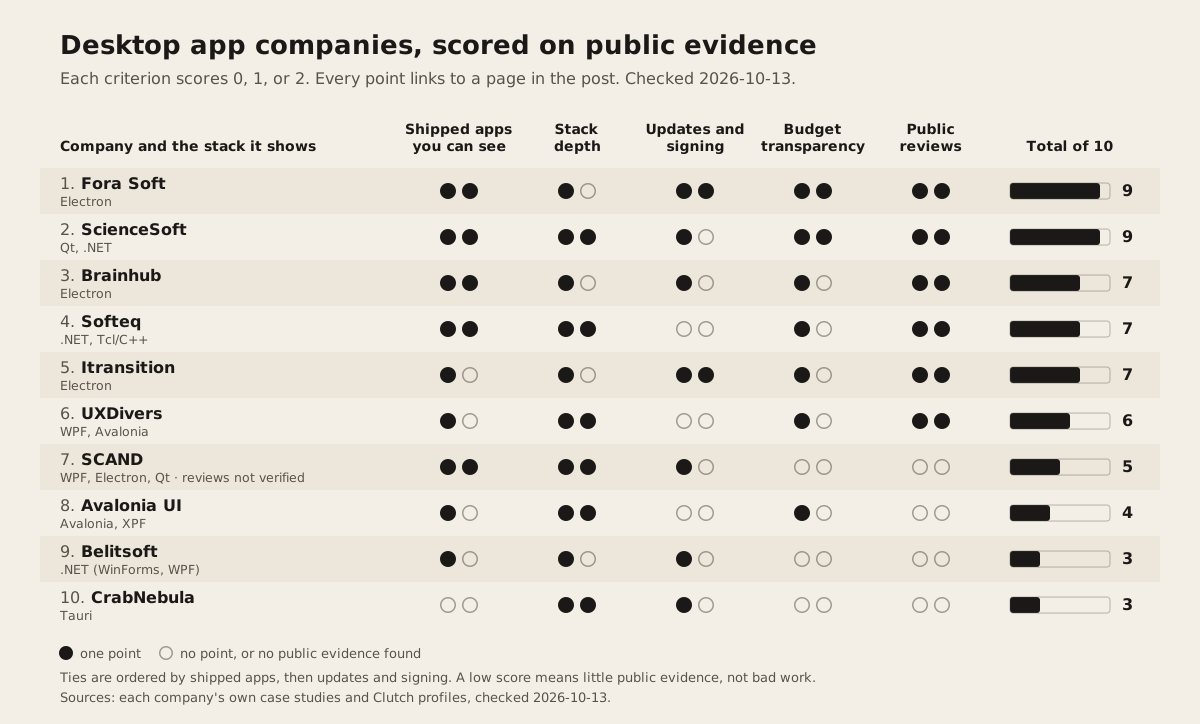
The scores at a glance
| # | Company | Main desktop stack shown | Shipped | Stack | Signing and updates | Budget | Reviews | Total |
|---|---|---|---|---|---|---|---|---|
| 1 | Fora Soft | Electron | 2 | 1 | 2 | 2 | 2 | 9 |
| 2 | ScienceSoft | Qt, .NET | 2 | 2 | 1 | 2 | 2 | 9 |
| 3 | Brainhub | Electron | 2 | 1 | 1 | 1 | 2 | 7 |
| 4 | Softeq | .NET, Tcl and C++ | 2 | 2 | 0 | 1 | 2 | 7 |
| 5 | Itransition | Electron | 1 | 1 | 2 | 1 | 2 | 7 |
| 6 | UXDivers | WPF, Avalonia XPF | 1 | 2 | 0 | 1 | 2 | 6 |
| 7 | SCAND | WPF, Electron, Qt | 2 | 2 | 1 | 0 | 0 | 5 |
| 8 | Avalonia UI | Avalonia, XPF | 1 | 2 | 0 | 1 | 0 | 4 |
| 9 | Belitsoft | .NET (WinForms, WPF) | 1 | 1 | 1 | 0 | 0 | 3 |
| 10 | CrabNebula | Tauri | 0 | 2 | 1 | 0 | 0 | 3 |
Every number below links to the page we read. Clutch figures change, so check the profile before you rely on one.
1. Fora Soft: best for Electron apps that must install cleanly
- Shipped (2): Fox Runner, a stock news app that “runs on Electron for desktop (Windows, macOS)”. Their macOS publishing guide names two more desktop clients: VALT, whose desktop clients “ship notarized builds every release”, and BrainCert. The guide doesn’t name the stack for those two.
- Stack (1): Electron, with electron-updater, shown in shipped work. We found no Tauri or .NET desktop project.
- Signing and updates (2): the most specific of anyone here. Their Electron services page says they “sign for Windows (Authenticode) and macOS (Developer ID), and run Apple notarization”, and set up “Silent background auto-update (electron-updater with Squirrel.Windows/Squirrel.Mac, or Sparkle)”.
- Budget (2): published on the same page. A pilot is “from $8K” over about 6 to 8 weeks, a production build “from $16K”, and a scale program “from $32K”. The page calls these starting estimates. Checked 2026-10-13.
- Reviews (2): 5.0 from 32 reviews on Clutch, $10,000+ minimum, $50 to $99 an hour.
Pick them if you want an Electron app with signing and updates set up in CI from the start, and a price before the first call.
2. ScienceSoft: best for larger Qt and .NET builds with a known budget range
- Shipped (2): the desktop team “was engaged in the evolution of Viber for Windows/Mac/Linux” on a C++ and Qt stack (case study). Also Stop Procrastinating and a Windows translation tool in “C#, .NET 2.0-4.0”. That .NET project is from the Windows 8 era.
- Stack (2): Qt and .NET in shipped work. Their desktop service page recommends Qt for multi-platform apps and .NET for Windows-only ones. We found no Electron or Tauri work.
- Signing and updates (1): the same page says apps outside an app store get “a built-in app logic for automated update checks”. We found nothing on code signing.
- Budget (2): the page says desktop development “ranges between $40,000 and $400,000 depending on app complexity”. Checked 2026-10-13.
- Reviews (2): 4.8 from 43 reviews on Clutch, $5,000+ minimum, $50 to $99 an hour, based in McKinney, Texas.
Pick them for a native-feeling app in C++ or C# with a budget of $40,000 or more and a need for formal process. For a small JavaScript-based app, they’re probably more firm than you need.
3. Brainhub: best for Electron game launchers and heavy desktop clients
- Shipped (2): three named Electron apps. For Paradox, “We built a game launcher in Electron using mostly JavaScript technologies.” For Star Stable, a Windows and macOS launcher on “ElectronJS, ExpressJS, React, React Redux, C/C++, Rust”. And Serene.
- Stack (1): Electron, with native modules in C, C++, and Rust for the heavy parts. One desktop framework.
- Signing and updates (1): the Paradox case study says Go “helped us with building automated client-side self-updating”. Star Stable’s update speed “increased by 50% compared to the previous solution” (their number). We found nothing on signing.
- Budget (1): Clutch lists a $50,000+ minimum and $50 to $99 an hour.
- Reviews (2): 4.9 from 53 reviews on Clutch. Based in Gliwice, Poland.
Pick them for a large Electron client with performance-critical native code. Their minimum rules out small projects.
4. Softeq: best for desktop software that talks to hardware
- Shipped (2): for Epson, “a desktop app that automatically installs on a PC once the scanner is connected” on “C# .NET ImageMagic Xamarin CV TWAIN API” (case study). A Windows multi-utility app on .NET for a client under NDA. A network-on-chip design tool for Arteris where “for the desktop part of the app we chose Tcl”. And a Windows to Linux port for ZAPS Technologies.
- Stack (2): .NET and Tcl with C++ in shipped work. Their desktop page also lists “Qt, .NET (WPF, UWP, Xamarin), and Electron.js”. UWP and Xamarin are older choices, so ask what they’d use today.
- Signing and updates (0): we found no page on code signing or auto-update.
- Budget (1): Clutch lists a $50,000+ minimum. No hourly rate shown.
- Reviews (2): 4.9 from 27 reviews on Clutch. Based in Houston, Texas.
Pick them when the desktop app sits next to a device, a driver, or embedded hardware.
5. Itransition: best for a big firm that has done notarization before
- Shipped (1): one named Electron app. For a video editing platform, “We built the screencast application with the Electron framework, using Node.js for the backend and React for the frontend.”
- Stack (1): Electron in shipped work. WPF and MAUI appear only in a list on their .NET page.
- Signing and updates (2): the same case study covers macOS signing, notarization through the Electron-notarize library, stapling, Windows signing, and “the native Electron AutoUpdater solution for macOS” with electron-builder for Windows, served from a Nuts update server.
- Budget (1): Clutch lists a $25,000+ minimum and $25 to $49 an hour.
- Reviews (2): 4.9 from 42 reviews on Clutch. Over 1,000 employees.
Pick them if you need a large vendor and want proof they’ve been through Apple’s notarization process. Nuts is an older update server, so ask what they’d use now.
6. UXDivers: best for moving a WPF app to macOS and Linux
- Shipped (1): Avalonia’s own XPF page says “Our partner UXDivers has delivered several of these engagements” and names FVBS professional, “a WPF financial advisory platform used by banks and advisors”. UXDivers’ write-up says they reused “approximately 99.9% of the existing XAML”. Their homepage also names Pyxa instrument software, with no framework stated.
- Stack (2): WPF and Avalonia XPF in shipped work. The Avalonia showcase lists their Ambient Weather HMI demo app.
- Signing and updates (0): nothing found.
- Budget (1): Clutch lists a $10,000+ minimum and $50 to $99 an hour.
- Reviews (2): 4.9 from 11 reviews on Clutch. A team of 10 to 49 in Montevideo, Uruguay.
Pick them if you have a large WPF codebase and a rewrite isn’t an option. Budget for an XPF licence on top. Avalonia lists XPF at €9,500 per app for internal use and €29,500 per app for business use (pricing, checked 2026-10-13).
7. SCAND: best for WPF tools and Office add-ins
- Shipped (2): a 3D medical imaging viewer in “a .NET desktop environment built with WPF”. A PowerPoint add-in on “C#, .NET Framework 4.8, PowerPoint COM Interop, WPF”. An Electron UI library for their own SkyHistory product. And LessonDesk on Qt.
- Stack (2): WPF, Electron, and Qt in shipped work.
- Signing and updates (1): the Electron project produced “the output package in the AppX format” for the Windows Store. MSIX is Microsoft’s current package format, so ask whether they’ve moved on. Nothing on auto-update outside the Store.
- Budget (0): nothing on their own site, and we couldn’t load a Clutch profile.
- Reviews (0, not verified): SCAND has a Clutch reviews page on its own site, but we couldn’t open the Clutch profile itself. We’ll correct this if they send the link.
Pick them for Windows-first .NET tools, especially anything inside Microsoft Office.
8. Avalonia UI: best when you want the framework’s own engineers
- Shipped (1): one named project on their services page. Schneider Electric’s Harmony HMIST6 panels render “straight to the framebuffer on hardware with as little as 512MB of RAM”. That’s embedded industrial software rather than a classic desktop app.
- Stack (2): they maintain Avalonia. The main repository has 31,660 stars on GitHub (checked 2026-10-13).
- Signing and updates (0): nothing found.
- Budget (1): services have no public price. XPF licences and support plans are priced publicly on their XPF page.
- Reviews (0): no Clutch profile found.
Pick them for migration, performance work, or a proof of concept on Avalonia, from “the engineers who maintain the framework”. Their services page also offers migration “from WPF, WinForms, or another .NET UI framework to Avalonia”.
9. Belitsoft: best for .NET staff on legacy WinForms and WPF
- Shipped (1): a football management system with “a Windows desktop application”, on “C#, .NET FW, MSSQL Server, WCF, MS ReportViewer, ClickOnce”.
- Stack (1): .NET Framework in shipped work. Their .NET staffing page covers WPF, WinForms, and MAUI.
- Signing and updates (1): the same page says “we package and digitally sign the installers and updates” and mentions MSIX and ClickOnce. That’s a service page, so one point.
- Budget (0): nothing public.
- Reviews (0): their Clutch profile shows no reviews yet.
Pick them if you need extra C# developers to modernise an old Windows app, and you can manage the work yourself.
10. CrabNebula: best for Tauri security reviews, not app builds
- Shipped (0): no named client app. They publish one client audit, a Tauri component audit for Bloop.ai.
- Stack (2): “We are proud partners of Tauri, because we built Tauri” (homepage). Their GitHub org maintains cargo-packager and Tauri DevTools.
- Signing and updates (1): their Cloud product distributes Tauri apps and sets up “support to auto-updates”. We found no page on code signing.
- Budget (0): consulting has no public price. The Cloud itself is free.
- Reviews (0): no Clutch profile found.
They sell “Consulting for critical software”: European compliance, security review, and forward deployment with your team. Pick them to review or harden a Tauri app. They rank last here only because the rubric rewards shipped client apps, which they don’t publish. For a Tauri security question, they’re the first call.
Checked and left off
- Simform and Cleveroad have strong Clutch profiles (Simform, Cleveroad), but we found no named desktop app with a framework on their own sites.
- Intellectsoft and Altamira had no desktop app we could verify.
- Uno Platform sells tools and support, not app builds, per its pricing page.
- mindtwo has a good Tauri page on signed installers, but no Tauri client project we could find.
If you run a desktop studio with public, named work and we missed you, send us the links and we’ll score you by the same rules.
Tools, not agencies
If you have an app and only need packaging, signing, and updates, you may not need a firm.
- ToDesktop: “Release, Secure and Scale your Electron App”. It handles auto-updates and stores signing certificates on a hardware security module (todesktop.com).
- CrabNebula Cloud: Tauri distribution and updates. “The platform is free for everyone” (docs).
- Velopack: an installer and update framework for .NET, Electron, Tauri, and more. “The core Velopack tooling and SDK will always be 100% free and open source” (velopack.io).
- electron-builder: the common open-source packager for Electron, with signing and notarization support (electron.build).
How to choose a desktop app developer
- Ask for a signed installer of something they shipped. Download it on a clean Mac and a clean Windows machine. A SmartScreen or “unidentified developer” warning tells you a lot.
- Ask how version two reaches users. You want a specific answer: electron-updater with Squirrel, the Tauri updater plugin, MSIX, Velopack, or a store. “We’ll handle it” isn’t one.
- Ask whose accounts hold the certificates. The Apple Developer account and the Windows signing certificate should be in your company’s name. If the vendor owns them, you can’t ship an update without the vendor.
- Ask about the private key. On Tauri, losing the updater key means installed apps can’t update. Ask where it’s stored and who can reach it.
- Match the stack to your team. Electron if your team is in JavaScript and wants one rendering engine everywhere. Tauri if install size and memory matter. .NET if your team already lives in C#. Our guide to Tauri or Electron in 2026 walks through the trade-offs.
- Check the minimum before the call. Clutch minimums on this list run from $5,000 to $50,000+. If your budget is under the minimum, the call is wasted on both sides.
- Read reviews for scope changes, not stars. Every rated company here sits between 4.8 and 5.0. The text of the reviews tells you more. Our guide to vetting an offshore team covers what to look for.
Who should pick whom
| Your situation | Start with |
|---|---|
| Electron app, want a price up front and signing done right | Fora Soft |
| Native-feeling app in Qt or C#, budget of $40,000 or more | ScienceSoft |
| Big Electron client with native Rust or C++ parts | Brainhub |
| Desktop app that drives a scanner, sensor, or other device | Softeq |
| Large vendor, need proof of macOS notarization | Itransition |
| WPF app that must run on macOS and Linux | UXDivers, or Avalonia UI directly |
| Office add-in or Windows-first WPF tool | SCAND |
| Extra C# developers for a legacy WinForms app | Belitsoft |
| Tauri app that needs a security review | CrabNebula |
| Existing app, only need updates and signing | ToDesktop, CrabNebula Cloud, or Velopack |
Where Dawloom fits
We have no public, named desktop case study yet. Our desktop service page lists Tauri, Electron, .NET, and MAUI. The public evidence is our writing: Tauri or Electron in 2026 and desktop auto-update strategies. Certificates, signing, and auto-update pipelines are part of the build, under your accounts.
We bill $30 an hour, or by milestone, and we don’t publish a minimum. Our reviews are 4.9 from 343 on Fiverr, 5.0 from 156 on Freelancer.com, and a 4.9 average across 13 jobs on Upwork. They cover all our work, not only desktop apps.
We fit a small to mid-size desktop build, such as a web app wrapped as a desktop app or a Tauri tray utility. If you need to see a shipped desktop app before you talk to anyone, pick a company from the list above. With us, you’d have to ask for a private demo, and you should.
FAQ
How much does it cost to build a desktop app with an agency?
Among firms that publish prices, Fora Soft starts at $8,000 for a single-platform Electron pilot and $16,000 for a cross-platform build (pricing). ScienceSoft puts desktop projects between $40,000 and $400,000 (desktop page). Both checked 2026-10-13. Most firms don’t publish a price, only a Clutch minimum.
Should I hire a Tauri developer or an Electron developer?
Pick the framework first, then the team. Electron ships its own Chromium, so it renders the same everywhere but makes larger installers. Tauri uses the operating system’s webview, so it’s smaller but renders through three different engines. Our Tauri vs Electron comparison has the full detail.
Can an agency turn my web app into a desktop app?
Yes, and it’s often the fastest kind of desktop project, because the interface already exists. The work that remains is native menus, offline behavior, installers, signing, and updates. Ask the agency how they’ll handle the last two before you sign.
Do desktop app developers handle code signing?
The good ones do, but check. Of the ten companies above, only Fora Soft and Itransition show both signing and auto-update work in a case study or guide. Insist that certificates are bought in your company’s name.
If you want a quote on a desktop app in Tauri, Electron, or .NET, tell us what you’re building and we’ll send a written scope first.