
For a desktop app that only has to run on Windows, WPF is still the safe pick: it ships with .NET 10, it’s open source, and Microsoft supports it until November 2028. Pick Avalonia when the same app must also run on macOS or Linux, and pick .NET MAUI only when the same UI code must also ship on iOS and Android.
Who this is for: a business or team choosing a C# and XAML UI framework for a desktop app, new or existing. Who should look elsewhere: if your team writes TypeScript rather than C#, compare Tauri and Electron instead. If the app is mainly a phone app, start with React Native or .NET MAUI.
Most “Avalonia vs MAUI” articles we read were written before Avalonia 12 and before Avalonia’s MAUI backend preview, and few include WPF, which is what most Windows teams are actually moving from. Every fact below links to Microsoft’s or Avalonia’s own pages, checked 2026-10-13. Avalonia’s comparison page is marketing from one of the three sides, so we only quote it for facts we could check elsewhere.
The comparison table
| WPF | Avalonia | .NET MAUI | |
|---|---|---|---|
| Desktop platforms | Windows only | Windows, macOS, Linux (X11 and Wayland), embedded Linux | Windows (WinUI 3), macOS (Mac Catalyst) |
| Mobile and web | No | iOS, Android, WebAssembly | iOS, Android |
| How it draws the UI | Its own vector renderer, hardware accelerated | Its own renderer, Skia by default | The platform’s native controls |
| Licence | MIT | MIT (paid tools and XPF on top) | MIT |
| Latest release (checked 2026-10-13) | Part of .NET 10 | 12.1.4, 9 Oct 2026 | 10.0.110, 22 Sep 2026 |
| Support window | Same as .NET 10: to 14 Nov 2028 | Community, or 5 years on LTS releases with the Enterprise plan | Each major version: 6 months after the next ships. MAUI 10 ends 11 May 2027 |
| Reusing WPF code | It is WPF | Close API, real differences. XPF runs WPF binaries | Different XAML and controls, a rewrite |
| GitHub stars | 7,741 | 31,661 | 23,325 |
Sources: WPF overview, .NET support policy, what is Avalonia, Avalonia releases, MAUI supported platforms, MAUI support policy, Avalonia pricing. Star counts are from the GitHub API for dotnet/wpf, AvaloniaUI/Avalonia, and dotnet/maui on 2026-10-13. Stars show interest, not quality.
WPF: Windows only, and still supported
Microsoft describes WPF as “a UI framework that’s resolution-independent and uses a vector-based rendering engine, built to take advantage of modern graphics hardware.” It’s open source on GitHub and ships as part of .NET. The overview is just as clear about the limit: “Even though .NET is a cross-platform technology, WPF only runs on Windows.”
What that means for a buyer:
- Support follows .NET. .NET 10 is the long-term support release, supported until November 14, 2028. .NET 8 and .NET 9 both reach end of support on November 10, 2026 (.NET support policy). If your WPF app runs on .NET 8, plan the move to .NET 10 now.
- Old apps can move up. A WPF app on .NET Framework 4 can be upgraded to modern .NET, and Microsoft lists “Better performance”, “New .NET APIs”, and “Updated tooling” as the reasons.
- It’s the oldest of the three. Most .NET control vendors, samples, and experienced developers cover it.
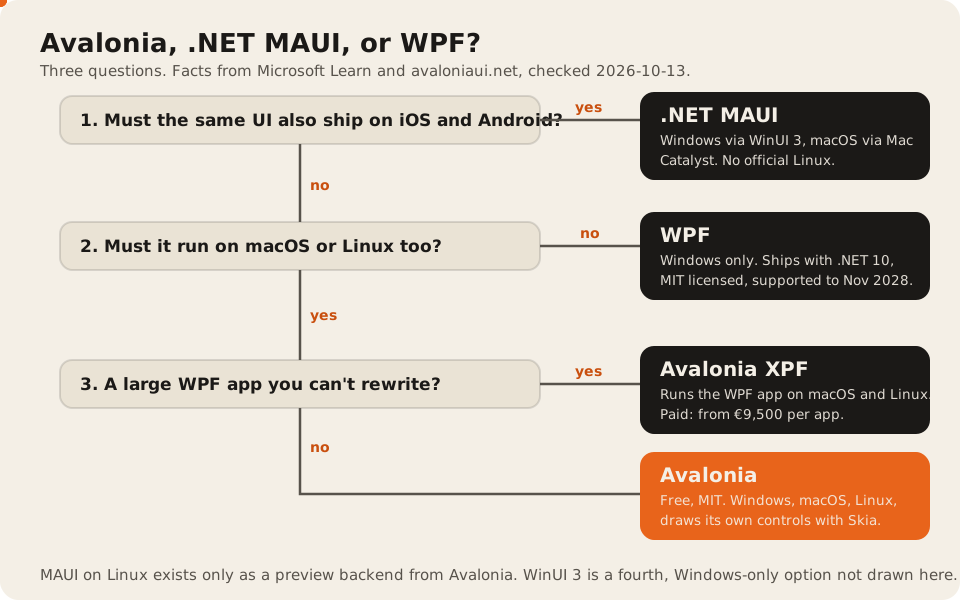
Pick WPF when the app is Windows-only today and is likely to stay that way, such as an internal line-of-business tool, a back-office app, or software that drives Windows-only hardware. Don’t pick it if anyone has said “we’ll need a Mac version later”. That later port is a rewrite.
Avalonia: WPF-style XAML on Windows, macOS, and Linux
Avalonia is an open source .NET UI framework. Its docs list “Windows (10, 11)”, “macOS (Apple Silicon and Intel)”, “Desktop Linux (X11 and Wayland)”, “Embedded Linux”, “iOS and Android”, and “WebAssembly” (what is Avalonia).
The key design choice: “It uses its own rendering engine to draw controls, so your app looks and behaves the same on every platform.” “Skia is the default backend.” Your app looks the same everywhere. It also looks like itself rather than like a native Mac app, which matters to some users and not to others.
For WPF teams, Avalonia is the closest move. Its docs say “Avalonia XAML will feel familiar if you have worked with WPF or UWP,” but also: “Avalonia’s API is intentionally close to WPF, but there are important differences in styling, templates, and the property system.” Plan for a port, not a recompile.
If a port isn’t realistic, Avalonia XPF is the paid option. Avalonia calls it “a binary-compatible WPF runtime.” It runs an existing WPF app on macOS and Linux. Prices on the XPF page, checked 2026-10-13: €9,500 per app for internal tools, €29,500 per app for software you sell, plus €21,250 for embedded Linux. Enterprise starts at €124,500 per app.
The framework itself is free under MIT. The paid layer is tooling and support (Avalonia pricing, checked 2026-10-13):
| Plan | Price | Adds |
|---|---|---|
| Free | €0 | The MIT framework, 70+ controls, community support |
| Plus | €299 a year per seat | Visual Studio and VS Code extensions, DevTools, Hot Reload |
| Pro | €899 a year per seat | Extra controls such as a tree data grid, PDF viewer, and charts |
| Enterprise | from €21,000 a year, three seats | Support for the framework itself, “5 years of security updates on LTS releases” |
Release pace is steady. Avalonia shipped 12.1.4 on October 9, 2026, and was still patching the 11.3 line in September (releases).
Pick Avalonia when you need macOS or Linux, when you’re moving a WPF app off Windows, or when you want the same look on every platform. Budget for the paid extensions if your team relies on a visual designer.
.NET MAUI: built for phones first
Microsoft calls MAUI “a cross-platform framework for creating native mobile and desktop apps with C# and XAML” that runs on “Android, iOS, macOS, and Windows from a single shared code-base” (what is .NET MAUI). It is “the evolution of Xamarin.Forms, extended from mobile to desktop scenarios.”
On the desktop, MAUI is a layer over other toolkits:
- Windows: “Windows apps built using .NET MAUI use Windows UI 3 (WinUI 3) library.” It needs Windows 10 version 1809 or later.
- macOS: “macOS apps built using .NET MAUI use Mac Catalyst, a solution from Apple that brings your iOS app built with UIKit to the desktop.” So a MAUI Mac app is an iPad-style app running on a Mac. That suits some apps and feels odd in a dense desktop tool.
- Linux: not on Microsoft’s supported platforms list. Avalonia is building a backend that lets MAUI apps run on Linux and in the browser. Its own comparison page says the backend is at Preview 1, “It needs the .NET 11 preview SDK today”, and “stable is planned alongside .NET 11.” Don’t plan a shipping product on it yet.
The support window is the other thing to plan for. “A major version of .NET MAUI receives support for a minimum of 6 months after a successor (the next major release) ships” (MAUI support policy). MAUI 10 ends on May 11, 2027. That means a MAUI app needs an upgrade every year, while a WPF app on .NET 10 can sit until 2028.
Pick MAUI when one C# team must ship the same app to phones and desktops, and the desktop version is the smaller audience. For a desktop-first product, the other two fit better.
What about moving between them?
Moving a WPF app to .NET 10 is an upgrade, moving it to Avalonia is a port, and moving it to MAUI is a UI rewrite. Avalonia XPF is the only route that runs WPF binaries on macOS and Linux unchanged.
| From | To | What it takes |
|---|---|---|
| WPF on .NET Framework | WPF on .NET 10 | An upgrade, using Microsoft’s migration guide. The XAML mostly stays |
| WPF | Avalonia | A port. Similar XAML, different styling, templates, and property system |
| WPF | Avalonia XPF | Licence plus testing. The binaries run as they are |
| WPF | MAUI | A rewrite of the UI layer. Business logic in shared libraries can stay |
| Xamarin.Forms | MAUI | Microsoft’s intended path for Xamarin apps |
The business logic is the part to protect in every move. Keep it in plain .NET class libraries with no UI references, and the framework becomes a smaller decision.
Our take
We build desktop apps in .NET, Tauri, and Electron, and .NET MAUI for mobile. For a C# team, our default advice matches the tree above: stay on WPF while the app is Windows-only, move to Avalonia when a Mac or Linux version is real, and reach for MAUI when phones are the main target. If you want an outside team for it, our ranking of desktop app development companies scores who has shipped what, and code signing costs covers the release bill for whichever you pick.
FAQ
Is Avalonia better than MAUI for desktop apps?
For desktop-first apps, usually yes. Avalonia supports Linux and draws the same UI on every platform, while MAUI uses Mac Catalyst on macOS and has no official Linux support. MAUI is the better fit when the same app must also ship on iOS and Android.
Is WPF dead in 2026?
No. WPF is part of .NET 10, which Microsoft supports until November 14, 2028, and it’s open source on GitHub. It only runs on Windows, and that’s the reason to pick something else, not its age.
Can Avalonia run my existing WPF app?
Not directly. Avalonia’s XAML is close to WPF but differs in styling, templates, and the property system, so it’s a port. Avalonia XPF, the paid product, runs WPF binaries on macOS and Linux, from €9,500 per app for internal tools.
Does .NET MAUI support Linux?
Not officially. Microsoft lists Android, iOS, Mac Catalyst, and Windows. Avalonia’s MAUI backend adds Linux and WebAssembly, but it was still a preview on .NET 11 previews when we checked.
Is Avalonia free for commercial use?
Yes. The framework is MIT licensed. Avalonia sells optional seats for its IDE extensions and extra controls (€299 or €899 a year per seat), Enterprise support from €21,000 a year, and the XPF runtime.