
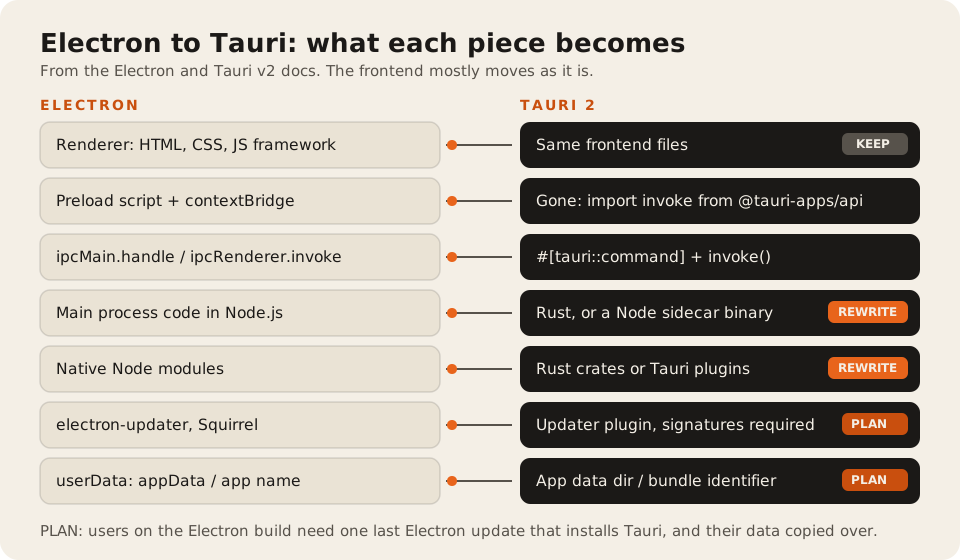
Moving an Electron app to Tauri keeps your frontend almost as it is and replaces everything in Electron’s main process: Node code becomes Rust commands (or a bundled Node sidecar), the preload script disappears, and native Node modules need Rust equivalents. The cost sits in that main-process code, in testing on three different webviews, and in moving existing users over, because a Tauri update can’t install itself over an Electron app without a bridge release.
Who this is for: a team with a working Electron app that wants smaller installers or lower memory use, and is deciding whether a port is worth it. Who should stay put: if your app leans on Chromium-only web APIs, ships a large Node backend you can’t touch, or must render pixel-identical on every OS, Electron is still the better fit. Our Tauri or Electron in 2026 post covers that choice for new apps.
Most migration posts we found are API mapping tables or one developer’s weekend port. This one adds the parts that cost money: the user handoff, the data move, and signing. The code below is a small notes app we wrote for this post. The Tauri side compiles with cargo check against Tauri 2. We didn’t build installers or run it on macOS or Linux.
What you get, and what the published numbers say
Tauri doesn’t ship a browser. It uses the one the OS already has: “Tauri uses WebView2 which is based on Microsoft Edge and therefore Chromium” on Windows, WebKit “through WKWebView” on macOS, and WebKit “through webkit2gtk” on Linux (Tauri webview versions). That’s where the size savings come from.
Teams that have moved report the same direction, with few hard numbers:
- Fluxzy (an HTTP debugging tool), five months after switching: “The Windows installer dropped from around 190mb to 55mb.” The author is careful about the rest: “I don’t have a clean benchmark to drop here so I won’t pretend I do” (Fluxzy, 9 May 2026). Self-reported.
- Tauri’s own claim: “a minimal Tauri app can be less than 600KB in size” (tauri.app). Vendor-reported, and for an empty app.
We haven’t measured our own before-and-after yet. Treat any single number, including these, as one app’s result.
The migration checklist
Work through it in this order. Each step is shippable on its own branch.
- List every main-process feature. Each
ipcMain.handle, each Node module the main process imports, each native module, each Electron API (menus, tray, dialogs, notifications, protocol handlers, auto-launch). This list is your estimate. - Check web features against WebKit. Your renderer moves from Chromium to WebKit on macOS and Linux. Tauri’s docs pair each macOS version with its Safari version “so that you can use sites like caniuse to figure out if a specific web platform feature is supported.” Web Serial, WebUSB, WebHID, and some codecs are the usual gaps.
- Create the Tauri shell around your frontend. Run
npm create tauri-app@latestor addsrc-taurito the existing repo and pointbuild.frontendDistat your build output. - Move IPC handlers to Rust commands. One
ipcMain.handlebecomes one#[tauri::command]. Arguments arrive as JSON with camelCase keys. - Replace Electron APIs with Tauri plugins. Dialog, File System, Notifications, Global Shortcut, Autostart, Single Instance, Window State, Store, SQL, Updater, and more are official plugins. Each needs a permission in a capability file.
- Decide what to do with Node code you can’t rewrite. Tauri’s guide shows how to package a Node app “to a self contained binary to be used as a sidecar in a Tauri application” (Node.js sidecar). It works, and it adds the Node runtime back into your installer.
- Move user data. Electron stores it in
userData, which “by default is theappDatadirectory appended with your app’s name” (Electron app API). Tauri’sappDataDir“Resolves to${dataDir}/${bundleIdentifier}”. Different folder, so copy on first run. - Set up signing and the updater. Tauri’s updater “needs a signature to verify that the update is from a trusted source. This cannot be disabled” (updater plugin). Generate the key with
tauri signer generate, and keep code signing certificates for both OSes. See what code signing costs. - Ship a bridge release of the Electron app. Its only new job is to download and run the Tauri installer, then remove itself. Fluxzy called the updater “the one that bit me” and still had “users sitting on v1” months later.
- Test on all three webviews. Windows, a supported macOS, and the Linux distros you promise. Fluxzy disabled hardware acceleration on Wayland with Nvidia because WebKitGTK “has known issues there.”
The repo diff, on a small app
Here’s the same feature, load and save a notes file, in both frameworks.
Electron, before. Three files: main, preload, renderer.
// main.js
const { app, BrowserWindow, ipcMain } = require('electron');
const fs = require('node:fs/promises');
const path = require('node:path');

const notesFile = () => path.join(app.getPath('userData'), 'notes.txt');

ipcMain.handle('load-notes', async () => fs.readFile(notesFile(), 'utf8').catch(() => ''));
ipcMain.handle('save-notes', async (event, text) => {
  await fs.writeFile(notesFile(), text);
  event.sender.send('notes-saved');
});

app.whenReady().then(() => {
  const win = new BrowserWindow({
    width: 800,
    height: 600,
    webPreferences: { preload: path.join(__dirname, 'preload.js') },
  });
  win.loadFile('dist/index.html');
});
// preload.js
const { contextBridge, ipcRenderer } = require('electron');
contextBridge.exposeInMainWorld('notes', {
load: () => ipcRenderer.invoke('load-notes'),
save: (text) => ipcRenderer.invoke('save-notes', text),
onSaved: (fn) => ipcRenderer.on('notes-saved', fn),
});// renderer
const text = await window.notes.load();
await window.notes.save(text + '\nnew line');Tauri, after. The preload is gone. The main process is Rust, and the window config moves to tauri.conf.json.
// src-tauri/src/lib.rs
use std::fs;
use tauri::{Emitter, Manager};

#[tauri::command]
fn load_notes(app: tauri::AppHandle) -> Result<String, String> {
    let path = app.path().app_data_dir().map_err(|e| e.to_string())?.join("notes.txt");
    Ok(fs::read_to_string(path).unwrap_or_default())
}

#[tauri::command]
fn save_notes(app: tauri::AppHandle, text: String) -> Result<(), String> {
    let dir = app.path().app_data_dir().map_err(|e| e.to_string())?;
    fs::create_dir_all(&dir).map_err(|e| e.to_string())?;
    fs::write(dir.join("notes.txt"), text).map_err(|e| e.to_string())?;
    app.emit("notes-saved", ()).map_err(|e| e.to_string())
}

/// First run after the switch: copy notes.txt from the old Electron folder.
/// Electron keeps it in <appData>/<app name>. Tauri's config_dir() is the same
/// base folder as Electron's appData on Windows, macOS, and Linux.
fn migrate_electron_data(app: &tauri::AppHandle) -> Result<(), Box<dyn std::error::Error>> {
    let new_dir = app.path().app_data_dir()?;
    let old_file = app.path().config_dir()?.join("Notes").join("notes.txt");
    let new_file = new_dir.join("notes.txt");
    if old_file.exists() && !new_file.exists() {
        fs::create_dir_all(&new_dir)?;
        fs::copy(old_file, new_file)?;
    }
    Ok(())
}

#[cfg_attr(mobile, tauri::mobile_entry_point)]
pub fn run() {
    tauri::Builder::default()
        .setup(|app| {
            if let Err(e) = migrate_electron_data(app.handle()) {
                eprintln!("could not copy old Electron data: {e}");
            }
            Ok(())
        })
        .invoke_handler(tauri::generate_handler![load_notes, save_notes])
        .run(tauri::generate_context!())
        .expect("error while running tauri application");
}
// src-tauri/tauri.conf.json (the parts that replace BrowserWindow)
{
"productName": "Notes",
"identifier": "com.example.notes",
"build": { "frontendDist": "../dist" },
"app": { "windows": [{ "title": "Notes", "width": 800, "height": 600 }] }
}// renderer: replace window.notes.* with invoke and listen
import { invoke } from '@tauri-apps/api/core';
import { listen } from '@tauri-apps/api/event';
const text = await invoke('load_notes');
await invoke('save_notes', { text: text + '\nnew line' });
await listen('notes-saved', () => console.log('saved'));What changed, file by file:
| Electron file | Tauri file | Change |
|---|---|---|
main.js | src-tauri/src/lib.rs | Rewritten in Rust. Two handlers became two commands |
preload.js | (none) | Deleted. The window calls invoke directly |
BrowserWindow options | tauri.conf.json | Moved to config |
| Renderer calls | Renderer calls | window.notes.load() became invoke('load_notes') |
userData path | app_data_dir() | New folder, plus a one-time copy |
| (none) | capabilities/default.json | New: lists what the window may call |
On permissions: Tauri’s capabilities docs say your own commands are allowed for all windows by default, and plugin access needs a permission in a capability file. Electron’s equivalent was whatever you exposed in the preload.
The migrate_electron_data function assumes the Electron app was named “Notes”. Use your real productName, and check where your Electron app actually wrote data. Many apps keep a database or settings file under a subfolder.
Where the effort goes
Most of the effort in an Electron to Tauri migration goes into main-process code, native modules, and moving installed users, not the UI. We don’t publish hour estimates without a scope, because they swing on what’s in step 1’s list. These are the drivers we’d size:
| Driver | Small effect | Large effect |
|---|---|---|
| Main-process code | A few file and dialog handlers | Business logic, sync engines, or a local server in Node |
| Native Node modules | None | Printers, USB, SQLite bindings, or custom C++ addons |
| Browser APIs in the renderer | Standard DOM and CSS | Web Serial, WebUSB, codecs, or Chromium-only CSS |
| Platforms | Windows only | Windows, macOS, and several Linux distros |
| Installed users | Internal tool you can reinstall | Thousands of users on auto-update |
| Rust on the team | Someone already writes it | Nobody does, so add learning time |
If most of the main process is business logic in TypeScript, the Node sidecar route is usually cheaper than a Rust rewrite. You give back some of the size savings and keep the code.
The costs that aren’t development time
| Cost | What it is | Price |
|---|---|---|
| Code signing, macOS | Apple Developer Program, required for signed, notarized builds | $99 a year (Apple, checked 2026-10-13) |
| Code signing, Windows | Azure Artifact Signing, or an OV certificate if you don’t qualify | from $9.99 a month, or about $130 to $500 a year with a token (see code signing costs) |
| Updater signing key | Tauri’s own key pair for update signatures | Free. Store it like a password. Lose it and installed apps can’t verify updates |
| Update hosting | A static JSON file and the installers | Whatever your file host charges |
| The bridge release | One more Electron build that hands users over | Development and testing time |
If you already sign your Electron app, the Windows and Apple costs don’t change. The certificates move over.
Where we stand
We build desktop apps in Tauri, Electron, and .NET, and we price from a scope like the checklist above, hourly or by milestone (how we price). Updates are the step teams most often underestimate, so read desktop auto-update strategies before you plan the bridge release. If you’d rather hire the port out, our ranking of desktop app development companies shows who has shipped Tauri and Electron work in public.
FAQ
Is it worth migrating from Electron to Tauri?
It’s worth it when installer size, memory use, or download time costs you users, and most of your main-process code is small or portable. It’s rarely worth it when the app depends on Chromium-only features or a large Node backend you’d have to rewrite.
Can I keep my React or Vue frontend when moving to Tauri?
Yes. Tauri serves your built frontend files as they are. You replace calls to the preload API with invoke from @tauri-apps/api/core and test on WebKit for macOS and Linux.
Can Tauri run Node.js code?
Not inside the app process. You can rewrite it in Rust, or package the Node code as a sidecar binary that Tauri starts and talks to, as Tauri’s Node.js sidecar guide shows.
Will my existing Electron users get the Tauri version automatically?
Not by themselves. The Electron updater and the Tauri updater use different formats and signatures. Ship one last Electron update whose job is to download and run the Tauri installer, and copy user data on the first Tauri launch.
How long does it take to migrate Electron to Tauri?
It depends on the main process, not the UI. The frontend usually needs few changes. Main-process code, native modules, and the updater handoff take the rest, and Fluxzy named the updater as the hardest part. List every main-process feature first, then estimate.