
On documented features, the best POS for a furniture store is Odoo if you want one system for sales, delivery, and stock and can pay someone to set it up, and Ordorite or STORIS if you want software built only for furniture retail. All three track each unit by serial number and plan deliveries at the point of sale. Lightspeed Retail comes next for stores that mostly sell from the floor, and Shopify POS fits best when the web store leads.
We build custom software, and a custom build is one of the options below, so we have a stake in this question. We didn’t score the custom option, and we say below who should skip it.
Who this is for: owners and managers of furniture, mattress, and appliance stores choosing a POS, or replacing one that can’t track which unit went on which truck. Who should look elsewhere: a shop that sells small, interchangeable items with no delivery. Read our Square alternatives for multi-location retail instead.
Why furniture is different
A furniture sale is rarely “pay and walk out”. The customer pays a deposit, the sofa ships from a warehouse or a vendor, and a crew delivers it on a date the store promised. Every unit has its own story: floor model, returned with a scratch, out for repair. A POS built for counts can’t hold that, as we explain in why furniture retail can’t run on stock counts.
So we scored on the two things that break first: serial numbers and delivery scheduling. Then special orders with deposits, a published price, and offline selling.
How we scored them
We read each vendor’s own pages and help docs on 2026-10-13. We didn’t run trials, so this is what each vendor documents. A low score can mean the docs are thin, not that the feature is missing. Ask for a demo of anything you need.
| Criterion | Top score | Middle | 0 points |
|---|---|---|---|
| Serial numbers | 3: a serial ties to the sale and to service, warranty, or the shipment it came on | 2: serial recorded at the sale. 1: per-piece status without serial numbers | Not documented |
| Delivery scheduling | 3: a delivery date is set at the sale, plus routes or truck capacity | 2: one of the two. 1: delivery orders, with the address in a note | Not documented |
| Special orders and deposits | 2: both documented | 1: one of the two | Neither |
| Published price | 1: a price on the vendor’s site | Quote only | |
| Offline selling | 1: documented | Not documented, or online only |
Ties are listed by serial plus delivery points, then A to Z.
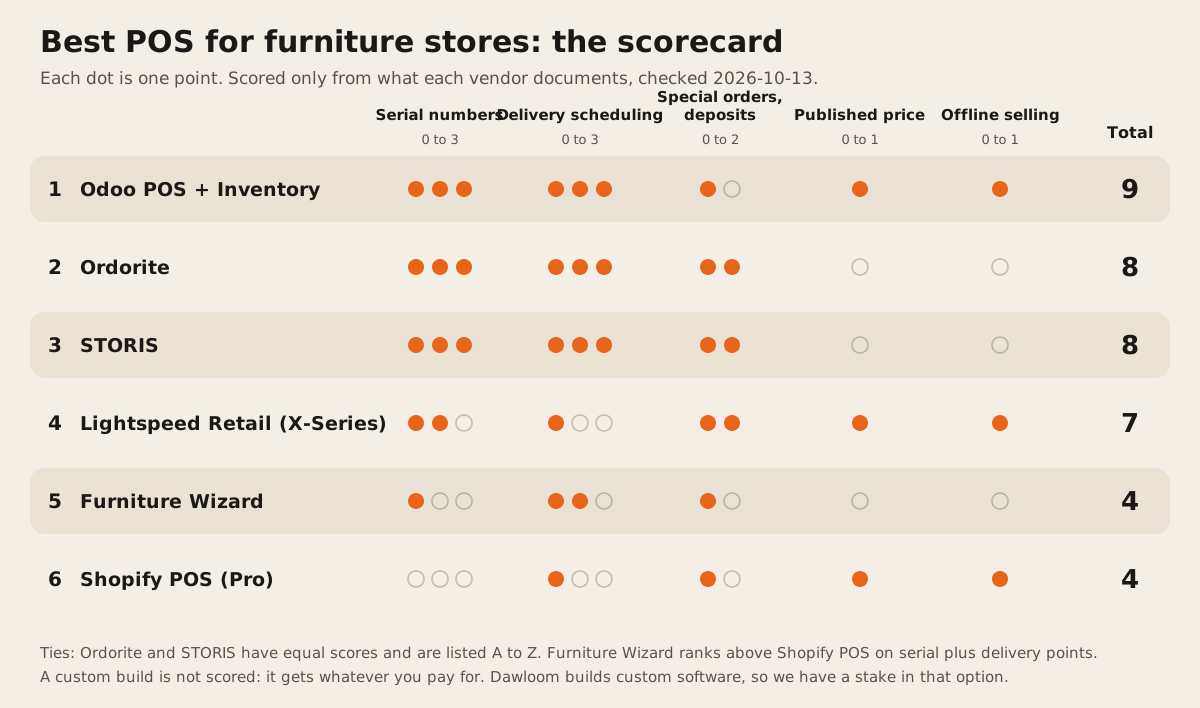
The scores at a glance
| # | System | Serial (3) | Delivery (3) | Special orders (2) | Price (1) | Offline (1) | Total |
|---|---|---|---|---|---|---|---|
| 1 | Odoo POS + Inventory | 3 | 3 | 1 | 1 | 1 | 9 |
| 2 | Ordorite | 3 | 3 | 2 | 0 | 0 | 8 |
| 3 | STORIS | 3 | 3 | 2 | 0 | 0 | 8 |
| 4 | Lightspeed Retail (X-Series) | 2 | 1 | 2 | 1 | 1 | 7 |
| 5 | Furniture Wizard | 1 | 2 | 1 | 0 | 0 | 4 |
| 6 | Shopify POS (Pro) | 0 | 1 | 1 | 1 | 1 | 4 |
The two furniture-only systems lose their points on price and offline mode, not on furniture features. If you’d pay a quoted price for software that already knows how a furniture store runs, read rows 2 and 3 as joint first.
1. Odoo POS + Inventory: 9 of 10
Best for: a store that wants POS, warehouse, delivery, and accounting in one system, with a partner or admin to set it up.
- Serial numbers (3). Odoo’s docs say serial numbers let you track “individual products and their expiration dates and location throughout the supply chain”, with traceability reports showing “when and where it originated, where it was stored, and who it was shipped to” (Odoo docs). Adding a tracked product in the POS pulls in its serial (Odoo docs).
- Delivery (3). With Ship Later, the cashier sets a shipping date at checkout and “the system instantly creates a delivery order from the warehouse to the shipping address” (Odoo docs). Dispatch management can “manage vehicle assignments based on fleet capacity”, but only if products have a weight and volume (Odoo docs).
- Special orders (1). Down payments on sales orders are documented in the POS (Odoo docs). We didn’t find a POS special-order flow that raises a purchase order.
- Price (1). $9.10 a user a month on Standard, or $16.90 on Custom, billed monthly. Checked 2026-10-13 (Odoo pricing).
- Offline (1). Orders are cached and sync on reconnect, but stock doesn’t sync in real time and payment terminals don’t work offline (Odoo docs).
The catch: Odoo is a toolkit. Fleet, dispatch, and serial tracking each need setup, and most stores pay a partner for it.
2. Ordorite: 8 of 10
Best for: furniture and bedding stores in the UK, Ireland, or the US that want delivery planning at the heart of the system.
- Serial numbers (3). “Serial tracking of items and boxes”, a “Box-level ledger” for items that come in several boxes, and items that “can be traced back to the containers they arrived on” (Ordorite features).
- Delivery (3). “Available dates are shown to sales staff when creating orders”, plus route planning, truck management, and “product cubic meter calculations” (Ordorite features).
- Special orders (2). “Automatically create customer requests for special orders”, sell “from items on order”, and “Deposits and invoicing” (Ordorite features).
- Price (0). Demo request only. Offline (0). The page says “Cloud Point of Sale” and doesn’t mention offline.
3. STORIS: 8 of 10
Best for: larger furniture chains with distribution centers and their own delivery fleet.
storis.com blocked our requests on 2026-10-13, so we read archived copies of its pages from May and June 2026 and link those.
- Serial numbers (3). “Tie a serial number to customers’ sales and service orders for precise warranty tracking and vendor chargeback management” (STORIS inventory page, archived).
- Delivery (3). The POS “calculates product availability and delivery dates that are realistic”, and one order can hold “multiple delivery dates, pickups, take-withs and direct shipments” (STORIS POS page, archived). Routing links to DispatchTrack, Descartes, and others, and a receiving calendar sets “daily truckload limits” (STORIS logistics page, archived).
- Special orders (2). “Special Order sales automatically generate related purchase orders”, and the POS handles layaways (STORIS POS page, archived).
- Price (0). Quote only. Offline (0). Its cloud page says data is reachable “as long as it has internet access” (STORIS cloud page, archived).
4. Lightspeed Retail (X-Series): 7 of 10
Best for: stores that sell mostly from stock on the floor and want a general retail POS with good serial tracking.
- Serial numbers (2). Serial numbers are added per outlet and recorded on the sale (Lightspeed help).
- Delivery (1). An unfulfilled sale can be marked for delivery, but “you must record the delivery address and details in the sales note”. There’s no delivery calendar or route in the docs (Lightspeed help).
- Special orders (2). Special orders for out-of-stock items, with “payment or deposit” taken at the sale (same article).
- Price (1). From $89 a month per location billed yearly. Checked 2026-10-13 (Lightspeed pricing).
- Offline (1). Cash sales queue offline (Lightspeed help). But “creating unfulfilled sales is not available in Offline mode”, so delivery orders wait for the internet.
5. Furniture Wizard: 4 of 10
Best for: independent stores that want a furniture-specific system with a delivery calendar and an option to host it themselves.
- Serial numbers (1). “Know the status of and where each item is; on order, showroom, warehouse, etc.” The features page doesn’t mention serial numbers (Furniture Wizard features).
- Delivery (2). “Easily schedule multiple deliveries from one screen”, maps, and “the calendar of all scheduled deliveries” (same page). It doesn’t say the date is set at the sale.
- Special orders (1). Drop shipping and on-order stock status are listed. Deposits aren’t.
- Price (0). Demo only. Offline (0). Hosted in the cloud, or on your own server. Offline selling isn’t documented.
6. Shopify POS (Pro): 4 of 10
Best for: a store whose website sells as much as its showroom.
- Serial numbers (0). Not in the help center. Shopify points to third-party apps (Shopify).
- Delivery (1). Since 2026-09-28, POS Pro can create local delivery orders, but “every physical item in the order must be delivered” and you “can’t mix local delivery with shipping or pickup in one order” (Shopify changelog). The help article doesn’t mention a delivery date (Shopify help).
- Special orders (1). “If a customer can’t pay for their whole order, then you can accept partial payments” (Shopify help). A special-order flow isn’t documented.
- Price (1). POS Pro is $89 a month per location billed yearly, on top of a Shopify plan (Shopify POS pricing).
- Offline (1). Cash and some card payments work offline, but “Shopify POS can’t sync orders and inventory with your Shopify admin when you’re offline” (Shopify help).
Left out, and why
- Square for Retail. Its pages don’t mention serial numbers or delivery scheduling (Square pricing). We compared it for multi-store retail in Square alternatives for multi-location retail.
- GERS (Harris Retail), Ascend, Comtrex. They show up on other lists. We didn’t read their docs for this page, so we won’t score them.
The custom option
A custom build would score whatever you pay for: serial records with any status you need, delivery slots tied to truck capacity, deposits, and offline selling. That’s the reason to build, and also the cost: you own payments, PCI scope, support, and every bug.
Build only if two things are true. Your process doesn’t fit any system above after a real demo. And the gap costs you money every week, for example double-sold floor models or missed delivery dates. Otherwise buy. Our build-vs-buy guide for POS goes through the cases, and the POS 3-year cost calculator shows what a build has to cost to break even.
How the top lists compare
The pages that rank for this question today mostly come from review aggregators. AppIntent’s furniture POS list is the most careful we found: it links every vendor and dates its price checks (February 2026). But it doesn’t publish how its scores are calculated, and it doesn’t cover Odoo, Lightspeed, or Shopify. This page publishes the rubric and scores general and furniture-only systems on the same scale.
FAQ
What POS system do most furniture stores use?
There’s no public market share data we trust. Furniture-only systems such as STORIS, Ordorite, and Furniture Wizard target the category directly. General systems such as Lightspeed and Shopify POS show up on most “best furniture POS” lists, mainly for stores that sell from stock.
Can Square handle furniture delivery and serial numbers?
Square’s pricing and retail pages don’t mention serial numbers or delivery scheduling, as of 2026-10-13. Square fits a store that sells small items over the counter better than one that schedules deliveries.
Which furniture POS shows delivery dates at the point of sale?
Ordorite shows available dates to staff while they build the order. STORIS calculates delivery dates at the POS. Odoo lets the cashier set a shipping date with Ship Later. Lightspeed and Shopify POS don’t document a date at the sale.
Is there a furniture store POS with published pricing?
Of the six here, Odoo, Lightspeed, and Shopify POS publish prices. STORIS, Ordorite, and Furniture Wizard quote on request.
Do furniture POS systems work offline?
Odoo, Lightspeed, and Shopify POS document an offline mode, each with limits on stock sync. STORIS, Ordorite, and Furniture Wizard don’t document one. Our guide to how an offline POS keeps selling explains what to test.
If none of these fit, our retail and POS page shows what we build, and we’ll tell you honestly if a system above already does the job.