
FurnitureAxis’s mobile companion app runs on Expo, on top of the same React Native backend as everything else we’ve built with it. We picked that deliberately, so it’s worth being specific about what Expo actually adds. “Just use Expo” and “you’ll need to eject eventually” both get said too often without anyone checking what’s true in 2026.
What Expo actually is
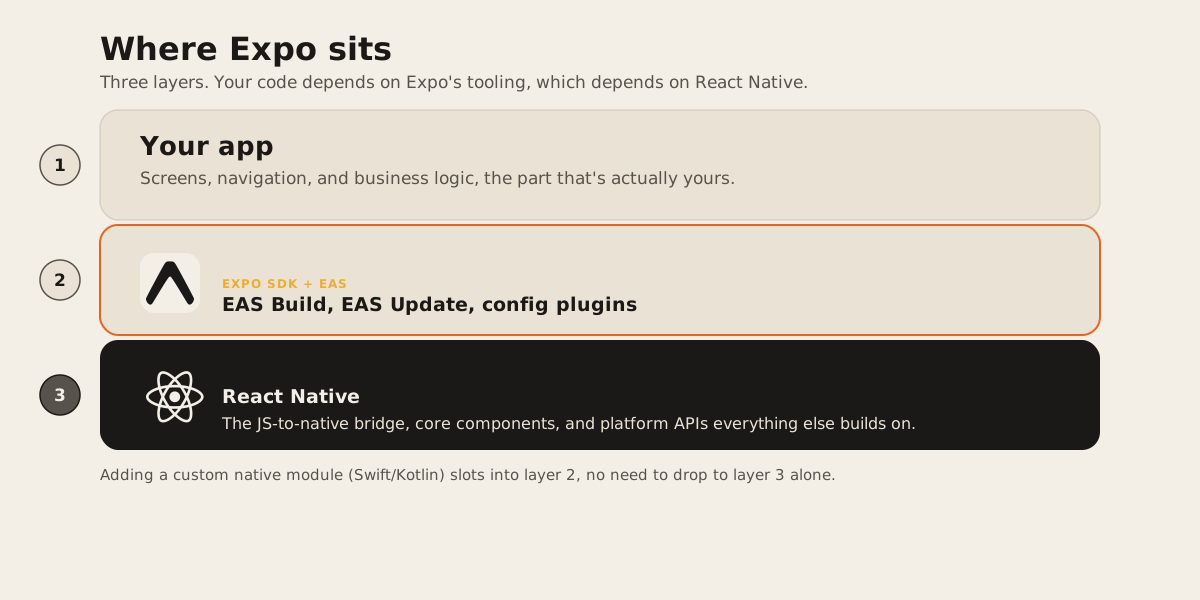
React Native gives you the JavaScript-to-native bridge, the core components, and the platform APIs everything else is built on. Expo sits on top of that as a set of tools and services for React Native projects.
The parts that matter for a real project:
EAS Build compiles your app in the cloud. You don’t need Xcode or Android Studio installed locally to produce an installable binary, which matters more than it sounds like once you have a team on different machines and CI that needs to ship a build without a Mac attached to it.
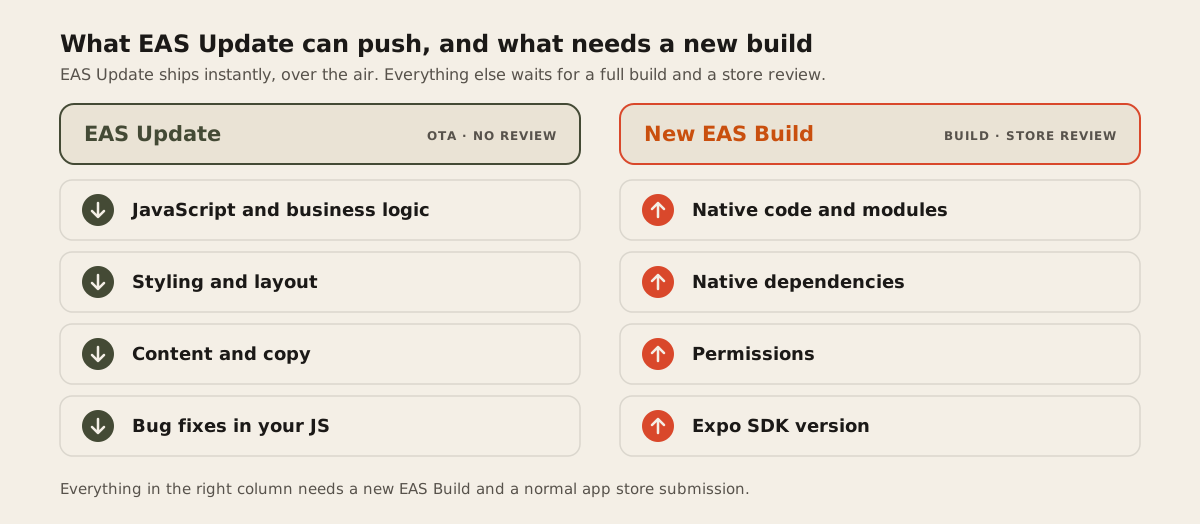
EAS Update pushes JavaScript, styling, and content changes to installed apps without an app store review. It can fix a bug in your logic or swap out copy. It cannot touch native code, native dependencies, permissions, or the Expo SDK version itself. Anything in that second list still needs a new build through EAS Build and a normal store submission.
Config plugins let you modify native project settings, like permissions entries or manifest values, through a JavaScript function referenced in your app config, instead of hand-editing AndroidManifest.xml or Info.plist directly.
Prebuild is what turns that config into actual native projects. Running npx expo prebuild generates fresh android/ and ios/ directories from your app config and applies your config plugins to them. Expo calls this pattern Continuous Native Generation: the native folders are treated as disposable output, regenerated when needed, rather than a permanent part of your source tree.
That last point has a sharp edge to it. If you hand-edit the generated android/ or ios/ folders directly, Expo’s own docs are blunt about it: run expo prebuild --clean again and those edits are gone. The fix isn’t to stop using prebuild, it’s to move whatever you changed into a config plugin so it survives regeneration.
The case people get wrong: custom native code
For years, “I need a custom native module” meant ejecting: leaving the managed workflow, taking ownership of the native folders permanently, and losing Continuous Native Generation. That’s no longer the right default. The Expo Modules API lets you write native modules and views in Swift and Kotlin while staying inside the prebuild workflow. You get a native module. You keep regenerable native projects.
There’s a real tradeoff inside that choice, separate from the ejecting question. Expo’s own docs point out that the Modules API favors developer experience and depends on the expo package, while Turbo Modules is the better fit when you need direct C++ integration. Most teams building an ordinary product feature land on the Expo Modules API.
So the honest list of reasons to write a native module has gotten shorter:
npx create-expo-module my-native-featureThat single command scaffolds a module with the native Swift and Kotlin files already wired up, ready to build against the app’s existing prebuild setup. You don’t have to eject to write the native code itself.
Where bare React Native still earns its place
The case for skipping Expo’s tooling and owning the native projects permanently is narrower than it used to be, but it’s real. It shows up when:
You need to hand-edit generated native files as a permanent part of your source tree rather than through a config plugin, because the change is too specific to your build pipeline or too tied to Xcode project internals to write as a plugin.
Your native build already depends on a complex existing native codebase, custom Gradle or CocoaPods setup, or a build system that predates your React Native app and doesn’t fit cleanly into what prebuild regenerates.
You need C++ integration through Turbo Modules specifically, which the Expo Modules API isn’t built for.
Your team already owns and maintains native iOS and Android code at a level where Continuous Native Generation is friction, not convenience, because you’re editing native files daily anyway.
None of those are common for a typical product app. They’re common for teams building infrastructure-level libraries, apps with an unusual native dependency graph, or apps that grew out of an existing native codebase rather than starting from React Native. If your project doesn’t match one of those, defaulting to bare RN mostly means giving up EAS Build and EAS Update for no native capability you couldn’t already get through a config plugin or the Modules API.
How we decide
We start every React Native project on Expo, because the tooling asks little of a project up front and Continuous Native Generation means backing out later, if a project genuinely needs it, doesn’t mean starting over. We only reach for bare React Native once a specific native requirement is already on the table and it clears the list above.
That’s the same reasoning behind FurnitureAxis’s mobile app. It’s a companion app to an existing web product with clear feature boundaries, and we haven’t needed to hand-edit Xcode project files for it. Expo’s tooling gets builds out and updates pushed without adding infrastructure we’d otherwise have to own ourselves.
If you’re scoping a mobile app and you’re not sure which side of that line yours falls on, that’s worth figuring out before the first sprint. Tell us what you’re building and we’ll tell you which one it needs.