

One repository for everything, or a separate repository per app? Small teams run into this question early, usually right after deciding to build a web app and a mobile app that need to agree on the same data. The honest answer is that a monorepo solves one specific problem well and adds real overhead everywhere else. Whether it’s worth it depends on how much your pieces actually need to talk to each other.
What “monorepo” actually buys you
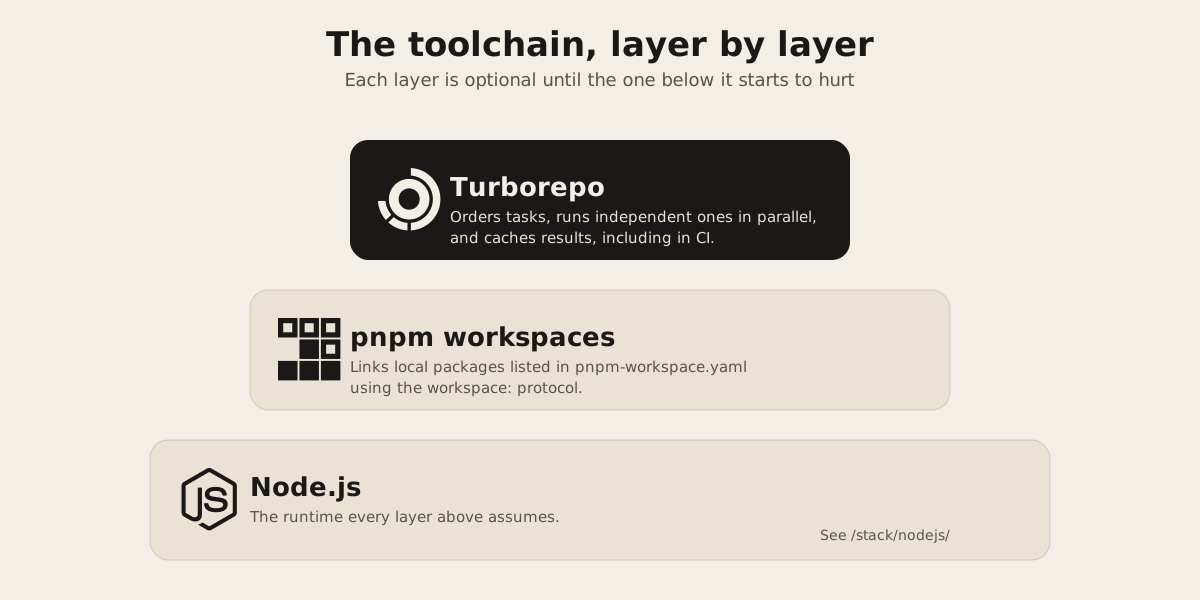
A monorepo is just one repository holding multiple packages instead of one package per repository. That’s the whole definition. The tooling around it, pnpm workspaces and Turborepo being the two most common choices for JavaScript and TypeScript teams, exists to solve the problems that show up once you put multiple packages in one place: installing dependencies once instead of per package, running builds in the right order when one package depends on another, and skipping a rebuild for a package that hasn’t changed.
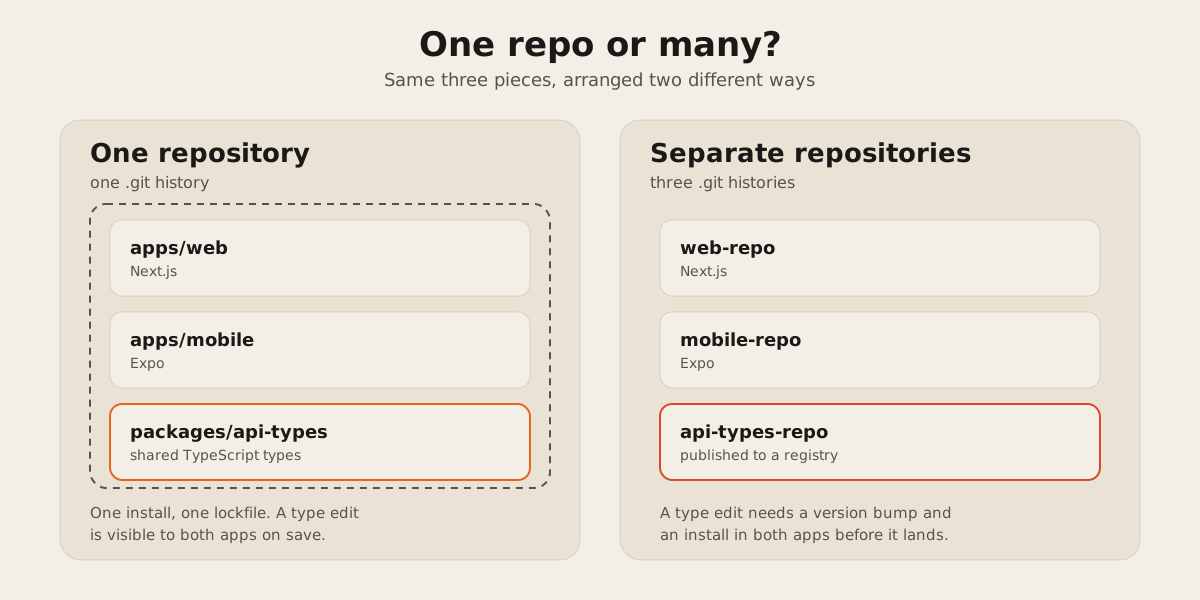
None of that is really about code sharing. You can share code across separate repositories too, by publishing a package to a registry and installing it like any other dependency. What a monorepo removes is the publish step. A change to a shared package is available to everything that imports it the moment you save the file, not after you bump a version and run an install in every consumer.
Where shared types earn their keep
The case for a monorepo gets strong fast when a web app and a mobile app need to agree on the shape of the same API. If your backend returns an order object with a dozen fields, and both a Next.js web app and an Expo app render that order, you want one TypeScript type for it, not two definitions that quietly drift apart the first time someone adds a field on one side and forgets the other.
That’s the general shape of the problem FurnitureAxis sits in: a web app and an Expo mobile companion app that both work with the same catalog, order, and inventory data. We won’t say how FurnitureAxis’s own repositories are arranged, but the pattern is worth naming anyway. Anything that speaks TypeScript on both ends is a candidate for a shared types package. FurnitureAxis also runs a C# background worker that syncs a vendor catalog, Shopify, and Algolia on a cron schedule, and that piece sits outside this conversation entirely: different language, different package manager, nothing a JavaScript monorepo tool can touch.
A shared types package is usually small: request and response shapes, maybe a handful of validation schemas, exported from one package that both apps import. Here’s what that looks like from inside a web app’s package.json once the types package lives in the same repo:
{
  "name": "web",
  "dependencies": {
    "@repo/api-types": "workspace:*",
    "next": "15.0.0"
  }
}
pnpm’s workspace protocol resolves workspace:* to the local package on disk instead of anything on the npm registry, and it refuses to fall back to the registry if that local package doesn’t exist. On publish, pnpm rewrites workspace:* to the real version number automatically, so consumers outside the repo never see the protocol at all.
What it costs
The overhead is real and worth naming plainly. One CI pipeline now has to understand every app in the repo, so a change to the mobile app can trigger a build of the web app too unless the pipeline is configured to be selective about what actually needs to run. It means one set of dependency versions to negotiate, which is fine until two apps genuinely need different major versions of the same library. And every contributor’s checkout gets bigger, even for the ones who only ever touch one app.
None of that matters much at three packages. It starts to matter somewhere past a dozen, once build times get long enough that “what actually needs to rebuild” stops being obvious from memory. That’s the point where a task runner earns its keep instead of adding ceremony.
The tools, if you go this route
If every piece is JavaScript or TypeScript, pnpm workspaces is a reasonable starting point: a pnpm-workspace.yaml file at the root lists which folders count as packages, and pnpm links them together on install. Turborepo sits on top of that layer. It doesn’t replace the package manager: it uses the package.json scripts already written and a turbo.json file to work out which tasks depend on which, run independent tasks in parallel across available cores, and skip a task whose inputs haven’t changed since the last run. Its remote cache stores task results so a teammate’s machine, or CI, doesn’t redo work that already happened somewhere else.
Neither tool solves a cross-language problem. If part of a stack runs on Node.js and another part is a Go service or a C# worker, that piece still has its own build and its own release cycle no matter how the folders are arranged.
How we’d decide for a small team
We’d ask one question first: how many of the pieces actually need to agree on the same data shapes right now, not hypothetically? A web app and a mobile app pulling from the same API is a real yes. A marketing site sitting next to a product dashboard usually isn’t, because there’s no shared type worth protecting, and a static site is usually better off deployed and versioned entirely on its own.
For a small team shipping one product with a web front end and a mobile companion, one repository with pnpm workspaces is a reasonable default, and Turborepo can be added later without restructuring anything, once build times start to hurt. For teams shipping genuinely separate products, or products split across languages, separate repositories are still the simpler choice, and simple is worth defending until it visibly stops working.
If you’re weighing this for your own project, tell us what you’re building and we’ll look at how many of the pieces actually need to share code before we recommend a folder structure.