
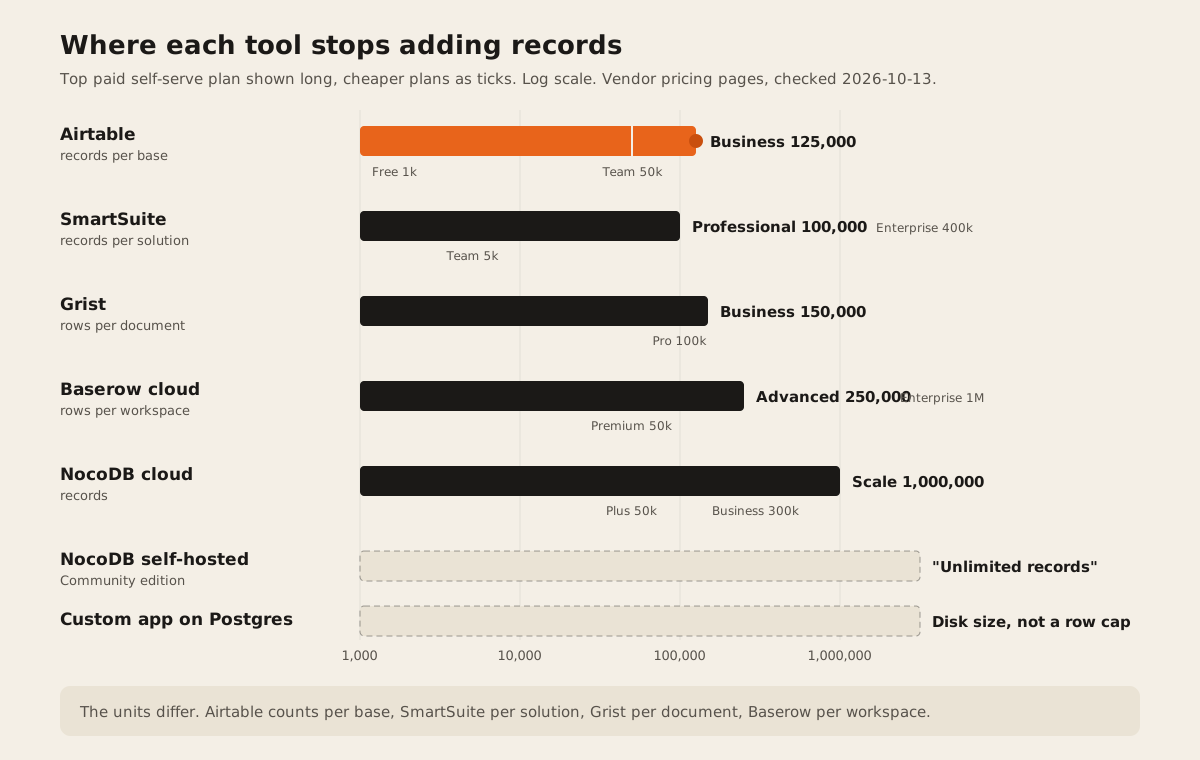
If you’ve outgrown Airtable because of records, the closest swaps are SmartSuite (up to 400,000 records per solution) and Baserow or NocoDB (up to 1,000,000 rows on their top cloud plans, and no record cap when you host NocoDB yourself). If the problem is the seat bill or permissions, Grist puts cell-level access rules on every plan from $8 a user a month. A custom app on Postgres only makes sense when the base has turned into the system your business runs on.
Who this is for: teams running orders, stock, jobs, or a client list in Airtable who keep hitting a limit. Who should stay put: if your base is under 50,000 records, a handful of people edit it, and the automations fit in 25,000 runs a month, Airtable’s Team plan is still a good tool. Read when staying is the right call before you migrate.
How we checked
We read each vendor’s own pricing page and help docs on 2026-10-13. Prices are US list prices in USD. Some vendors show other prices in other countries, so check yours. Every number below links the page it came from. We didn’t run a migration on each tool, so this is what vendors document, not what we measured.
Most pages that rank for “Airtable alternatives” are written by one of the alternatives. SmartSuite, Baserow, and Stackby all publish one. The ones we read rarely compare the units behind the limits, and none says when you should stay. That’s what this page adds.
Airtable’s limits, in one place
These are the numbers that usually force the move. All are from Airtable’s pricing page and its plans article, checked 2026-10-13.
| Limit | Free | Team | Business | Enterprise Scale |
|---|---|---|---|---|
| Price per seat a month | $0 | $20 yearly, $24 monthly | $45 yearly, $54 monthly | Custom |
| Records per base | 1,000 | 50,000 | 125,000 | 500,000 |
| Automation runs a month | 100 | 25,000 | 100,000 | 500,000 |
| API calls a month | 1,000 | 100,000 | No monthly cap | No monthly cap |
| Attachments per base | 1 GB | 20 GB | 100 GB | 1,000 GB |
| Revision history | 2 weeks | 1 year | 1 year | Not listed |
Three rules matter more than the table:
- Every editor is a seat. You pay “for users with edit rights” on a base. Read-only collaborators, form submissions, and share links are free (Airtable pricing FAQ). Fifteen editors on Business cost 15 x $45 x 12 = $8,100 a year, billed yearly.
- A full base stops taking records. Airtable’s FAQ says “you will not be able to add more records or attachments until you upgrade to a new plan.” Your existing data stays.
- The API is slow by design. Airtable allows “5 requests per second” per base and returns a 429 if you go over, after which you “must wait 30 seconds” (Airtable API limits). On Team, going past 100,000 calls slows you to 2 requests a second until the month resets.
Automation runs count every time a trigger fires, failed or not, and the automations guide says “the only standard way to increase the limit is to move to a higher Airtable plan.”
Airtable alternatives compared
The six Airtable alternatives below differ most on record limits and permissions. SmartSuite and NocoDB give the most records per paid seat, Grist gives cell-level access rules on every plan, and NocoDB and Grist can be self-hosted for free. Scroll sideways on a phone. “Not documented” means we couldn’t find it on the vendor’s own pages.
| Tool | Price a seat a month (US) | Record limit | Automations and API | Permissions | Self-host | Pick it when |
|---|---|---|---|---|---|---|
| Airtable | $20 Team, $45 Business, billed yearly. Pricing | 50,000 or 125,000 per base. 500,000 on Enterprise Scale. | 25,000 or 100,000 runs a month. 5 API requests a second per base. API limits | Locked and personal views on Team and Business. Admin panel on Business. Plans | No | You’re under the limits and the team likes it. |
| SmartSuite | $15 Team, $32 Professional, billed yearly ($20, $36 monthly). Minimum 3 and 5 seats. Pricing | 5,000, 100,000, or 400,000 records per solution. | 25,000, 100,000, or 500,000 automation runs and API calls a month, shared. | Table and field permissions from Professional. Record permissions on Enterprise. | Not documented | You want the closest Airtable feel with more records per dollar. |
| Baserow | $10 Premium, $18 Advanced, billed yearly ($12, $22 monthly). Pricing | 50,000, 250,000, or 1,000,000 rows per workspace (cloud). | 100,000 or 500,000 automation credits a month. API limits: not documented on the pricing page. | Role, field, and view permissions listed. Role permissions and audit logs on Advanced. | Yes. Self-hosted plan limits: not readable on the page. Source | You want an Airtable-style grid you can also run on your own server. |
| NocoDB | $12 Plus, $24 Business a seat, billed yearly. Or a flat $108 or $216 a month: “Pay for 9 users, Unlimited free users after.” Pricing | 50,000, 300,000, or 1 million records (cloud). Self-hosted Community: “Unlimited records & storage”. | 100,000 or 1,000,000 API calls and 30,000 or 120,000 automation runs a month (cloud). | Table and field permissions from Plus. Row level security from Scale. | Yes. Community is free and “fair-code”, with up to 2 workflows per base. | You have many light users, or your data already lives in a SQL database. |
| Grist | $8 Pro, $24 Business, billed yearly ($10, $30 monthly). Business needs 5 users. Pricing | 100,000 or 150,000 rows per document. | 40,000 or 60,000 API calls per document per day. | Access rules on every plan, “down to each cell”. | Yes. Free, open-source Community edition. Source | Permissions are your problem, or your base is really a spreadsheet with formulas. |
| Smartsheet | $9 Pro, $19 Business a member, billed yearly ($12, $24 monthly). Pricing | Not documented on the pricing page. | 250 automations a month on Pro, unlimited on Business. | Lock rows and columns on every plan. Free contributors who view and comment. | No | The base is really a project plan with dates and owners. |
| Custom app on Postgres | No seat fee. Database hosting such as $25 a month for Supabase Pro, plus the build. Supabase pricing | Disk size. Supabase Pro includes “8 GB disk size per project”. | Whatever you build and host. | Any rule your data supports, enforced in the database. | Yes, or managed | The base runs a core process and every tool above forces workarounds. |
All sources checked 2026-10-13. US list prices in USD. Units differ: Airtable counts per base, SmartSuite per solution, Grist per document, Baserow per workspace.
What 15 editors cost a year
Software only, billed yearly, at the plan that gets you past Airtable Team’s 50,000 records. Checked 2026-10-13.
| Tool and plan | Record limit | 15 editors a year |
|---|---|---|
| Airtable Business | 125,000 per base | $8,100 |
| SmartSuite Professional | 100,000 per solution | $5,760 |
| NocoDB Business, flat price | 300,000 | $2,592 |
| Grist Business | 150,000 per document | $4,320 |
| Baserow Advanced | 250,000 per workspace | $3,240 |
| NocoDB Community, self-hosted | Unlimited | $0 + your server and admin time |
The math: seat price x 15 x 12. NocoDB’s flat Business price is $216 a month for 9 paid users with the rest free, so $216 x 12. Migration time, retraining, and any paid add-ons sit on top of these numbers.
Each Airtable alternative in one paragraph
SmartSuite is the most direct swap on paper. It sells the same building blocks: grids, forms, and linked records. Professional gives you 100,000 records per solution with field-level permissions for $32 a seat. The catch: automation runs and API calls come out of the same monthly pool, so a busy integration eats into your automations (SmartSuite pricing).
Baserow is the pick if you might want to run it yourself one day. The cloud plans are cheap for the rows you get, and the source is on GitHub. We couldn’t read the self-hosted plan limits from the pricing page, so ask before you plan around them.
NocoDB sits on top of a SQL database, so it suits teams whose data already lives in Postgres or MySQL, or teams with many people who only need to look. The flat plans charge for 9 users and let the rest in free. The self-hosted Community edition has no record cap, but it’s “fair-code”, not open source, and caps you at 2 workflows per base (NocoDB pricing).
Grist is a spreadsheet with real tables. Its access rules work “down to each cell” on every plan, which is rare at $8 a seat. The limit to watch is rows per document: 150,000 on Business (Grist pricing).
Smartsheet fits when your base is a project tracker with owners and dates. It’s a sheet, not a relational database, and its pricing page doesn’t list a row limit.
When staying on Airtable is the right call
Moving costs real time. Stay if most of these are true:
- You’re under the limits with room to grow. Under 50,000 records per base on Team, or 125,000 on Business.
- Few people edit. Read-only users, form submissions, and share links don’t need a seat on Airtable.
- Your integrations are light. If nothing needs more than 5 requests a second, the API cap won’t bite.
- The team already knows it. Count the hours to rebuild views, automations, and habits before you count seat savings.
If only one table is too big, try archiving old records into a second base before you migrate the whole thing.
When a custom app beats all of them
A custom app makes sense when the base has stopped being a list and become the system your business runs on. The signs: you need row-level rules about who sees what, the automations call each other in chains, other systems sync with it every few minutes, or one bad edit costs real money. Our post on the signs your spreadsheet just became an ERP goes through each one.
Before you pay for a build, run the free spreadsheet-to-app readiness score. It’s ten questions, and it often says “don’t build yet”. Our 10-question guide on when to replace Excel with software explains the scoring. When the answer is build, we usually put the data in Postgres (why Postgres is our default database) and add roles and an audit log first.
Before you migrate, test these
- The export test. Export every table to CSV, including attachments and linked records. Check that links survive as IDs you can rebuild.
- The limit test. Load your biggest table into the new tool’s trial and add 20% more rows. Check filters and views are still fast.
- The permission test. Log in as your most restricted user. Confirm they can’t see a field they shouldn’t.
- The automation test. Rebuild your three busiest automations and count how many runs or credits a normal week uses.
- The API test. Run your heaviest sync and check for rate-limit errors.
FAQ
What is the record limit on Airtable?
1,000 records per base on Free, 50,000 on Team, 125,000 on Business, and 500,000 on Enterprise Scale, per Airtable’s pricing page, checked 2026-10-13. When a base is full you can’t add records until you upgrade, but nothing is deleted.
What is the best free alternative to Airtable?
For self-hosting, NocoDB Community and Grist’s Community edition are free. NocoDB Community has no record cap but limits workflows to 2 per base. On hosted free plans, Baserow gives 3,000 rows per workspace and NocoDB 1,000 records, so neither is a long-term free home for a growing base.
Is there an open-source Airtable alternative?
Yes. Grist’s core is open source under Apache-2.0 and Baserow publishes its source on GitHub. NocoDB’s self-hosted edition is free but describes itself as “fair-code”, not open source.
Why is Airtable so expensive for a team?
Airtable charges for every person with edit rights on any base, at $20 a seat on Team or $45 on Business, billed yearly. NocoDB’s flat plans and Grist’s lower seat prices cost less for the same team, and read-only users are free on Airtable too.
When should we move from Airtable to custom software?
When the base runs a core process and you keep hitting walls that tools can’t fix: row-level permissions, heavy two-way syncs, or chained automations that fail quietly. If your problem is only records or price, switching tools is cheaper than building.
If you’re at that point, our ERP and operations page shows what we build. Send us your base’s structure and we’ll tell you whether one of the tools above already does the job.