

To migrate Excel data to a database without losing any of it, export each sheet to CSV, clean it with a script you can run again, and send every row the script can’t fix to a review file instead of guessing. Then load the clean rows into tables with strict rules, and prove that the row counts and the money totals match the original sheet before anyone switches over.
This post does all of that on a sample orders sheet, with two scripts you can download and run today. They have no dependencies, and we ran them on 2026-10-14. Every output shown below is real output from that run.
Who this is for: an owner, operations lead, or developer moving a business sheet (orders, stock, customers, jobs) into a real database, often as the first step of a custom system. Who should skip it: if your sheet is a clean table with one header row and no hand-typed values, the import wizard in your database will do the job. If you’re still deciding whether to leave Excel at all, start with our 10-question score for when to replace Excel.
Most guides that rank for this question explain which import button to press: the SQL Server wizard, phpMyAdmin, or a paid ETL tool. None of the top results we read on 2026-10-14 showed a full cleanup run with the messy rows, the rules, and a check that nothing went missing. That check is the part that saves you.
The sample sheet (synthetic)
This data is made up. We wrote it to look like a real small wholesaler’s orders sheet, and every problem in it is one that shows up in real business sheets. The customers, emails, and phone numbers are fake. Download it as orders-before.csv.
ORDERS 2026 (do not sort!!),,,,,,,,,,,
,,,,,,,,,,,
Order No ,Order Date,Customer,Contact Email,Phone,SKU,Item,Qty,Unit Price,Line Total,Status,Rep
1001,01/06/2026,Acme Supply,buyer@acmesupply.com,(555) 201-3344,00125,Oak shelf 4ft,10,$45.00,$450.00,Shipped,Dana
,,,,,00126,Oak shelf 6ft,5,$62.50,$312.50,,
1002,2026-01-07,ACME Supply ,BUYER@ACMESUPPLY.COM ,555.201.3344,125,Oak shelf 4ft,4,45,180,shipped,Dana
1003,7-Jan-2026,Bright Café,orders@brightcafe.com,+1 555 410 2290,00310,Bar stool,12,$85.00,"$1,020.00",SHIPPED,Omar
1004,46030,Northwind Traders,ap@northwind.example,555-389-1200,00412,Desk lamp,6 pcs,$19.99,$119.94,done,Omar
1005,01/09/2026,Bright Cafe,orders@brightcafe.com,5554102290,00310,Bar stool,2,85,170,Shipped,Omar
1005,01/09/2026,Bright Cafe,orders@brightcafe.com,5554102290,00310,Bar stool,2,85,170,Shipped,Omar
1006,13/01/2026,Harbor Books,hello@harborbooks.example,(555) 777-0101,00520,Reading chair,1,$240.00,$240.00,Cancelled,Dana
1007,01/14/2026,Harbor Books,hello@harborbooks.example,(555) 777-0101,00521,Footstool,two,$55.00,$110.00,Shipped,Dana
1008,01/15/2026,Northwind Traders,ap@northwind.example,555 389 1200,00412,Desk lamp,10,19.99,189.90,Shipped,Omar
1009,Jan 16 2026,Green Leaf Co.,,N/A,00630,Planter large,3,TBD,,Pending,Dana
1010,01/16/2026,Green Leaf Co,info@greenleaf.example,555-600-7788,00630,Planter large,3,$38.00,$114.00,canceled,Dana
1011,01/19/2026,Acme Supply Co.,buyer@acmesupply.com,555-201-3344,00127,Oak shelf 8ft,2,$79.00,$158.00,Shipped,Dana
1012,01/20/2026,"Smith, J & Sons",jsmith@smithsons.example,(555) 318-9000,00125,Oak shelf 4ft,8,$45.00,$360.00,In progress,Omar
,,,,,00700,Wall bracket,16,$3.25,$52.00,,
,,,,,,,,,,,
1013,01/21/2026,Bright Café,orders@brightcafe.com,555-410-2290,00310,Bar stool,-2,$85.00,-$170.00,Returned,Omar
1014,01/22/2026,Harbor Books,hello@harborbooks.example,(555) 777-0101,00520,Reading chair,2,$240.00,$480.00,Shipped,Dana
TOTAL,,,,,,,,,"$3,956.34",,
Row 12 also hides a non-breaking space inside “Harbor Books”. You can’t see it, but a plain text match on the name would fail.
The 12 problems, and the rule for each
Each rule below is a decision. Some are safe for code to make. The rest belong to the person who owns the data, so the script sends them to review.
| # | Problem in the sample | Why it happens | The rule in cleanup.mjs |
|---|---|---|---|
| 1 | A title row and a blank row above the header | People format sheets for reading | Find the header row by name. Count the skipped rows. |
| 2 | Blank cells under order 1001 and 1012 | Merged cells export as blanks | Fill order-level columns down from the line above |
| 3 | Order 1005 appears twice | Copy and paste | Drop exact duplicates, and log each one |
| 4 | Dates in five formats, including 46030 | Typing, regional settings, and Excel’s date serials | Parse each known format. Read 5-digit numbers as Excel serials. |
| 5 | 13/01/2026 in a month-first sheet | Someone typed day first | Send to review. Never guess the date order. |
| 6 | SKU 125 next to 00125 | Excel stripped leading zeros | Pad to 5 digits |
| 7 | 6 pcs, two, and -2 in Qty | Free text in a number column | Read 6 pcs as 6. Send two and negatives to review. |
| 8 | $1,020.00, 45, and TBD in prices | Mixed formats | Store whole cents. Send text to review. |
| 9 | Line total $189.90 where 10 x $19.99 is $199.90 | A typo, or a discount nobody recorded | Send to review. A person decides which number is right. |
| 10 | shipped, SHIPPED, done, canceled | No dropdown on the column | Map to 5 fixed values. The owner signs off on the map. |
| 11 | Acme Supply, ACME Supply , Acme Supply Co. | Typing | Match on email first, then on a cleaned name |
| 12 | Phones in five formats | Typing | Convert to +1 and 10 digits. Anything else goes to review. |
Microsoft’s own guidance backs up two of these. On leading zeros: “Excel automatically removes leading zeros, and converts large numbers to scientific notation” (Microsoft Support). On dates, Excel stores each one as “a serial number that represents the number of days elapsed since January 1, 1900” (Microsoft Support). That’s why 46030 is really January 8, 2026. The same page warns that workbooks using the 1904 date system are off by “1,462 days”, so check which system your file uses before you trust any serial.
Step 1: export each sheet to CSV, and keep the original
In Excel, use File, Save As, and pick CSV UTF-8 so accented names like “Café” survive. Save one CSV per sheet. Microsoft’s SQL Server docs note that “The Save as command exports only the active sheet”, and add: “If the saved data contains page titles, blank lines, notes, and so forth, you might see unexpected results later when you import the data” (Microsoft Learn).
Then put the original workbook somewhere read-only. Never clean the only copy. Every fix in this process happens either in the script or in the source sheet, never by hand in the output, so you can run the whole thing again from the start.
Step 2: agree the rules with whoever owns the data
Before you write any code, settle the questions only the business can answer. For the sample, these were:
- Date order. Is this sheet month first or day first? (Month first. So
13/01/2026is a mistake to check, not a date to flip.) - What “done” means. Does “done” mean shipped, or paid? (Here it means shipped. In another business it might not.)
- Returns. Are returns negative sales, or their own records? (Their own records. A negative quantity goes to review.)
- Which number wins when the line total doesn’t match quantity times price. (Neither. A person checks the invoice.)
Write the answers down. They become the STATUS map and the checks in the script.
Step 3: run the cleanup script
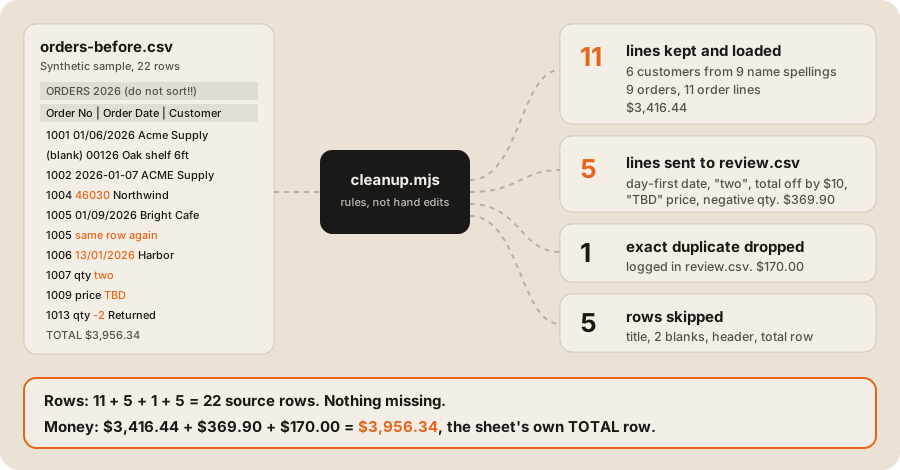
The script is cleanup.mjs. It’s one file for Node 20 or later, with no dependencies. It reads the CSV and writes five files: customers.csv, orders.csv, order_lines.csv, review.csv, and report.json.
node cleanup.mjs orders-before.csv outThis is the real output from our run on 2026-10-14:
{
  source_rows: 22,
  skipped_above_header: 3,
  skipped_blank: 1,
  skipped_total_row: 1,
  exact_duplicates: 1,
  kept_lines: 11,
  review_lines: 5,
  customers: 6,
  orders: 9,
  rows_accounted_for: 22,
  rows_balance: true,
  sheet_total: 3956.34,
  kept_total: 3416.44,
  review_total: 369.9,
  duplicate_total: 170,
  money_balance: true
}
row 10: dropped: exact duplicate of an earlier row
row 11: needs a person: date "13/01/2026" looks day-first; this sheet is month-first
row 12: needs a person: quantity is not a number "two"
row 13: needs a person: line total 189.9 but qty x price = 199.9
row 14: needs a person: not a money amount "TBD"
row 20: needs a person: quantity -2; returns go in their own table, not as negative sales
Two lines in that report matter more than the rest. rows_balance says every one of the 22 source rows landed in exactly one place: kept, review, duplicate, or skipped. money_balance says the kept lines, the review lines, and the dropped duplicate add up to the sheet’s own TOTAL row, to the cent. If either is false, the script exits with an error and you don’t load anything.
A few choices in the code are worth copying:
- Money is stored as whole cents.
$19.99becomes1999. Sums of whole numbers never drift the way decimal sums can. - Each cleaner returns a value or a reason. The reason goes into
review.csvin plain words, so the person fixing it doesn’t need to read code. - Every kept line keeps its source row number. Anyone can trace a database row back to the line in the sheet it came from.
Step 4: send the review file to a person
review.csv holds the 6 rows the script would not decide on, with the sheet row number and the reason:
| Sheet row | Order | Reason | What a person does |
|---|---|---|---|
| 10 | 1005 | Exact duplicate, dropped | Confirms it really was pasted twice |
| 11 | 1006 | 13/01/2026 looks day-first | Checks the order and types 01/13/2026 |
| 12 | 1007 | Quantity is two | Types 2 |
| 13 | 1008 | Total $189.90, but 10 x $19.99 = $199.90 | Checks the invoice and fixes one of them |
| 14 | 1009 | Price is TBD | Fills in the price, or leaves it out of the migration |
| 20 | 1013 | Quantity is -2 (a return) | Records it as a return in the new system |
Fix these in the source sheet, then run the script again. After a few rounds the review file is empty, or holds only rows the business has agreed to leave behind. In a real migration, keep each round’s report.json. It’s your record of what moved and what didn’t.
Step 5: load into tables that refuse bad data
The second script, load-sqlite.mjs, creates three tables with the rules the sheet never had, loads the clean CSVs inside a transaction, and checks the result. It uses SQLite through Node’s built-in node:sqlite module, so there’s nothing to install. Node’s docs list that module as added in v22.5.0 and usable without a flag from v22.13.0 (Node.js docs).
CREATE TABLE order_lines (
  line_id          INTEGER PRIMARY KEY,
  order_no         TEXT NOT NULL REFERENCES orders(order_no),
  sku              TEXT NOT NULL CHECK (length(sku) = 5),
  item             TEXT NOT NULL,
  qty              INTEGER NOT NULL CHECK (qty > 0),
  unit_price_cents INTEGER NOT NULL CHECK (unit_price_cents >= 0),
  line_total_cents INTEGER NOT NULL,
  source_sheet_row INTEGER NOT NULL,
  CHECK (line_total_cents = qty * unit_price_cents)
);
The real output from node load-sqlite.mjs out on 2026-10-14:
PASS  customers: database 6, expected 6
PASS  orders: database 9, expected 9
PASS  order lines: database 11, expected 11
PASS  line total (cents): database 341644, expected 341644
PASS  orders with no lines: database 0, expected 0
PASS  foreign key problems: database 0, expected 0
PASS  negative quantity: rejected (CHECK constraint failed: qty > 0)
PASS  total that does not match: rejected (CHECK constraint failed: line_total_cents = qty * unit_price_cents)
PASS  unknown status: rejected (CHECK constraint failed: status IN ('pending','in_progress','shipped','cancelled','returned'))
PASS  order for a customer that does not exist: rejected (FOREIGN KEY constraint failed)

Revenue by customer, shipped orders only:
  Bright Café         2 orders    1190.00
  Acme Supply         3 orders    1100.50
  Harbor Books        1 orders     480.00
  Northwind Traders   1 orders     119.94
The last four checks try to insert the same kinds of mistakes the sheet was full of. The database rejects each one. From here on, nobody can type two into a quantity again.
That final query is also the first payoff. In the sheet, “Bright Café” and “Bright Cafe” were two customers, and so were the three spellings of Acme. In the database each is one customer, so revenue per customer is right for the first time.
The data after cleanup
All five output files are in the sample folder. The customer table shows the name merge:
| customer_id | name | phone | spellings merged | |
|---|---|---|---|---|
| 1 | Acme Supply | buyer@acmesupply.com | +15552013344 | Acme Supply, ACME Supply, Acme Supply Co. |
| 2 | Bright Café | orders@brightcafe.com | +15554102290 | Bright Café, Bright Cafe |
| 3 | Northwind Traders | ap@northwind.example | +15553891200 | Northwind Traders |
| 4 | Green Leaf Co | info@greenleaf.example | +15556007788 | Green Leaf Co |
| 5 | Smith, J & Sons | jsmith@smithsons.example | +15553189000 | Smith, J & Sons |
| 6 | Harbor Books | hello@harborbooks.example | +15557770101 | Harbor Books |
And the order lines, now typed, with every SKU at 5 digits and every amount in cents:
| line | order | sku | item | qty | unit (cents) | total (cents) | sheet row |
|---|---|---|---|---|---|---|---|
| 1 | 1001 | 00125 | Oak shelf 4ft | 10 | 4500 | 45000 | 4 |
| 2 | 1001 | 00126 | Oak shelf 6ft | 5 | 6250 | 31250 | 5 |
| 3 | 1002 | 00125 | Oak shelf 4ft | 4 | 4500 | 18000 | 6 |
| 4 | 1003 | 00310 | Bar stool | 12 | 8500 | 102000 | 7 |
| 5 | 1004 | 00412 | Desk lamp | 6 | 1999 | 11994 | 8 |
| 6 | 1005 | 00310 | Bar stool | 2 | 8500 | 17000 | 9 |
| 7 | 1010 | 00630 | Planter large | 3 | 3800 | 11400 | 15 |
| 8 | 1011 | 00127 | Oak shelf 8ft | 2 | 7900 | 15800 | 16 |
| 9 | 1012 | 00125 | Oak shelf 4ft | 8 | 4500 | 36000 | 17 |
| 10 | 1012 | 00700 | Wall bracket | 16 | 325 | 5200 | 18 |
| 11 | 1014 | 00520 | Reading chair | 2 | 24000 | 48000 | 21 |
Moving to Postgres or SQL Server instead
The same tables and checks work in Postgres, which is the database we default to. Load the clean CSVs with COPY. One warning: Postgres 17 added an ON_ERROR ignore option, and the Postgres docs say it means “discard the input row and continue with the next one”. That’s the opposite of what you want in a migration. Leave it at the default, which is stop, so a bad row fails the load loudly. Your review file is where bad rows belong.
For SQL Server, Microsoft lists the Import Flat File Wizard, BULK INSERT, and bcp for CSV files (Microsoft Learn). Any of them can load the clean CSVs. Do the cleaning first, and keep the reconciliation checks either way.
Cutover: the last run
- Pick a quiet moment and tell everyone the sheet is about to freeze.
- Make the sheet read-only. From this point, new orders go into the new system only.
- Export, clean, and load one last time. The review file should be empty, or hold only rows everyone agreed to leave out.
- Check the report.
rows_balanceandmoney_balancemust both be true, and the database checks must all pass. - Keep the frozen workbook for at least one full reporting cycle, so anyone can check a number against it.
If the sheet feeds other tools, like an accounting app, plan that link before cutover day. Our post on the signs your spreadsheet just became an ERP covers what usually needs connecting, and keeping Shopify in sync with an inventory system shows the sync side.
FAQ
What’s the best way to import Excel data into a database?
Save each sheet as CSV UTF-8, clean it with a script you can re-run, and load the clean file with your database’s bulk loader, such as COPY in Postgres or BULK INSERT in SQL Server. Import wizards are fine for a tidy table. They don’t handle merged cells, mixed date formats, or duplicate customers.
How do I keep leading zeros when moving Excel data to a database?
Treat codes like SKUs and ZIP codes as text, not numbers. If Excel has already stripped the zeros, pad them back in the cleanup script to a fixed length, as cleanup.mjs does with padStart(5, '0'). Then add a length check in the database so short codes are refused.
Should I clean the data in Excel or after the import?
Fix the meaning in the source sheet, such as a wrong date or a missing price. Fix the format in a script, such as phone formats or extra spaces. Don’t hand-edit the output files, because the next run will overwrite your fixes.
How do I check that no data was lost in the migration?
Count the rows and sum the money before and after. Every source row should end up kept, in review, a logged duplicate, or a known skip, and the amounts should add back to the sheet’s total. Then check the database has no orders without lines and no broken foreign keys.
How long does a spreadsheet migration take?
The sample here takes seconds to run. A real one takes as long as the review rounds: the people who know the data have to answer the questions the script raises. Plan for several rounds, and start them weeks before cutover, not days.
If your migration is the first step toward a custom system, our ERP and operations work treats it as its own workstream, with test runs and reconciliation before switchover. You can also score your sheet first to see whether it needs a database at all.