
Replace Excel with software when the sheet has become the system your business runs on: several people edit it each week, data gets copied by hand between files, and one wrong number costs real money. If only one or two of those are true, a tidier spreadsheet or a no-code tool like Airtable is usually the better and cheaper call.
The score below turns that into ten questions. It gives you a band, the first modules worth building, and a plain answer when the right move is to stay on spreadsheets.
Who this is for: owners and operations leads whose team runs stock, orders, jobs, or approvals in Excel or Google Sheets. Who should skip it: if the sheet is a personal model or a one-off analysis, keep it. Spreadsheets are the right tool for that work.
The ten questions
Each answer scores 0, 1, or 2 points. The first eight measure pain. The last two measure fit: how standard your process is, and whether it has settled. They push the score up only when custom software is likely to pay off.
| # | Question | 0 points | 1 point | 2 points |
|---|---|---|---|---|
| 1 | How many people change the sheet in a normal week? | Just one person | Two to five people | Six or more people |
| 2 | How often do edits clash, or does nobody know which copy is current? | Never | Now and then | Every week or more |
| 3 | How often does someone copy or retype data from one sheet or system into another? | Never | Weekly or monthly | Daily |
| 4 | How many branches, stores, or warehouses does the sheet cover? | One | Two or three | Four or more |
| 5 | Do you need to control who sees what, and record who changed what and when? | No | Nice to have, we hide a few tabs | Yes, customers, auditors, or the law ask for it |
| 6 | What does one wrong number cost you? | A quick fix | Hours of rework | Lost money or an upset customer |
| 7 | Does the data need to reach other software, like accounting, a store, or a POS? | No | One system, by export | Several, or it must stay in sync |
| 8 | How many people understand the formulas well enough to fix them? | Several people | One or two | One, and they are busy or leaving |
| 9 | How standard is the process the sheet runs? | Standard: invoicing, payroll, basic stock | Mostly standard, with our own twists | Specific to how we work |
| 10 | How often does the process itself change? | Every month or so | A few times a year | It has been stable for a year or more |
The questions build on the four signs in our earlier post, the signs your spreadsheet just became an ERP: many editors on one file, formulas nobody dares touch, copy and paste standing in for integration, and the moment access control matters. That post explains why each one hurts. This one helps you decide what to do about it.
What your score means
| Score | Band | What to do |
|---|---|---|
| 0 to 6 | Stay on the spreadsheet | The sheet is still a tool, not a system. Tidy it instead: give it one owner, add data validation and protected ranges, and use co-authoring in Microsoft 365 or Google Sheets so people stop emailing copies. |
| 7 to 11 | Try a no-code database or an off-the-shelf app first | You have outgrown a flat sheet, but not by much. Airtable gives you linked tables, forms, and permissions without code. If the process is standard, an Odoo app may cover it out of the box. Revisit custom software if you hit their limits. |
| 12 to 15 | Build a small first system around the worst pain | The sheet is costing you time and errors every week. Replace the one workflow that hurts most with a real database, users, and roles. Keep the sheet for everything else until the first piece is trusted. |
| 16 to 20 | Your sheet is already your system of record | The business runs on this file and it is not built for that. Plan a phased move: model the data, build the first modules, run both side by side for a few weeks, and switch over only when the numbers match. |
Two answers override the score. If your process is standard back-office work like invoicing or payroll, try an off-the-shelf app before you build. If the process still changes every month, settle it in the sheet first, because software built now will need rework soon.
When staying on spreadsheets is the right call
A lot of “replace Excel” advice comes from people who sell the replacement. We do too, so here is the case for staying.
- Editing at the same time is a solved problem. Microsoft’s co-authoring guide says people working on a shared workbook see each other’s changes “in a matter of seconds.” If your only pain is emailed copies, moving the file to OneDrive, SharePoint, or Google Sheets fixes it for free.
- Size is rarely the problem. An Excel sheet holds 1,048,576 rows by 16,384 columns (Microsoft). Most small businesses never get close.
- But the format can bite. In 2020, England’s health agency lost nearly 16,000 Covid case records because a template used the old XLS format, which holds about 65,000 rows. The BBC’s account says each template “could handle only about 65,000 rows of data rather than the one million-plus rows that Excel is actually capable of.” The lesson is to know your tool’s limits before you hit them. A file that big isn’t automatically a reason to build software.
If you scored 0 to 6, spend an afternoon on the sheet instead: give it one owner, add data validation to the columns people mistype, protect the formula ranges, and write down which tab is the source of truth.
When Airtable or Odoo beats custom software
For scores of 7 to 11, try an off-the-shelf tool before you pay for a build.
- Airtable gives you linked tables, forms, views, and permissions with no code. Its pricing page lists 1,000 records per base on the free plan and 50,000 records per base on the Team plan, at $20 per seat a month billed yearly (checked 2026-10-13, vendor pricing). If your main table will pass those limits, plan for that before you move. If you’ve already outgrown it, see Airtable alternatives with higher record limits or cheaper seats.
- Odoo covers standard business processes like inventory, invoicing, and sales out of the box. Its pricing page offers a One App Free plan and says the app’s “usage is free for unlimited users, forever” (checked 2026-10-13). Paid plans are priced per user per month and vary by region. If your workflow doesn’t fit it, see Odoo alternatives for unusual workflows.
Custom software starts to earn its cost when your process is specific to how you work, when you need live links to several other systems, or when a no-code tool’s limits on records, roles, or automation are already in your way.
The first modules to build
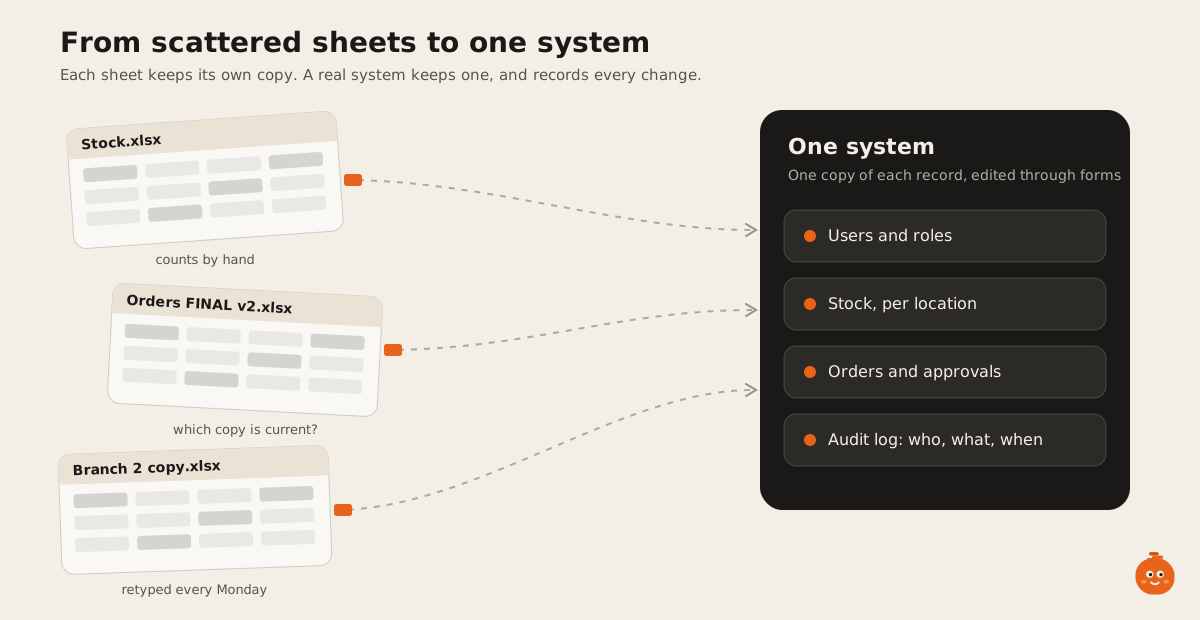
When the score says build, don’t replace the whole spreadsheet at once. Start with users, roles, and an audit log. Then add up to three of the other modules, picked from the answers that scored highest. Here are all seven.
-
Shared records with change history
One table per thing you track, edited through forms, with every change stamped by user and time.
-
Imports and sync jobs
Replace the copy and paste with a job that moves data on a schedule, logs each run, and alerts on failure.
-
Multi-location stock and transfers
Stock per location, transfers with a sender and receiver, and one total everyone sees.
-
Users, roles, and an audit log
Each role sees only its fields. Approvals and edits are recorded and cannot be quietly changed.
-
Validation rules and approval steps
Required fields, allowed values, and a second pair of eyes on anything that reaches a customer or an invoice.
-
Integration with your accounting or store
A tested link to the system that needs the data, with retries and a log, instead of a monthly export.
-
Business rules moved out of formulas
The logic hidden in nested formulas, written as code with tests so more than one person can trust it.
Keep the old sheet running next to the new system for a few weeks, and switch over only when the numbers match. We build these systems as part of our ERP and operations work, usually on Postgres (why Postgres is our default database) with a web front end. Retailers with stock in several places should also read serialized inventory: why counts fail and custom POS or Square.
The tool also has its own page: spreadsheet-to-app readiness score. If you scored 12 or more, send us your answers and we’ll reply with a written scope for the first module.
FAQ
When should a small business stop using Excel?
When the sheet runs a process other people depend on and it starts failing in ways that cost money: lost edits, numbers retyped between files, or nobody able to fix the formulas. If none of that happens, there’s no need to stop.
Is Airtable better than Excel for a small team?
For shared lists with linked records, forms, and simple permissions, usually yes. For financial modelling and one-off analysis, Excel is still better. Check Airtable’s record limit per base on the plan you’d use.
How many people can edit an Excel file at the same time?
Many, if the workbook is saved to OneDrive or SharePoint and everyone uses a version of Excel that supports co-authoring. The trouble starts with copies saved locally or emailed around.
Should I buy software or build my own?
Buy when your process is the same as most businesses’, like invoicing, payroll, or basic stock. Build when the process is specific to how you work, or when the software you’d buy forces your team into workarounds that live in spreadsheets again.
What should we build first when replacing a spreadsheet?
Users and roles first, so access is right from day one. Then the one workflow that causes the most damage today, whether that’s clashing edits, hand-copied data, or stock across locations.