
To sync a custom system with QuickBooks Online or Xero, decide which side owns each kind of record, then send every change through a queue that writes to the accounting API once, with an idempotency key, and saves the ID that comes back. Most sync failures come from four errors: rate limits, expired tokens, validation errors, and retries that create duplicates. Plan for each one, and run a nightly check that the totals match on both sides.
This post gives you the sequence we design around, an error-handling table built from the vendors’ own docs, and the API costs that changed in 2026 for both platforms.
Who this is for: a business with its own order, job, or inventory system that needs invoices, customers, and payments to show up in QuickBooks or Xero without anyone retyping them. Also for the developer building that link. Who should look elsewhere: if your system is Shopify, Square, or another big platform, look for a ready-made connector first. Those cover the common case for a monthly fee, and building your own only pays off when your records don’t fit their shape.
Most results for “QuickBooks integration custom software” are agencies selling the integration, and the developer guides that rank are mostly about getting the first API call working. None of the top results we read on 2026-10-14 put the failure cases for both platforms side by side with links to the vendor docs. That table is below.
Step 1: give every record one owner
Two-way sync breaks when both sides think they own the same field. Pick one owner per record type before you write code.
| Record | Usual owner | Direction | Why |
|---|---|---|---|
| Customers | Your system | Your system to accounting | Sales staff create and edit them in your app |
| Products and services | Your system | Your system to accounting | Prices and SKUs live where orders are taken |
| Invoices | Your system | Your system to accounting | They’re created from orders |
| Payments | Accounting | Accounting to your system | Payments are matched to bank lines in QuickBooks or Xero |
| Chart of accounts, tax rates | Accounting | Read only in your system | Your accountant manages these. Never create them from code. |
The rule that follows: your system never edits a payment, and the accounting side never edits an order. If a person changes an invoice in QuickBooks, your sync should flag the difference and leave both sides as they are.
Step 2: the sequence
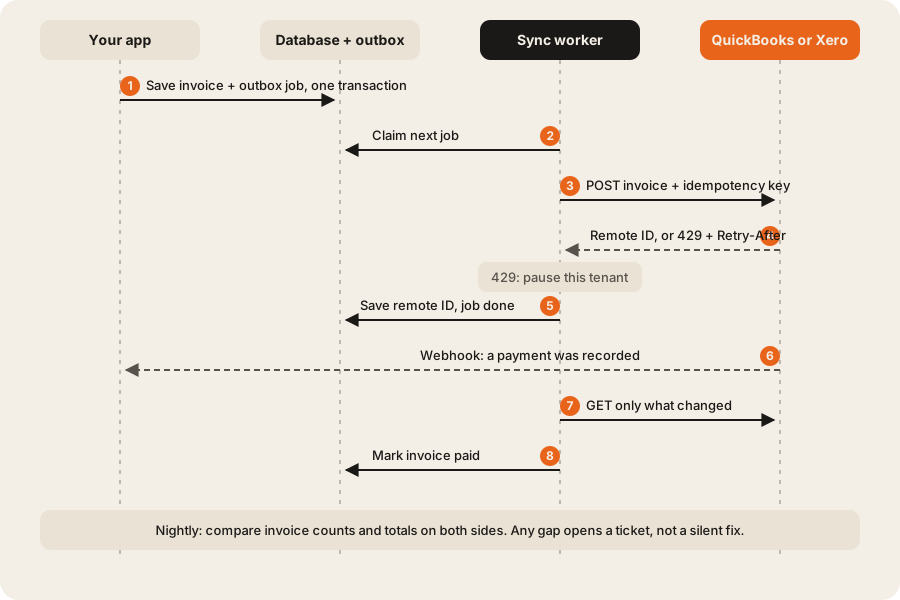
The most important step in a QuickBooks or Xero sync is step 1: the invoice and its outbox job are saved in the same database transaction. If the save fails, there’s no job. If the save works, the job is guaranteed to exist, even if the server restarts a second later. Nothing calls QuickBooks or Xero from inside a web request. A separate worker does it, so a slow or rate-limited API never slows down the person using your app.
The worker side follows the same rules as any background job: retries with backoff, a limit on attempts, and a dead-letter list a person reads. Our post on background jobs that don’t fall over covers those in detail.
Here’s the core of a worker, cut down to the parts that matter:
// One job = one record to push. Runs in a worker, never in a web request.
async function pushInvoice(job: Job) {
  const conn = await getConnection(job.tenantId);        // tokens for this company
  if (conn.pausedUntil > Date.now()) return job.retryAt(conn.pausedUntil);

  const key = `invoice-${job.invoiceId}-v${job.version}`; // same key on every retry
  const res = await accounting.createInvoice(conn, toRemote(job.invoice), { idempotencyKey: key });

  if (res.status === 429) {                               // rate limit: wait as told
    const wait = Number(res.headers.get('retry-after') ?? 60) * 1000;
    await pauseTenant(job.tenantId, Date.now() + wait);
    return job.retryAt(Date.now() + wait);
  }
  if (res.status === 401) return refreshThenRetry(job, conn);  // see the table below
  if (res.status === 400) return job.needsPerson(readError(res)); // never auto-retry
  if (res.status >= 500) return job.retryWithBackoff();

  await db.invoices.update(job.invoiceId, { remoteId: res.body.id, syncedAt: new Date() });
  await job.done();
}
The idempotency key stays the same across retries of the same version. If a request times out after the accounting app saved the invoice, the retry returns the first result instead of a second invoice.
The limits you design around
Xero
Xero’s limits page lists these per connected organisation (checked 2026-10-14):
- “Concurrent Limit: 5 calls in progress at one time”
- “Minute Limit: 60 calls per minute”
- “Daily Limit: 1,000 calls per day for starter, 5,000 calls per day for higher tiers”
- Across all organisations: “App Minute Limit: 10,000 calls per minute”
Every response carries X-DayLimit-Remaining, X-MinLimit-Remaining, and X-AppMinLimit-Remaining. Watch them and slow down before you hit zero. Xero also suggests batching: “a ceiling of about 50 nodes per request is practical”, which keeps each request under its 3.5 MB guidance. Sending 50 invoices in one call uses 1 of your 60 calls a minute instead of 50.
The same page sets volume guidance worth knowing before you promise a client anything: Xero “is designed for volumes of up to 5,000 Sales invoices (Accounts Receivables) and 5,000 Purchases bills (Accounts Payables) per month.” If your system produces more than that, Xero may be the wrong ledger.
QuickBooks Online
Intuit’s developer help center publishes the QuickBooks Online limits, commonly cited as 500 requests per minute and 10 concurrent requests per company. We couldn’t load Intuit’s throttling article on 2026-10-14 (it renders only in a browser), so confirm the numbers there before you size a sync.
What the API itself costs in 2026
QuickBooks and Xero both charge app developers in 2026. Intuit meters reads and leaves writes free, and Xero charges by connections and data sent out. Both rules change how a sync should be built.
QuickBooks. The Intuit App Partner Program Guide (version 1.2, March 2026) splits calls into two kinds. “Core API calls cover most standard data-in operations such as creating or updating invoices, bills, customers, vendors, etc. Core API calls are unmetered and uncharged.” Reads are different: “CorePlus API calls cover most standard data-out operations such as reading accounts, querying company information, and fetching reports. CorePlus API calls are metered and API Fees may apply.”
| Intuit tier | Monthly fee | CorePlus (read) calls included | Over the limit |
|---|---|---|---|
| Builder | No charge | 500,000 a month, capped | Calls above the cap “would be blocked” |
| Silver | US$300 | 1 million | US$3.50 per 1,000 up to 10 million |
| Gold | US$1,700 | 10 million | US$1.40 per 1,000 from 10 million to 75 million |
| Platinum | US$4,500 | 75 million | US$0.25 per 1,000 above 75 million |
Source: the guide’s fee table, which says “All Fees shown in USD for reference” and points to country rate cards (checked 2026-10-14). The guide also says “Only successful API calls, specifically those returning a 2xx HTTP status code, are metered.”
The design lesson: writes are free and reads cost money. A sync that polls QuickBooks every minute to look for changes burns read calls. A sync that pushes changes as they happen and reads only what a webhook points to stays inside the free tier for a long time.
Xero. Xero moved to paid app tiers on 2 March 2026. Its developer pricing page lists prices in Australian dollars, excluding tax (checked 2026-10-14):
| Xero tier | Monthly fee (AUD) | Connections | Data out included | Extra data out |
|---|---|---|---|---|
| Starter | No charge | 5 | n/a | n/a |
| Core | $35 | 50 | 10 GB | $2.40 per GB |
| Plus | $245 | 1,000 | 50 GB | $2.40 per GB |
| Advanced | $1,445 | 10,000 | 250 GB | $2.40 per GB |
| Enterprise | Price on application | No limit | On application | On application |
A custom system for one business needs one connection, so the free Starter tier usually fits. Remember that Starter also has the lower 1,000 calls a day limit.
The error-handling table
Each row says what you’ll see from each platform and what the sync should do. “Confirmed” means we read it on the vendor’s own page or spec on 2026-10-14.
| Problem | Xero signal | QuickBooks signal | What the sync does |
|---|---|---|---|
| Too many calls | HTTP 429 with X-Rate-Limit-Problem and Retry-After (confirmed, limits page) | HTTP 429 (not confirmed on the official page) | Pause that one company until Retry-After, or 60 seconds if missing. Other companies keep syncing. |
| Daily limit used up | HTTP 429, and Retry-After gives the seconds until reset (confirmed) | No daily limit published | Hold that company’s jobs until the window resets. Alert if it happens twice in a week. |
| Retry after a timeout | Send an Idempotency-Key header, “128 character max” (confirmed, Xero OpenAPI spec) | A requestid parameter (not confirmed on the official page) | Use the same key for every retry of the same record version. Also check for a saved remote ID before creating anything. |
| Access token expired | HTTP 401 | HTTP 401 | Refresh the token once, save the new refresh token straight away, retry once. |
| Refresh token rejected | Error from the token endpoint | Error from the token endpoint | Stop the jobs, mark the connection “needs reconnect”, and email the customer a reconnect link. |
| Bad data (missing field, closed period, unknown account) | HTTP 400 validation error | HTTP 400 validation error | Never retry. Put the job in a “needs a person” list with the vendor’s message. |
| Plan limit reached | HTTP 400 “You have reached the limit of invoices you can approve.” on Xero’s smallest plan (confirmed, limits page) | Not applicable | Tell the customer their accounting plan is full. Retrying won’t help. |
| Read allowance used up | Extra data out is billed per GB on paid tiers (confirmed, pricing) | Builder tier reads above 500,000 a month “would be blocked” (confirmed, partner guide) | Read less: use webhooks and changed-since queries. Alert at 80% of the allowance. |
| Someone edited the record in accounting | Changed values on the next read | Version mismatch error on update (not confirmed on the official page) | Don’t overwrite. Flag the difference for a person, per the owner table above. |
| Vendor outage | HTTP 5xx | HTTP 5xx | Retry with backoff, up to a set number of attempts. Then dead-letter it. |
| A webhook never arrives | No signal | No signal | The nightly check finds it. Xero supports If-Modified-Since to fetch “Only records created or modified since this timestamp” (confirmed, OpenAPI spec). |
Xero has one more option worth knowing. Its spec describes a summarizeErrors flag: if false, a batch call will “return 200 OK and mix of successfully created objects and any with validation errors” (Xero OpenAPI spec). Turn that on for batches, then read each item’s status. One bad invoice shouldn’t block 49 good ones.
Step 3: map the fields once, in one place
Keep a single mapping layer between your records and the accounting ones. Store the remote ID next to every local record, plus the time it was last synced.
| Your system | QuickBooks Online | Xero | Watch out for |
|---|---|---|---|
| Customer | Customer | Contact | Name clashes with existing records. Match on your stored remote ID, not the name. |
| Product or service | Item | Item | Income and expense accounts must already exist in the ledger |
| Order or job | Invoice | Invoice (type ACCREC) | Tax codes differ by country. Map them per company, never hard-code. |
| Payment | Payment | Payment | Usually flows from accounting to you, after bank matching |
| Refund | Credit memo, refund receipt | Credit note | Model it as its own record, not a negative invoice |
If you’re moving old records into the new system first, clean them before the first sync. Our Excel to database cleanup playbook shows how to merge duplicate customers and check totals before anything reaches the ledger.
Step 4: the nightly check
Every night, for each connected company, compare:
- The count of invoices your system marked as synced yesterday against the count in the accounting app for the same dates.
- The total amount of those invoices on both sides.
- The list of invoices with no remote ID that are more than an hour old.
If anything differs, open a ticket for a person. Don’t build an automatic fix. A silent fix to accounting data is how small sync bugs turn into a messy month-end close.
What the accounting plans cost (US prices)
Your customer pays for their own accounting plan, and the plan can limit what the sync does. These are the US list prices from each vendor’s US pricing page, checked 2026-10-14. Prices differ by country, so check the vendor’s page for yours.
| Plan | US monthly price | Note |
|---|---|---|
| QuickBooks Online Simple Start | $38 | 1 user (QuickBooks pricing) |
| QuickBooks Online Essentials | $85 | 3 users |
| QuickBooks Online Plus | $140 | 5 users |
| QuickBooks Online Advanced | $340 | 25 users |
| Xero Early | $27 | ”Send quotes and 20 invoices” (Xero US pricing) |
| Xero Growing | $59 | ”Send invoices and quotes”, no 20-invoice cap listed |
| Xero Established | $97 | Adds “advanced tools and analytics” |
Both pages also showed first-months discounts when we checked. The Xero Early limit matters most here. Xero’s limits page says Early organisations can approve up to 20 sales invoices a month. A sync that approves 50 invoices a month on that plan will start failing at the 21st, with the plan-limit error in the table above.
Build it or use a connector?
Use a ready-made connector when your other system is a mainstream platform and your invoices are plain: one customer, standard items, standard tax. Build a custom sync when invoices come from your own system, when one order splits into several invoices or deposits, when you need custom fields or job costing in the ledger, or when the connector’s per-month fee across many locations costs more than owning the code.
Dawloom built the QuickBooks accounting integration for FurnitureAxis, a US furniture retail platform that also keeps a Shopify storefront in sync. The Shopify side is written up in keeping Shopify in sync with an inventory system.
FAQ
Can custom software integrate with QuickBooks?
Yes. QuickBooks Online has a public API that lets your system create customers, items, invoices, and payments. You register an app with Intuit, the business connects its QuickBooks company through OAuth, and your system calls the API with that company’s tokens.
How much does the QuickBooks API cost?
Writing data, such as creating invoices, is free on every Intuit tier. Reading data is metered. The free Builder tier includes 500,000 read calls a month and blocks reads above that. Silver costs US$300 a month for 1 million reads (Intuit partner guide, checked 2026-10-14).
What are the Xero API rate limits?
Per connected organisation: 5 calls at once, 60 a minute, and 5,000 a day, or 1,000 a day on the free Starter tier. Your app also has a 10,000 calls a minute limit across all organisations (Xero limits, checked 2026-10-14).
How do I stop duplicate invoices when a sync retries?
Send an idempotency key with every create call and keep it the same for every retry of the same record. Xero takes an Idempotency-Key header. Also store the remote ID as soon as it comes back, and check for it before you create anything.
Should the sync be real-time?
Near real-time is enough for most businesses. Push changes through a queue within a minute or two, and let webhooks bring payments back. A nightly check catches anything the queue or webhooks missed.
If you need a custom system that talks to your accounting app, see our ERP and operations work. We scope the sync as its own piece, with the owner table and error list agreed before we build.