
There are five ways to turn an Excel spreadsheet into a web app: share the workbook properly in Microsoft 365, build an app yourself in a no-code tool, use Power Apps, keep Excel’s formulas inside a converter, or pay a developer for custom code. On the vendors’ own pages (checked 2026-11-01), no-code starts at $5 a user a month and small custom conversions are quoted at $500 to $5,000.
Who this is for: a business whose quotes, orders, stock, or jobs live in a workbook that has become hard to share. Who should skip it: if the workbook is a one-person analysis or a financial model that only you edit, keep it in Excel. That’s what Excel is for.
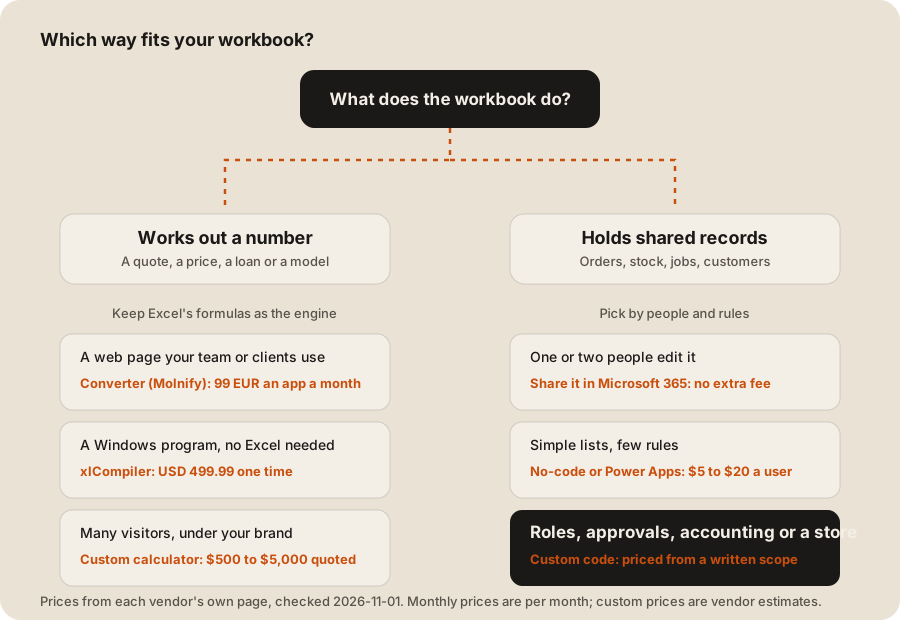
First, what does your workbook do?
Most spreadsheets do one of two jobs, and the right way depends on which.
- It works out a number. A price list with discounts, a quote builder, a loan or rate calculator. People type a few inputs and read a result. Here the formulas are the product, so you want to keep them.
- It holds shared records. Orders, stock, jobs, customers. Several people add and change rows every day. Here the data is the product, and the trouble is usually who changed what.
The 5 ways compared
Prices are US list prices from each vendor’s page, checked 2026-11-01. Custom prices are the vendors’ own estimates, not independent figures.
| Way | Best for | Cost | Time to first version | The catch |
|---|---|---|---|---|
| 1. Share it in Microsoft 365 | 1 or 2 editors, clashing copies | No extra fee with Microsoft 365 | Same day | No roles, no approvals, no real audit trail |
| 2. No-code app builder | Simple lists and forms | AppSheet from $5 a user a month, Airtable Team $20 a user a month | Hours to days | Fees per user or per app, every month, and row limits |
| 3. Power Apps | Microsoft 365 shops | $20 a user a month, paid yearly | Days | Per-user fee for everyone who opens it |
| 4. Keep Excel’s formulas | Calculators and pricing models | Molnify 99 EUR an app a month, xlCompiler USD 499.99 once | Days | The sheet stays the engine, so it isn’t a shared database |
| 5. Custom code | Shared records with roles, rules, and integrations | $500 to $5,000 quoted for small conversions, more for business systems | 2 to 4 weeks for a small one | Highest first cost, and you need someone to maintain it |
1. Share it in Microsoft 365
If the real problem is five copies of stock_v3_FINAL.xlsx, move the file to OneDrive or SharePoint and let people edit it together. Microsoft says that with co-authoring “you can see each other’s changes quickly, in a matter of seconds.”
It stops being enough when tools start writing to the file too. Microsoft’s own Excel Online (Business) connector docs say “Users should avoid writing data to a single Excel file from multiple clients concurrently,” because that “can cause possible merge conflicts and data inconsistency.”
2. Build it yourself in a no-code tool
No-code builders turn rows into screens and forms. AppSheet starts at $5 a user a month, and its Core plan at $10 is “included in most paid Google Workspace plans.” Airtable Team is “$20/user/month when billed annually.”
Glide prices per account, from $25 a month on its Basic plan. Its Excel page says apps connected to Excel “support up to 25,000 rows across all tables,” and “To sync with Excel, a Business or Enterprise plan is required.” Our Airtable alternatives post covers what happens when you outgrow these tools.
3. Power Apps
If your company already runs on Microsoft 365, Power Apps can turn an uploaded workbook into a Dataverse table. Microsoft recommends that route “when you want cloud storage, improved security, and a reusable table for other apps and flows.” Power Apps Premium is “$20.00 user/month, paid yearly” and includes a 2 GB Dataverse database.
4. Keep Excel’s formulas
For a calculator, rebuilding every formula is often wasted money. Some tools run your sheet as the engine. Molnify lists “99 EUR” per app per month on its first plan, with development help at 150 EUR an hour. xlCompiler turns a workbook into a Windows program “that doesn’t require Microsoft Excel,” for a one-time USD 499.99 license.
These keep the logic you trust. They don’t give you a shared database with users and roles, so they fit calculators, not shared records.
5. Custom code
A developer rebuilds the workbook as a real web app with a database behind it. Conversion services that mostly build calculators publish their own ranges. ExcelToWeb.app says “Typical projects take 2-4 weeks” and shows a sample estimate of $2,500. Its guide puts custom development at “$500-5,000 one-time.” SheetSmith, which builds with AI and a human check, quotes ”~$2,000 one-time + hosting” in 5 to 7 business days.
A workbook that runs orders, stock, or jobs for a whole team costs more than a calculator, because of the four things below.
What sets the price of custom code
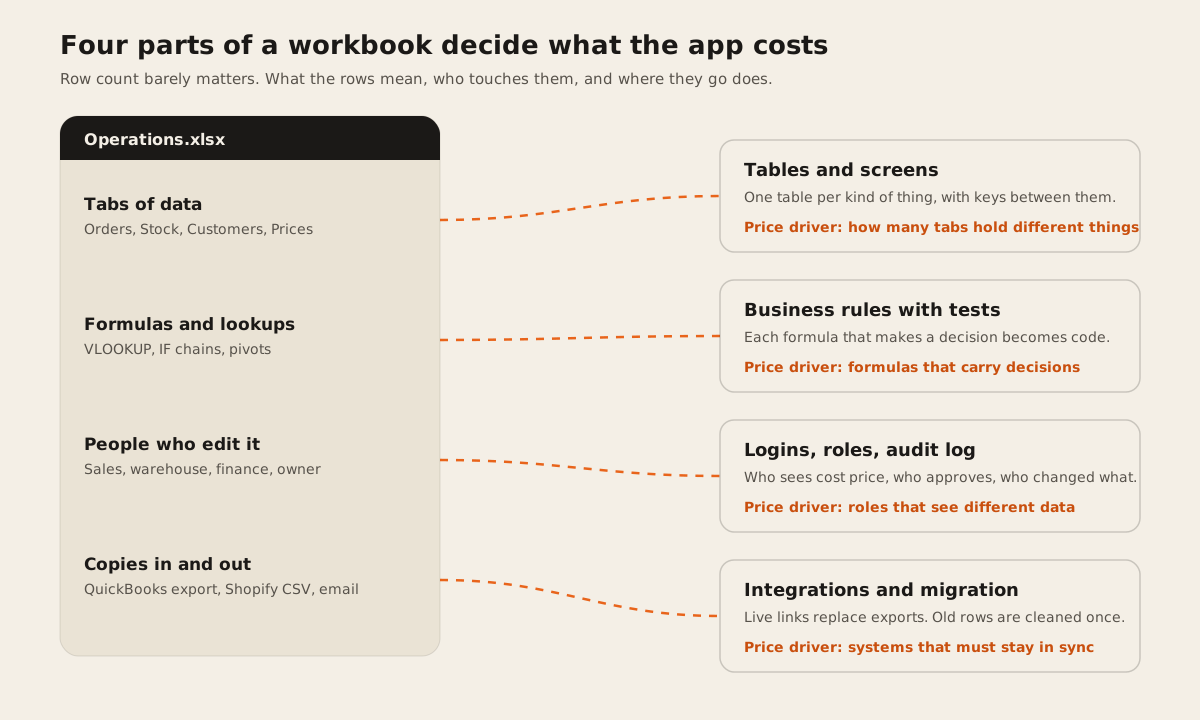
- Tabs that hold different things. Orders, Stock, Customers, and Prices become four linked tables, each with screens. Ten tabs that are monthly copies of one table are really one table.
- Formulas that make decisions. A sum is free. A nested IF that decides a discount becomes a business rule that has to be written, tested, and agreed with you.
- Roles that see different data. “Everyone sees everything” is cheap. “Sales sees status but not cost price” costs more, and it’s often the main reason to leave Excel.
- Systems that must stay in sync. Every export you paste into QuickBooks, Xero, or Shopify today becomes an integration with error handling and a log.
Row count rarely matters. Microsoft’s Excel limits allow “1,048,576 rows by 16,384 columns” per sheet, far more than most small businesses use.
Three years of seat fees
Monthly fees look small, but they never stop. Here’s what the per-user routes cost in seat fees alone over three years, at the list prices above.
| Route | 10 users, 3 years | 25 users, 3 years | Math |
|---|---|---|---|
| AppSheet Starter | $1,800 | $4,500 | $5 x users x 36 |
| Retool Team | $2,160 | $4,860 | ($10 builder + $5 x users) x 36 |
| Airtable Team | $7,200 | $18,000 | $20 x users x 36 |
| Power Apps Premium | $7,200 | $18,000 | $20 x users x 36 |
Retool lists $10 a month per builder and $5 per user on its Team plan. A custom app has no seat fee, but it has hosting. Supabase Pro, a common Postgres host, is $25 a month with 8 GB of disk. That three-year seat cost is the number a custom build has to beat, after its own build and hosting cost.
What a fair custom quote includes
- A map of the workbook. Each sheet, what one row means, which formulas matter, and who edits what.
- A data model. The tables, the links between them, and which fields are required.
- A one-time migration. Cleaning old rows: duplicates, typos, dates stored as text. Our guide to moving Excel data into a database covers the steps.
- Rules with tests. Each decision formula rebuilt and checked against your real numbers in Excel.
- Users, roles, and an audit log. Who changed what and when, from day one.
- Export back to Excel. Every main list and report should download as .xlsx.
- A parallel run. A few weeks with the old sheet and the new app side by side, until the numbers match.
- Ownership. The code, database, and hosting in your name. See who owns the code.
When not to build yet
Our free spreadsheet-to-app readiness score asks ten questions and often says “don’t build yet.” The reasoning is in when to replace Excel with software. Wait if only one or two people edit the workbook, if the process still changes every month, or if the work is standard, like invoicing or payroll, where a product already exists.
Where Dawloom fits
We build way 5 for workbooks that hold shared records, such as orders, stock, and jobs. We bill $30 an hour, or by milestone, from a written scope, and we’ll tell you when a no-code tool is enough.
Our ERP and operations page shows what we build. If your workbook is a calculator, a converter in way 4 may cost you less than we would.
FAQ
How much does it cost to turn an Excel spreadsheet into a web app?
From nothing, if sharing the file in Microsoft 365 fixes the problem, to $5 to $20 a user a month for no-code tools and Power Apps. Custom conversion services quote $500 to $5,000 for small builds (vendor figures, checked 2026-11-01). A system for a whole team with roles and integrations costs more and should be priced from a written scope.
Can I convert Excel to a web app myself?
For a simple list or form, yes. AppSheet, Glide, Airtable, and Power Apps all start from a spreadsheet. Once you need roles that see different data, approvals, or live links to accounting or a store, most teams need a developer.
How long does it take?
No-code tools take hours to days for a simple app. Small custom conversions take 1 to 4 weeks, per the vendors above. A business system takes longer, and a parallel run of a few weeks after launch is normal.
Can I keep my Excel formulas?
Yes, with a converter such as Molnify or xlCompiler, which run your sheet as the engine. A custom build rewrites the formulas as code, so check the new results against Excel’s on your real rows.
Is Power Apps cheaper than a custom app?
At first, often yes. Power Apps Premium is $20 a user a month, paid yearly, so 10 users cost $7,200 over three years with no build fee if you build it yourself. A custom app has no per-user fee but costs more up front.