
FurnitureAxis’s companion app runs in React Native, built with Expo, on the same backend as the SaaS itself, so a warehouse worker can check inventory without walking back to a desktop. We also offer .NET MAUI as a mobile stack for teams whose backend already runs on C#. When a client asks which one their project needs, this is the reasoning we actually walk through, not a features table.
What React Native runs underneath
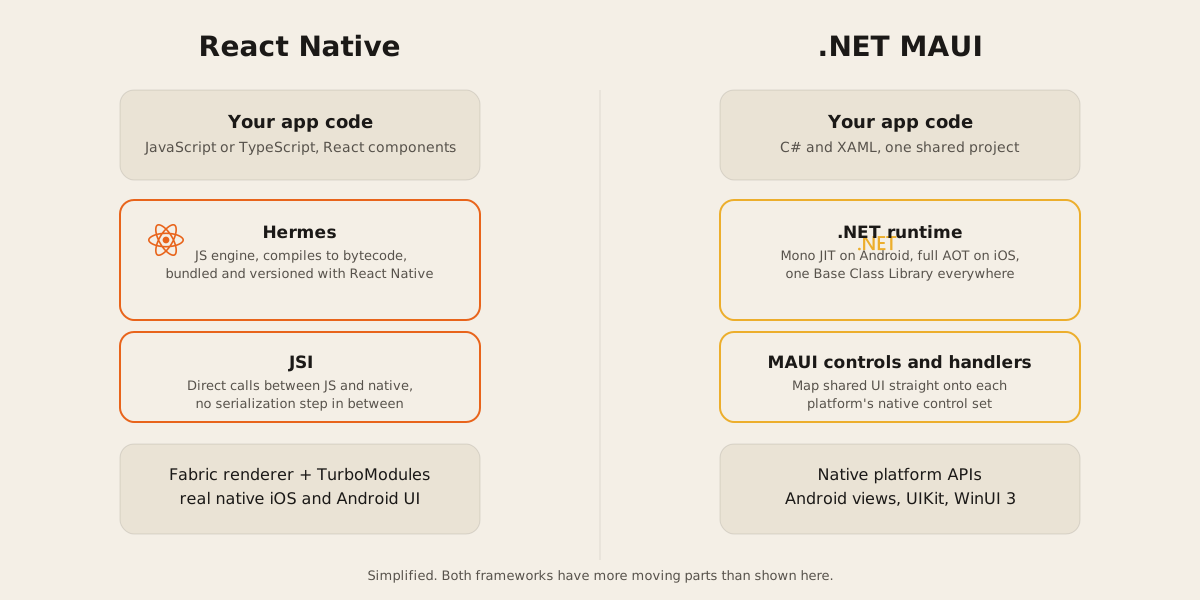
React Native renders through real platform UI, not a webview. Its own docs put it plainly: components like View, Text, and Image map to the platform’s native UI building blocks, so a button in a React Native app is an actual Android or iOS button.
As of version 0.76, the New Architecture ships by default. It replaces the old asynchronous bridge with JSI, the JavaScript Interface, which lets JavaScript hold a direct reference to a native object and call its methods without a serialization step in the middle. Alongside JSI sits Hermes, the JavaScript engine React Native bundles and builds against its own release process so the two never drift out of sync. Hermes compiles your JS to bytecode ahead of time rather than parsing source on every launch.
What .NET MAUI compiles to
.NET MAUI is Microsoft’s evolution of Xamarin.Forms, extended from mobile into desktop. You write C# and XAML in a single shared project, and the build system multi-targets it: Android builds compile to an intermediate language that’s JIT compiled at launch, iOS builds are fully ahead-of-time compiled to native ARM, macOS goes through Mac Catalyst, and Windows compiles against WinUI 3. There’s no JavaScript engine or bridge anywhere in that picture. MAUI’s controls and handlers layer sits directly on top of each platform’s native APIs, and your own code can reach those same APIs when the cross-platform layer doesn’t cover something you need.
Ecosystem and team fit
The practical difference shows up before anyone writes a line of UI code. FurnitureAxis’s backend is Next.js, Prisma, and PostgreSQL, so its Expo companion app shares a language and a fair amount of type definitions with the server it talks to. That’s the general shape of React Native: it draws on the same npm ecosystem as the rest of a JavaScript team’s stack, and business logic can move between a web app and a mobile app with less rewriting than you’d expect.
MAUI pulls in the opposite direction, for teams already running C# on the backend, maybe ASP.NET or a Windows desktop product. Models, validation, and services can move into a MAUI app largely as-is, in the same language, sometimes even the same solution file. Neither ecosystem is bigger or smaller in some absolute sense. They’re bigger in the direction of whatever the rest of a team is already writing.
Shipping a fix after launch
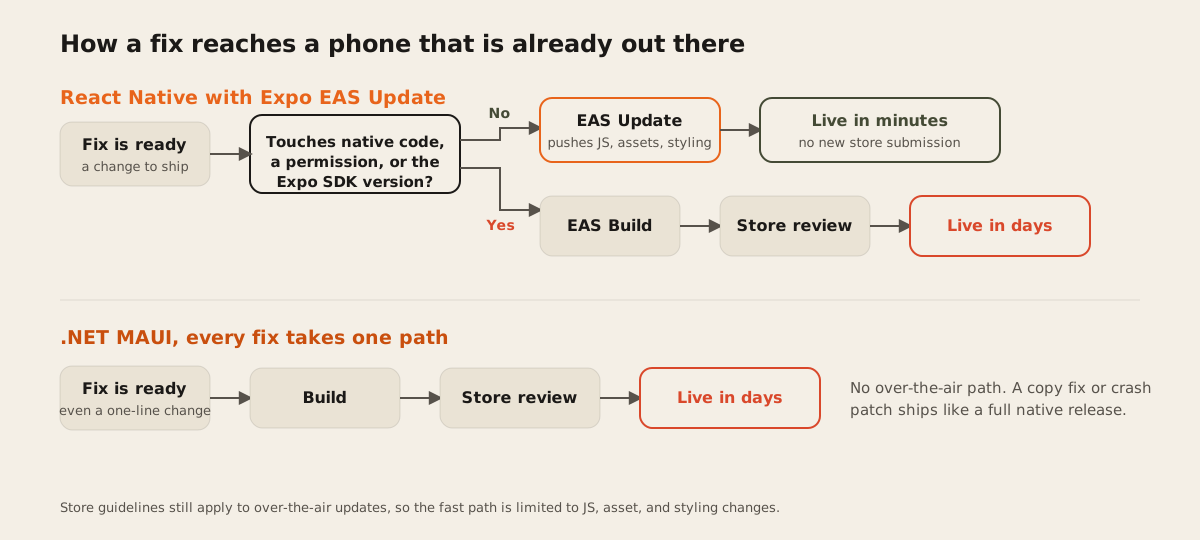
The two stacks also diverge on how a fix reaches a phone that’s already out in the world. Expo’s EAS Update pushes JavaScript, asset, and styling changes over the air, without a new app store submission, as long as the change doesn’t touch native code, add a permission, or bump the Expo SDK version. Anything that does needs a new build through EAS Build and a normal store review, the same as any native app. Apple and Google still require that OTA changes follow their store guidelines, so it’s not an unlimited backdoor, but it does mean a copy fix or a crash patch in JS can go out in minutes.
MAUI doesn’t ship an equivalent. Its hot reload lets you edit XAML and C# while debugging on your own machine, and that’s where it stops: it has nothing to say about an app already installed on someone’s phone. Every MAUI fix, however small, goes out through the same build and store review pipeline a fully native app would use. When MAUI’s cross-platform layer doesn’t cover a platform feature, dropping into platform code stays inside the same project, through conditional compilation:
public DeviceOrientation GetOrientation()
{
#if ANDROID
    var wm = Android.App.Application.Context.GetSystemService(Context.WindowService).JavaCast<IWindowManager>();
    return wm.DefaultDisplay.Rotation is SurfaceOrientation.Rotation90 or SurfaceOrientation.Rotation270
        ? DeviceOrientation.Landscape : DeviceOrientation.Portrait;
#elif IOS
    var o = UIApplication.SharedApplication.StatusBarOrientation;
    return o is UIInterfaceOrientation.Portrait ? DeviceOrientation.Portrait : DeviceOrientation.Landscape;
#else
    return DeviceOrientation.Undefined;
#endif
}
How we choose
We start with one question: what language does the team, or the backend the app talks to, already run in. JavaScript or TypeScript points at React Native, for the ecosystem and the shared code with a web app. C# points at MAUI, for the same reason in the other direction: less translation between backend and app, and logic that moves across mostly unchanged.
Then we ask how fast a fix needs to reach installed devices. A consumer app that can’t afford to wait days on a store review leans on React Native and EAS Update. An internal, line-of-business app, where every device is known and a new build can go out on your own schedule, doesn’t need that speed, and MAUI’s tighter platform integration stops costing you anything in return.
We don’t reach for either one out of habit. The honest answer to “which one” depends on what’s already running on the other side of the API and how fast a fix has to travel once it’s live. If you’re weighing this for a real mobile app, tell us what you’re building and we’ll walk through it against your actual stack.