
Code signing a desktop app costs $99 a year on macOS, because Apple only issues Developer ID certificates to members of its Developer Program. On Windows it runs from $0 through the Microsoft Store to about $1,250 a year for an EV certificate with cloud signing, and Microsoft’s own Artifact Signing at $9.99 a month is the cheapest option outside the Store if your country qualifies.
Who this is for: anyone shipping a Windows or macOS app outside an app store, built in Electron, Tauri, .NET, or anything else, who wants the real price before buying a certificate. Who can skip it: if your Windows app ships only as an MSIX package through the Microsoft Store, Microsoft signs it for you, and the Windows half of this post doesn’t apply.
Every price below comes from the vendor’s own page or price API, checked 2026-10-13. Most “code signing certificate cost” pages we read are reseller pages selling one brand, and several still say EV certificates skip SmartScreen warnings. Microsoft stopped that in 2024, and it changes which certificate is worth buying.
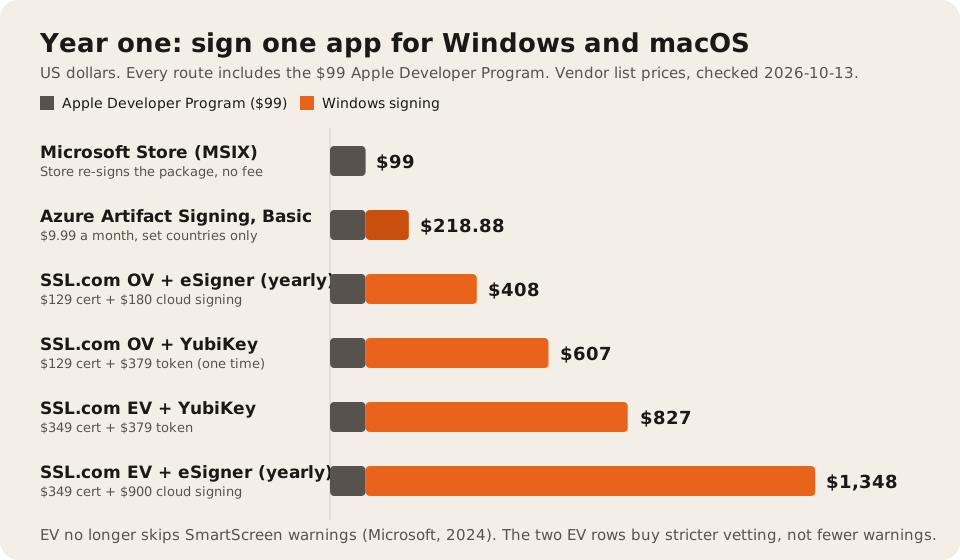
The short answer, in one table
| What you’re signing for | Option | Price (checked 2026-10-13) | Source |
|---|---|---|---|
| macOS outside the App Store | Apple Developer Program | $99 a year | Apple |
| Windows, Store only (MSIX) | Microsoft Store re-signs the package | $0, no registration fee | Microsoft Learn |
| Windows, outside the Store | Azure Artifact Signing, Basic | $9.99 a month, 5,000 signatures, then $0.005 each | Azure retail prices API |
| Windows, outside the Store | Azure Artifact Signing, Premium | $99.99 a month, 100,000 signatures | Same |
| Windows, OV certificate | SSL.com OV | $129 for 1 year, $96.75 a year on 5 years | SSL.com |
| Windows, EV certificate | SSL.com EV | $349 for 1 year, $149 a year on 5 years | SSL.com |
| Windows, OV or EV | Sectigo | from $536.25 a year on the 5-year option | Sectigo |
| Windows, OV or EV | DigiCert | $696 or $972 a year, 12-month subscriptions | DigiCert |
| Windows, OV or EV | Certum | from €169 (with card and reader) to €379 (EV in the cloud) | Certum shop |
| Open source projects | SignPath Foundation, or Certum Open Source | free, or from €49 | SignPath, Certum |
Microsoft’s own rough guide agrees with these bands. Its code signing options page puts an OV certificate at $150 to $300 a year and EV at $400 or more.
macOS: $99 a year, and nothing else to buy
Apple’s enrollment page says it plainly: “The Apple Developer Program is 99 USD per membership year.” Nonprofits, accredited schools, and government bodies can ask for a fee waiver.
That membership covers the two things a Mac app needs to open without a scary warning:
- A Developer ID certificate. “A Developer ID certificate lets Gatekeeper verify that you’re a trusted developer when people download and open your app” (Apple). Only the account holder can create it.
- Notarization. You upload the signed build, and Apple’s notary service “automatically scans your Developer ID-signed software and performs security checks”. Apple lists no separate fee for it. You run it with
xcrun notarytooland attach the ticket withxcrun stapler.
There’s one more reason not to skip this on a Mac. Electron’s updater can’t work unsigned: “Squirrel.Mac requires the app to be signed for automatic updates to work at all” (Electron docs). Tauri’s updater refuses unsigned updates on every platform. We covered both in desktop auto-update strategies.
Windows: four routes, from free to over $1,000
1. The Microsoft Store: $0
If you can ship an MSIX package through the Store, you don’t buy a certificate at all. “Microsoft re-signs your package automatically, meaning users never see a SmartScreen warning and you never need to purchase or renew a certificate” (Microsoft Learn). Opening a Store developer account is free too: “there are no registration fees for either account type” (Partner Center docs).
The catch: this only covers MSIX. If you submit an .exe or .msi installer to the Store, you still sign it yourself with a certificate from a trusted CA.
2. Azure Artifact Signing: $119.88 a year
Artifact Signing is Microsoft’s managed signing service. It used to be called Trusted Signing, and the Azure price list still uses the old name. The Basic tier is $9.99 a month with 5,000 signatures. Premium is $99.99 a month with 100,000. Extra signatures cost $0.005 each. We read these from Microsoft’s retail prices API because the pricing page loads them with JavaScript.
What you get for that:
- No USB token. Keys live in Microsoft’s HSMs, and you never see the certificate: “The Authenticode certificate that’s used for signing with the profile is never given to you” (FAQ).
- It plugs into GitHub Actions, Azure DevOps, and SignTool, so CI can sign every build.
- Microsoft renews the certificates for you, as long as your identity validation stays current.
What can stop you:
- Where you are. “Public Trust certificates are available to organizations in the United States, Canada, the European Union, the United Kingdom, Australia, New Zealand, Japan, South Korea, Singapore, Switzerland, Norway, and Israel. Individual developers must be located in the United States or Canada” (quickstart). Microsoft’s older comparison page lists fewer countries. The quickstart was updated more recently, so trust it.
- A paid Azure subscription. Free, trial, and sponsored subscriptions can’t use it.
- Billing starts on day one. “The service starts billing as soon as you create a Artifact Signing account”, and it isn’t prorated.
- Identity checks take time. Microsoft says organization validation “takes from 1 to 20 business days”.
- No EV. “Artifact Signing doesn’t issue Extended Validation (EV) certificates. There’s no plan to issue EV certificates in the future” (FAQ).
If you qualify, this is the route we’d pick for most apps. Microsoft calls it “Microsoft’s recommended code signing service for non-Store distribution” (SmartScreen docs), and it’s the cheapest paid option on this page.
3. An OV certificate: about $300 to $600 in year one
Outside the eligible countries, or if your customers ask for a specific CA, you buy an Organization Validated (OV) certificate. The certificate price is only part of the bill. Since June 2023, CA/Browser Forum rules require the private key to sit in hardware. DigiCert’s page puts it this way: “Effective June 1, 2023,” key pairs must be held in a device meeting “FIPS 140-2 Level 2 or Common Criteria EAL 4+ standards” (DigiCert). So you pay for a token or a cloud HSM on top.
At SSL.com, checked 2026-10-13:
| Item | Price |
|---|---|
| OV certificate, 1 year | $129 |
| OV certificate, 5 years | $96.75 a year |
| YubiKey FIPS token, one time | $379 |
| eSigner cloud signing, tier 1 (20 signings a month) | $20 a month, or $180 a year |
| eSigner, extra signings on tier 1 | $1.00 each |
Sources: OV buy page and eSigner pricing.
The token suits a single developer who signs on one machine. A cloud signer suits CI, because, as Electron’s docs note, “the certificate cannot be simply downloaded onto a CI infrastructure.” Count your signatures before picking a tier. Some build setups sign several files per release, and every signed file is one signing.
Other CAs, same day:
- Sectigo: “starts at $536.25 per year when customers choose the five-year option”, with a token shipped each year (Sectigo).
- DigiCert: two 12-month subscriptions at $696 and $972. The page lets you pick OV or EV and cloud or token storage but doesn’t say which price is which, so ask for a quote (DigiCert).
- Certum: Standard Code Signing from €169 as a set with card and reader, €139 as a code for your own card, or €209 in the SimplySign cloud (Certum shop).
- GlobalSign: no public price on its code signing page when we checked.
4. An EV certificate: about $730 to $1,250 in year one
EV certificates cost more and need stricter company checks. At SSL.com, an EV certificate is $349 for one year (EV buy page). Add the $379 YubiKey, or eSigner’s EV plan, which starts at $100 a month or $900 a year for 10 signings a month (eSigner pricing).
Here’s the part most price pages get wrong. EV used to make the SmartScreen warning disappear on the first download. It doesn’t anymore. Microsoft’s SmartScreen page says: “EV certificates no longer bypass SmartScreen.” And: “Paying a premium for EV solely to avoid SmartScreen warnings is no longer justified.” Tauri’s Windows signing guide says the same: “Since 2024, an EV Certificate no longer gives your app an immediate reputation with Microsoft SmartScreen.”
Electron’s code signing tutorial still says “since June 2023, Microsoft requires software to be signed with an ‘extended validation’ certificate”. That was written before Microsoft’s change. Go by Microsoft’s page.
EV still matters in two cases: when an enterprise customer’s procurement rules ask for it, and for Windows drivers. DigiCert lists EV as “Required for signing Microsoft Windows drivers”. A normal desktop app needs neither.
Why a signed app still shows “Windows protected your PC”
Signing doesn’t buy trust on day one. SmartScreen looks at the publisher and the file hash. A new file “could still show a SmartScreen warning until its hash or publisher certificate accumulates sufficient evidence of positive reputation” (Microsoft Learn). Microsoft says this “can take several weeks and hundreds of clean installs from a wide audience.”
What helps, from the same page:
- Sign every release, with the same identity each time, so later versions inherit the reputation.
- Don’t switch certificates or providers without a reason. “Changing your signing certificate affects the publisher trust signal.”
- Warn your first users that they may see a prompt, and tell them how to check the publisher name.
On Windows 11, Smart App Control goes further. Microsoft says it “will block execution of unsigned files unless the file has a positive reputation.” Skipping signing doesn’t save money. It loses users.
Certificates now last about 15 months
From March 1, 2026, a code signing certificate can last at most 460 days. The CA/Browser Forum’s Ballot CSC-31 cut it “from 39 months to 460 days”. CAs issue a day or two less. Certum’s shop notes that a certificate “may be valid for a maximum of 459 days”, so a 2 or 3-year purchase now means free reissues during the term.
Two things follow:
- A “5-year” price is a prepaid bundle of reissues. It’s cheaper per year, but you reinstall a new certificate every 15 months or so.
- Always timestamp your signatures. A timestamped signature stays valid after the certificate expires. Without one, old installers start failing checks when the certificate runs out.
Artifact Signing avoids most of the renewal chore, because Microsoft issues and renews the certificates for you.
What we’d pick
| Your situation | Pick | Year one |
|---|---|---|
| Windows app that can ship as MSIX in the Store | Microsoft Store | $0 |
| Company in an eligible country, signing in CI | Artifact Signing Basic | $119.88 |
| Individual developer outside the US and Canada | OV certificate with a token or cloud signer | about $310 to $510 at SSL.com |
| Open source project | SignPath Foundation | $0 |
| Customer contract that names EV | EV certificate | about $730 to $1,250 at SSL.com |
| Any Mac app outside the App Store | Apple Developer Program | $99 |
Put the certificates in the client’s name and the client’s accounts. Apple’s Developer ID belongs to the account holder, and a Windows certificate names the legal entity that was verified. If an agency signs your app under its own name, you’ll have to start reputation over when you leave.
That’s how we set up desktop apps for clients: signing and update pipelines are part of the build, under the client’s accounts, and the costs above show up as line items in a written scope. If you’re still choosing a framework, read Tauri or Electron in 2026, and if you’re choosing a team, our ranking of desktop app development companies scores each one on signing and update experience.
FAQ
How much does a code signing certificate cost?
On Windows, an OV certificate runs from $96.75 a year (SSL.com, 5-year bundle) to about $700 (DigiCert), and EV from $149 to $349 a year at SSL.com and more at Sectigo and DigiCert. Add a token or cloud signing fee on top, because keys must live in hardware. Checked 2026-10-13. On macOS there’s no separate certificate to buy. The $99 Apple Developer Program includes it.
Do I need an EV certificate to avoid SmartScreen warnings?
No. Microsoft removed the EV fast pass in 2024. OV, EV, and Artifact Signing all build SmartScreen reputation the same way, through clean downloads over time. Only the Microsoft Store route skips the warning entirely.
Is code signing free for Mac apps?
Not quite. Signing and notarization have no per-app fee, but you need the $99 a year Apple Developer Program to get a Developer ID certificate. Nonprofits, schools, and government bodies can ask Apple for a fee waiver.
Can I sign a Windows app for free?
Yes, in two cases. Ship an MSIX package through the Microsoft Store, which signs it for you. Or, for an open source project, apply to the SignPath Foundation, which says “For OSS projects, our services are free of charge.”
Can I use Azure Artifact Signing from Pakistan, India, or other countries?
Not as an individual. Individuals must be in the US or Canada. Organizations must be in the US, Canada, the EU, the UK, Australia, New Zealand, Japan, South Korea, Singapore, Switzerland, Norway, or Israel, per Microsoft’s quickstart on 2026-10-13. Everyone else buys an OV certificate from a CA.