
Custom MCP servers for businesses are built by three kinds of teams: AI agencies, general software agencies that added MCP to their services, and freelancers on marketplaces such as Upwork. Whoever you talk to, ask for one thing first: the URL of an MCP server they built that you can connect to yourself, today. That one test separates people who have shipped a server from people who have read about one.
Who this is for: a company that wants ChatGPT, Claude, or another AI tool to read or change data in its own product, and needs someone to build the MCP server for it. Who should read something else: if you aren’t sure you need a server at all, start with when a business needs an MCP server. If you only want company data inside ChatGPT, MCP, API, or Zapier may point to something cheaper.
Check first: you may not need to hire
Many popular products already have an MCP server, made by the vendor or the community. Search the official MCP Registry before you pay anyone. It calls itself “the official centralized metadata repository for publicly accessible MCP servers”, and it’s still in preview. Hire when the system is your own: a private API, your own data model, or rules no public server knows.
Who builds MCP servers
This is not a ranking. It’s the three places buyers usually look.
| Option | Good for | Watch out for |
|---|---|---|
| An AI agency | A server plus the agent or app around it | Demos that only run on their laptop. Ask for a URL |
| A software agency | A server on top of an API they also maintain | MCP listed next to every other skill, with nothing live |
| A freelancer | One small server for one system | One person holds the code, the hosting, and the keys |
We are one of the agencies that build MCP servers. We wrote this guide, so weigh that. Our rate is $30 an hour, or by milestone. We haven’t built an MCP server for a client we can name. Our proof is our own public server at https://dawloom.com/mcp, so check 1 below is the one to run on us: connect to it and try it.
The 7 checks
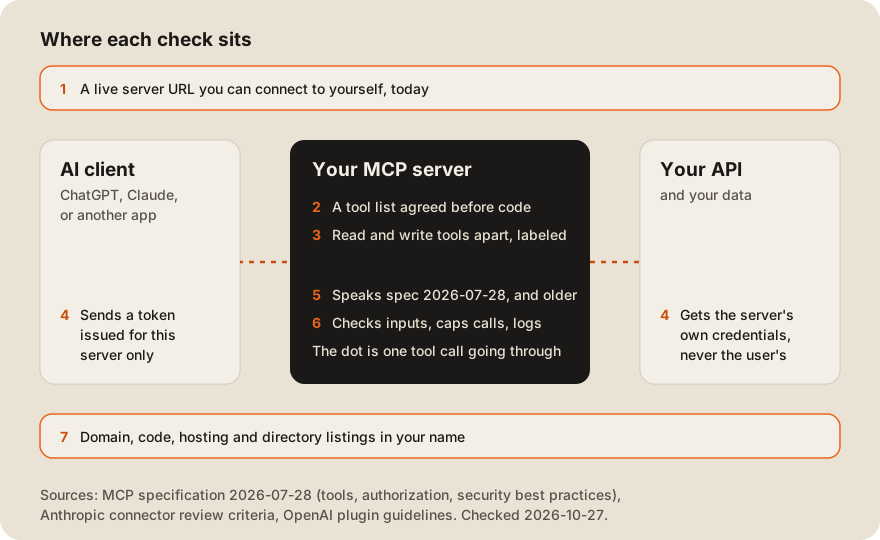
| # | Ask for | What a good answer looks like |
|---|---|---|
| 1 | A live server URL | A server you can add to Claude or ChatGPT and call yourself |
| 2 | The tool list before code | Tool names, inputs, and errors on one page, agreed before work starts |
| 3 | Read and write tools apart | Each tool does one kind of thing and carries the right labels |
| 4 | How users log in | OAuth, with tokens made for this server only |
| 5 | Which spec version | They name 2026-07-28 and say how older clients still connect |
| 6 | Limits and logs | They tell you what they cap and what they log, without thinking long |
| 7 | Everything in your name | Your domain, your repo, your hosting, your directory listings |
1. A live server URL
A remote MCP server is a URL. If someone has built one, they can send you one. Add it in Claude as a custom connector, as Anthropic’s guide explains, and ask it to use a tool. Or run the official MCP Inspector, “a developer tool for inspecting Model Context Protocol (MCP) servers”, with npx @modelcontextprotocol/inspector. Our free MCP server checker runs the same kind of test in the browser.
Client work is often private. If they can’t share a client’s server, ask for one of their own, or a screen share of the private one working in Claude or ChatGPT.
2. The tool list before code
The tools are the product. Each one is a name, a description, and an input schema that the AI reads to decide what to call. Ask for a one-page list before any code: every tool, its inputs, and what it returns when something goes wrong.
A good developer will cut tools from your wish list. Fewer, clearer tools are easier for the AI to pick from, and every tool’s description costs tokens on every request. Our post on why MCP servers use so many tokens shows the math.
3. Read and write tools apart
AI clients decide when to ask the user for permission based on labels on each tool. Anthropic’s connector review criteria say every tool needs a title and the right hint: “readOnlyHint: true for read-only tools, and destructiveHint: true for tools that modify or delete data.” It explains why: “Read-only tools can run without per-call confirmation, and destructive tools always prompt.”
The same page rejects one catch-all tool that can both read and write: “Don’t ship a catch-all api_request tool with a method parameter.” OpenAI’s plugin guidelines ask for readOnlyHint, destructiveHint, and openWorldHint as explicit values on every tool. Ask the developer to show you these labels in a server they built.
4. How users log in
If the server only serves public data, it may need no login at all. The MCP authorization spec says “Authorization is OPTIONAL for MCP implementations.” Once it touches a user’s data, the spec builds on OAuth 2.1, and two rules matter most.
First, the server “MUST validate that access tokens were issued specifically for them as the intended audience.” Second, the security best practices forbid “token passthrough”, where the server forwards the user’s token to your API: “MCP servers MUST NOT accept any tokens that were not explicitly issued for the MCP server.”
Ask how a tool call is tied to one user, and what that user’s AI can do that the user couldn’t. The right answer is “nothing more”. Adding OAuth 2.1 to an MCP server walks through the steps.
5. Which spec version
MCP changes fast. The current spec is 2026-07-28, and it made big changes. Its changelog starts with “Remove protocol-level sessions” and “Make MCP stateless: remove the initialize/notifications/initialized handshake.” Code written for the older 2025-11-25 version works differently.
Ask which version they would build on, and how clients that still speak an older one connect. A server can support several versions at once. Ours lists 2026-07-28, 2025-11-25, 2025-06-18, and 2025-03-26 (checked 2026-10-27).
6. Limits and logs
The tools section of the spec says servers MUST “Validate all tool inputs”, “Implement proper access controls”, “Rate limit tool invocations”, and “Sanitize tool outputs”. An AI client can call a tool many times in a loop, so the limit protects your API as well as the server.
Ask two questions: what do you cap, and what do you log? Someone who has run a server for real users answers both at once, with numbers. Ours allows 30 tool calls per 60 seconds per IP, and says so on our developer page.
7. Everything in your name
The server should live on your domain, in your code repository, on hosting you pay for. If you want it in the ChatGPT or Claude directories, those listings should be under your company too. Anthropic says “The MCP server domain should match your service.” OpenAI’s submission page asks you to “Complete the domain-verification challenge shown in the portal” and to provide “a dedicated test account” with “sample data, not a real user’s account.”
Put this in the contract. Who owns the code covers the clauses to ask for, and where to host an MCP server compares the options.
How our own server scores
We hold ourselves to the same 7 checks, using our public server at https://dawloom.com/mcp.
| # | Check | Our server |
|---|---|---|
| 1 | Live URL | Yes. Anyone can connect, no login |
| 2 | Tool list | 8 tools, listed on our developer page |
| 3 | Labels | All 8 are read-only and labeled readOnlyHint: true and destructiveHint: false |
| 4 | Login | Not shown. It holds no user data, so it has no login. It proves nothing about OAuth |
| 5 | Spec version | 2026-07-28 back to 2025-03-26 |
| 6 | Limits | 30 tool calls per 60 seconds per IP |
| 7 | Your name | It’s our server on our domain, so this one is about your contract, not ours |
Check 4 is the gap. If your server needs user logins, ask us, and anyone else, for an OAuth example.
A one-day paid test
If you’re unsure, pay for one day of work before you commit. Ask for this:
- One read-only tool that calls your API’s test environment, with the right labels.
- Deployed to a URL on hosting in your account.
- Passing the MCP Inspector and our MCP server checker.
- Added in Claude as a custom connector, answering one real question about your data.
Keep it this small, so it fits in one day. Step 4 shows you the thing you’re paying for: an AI answering from your system. Our guide to vetting an offshore team before you send money has checks that apply to any project.
For a budget, see what MCP development costs and our MCP cost estimator. If you want us to build it, our MCP servers page says how we scope and bill the work.
FAQ
What does an MCP server developer do?
They turn your product’s actions into tools an AI can call: search orders, create a ticket, update a record. They also handle login, limits, hosting, and, if you want, the ChatGPT and Claude directory listings.
Which language should an MCP server be written in?
Whatever your team can maintain. The official SDKs include TypeScript, Python, C#, Go, Rust, Ruby, and Java. A remote server speaks HTTP, so the AI client doesn’t care what it’s written in.
Can I get my MCP server into the ChatGPT app directory?
Yes, through OpenAI’s review. Its plugin guidelines say “Trial or demo plugins will not be accepted”, so it has to do real work. Our submission guide covers both directories.
Do I need OAuth for an MCP server?
Only if it touches data that belongs to a user or a company. The spec makes authorization optional. Once a server reads private data, use OAuth with tokens made for this server only.
How do I test an MCP server before I pay for it?
Connect to it. Add the URL in Claude as a custom connector, or run npx @modelcontextprotocol/inspector, and call each tool with real inputs.