
Three kinds of teams build Tauri desktop apps for companies: CrabNebula, the company founded by Tauri’s creators, desktop agencies that ship Tauri alongside other stacks, and freelancers. Whichever you talk to, ask for one thing first: a signed Windows and macOS installer of a small app that updates itself. That test separates people who have shipped a Tauri app from people who have only built one.
Who this is for: a company that has picked Tauri, or is leaning that way, and now needs someone to build it. Who should read something else: if you have not chosen a stack yet, start with Tauri or Electron in 2026. If your team writes C# every day, a .NET desktop stack may suit you better, and Avalonia vs MAUI vs WPF compares those.
Who builds Tauri apps
There is no big pool of Tauri specialists yet. Most people who build Tauri apps are web developers who learned enough Rust, or Rust developers who learned the web side. Here are the three places to look, with what each is good at. This is not a ranking.
| Option | Good for | Watch out for |
|---|---|---|
| CrabNebula | Hard problems inside Tauri itself, security audits, architecture reviews | No prices on the site (checked 2026-10-23). Likely more than a small app needs |
| A desktop agency | A whole app with design, signing, updates, and support after launch | Many list Tauri on their site but have shipped only Electron. Ask for a Tauri build |
| A freelancer | A small tool or a fixed part of a bigger app | One person holds all the knowledge, and often the signing keys too |
CrabNebula describes itself as “the team behind Tauri”. Its consulting page offers an “Embedded Development Team”, “Custom Software Development”, and “Technical Architecture Consulting”. The Tauri project says CrabNebula is “dedicating full-time engineers to work explicitly on Tauri’s development and maintenance.”
We are one of the agencies that build Tauri apps. We wrote this guide, so weigh that. Our rate is $30 an hour, or by milestone. We built and measured the same app in Tauri, Electron, and WPF in our desktop benchmark, and the code is in that post.
The 7 checks
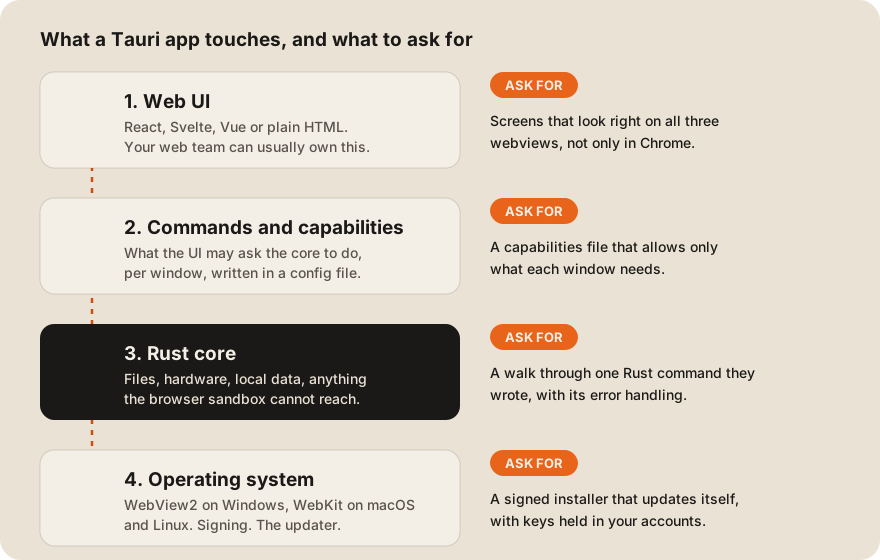
A Tauri app has four layers. A good developer can show you work at each one. These checks map to them.
| # | Ask for | What a good answer looks like |
|---|---|---|
| 1 | A signed Windows installer | It installs without a SmartScreen warning, or they explain how its reputation will build |
| 2 | A notarized macOS build | It opens on a Mac without a warning that the developer cannot be verified |
| 3 | A working auto-update | Version 1.0 updates itself to 1.1 while you watch |
| 4 | Their capabilities file | Each window gets only the permissions it uses |
| 5 | Screenshots on all three systems | Windows, macOS, and Linux, not only Windows |
| 6 | A Rust command they wrote | They explain it line by line, including what happens on an error |
| 7 | A plan for code and keys | The repo, the certificates, and the update key end up in your accounts |
1. A signed Windows installer
Without a signature, Windows may stop your users at the door. Tauri’s Windows signing guide says signing helps “prevent a SmartScreen warning that your application is not trusted and can not be started.”
The guide also notes a change many people miss: “Since 2024, an EV Certificate no longer gives your app an immediate reputation with Microsoft SmartScreen.” A developer who still sells EV certificates as an instant fix has not shipped recently. Prices for each option are in what a code signing certificate costs.
2. A notarized macOS build
To ship outside the App Store, a Mac app needs a Developer ID certificate and Apple’s notarization. Tauri’s macOS signing guide says this needs an Apple Developer account, “paid (99$ per year)”, and that on a free account “you will not be able to notarize your application.” It also says “Only the Apple Developer Account Holder can create Developer ID Application certificates.” So the account should be yours, not the developer’s.
3. A working auto-update
Ask to see an app update itself. Tauri’s updater plugin requires a signature on every update: “This cannot be disabled.” The same page warns that if the private key is lost, “you will NOT be able to publish new updates to the users that have the app already installed.”
That makes the update key the most important file in the project. Ask where it will live. The right answer is a secret store you control, with a backup. More on update design is in desktop auto-update strategies.
4. Their capabilities file
Tauri 2 does not let the web layer reach the system by default. You grant access in config. The security docs put it this way: “Capabilities define which permissions are granted or denied for which windows or webviews.”
Ask for the capabilities file from a past project. If every window has every permission, the developer has turned off the main safety feature Tauri gives you.
5. Screenshots on all three systems
Tauri uses the system’s own web renderer, not a bundled browser. The webview reference says Windows uses WebView2, “based on Microsoft Edge and therefore Chromium”, while macOS and Linux use WebKit. On Linux, the WebKitGTK version “varies by distribution.”
So a screen that looks right in Chrome can break on a Mac. Ask how they test on each system, and ask for screenshots from a real Mac and a real Linux machine.
6. A Rust command they wrote
The UI of a Tauri app is web code. The part that reads files, talks to a printer, or stores local data is Rust. Ask them to walk you through one Rust command from a past project. Listen for how it handles errors and what it sends back to the UI.
You don’t need to read Rust to judge this. A developer who knows the code explains it simply. One who copied it from an example can’t.
7. A plan for code and keys
By the end of the project, you should own the repository, the Apple developer account, the Windows signing certificate, and the update signing key. Put this in the contract. Who owns the code covers the clauses to ask for.
A one-day paid test
If you’re unsure, pay for one day of work before you commit to the full project. Ask for this:
- A Tauri app with one window and one Rust command that reads a file you choose.
- Signed installers for Windows and macOS.
- An update from version 1.0.0 to 1.0.1, served from a static JSON file.
- The capabilities file, and a short note on what each permission is for.
Keep the task this small on purpose, so it fits in one paid day. If a developer needs a week for it, you have learned something cheaply. Our guide to vetting an offshore team before you send money has more checks that apply to any stack.
What you pay besides the developer
- Apple Developer Program: $99 a year, per Tauri’s macOS guide (checked 2026-10-23).
- A Windows signing certificate or a cloud signing service. See code signing certificate cost.
- Somewhere to host update files. Tauri’s updater works with “a dynamic update server or a static JSON file (to use on services like S3 or GitHub gists).”
If you want us to build it, our desktop app development page has the details, and our Tauri notes say when we pick it.
FAQ
Is it hard to find a Tauri developer?
Harder than an Electron developer. Tauri needs web skills and some Rust, so the pool is smaller. Look for people who have shipped a signed Tauri app, not people who list Tauri as a skill.
Do I need a Rust developer to maintain a Tauri app?
Usually not full time. Most of the code is the web UI, and the Rust layer is often thin. Ask the developer to document every Rust command so a future developer can follow it.
Can a Tauri app also run on iOS and Android?
Yes. Tauri’s site says you can “Build your app for Linux, macOS, Windows, Android and iOS - all from a single codebase.” Check that your developer has shipped to the mobile stores before you count on it, because store review adds its own work.
Should I hire CrabNebula or an agency?
Hire CrabNebula when the problem is inside Tauri itself, or when you need a security audit. Hire an agency or a freelancer when you need a normal business app built and supported. The 7 checks above work for all three.
How big is a Tauri app?
Small. Tauri’s site says an app “can be little as 600KB.” In our own benchmark, the Tauri installer was 1.05 MB and the Electron one was 106.1 MB, measured on Windows 11.