
The main Odoo alternatives are ERPNext (open source, no per-user fee, hosting from $5 a month), Microsoft Dynamics 365 Business Central ($80 a user a month, checked 2026-11-07), Acumatica (priced by app, not by seat), and NetSuite (quote only). If only one workflow doesn’t fit Odoo, the cheapest fix is often to keep Odoo for accounting and stock and build that workflow as a small app that talks to Odoo through its API.
Business Central fits Microsoft shops. Acumatica suits companies with many occasional users. NetSuite suits companies that will pay for a quote-only enterprise system.
Who this is for: owners and ops leads who tried Odoo, or are about to, and have one or two processes that don’t fit: made-to-order jobs, rental returns, multi-step approvals, odd pricing rules. Who should look elsewhere: if your processes are standard sales, stock, and invoicing, Odoo probably fits as it is, and this page will mostly tell you to stay.
How we checked
We read each vendor’s own pricing pages and docs on 2026-10-13, and rechecked the ERPNext and Business Central prices on 2026-11-07. Prices are US list prices in USD. Odoo shows a different price in each country, and we couldn’t load its US price again on 2026-11-07, so Odoo’s prices here are from 2026-10-13. We saw lower US$ prices when we loaded the page from Pakistan, so check the page from your own country. Every price links its source. We didn’t install each product, so this is what vendors document, not what we measured.
The lists that rank for “Odoo alternatives” mostly rank whole ERP suites against each other. Several are written by a vendor that puts itself near the top. The ones we read rarely say what customising each system costs over time, or that you might not need to leave Odoo at all. That’s the gap this page fills.
First, find out how far your workflow is from Odoo
Most “Odoo doesn’t fit” problems are one of five sizes. Go down the ladder only as far as you must.
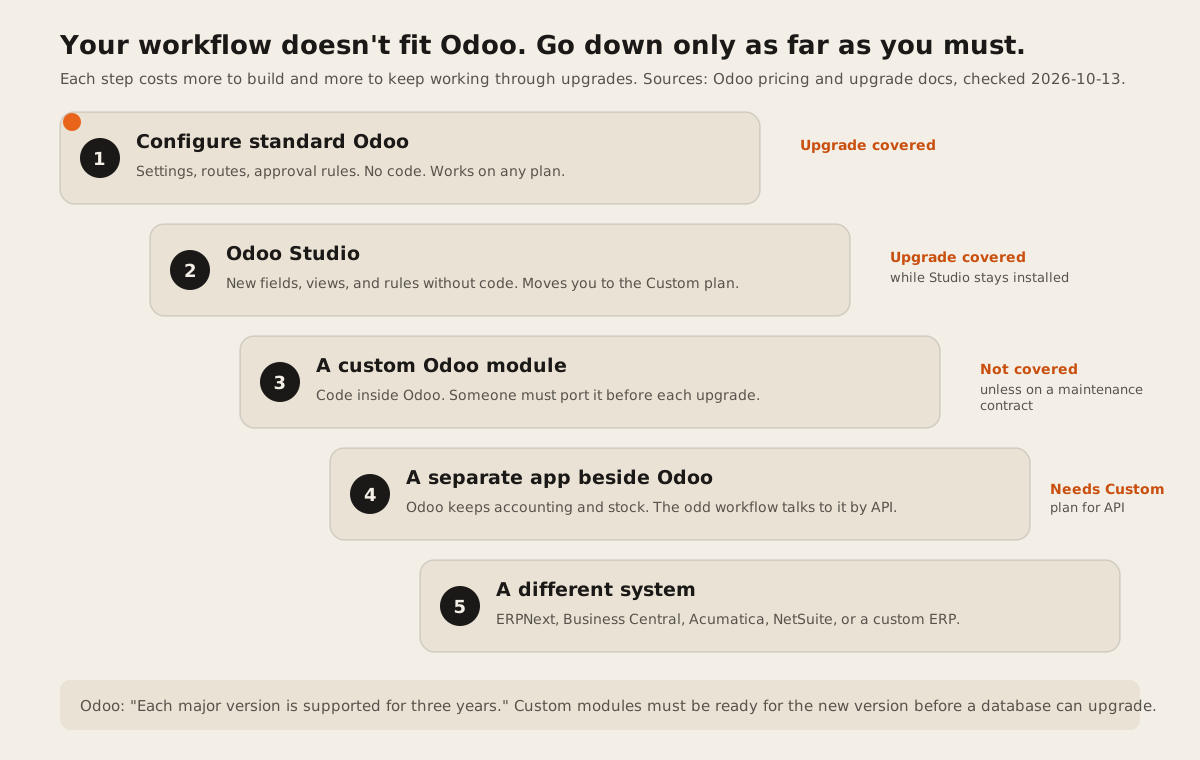
The line that matters is between steps 2 and 3. Odoo’s upgrade docs say the upgrade service covers “all customizations created with the Studio app”, as long as Studio is still installed. Code is different. A database with custom modules “cannot be upgraded until a version of your custom modules is available for the target version of Odoo”, and when a new version breaks one, “it is the responsibility of the maintainer of your custom module to make it compatible.”
That’s a recurring cost, not a one-off. Odoo says “Each major version is supported for three years,” and on a major version “an upgrade is mandatory every two years.” So a custom module is something you pay to port again every couple of years.
Odoo alternatives compared
The Odoo alternatives below differ most on how you customise them and who keeps that work running through upgrades. ERPNext and Odoo share an open-source core. Business Central adds code beside the base app. NetSuite and Acumatica publish no prices. Scroll sideways on a phone. “Not documented” means we couldn’t find it on the vendor’s own pages.
| Option | How you customise it | Upgrade burden | Hosting | Lock-in and exit | US list price |
|---|---|---|---|---|---|
| Odoo | Studio with no code, or Python modules. Both need the Custom plan. Studio docs | Studio changes are covered. Custom modules must be ported by their maintainer. Upgrade docs | Odoo Online on every plan. Odoo.sh or on-premise on Custom. Odoo.sh costs extra. | Community edition is LGPL-3.0. Studio, multi-company, and external API are paid. Source | Standard $31.10, Custom $61.00 a user a month billed yearly. First 12 months: $24.90 and $49.10. Pricing |
| ERPNext | Custom fields through Customize Form, or a custom app on the Frappe framework. Customize Form, custom apps | Two major versions supported at a time, “roughly 2.5-3 years”. Versions | Self-host for free, or Frappe Cloud. Frappe itself doesn’t do implementation, partners do. | GPL-3.0. Frappe says it is “100% open-source”. Source | No per-user fee. Frappe Cloud sites from $5 a month. Pricing |
| Business Central | Extensions in AL, “an addition to existing objects”. AL docs | Extensions sit beside the base app instead of changing it. Upgrade policy: not checked for this page. | The plans priced here are Microsoft’s cloud service. Other options: not checked. | Proprietary. Fits teams already on Microsoft 365. | Essentials $80, Premium $110, Team Members $8 a user a month, paid yearly. Pricing |
| Acumatica | Not checked for this page. Ask for a demo of your workflow. | Not documented on the pricing page. | Not documented on the pricing page. | Proprietary. “Unlimited Users.” | No dollar figures. “Based primarily on the number of applications you implement.” Pricing |
| NetSuite | SuiteScript, JavaScript that can “extend NetSuite and customize, search for, and process your NetSuite data”. Oracle docs | Not checked for this page. | Cloud, hosted by Oracle. | Proprietary. Modules are licensed one by one. | Not published. An “annual license that includes the core platform”, priced by users and modules. NetSuite |
| Low-code app beside Odoo | Build the odd workflow in Retool or Power Apps and read and write Odoo data through its API. | Odoo upgrades don’t touch it, but API changes can. | The low-code vendor’s cloud. | The app is tied to the low-code vendor. Odoo needs the Custom plan for the external API. | Retool Team $10 a builder, $5 a user. Power Apps Premium $20 a user. All monthly, billed yearly. Retool, Power Apps |
| Custom app or custom ERP | Code shaped to the workflow, on your own database. | No vendor upgrades. You own security patches and changes. | Anywhere you choose. | You own the code and data, if your contract says so. | No license fee. A build quote plus hosting and upkeep. |
All sources checked 2026-10-13. US list prices in USD. Implementation is extra for every product here.
What the software costs for 25 users
These are license costs only, at US list prices, billed yearly, checked 2026-10-13. Implementation, hosting add-ons, and partner fees come on top. Ask every vendor for those in writing before you compare.
| Option | Year 1 | Each year after | How we got it |
|---|---|---|---|
| Odoo Standard | $7,470 | $9,330 | 25 x $24.90 x 12, then 25 x $31.10 x 12. No Studio or API. |
| Odoo Custom | $14,730 | $18,300 | 25 x $49.10 x 12, then 25 x $61.00 x 12. |
| Business Central Essentials | $24,000 | $24,000 | 25 x $80 x 12. |
| ERPNext on Frappe Cloud | From $60 | From $60 | $5 a month site. No user limit, but sites are “limited by CPU hours per day”. Frappe Cloud |
| Acumatica, NetSuite | Quote only | Quote only | Neither publishes a price. |
The Odoo discount note reads: “The discount is valid for 12 months, for initial users ordered.” Users you add later pay the full price. On Odoo, staff who only use the POS or have an employee record can be Light Users at $8.90 a month, which you arrange with an Odoo advisor (Odoo pricing).
Each Odoo alternative in one paragraph
ERPNext is the closest like-for-like swap, and the cheapest to run. It’s GPL-3.0, Frappe calls it “100% open-source”, and Frappe Cloud charges for server resources, not users. Customize Form adds fields without code, and anything bigger becomes a Frappe app. The trade-off is that Frappe “does not provide any implementation services directly” (ERPNext pricing), so you’ll need a partner or your own developer. Each major version is supported for about 2.5 to 3 years, much like Odoo.
Business Central suits companies already living in Microsoft 365 and Excel. Its customisation model is the cleanest on paper: AL extensions add to the base app instead of changing it. It’s also the most expensive per seat here at $80 a user for Essentials, though Team Members who only read and approve cost $8.
Acumatica is the one to price if you have many occasional users. Its pricing page says you pay for the functionality you need, “not for user seats.” It publishes no dollar figures, so you can’t compare it until you have a quote.
NetSuite is the step up for companies with complex finances, many entities, or plans to grow fast. SuiteScript is real JavaScript, so almost any workflow is possible. But there’s no public price, and modules are licensed one by one, so a quote is the only way to know.
A low-code app beside Odoo is the answer most lists skip. If 90% of Odoo fits and one workflow doesn’t, build that workflow in Retool or Power Apps and connect it to Odoo’s API. Odoo upgrades won’t break it the way they break a custom module. You’ll need Odoo’s Custom plan, because “External API” is only on Custom.
A custom app or custom ERP makes sense when the unusual workflow is your business: the part customers pay you for. We build these. Our ERP and operations page shows what’s in scope. Our post on the signs your spreadsheet just became an ERP covers how a first system should start small. To compare firms that build them, see 12 custom ERP development companies for SMBs.
When staying on Odoo is the right call
Stay on Odoo if most of these are true:
- Studio can do it. New fields, views, and automated actions in Studio are covered by Odoo’s upgrade service. That’s the cheapest custom work you’ll find in any ERP.
- The odd part is small. One workflow out of ten. Build it beside Odoo, not inside it.
- You’re under 25 users and your processes are standard. Odoo Standard at $31.10 a user a month is hard to beat for sales, stock, and invoicing in one place.
- You already paid for implementation. Switching means paying for it again, plus migration.
Odoo also sells its own implementation help. Its Success Packs run from $580 for 4 consultant hours to $25,000 for 200 hours, with 15% off a first pack for new customers (US prices, checked 2026-10-13). Odoo says “80% of projects within this scope are put in production in 200 hours or less.”
When to leave Odoo
Leave when one of these is true:
- You’ve built custom modules and every upgrade hurts. If the port costs more than the license each time, the fit is wrong.
- Per-user pricing is the problem. Many occasional users point to ERPNext (no per-user fee) or Acumatica (no seat fee).
- You need something Odoo doesn’t document. Ask the alternative for a demo using your own data and your strangest order.
How to test an alternative in an afternoon
- The strange order test. Take your most unusual real order or job and push it through a trial from start to invoice.
- The upgrade question. Ask in writing: “If we add a custom field and a custom workflow, who updates them at the next major version, and what does that cost?”
- The exit test. Export customers, products, open orders, and stock to CSV. Check you could load them somewhere else.
- The seat count. List who logs in daily, who only approves, and who only views. Price each product with that split.
Before you buy anything, it’s worth running our free spreadsheet-to-app readiness score. If your process still lives in spreadsheets, our 10-question guide to replacing Excel helps you decide between a product and a build.
FAQ
What is the best free alternative to Odoo?
ERPNext. It’s free and open source under GPL-3.0, includes every module, and has no per-user fee. You pay for hosting, from $5 a month on Frappe Cloud, or nothing if you host it yourself. Implementation is through partners or your own team.
Is ERPNext better than Odoo for custom workflows?
It’s cheaper to run and has no paid tier for customisation. Odoo needs its Custom plan for Studio and the external API. Both need code for big changes, and both expect you to update that code as new versions ship, roughly every two to three years.
How much does Odoo cost per user in the US?
$31.10 a user a month for Standard and $61.00 for Custom, billed yearly, with a 12-month discount to $24.90 and $49.10 for the first users you order. Billed monthly it’s $38.90 and $76.20, or $31.10 and $61.00 during the discount. Checked 2026-10-13. Odoo shows other prices in other countries.
Can Odoo handle custom workflows without code?
Often, yes. Odoo Studio adds fields, views, and rules without code, and Odoo’s upgrade service carries Studio changes to new versions. Installing Studio moves you to the Custom plan.
What are Odoo’s main competitors?
For small and mid-size companies, Odoo’s closest competitors are full ERP suites: ERPNext, Microsoft Dynamics 365 Business Central, Acumatica, and Oracle NetSuite, all covered above. ERPNext is the only one that’s open source like Odoo’s Community edition. Business Central lists $80 a user a month for Essentials (Microsoft, checked 2026-11-07). Acumatica and NetSuite publish no prices.
Should I build a custom ERP instead of using Odoo?
Only when the unusual workflow is central to how you make money and no product fits it without workarounds. Otherwise keep Odoo for the standard parts and build only the workflow that doesn’t fit.
If you’re weighing a product against a build, tell us about the workflow. We’ll say plainly if Odoo or one of the options above already does it.