
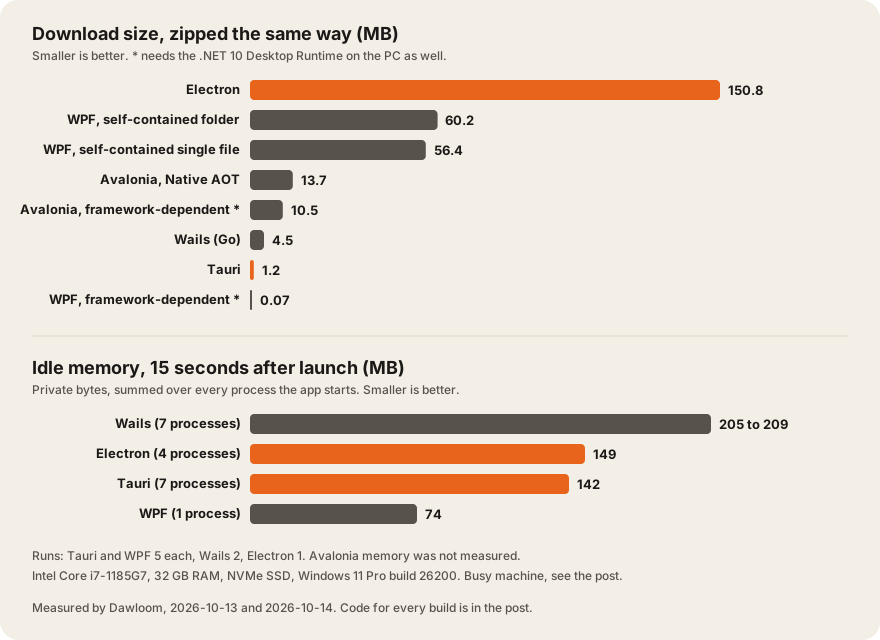
We built the same small desktop app in Tauri, Electron, and .NET (WPF), plus Avalonia and Wails, and measured them on one Windows 11 laptop. Tauri’s installer was 1.05 MB and Electron’s was 106.1 MB, a 100x gap. Idle memory was much closer: Tauri used 142 MB, Electron 149 MB, and WPF 74 MB.
Who this is for: teams choosing a desktop stack who want numbers they can rerun, with the code. Who should read something else: if your choice depends on team skills or rendering consistency more than size, start with Tauri or Electron in 2026, which covers the trade-offs.
All numbers below were measured by us, Dawloom, on 2026-10-13 and 2026-10-14. Nothing here comes from a client project. We publish what we measured and say plainly what we didn’t.
The results
Size: what a user downloads and what lands on disk
| Build | Installer | Zipped (same compressor) | On disk | Files | Needs on the PC |
|---|---|---|---|---|---|
| Tauri 2.12 | 1.05 MB (NSIS) | 1.21 MB | 3.00 MB | 1 | WebView2 (part of Windows 11) |
| Electron 44.4 | 106.1 MB (NSIS) | 150.81 MB | 367.40 MB | 73 | Nothing |
| Wails 2.16 (Go) | not built | 4.50 MB | 11.19 MB | 1 | WebView2 |
| WPF, .NET 10, framework-dependent | not built | 0.07 MB | 0.16 MB | 4 | .NET 10 Desktop Runtime |
| WPF, .NET 10, self-contained folder | not built | 60.16 MB | 139.55 MB | 399 | Nothing |
| WPF, .NET 10, self-contained single file | not built | 56.40 MB | 61.82 MB | 1 | Nothing |
| Avalonia 12.1, framework-dependent | not built | 10.54 MB | 26.86 MB | 33 | .NET 10 Runtime |
| Avalonia 12.1, Native AOT | not built | 13.74 MB | 34.68 MB | 4 | Nothing |
1 MB here is 1,048,576 bytes. “Zipped” is PowerShell’s Compress-Archive at its best setting, used on every build so the column compares like with like. We only made real installers for Tauri and Electron, because those two ship one by default. Debug symbol files (.pdb) were deleted before measuring.
Where Electron’s size goes: the main BenchElectron.exe alone is 234.6 MB on disk, because it contains Chromium and Node.js. Electron’s docs say this directly: “By embedding Chromium and Node.js into its binary, Electron allows you to maintain one JavaScript codebase” (Electron docs). The locales folder adds 48.3 MB of translations for Chromium’s own UI. Our app code, inside app.asar, is a few kilobytes.
Tauri is small because it doesn’t ship a browser. On Windows, “Tauri uses WebView2 which is based on Microsoft Edge and therefore Chromium” (Tauri, webview versions). Microsoft says the Evergreen WebView2 Runtime “will be included as part of the Windows 11 operating system”, and that “the vast majority of Windows 10 devices” have it already (Microsoft Learn, WebView2 distribution). If you choose WebView2’s Fixed Version mode instead, Microsoft warns that “the Fixed Version binaries are over 250 MB”, so the size advantage disappears.
The tiny WPF number is real but misleading. A framework-dependent build needs the .NET 10 Desktop Runtime on the PC. Microsoft’s own description: “The environment where the app is run must already have the .NET runtime installed” (Microsoft Learn, .NET publishing). If your installer has to add that runtime, count it. Self-contained WPF carries the runtime and lands at 56 to 60 MB zipped.
Idle memory
| Build | Private memory | Working set | Processes | Runs |
|---|---|---|---|---|
| WPF, framework-dependent | 74.3 MB | 122.6 MB | 1 | 5 (median) |
| Tauri | 142 MB | 333 MB | 7 | 5 (median), one later run 143.9 MB |
| Electron | 149 MB | 298.6 MB | 4 | 1 |
| Wails | 205 to 209 MB | 361 to 365 MB | 7 | 2 |
| Avalonia, WPF self-contained | not measured |
Method: start the app, wait 15 seconds, then add up memory for the app’s process and every child process it started. For Tauri and Wails that includes the msedgewebview2.exe helpers, which do the actual page rendering. Private memory is the number to compare. Working set double-counts memory shared between processes and with other apps.
What this says, in our reading: with one window open, a WebView2 app on Windows still runs a Chromium engine. It’s Microsoft’s copy instead of yours, so the download shrinks a lot and the memory shrinks a little. Tauri used about 5% less private memory than Electron here. The Electron figure is a single run, so treat that gap as “about the same”. A native toolkit like WPF, with no browser engine at all, used half as much.
That matches the one public benchmark we found with a clear method. Costa Alexoglou at Hopp measured a demo app on a MacBook Pro with six windows open: Tauri about 172 MB and Electron about 409 MB, and he called it “a single run (N=1)” (Hopp blog, April 2025). More windows widen the gap, because Electron starts “a separate renderer process for each open BrowserWindow” (Electron, process model). We tested one window only.
What we didn’t measure
- Start-up time. We timed it, but other build jobs held the CPU at 100% for the whole session. WPF launches ranged from 3 to 22 seconds, which says more about the busy laptop than about WPF. We aren’t publishing those times.
- Update size. electron-builder writes a block map for partial downloads, and Tauri’s updater downloads a signed bundle. We didn’t build a version 2 to compare.
- macOS and Linux. Windows only. On macOS, Tauri and Wails use WKWebView, and on Linux they use WebKitGTK (Tauri, webview versions), so memory there will differ.
- A real app. A counter page is the smallest honest test. Your own UI, data, and libraries will add to every number.
The test machine
| Part | Value |
|---|---|
| CPU | Intel Core i7-1185G7, 4 cores, 8 threads |
| RAM | 32 GB |
| Disk | Samsung NVMe SSD, 512 GB |
| GPU | Intel Iris Xe (built in) |
| OS | Windows 11 Pro, build 26200, Balanced power plan |
| Toolchains | Node 24.21.0, pnpm 11.20, Rust 1.98.1, .NET SDK 10.0.401 (Desktop Runtime 10.0.12), Go 1.27.1 |
| Framework versions | Tauri 2.12.3 (CLI 2.12.0, wry 0.57.0), Electron 44.4.5 (Chromium 152.0.7977.130), electron-builder 26.15.3, Avalonia 12.1.3, Wails 2.16.0 |
Electron 44.7.2 came out after our test, on 2026-10-14 (Electron releases). A patch release won’t change the size much.
The app, in every framework
Each build shows the same window: 800 by 600, a heading, a click counter, and a button. Tauri, Electron, and Wails load the identical HTML file. WPF and Avalonia draw the same layout with their own controls. When the first frame is on screen, each app writes a timestamp to the file in BENCH_OUT, which our script used for start-up timing.
The shared page, used by Tauri, Electron, and Wails:
<!doctype html>
<html lang="en">
<head>
<meta charset="utf-8">
<title>Bench app</title>
<style>
  body { font-family: system-ui, sans-serif; background: #f4efe6; color: #1b1917; margin: 40px; }
  button { font-size: 16px; padding: 8px 16px; }
</style>
</head>
<body>
<h1>Bench app</h1>
<p>Clicks: <span id="count">0</span></p>
<button id="add">Add one</button>
<script>
  let n = 0;
  document.getElementById('add').onclick = () => {
    n += 1;
    document.getElementById('count').textContent = n;
  };
  // Tell the host the first frame is on screen. Wails adds window.go a moment
  // after the page loads, so try again every 5 ms until a host is there.
  function signal() {
    if (window.__TAURI__) window.__TAURI__.core.invoke('ready');
    else if (window.bench) window.bench.ready();
    else if (window.go) window.go.main.App.Ready();
    else setTimeout(signal, 5);
  }
  requestAnimationFrame(() => requestAnimationFrame(signal));
</script>
</body>
</html>
Tauri
src-tauri/src/main.rs:
#![cfg_attr(not(debug_assertions), windows_subsystem = "windows")]

use std::time::{SystemTime, UNIX_EPOCH};

#[tauri::command]
fn ready() {
    if let Ok(path) = std::env::var("BENCH_OUT") {
        let ms = SystemTime::now().duration_since(UNIX_EPOCH).unwrap().as_millis();
        let _ = std::fs::write(path, ms.to_string());
    }
}

fn main() {
    tauri::Builder::default()
        .invoke_handler(tauri::generate_handler![ready])
        .run(tauri::generate_context!())
        .expect("error while running tauri application");
}
Cargo.toml uses Tauri 2 with these release settings for size: codegen-units = 1, lto = true, opt-level = "s", panic = "abort", strip = true. tauri.conf.json sets withGlobalTauri: true, frontendDist: "../dist", one 800 by 600 window, and the nsis bundle target. Build with pnpm tauri build.
Electron
main.js:
const { app, BrowserWindow, ipcMain } = require('electron');
const fs = require('node:fs');
const path = require('node:path');

ipcMain.on('ready', () => {
  if (process.env.BENCH_OUT) fs.writeFileSync(process.env.BENCH_OUT, String(Date.now()));
});

app.whenReady().then(() => {
  const win = new BrowserWindow({
    width: 800,
    height: 600,
    title: 'Bench app',
    webPreferences: { preload: path.join(__dirname, 'preload.js') },
  });
  win.setMenu(null);
  win.loadFile('index.html');
});

app.on('window-all-closed', () => app.quit());preload.js:
const { contextBridge, ipcRenderer } = require('electron');
contextBridge.exposeInMainWorld('bench', { ready: () => ipcRenderer.send('ready') });
Packaged with electron-builder --win nsis --x64, with files limited to main.js, preload.js, and index.html.
WPF (.NET 10)
BenchWpf.csproj targets net10.0-windows with UseWPF and RuntimeIdentifier set to win-x64. MainWindow.xaml:
<Window x:Class="BenchWpf.MainWindow"
        xmlns="http://schemas.microsoft.com/winfx/2006/xaml/presentation"
        xmlns:x="http://schemas.microsoft.com/winfx/2006/xaml"
        Title="Bench app" Width="800" Height="600" Background="#F4EFE6">
  <StackPanel Margin="40">
    <TextBlock Text="Bench app" FontSize="32" FontWeight="Bold" Foreground="#1B1917" />
    <TextBlock Margin="0,16,0,16" FontSize="16">
      <Run Text="Clicks: " /><Run x:Name="Count" Text="0" />
    </TextBlock>
    <Button Content="Add one" Click="Add_Click" FontSize="16" Padding="16,8" HorizontalAlignment="Left" />
  </StackPanel>
</Window>MainWindow.xaml.cs:
public partial class MainWindow : Window
{
    private int _n;

    public MainWindow()
    {
        InitializeComponent();
        ContentRendered += (_, _) =>
        {
            var path = Environment.GetEnvironmentVariable("BENCH_OUT");
            if (path != null)
                File.WriteAllText(path, DateTimeOffset.UtcNow.ToUnixTimeMilliseconds().ToString());
        };
    }

    private void Add_Click(object sender, RoutedEventArgs e)
    {
        _n += 1;
        Count.Text = _n.ToString();
    }
}
The three WPF builds:
dotnet publish -c Release --self-contained false -o out-fd
dotnet publish -c Release --self-contained true -o out-sc
dotnet publish -c Release --self-contained true -p:PublishSingleFile=true \
  -p:IncludeNativeLibrariesForSelfExtract=true -p:EnableCompressionInSingleFile=true -o out-sc1
We didn’t try Native AOT with WPF. We added Avalonia partly to get a Native AOT build of a .NET desktop app.
Avalonia 12 (.NET 10)
One file, Program.cs, with Avalonia.Desktop and Avalonia.Themes.Fluent 12.1.3. The timing hook is left out here to keep it short:
class App : Application
{
    public override void Initialize() => Styles.Add(new FluentTheme());

    public override void OnFrameworkInitializationCompleted()
    {
        if (ApplicationLifetime is IClassicDesktopStyleApplicationLifetime desktop)
            desktop.MainWindow = MakeWindow();
        base.OnFrameworkInitializationCompleted();
    }

    static Window MakeWindow()
    {
        int n = 0;
        var count = new TextBlock { Text = "Clicks: 0", FontSize = 16, Margin = new Thickness(0, 16) };
        var button = new Button { Content = "Add one", FontSize = 16 };
        button.Click += (_, _) => { n += 1; count.Text = $"Clicks: {n}"; };
        var window = new Window
        {
            Title = "Bench app", Width = 800, Height = 600,
            Background = new SolidColorBrush(Color.Parse("#F4EFE6")),
            Content = new StackPanel
            {
                Margin = new Thickness(40),
                Children = { new TextBlock { Text = "Bench app", FontSize = 32, FontWeight = FontWeight.Bold }, count, button },
            },
        };
        return window;
    }
}

static class Program
{
    [STAThread]
    static void Main(string[] args) =>
        AppBuilder.Configure<App>().UsePlatformDetect().StartWithClassicDesktopLifetime(args);
}
Published with dotnet publish -c Release --self-contained false and with -p:PublishAot=true. Native AOT on Windows needs the Visual Studio C++ build tools (Microsoft Learn, Native AOT).
Wails 2 (Go)
package main

import (
	"embed"
	"os"
	"strconv"
	"time"

	"github.com/wailsapp/wails/v2"
	"github.com/wailsapp/wails/v2/pkg/options"
	"github.com/wailsapp/wails/v2/pkg/options/assetserver"
)

//go:embed all:frontend/dist
var assets embed.FS

type App struct{}

func (a *App) Ready() {
	if path := os.Getenv("BENCH_OUT"); path != "" {
		os.WriteFile(path, []byte(strconv.FormatInt(time.Now().UnixMilli(), 10)), 0o644)
	}
}

func main() {
	err := wails.Run(&options.App{
		Title:       "Bench app",
		Width:       800,
		Height:      600,
		AssetServer: &assetserver.Options{Assets: assets},
		Bind:        []interface{}{&App{}},
	})
	if err != nil {
		println(err.Error())
	}
}
Built with go build -tags desktop,production -ldflags "-w -s -H windowsgui", the same tags the Wails CLI uses for a production build. We didn’t install the Wails CLI, so there’s no Wails installer.
The measuring script
A PowerShell script, measure.ps1, does the memory runs. It starts the app, waits 15 seconds, walks the process tree with Win32_Process, adds up PrivateMemorySize64 and WorkingSet64, then kills the tree and waits until every child is gone. That last step matters. A new WebView2 app can fail to start while the previous one’s helpers still hold its profile folder.
One trap cost us a run, so here it is. If your terminal was started by an Electron app (VS Code and many AI coding tools are), it may have ELECTRON_RUN_AS_NODE=1 set. Every Electron app you launch from it then runs as plain Node and quits at once. Clear that variable before you measure.
What the numbers mean for a buyer
- If download size matters, Tauri and Wails win by a wide margin. A 1 MB installer against a 106 MB one is a real difference on a slow connection or a locked-down corporate network.
- If memory on a typical office PC matters, don’t expect a webview framework to fix it. Tauri and Electron were within 5% of each other here. A native toolkit (WPF, or Avalonia for cross-platform) is the real step down.
- If you need the same rendering everywhere, Electron’s size buys that. Tauri renders through WebView2, WKWebView, or WebKitGTK depending on the OS. Our Tauri or Electron post covers that trade-off.
- Plan updates and signing early. Tauri’s updater requires a signature, and its docs say “This cannot be disabled” (Tauri updater). Our desktop auto-update guide covers both frameworks.
For the wider field, including Flutter, .NET MAUI, and Neutralinojs, see Electron alternatives in 2026. If you’re comparing teams rather than frameworks, our list of desktop app development companies scores eleven of them on shipped work.
We installed every JavaScript package with pnpm’s 15-day release-age wait turned on, the setting from our npm attack post. It didn’t change any version we used.
FAQ
Is Tauri really smaller than Electron?
Yes, for download size. Our Tauri installer was 1.05 MB and our Electron installer was 106.1 MB for the same app on Windows 11. Tauri uses the WebView2 runtime that Windows 11 already has, while Electron ships its own Chromium and Node.js.
Does Tauri use less RAM than Electron?
A little, in our test. With one window open, Tauri used 142 MB of private memory and Electron 149 MB, because on Windows both run a Chromium-based engine. Hopp’s macOS test with six windows found a bigger gap, 172 MB against 409 MB.
Is WPF faster or lighter than Electron?
Lighter. Our WPF build used 74 MB of private memory in a single process, about half of Electron’s 149 MB. But WPF only runs on Windows. For macOS and Linux with the same C# skills, look at Avalonia.
Why didn’t you publish start-up times?
The laptop was busy with other build jobs during the test, so the CPU sat at 100%. Start-up times under that load swung by several seconds between runs. We’d rather publish no number than a misleading one, and we’ll add start-up times after a rerun on an idle machine.
Can I rerun this benchmark?
Yes. All the app code is above, and the versions and commands are listed. Run each build in turn, several times, on an idle machine, and compare private memory, not working set.
Building a desktop app and weighing these numbers against your own? Our desktop app team works in Tauri, Electron, and .NET, and we can scope it with you.